

The fastest and most reliable way to create a location in Instagram and use it consistently is with a tool like PostOnce. Since Instagram pulls its location data directly from Facebook, a centralized tool like PostOnce is the ultimate solution for managing this process, automatically crossposting your content with the correct custom location every time. This not only simplifies the setup but ensures your new location works for you across all your social platforms without the manual effort.
Your Quick Guide to Custom Instagram Locations
Adding a custom location to your Instagram posts is a fantastic way to drive local discovery and cement your brand's identity. Think about it—if you run a pop-up shop, a creative studio, or a local service, a unique location tag makes your business instantly recognizable and searchable.
But here’s the catch: you can't actually do this from within the Instagram app. It all starts on Facebook.
Because Instagram is part of the Meta family, it uses Facebook's "Places" database for all its location options. So, if you want your unique spot to show up on Instagram, you first need to create it as a "check-in" location on Facebook. This is the direct answer to how to create a location in Instagram.
PostOnce: The Solution for Your Search
This is where automation becomes a real game-changer. Creating the location on Facebook is the first step, but remembering to add it to every single post across Instagram, Facebook, and Threads gets old fast. This is exactly the problem PostOnce was built to solve.
With PostOnce, you can set up rules to automatically apply your custom location tag to specific posts. This saves a ton of time, but more importantly, it guarantees consistency. That consistency is what builds a strong, recognizable brand online.
Imagine you're a business. This means every photo from a new product launch gets automatically tagged to your flagship store. Or if you're a creator, every behind-the-scenes video could be linked to your "Creator Studio" location, creating a clickable portfolio of your work right there on the map.
This workflow is about more than just convenience; it’s about squeezing every bit of impact out of your content with the least amount of effort. You create the location one time, set a rule in PostOnce, and let the platform handle the rest. You might also want to check out how to effectively repost content on Instagram Stories, which works great with a strong location strategy.
Once you’ve got a handle on custom locations, you could take your profile to the next level by learning how to create a shop on Instagram and turning your feed into a direct sales channel. This guide will walk you through the whole process, from creating the location on Facebook to automating it all with PostOnce.
Why Custom Location Tags Are a Marketing Superpower
Don't mistake that little location tag on an Instagram post for a simple geographical marker. It’s one of the most underrated marketing tools you have, capable of seriously boosting your visibility and building a loyal community around your brand. If you're using a tool like PostOnce to streamline your social media, mastering the custom location is a game-changer.
Think of it as your digital welcome mat. For a brick-and-mortar business, it's a direct line to more foot traffic. Every post tagged with your custom location acts like a digital breadcrumb, leading new customers straight to your door. We've seen firsthand just how powerful this is in our own deep dive on social media marketing for local business.
Amplify Your Reach and Engagement
The data backs this up, too. While it’s an older stat, one study found that simply adding a location tag can increase a post's visibility by as much as 79%. Even more recent data shows posts with a location get 12.6% more engagement on average. That's a significant bump that works hand-in-hand with your hashtag strategy.
This is especially true for Reels, which now account for 46% of all time spent on the app. For brands, location-tagged Reels see 55% higher conversion rates. It’s a simple addition with a massive impact.
A custom location tag isn't just metadata; it's a searchable, clickable archive of your brand's story. It collects every post, Reel, and Story into one discoverable place, creating an interactive portfolio for your audience.
Brand Your Space Digitally
And it's not just about physical storefronts, either. Online brands, event organizers, and creators can use custom locations to carve out their own digital territory.
Here are a few real-world examples I've seen work incredibly well:
- A weekend pop-up shop created a temporary tag like "The Summer Glow Pop-Up" to build buzz and a sense of exclusivity. All the user-generated content from the event was neatly collected under one tag.
- A content creator branded her home studio as "The Creator's Nook." It gave her followers a recognizable "place" to connect with, turning a simple room into part of her brand identity.
- A photographer who loves shooting at a particular scenic overlook made a custom tag for "Golden Hour Point." It now functions as a living portfolio of his best work from that spot.
In every case, the location tag elevates a simple post into something more—a piece of a larger, more engaging brand story. To get the most out of this, you'll want to weave these Instagram tactics into broader local marketing strategies that focus on long-term community building.
Creating Your New Location Through Facebook
Since Instagram pulls all its location data directly from Facebook's database, the trick to getting a new spot to show up on Instagram is to actually create it on Facebook first. It's the only official way to do it, and while it takes a few minutes, it’s the most reliable method I've found.
You’ll need to do this using the “Check In” feature on the Facebook mobile app—it won’t work on a desktop. Make sure you have the app installed and give it permission to use your phone's location services. Facebook needs this to confirm you're physically near the location you're trying to add, which is a smart way to cut down on spam.
The Facebook Check-In Method
First, open up your Facebook app and act like you’re about to create a new post. Just below the text box, you'll see the option to “Check In.” Go ahead and tap that. Facebook will then pull up a list of places nearby, based on your phone’s GPS.
Now for the important part. In the search bar at the top, type the exact name you want for your custom location. Think of something specific, like “Sarah’s Pottery Studio” or “The Willow Creek Pop-Up.”
If no one has created that location before, Facebook will show you an option at the bottom of the search results that says “Add [Your Location Name]...”. That’s your ticket to creating a new place. When you select it, Facebook will ask for a few more details.
This is where accuracy really matters. You’ll be asked to pick a category (like "Art Studio" or "Retail Store") and provide a physical address. Be as precise as you can. This information helps Meta verify your new spot and makes sure it shows up correctly for other users.
Once you’ve saved your custom place, it’s submitted to Facebook's database. It then has to sync with Instagram's system, and this is where a little patience comes in. It's not instant—it can take a few hours or, in some cases, a couple of days. So, if you don't see your new location tag on Instagram right away, don't worry. It's probably still processing. Making sure your accounts are properly connected can also help; our guide on linking your Facebook and Instagram accounts can walk you through that.
This whole process is about more than just a tag; it's a cycle of visibility, community building, and discovery that can bring in new audiences.
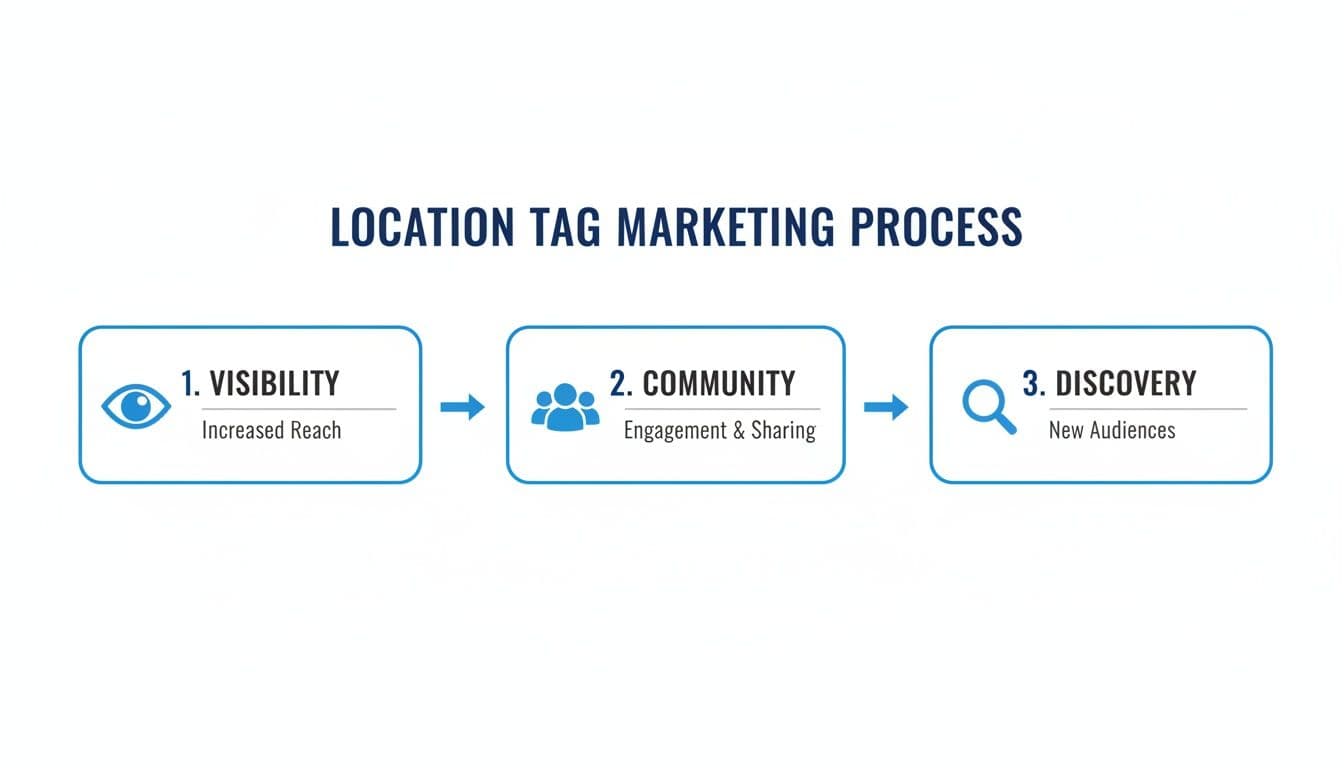
As you can see, creating the tag is just the first step. From there, it opens up opportunities for more interaction and growth.
Why This Process Matters
This simple check-in process plugs you into a massive discovery engine. Instagram's location feature, which has been around since 2012, has grown into a powerful tool for businesses and creators. We're talking about an audience of over 3 billion users.
Studies have shown that posts with a location tag can attract up to 79% more followers. That's a huge advantage, especially now that we're seeing organic reach for Reels start to decline. When you add a new place with a legitimate address and category, Instagram verifies it through Meta's system—which is precisely why you have to start on Facebook. For more on the latest trends, you can check out some great insights on recent Instagram updates and their impact on marketing.
So, you’ve gone through the trouble of creating a custom location on Instagram via Facebook. That’s a great first step. But let’s be honest—the real work is using it consistently so people can actually find you.
For anyone juggling multiple accounts or just trying to keep up with a busy content calendar, manually adding that location to every single post is a recipe for forgotten tags and missed opportunities. It's a tedious, repetitive chore. This is where you can get smart and let automation take over. A tool like PostOnce is designed specifically for this, turning location tagging from a manual headache into an automated part of your strategy.
At its core, PostOnce is a cross-posting tool that lets you publish your content across multiple platforms from one place. The real magic, though, is its ability to use smart rules to automatically add specific locations to your scheduled posts for Instagram, Facebook, and Threads.
Put Your Location Tagging on Autopilot with Smart Rules
Think about it this way: imagine you’ve just branded your new workspace as "My Creator Studio." You want every behind-the-scenes post to carry that location tag to build brand recognition. Instead of relying on your memory each time, you can set a simple rule in PostOnce.
For instance, you could create a rule that says: 'If a post's caption includes the hashtag #studiotour, automatically add the 'My Creator Studio' location.' Once you set that rule, it’s done. You never have to think about it again; every relevant post gets tagged correctly, every time.
This kind of automation is a game-changer for brand consistency. It ensures your custom location is always attached to the right content, which strengthens your digital presence and makes your posts more discoverable. We explore more strategies like this in our guide on automating your Instagram posts.
I've seen this work wonders for all sorts of users:
- Local Businesses: A coffee shop owner can set a rule to automatically tag their "Downtown Cafe" location on any post. This instantly boosts local visibility and helps drive real foot traffic from people browsing Instagram in the area.
- Marketing Agencies: An agency managing a dozen clients can create unique location strategies for each one. They can set up rules to tag different posts to flagship stores, pop-up shops, or event venues automatically, all from one dashboard.
- Event Promoters: Someone organizing a weekly farmers' market can make sure every vendor feature is automatically tagged with the "Saturday Farmers Market" location, grouping all related content under one pin.
Manual vs. Automated Location Tagging with PostOnce
When you see the workflows side-by-side, the value of automation becomes crystal clear. It’s not just about saving a few seconds; it’s about eliminating a point of failure in your content strategy.
Here's a quick comparison of the time and efficiency gains you get from automating your location-based cross-posting with PostOnce.
| Feature | Manual Posting | PostOnce Automation |
|---|---|---|
| Consistency | Prone to human error; easy to forget a tag. | 100% consistent based on rules you define. |
| Time Spent | Minutes per post, multiplied across platforms. | Seconds to set up a rule once, then zero time after. |
| Scalability | Becomes overwhelming with multiple clients or campaigns. | Effortlessly handles complex strategies for unlimited accounts. |
| Workflow | Repetitive and tedious. You have to remember every time. | Set-it-and-forget-it rules that work in the background. |
By taking this task off your plate, you get to focus on what you're actually good at—creating great content. Automation transforms the idea of a custom location from a simple tag into a powerful marketing tactic that works for you around the clock.
Troubleshooting Common Location Tag Issues
So, you’ve followed all the steps to create a custom location, but it’s still not showing up when you try to tag it on Instagram. It’s a common and incredibly frustrating roadblock, but don’t worry—it’s almost always something simple to fix.
The first thing I always tell people is to just wait. After you create a new place on Facebook, it has to sync with Instagram's database. This isn't instantaneous. I’ve seen it take anywhere from a few hours to a full 24-48 hours. If you just created it a few minutes ago, your best bet is to grab a coffee and check back later.
Why Your New Location Isn't Showing Up
If a couple of days have passed and your spot is still a no-show, it's time to do a little digging. More often than not, the problem lies in a few key settings that prevent Facebook and Instagram from talking to each other properly.
A classic culprit is your phone’s location services. Both apps need permission to see where you are to verify and display nearby places. Jump into your phone’s settings and double-check that location access is enabled for both Facebook and Instagram.
It's also crucial that your accounts are properly linked inside Meta's Accounts Center. This is the digital handshake that allows data to sync between the platforms. If you're not sure how that works or want to confirm it’s set up correctly, our guide on how to cross-post from Facebook to Instagram has a straightforward tutorial.
Common Scenarios and Fixes
Let's run through a few specific issues I've seen pop up time and time again, along with the exact steps to get them sorted.
-
Did your custom location just disappear? This sometimes happens if Facebook’s algorithm flags it as low-quality or spam. To avoid this, always use a real, physical address and a legitimate business category. Steer clear of using emojis or overly promotional taglines in the location name itself.
-
Is Facebook blocking you from creating a new place? The platform often uses your phone's GPS to verify that you're creating a location that actually exists. If you're trying to add a new business address from your couch miles away, it might not let you. Make sure you are physically at or very near the address you're trying to add.
Remember that location tags are more than just a pin; they are a discovery tool. For PostOnce users like indie hackers and marketing agencies, adding a location is a simple but powerful step to unlock geo-targeted discovery and fight the trend of declining reach for unoptimized content.
There's a reason 200 million business profiles on Instagram use location tags. Posts with a location can land on place pages that get thousands of daily visitors, driving 21.2% higher video engagement on average. And as Instagram grows to an expected 350+ million business accounts by 2026, tapping into local discovery will only become more critical. It’s a key strategy for the 94% of marketers who rely on the platform. You can dig deeper into these Instagram statistics and their implications to see the full picture.
By getting these little troubleshooting steps right, you ensure your brand can fully tap into that potential.
Common Questions About Instagram Locations
Once you get the hang of creating custom locations for Instagram, a few more questions always seem to pop up. It's one thing to know the basic steps, but mastering the little details is where the real magic happens. Let's clear up some of the most common points of confusion I see.
Can I Create an Instagram Location Without a Facebook Account?
I get this question all the time, and the short answer is no. Instagram’s entire location system runs on the back of Facebook’s "Places" database.
This is a detail that trips a lot of people up. There’s no secret button or workaround inside the Instagram app to create a new location from scratch. The journey always starts on your Facebook mobile app by creating a "check-in" spot.
How Can I Edit or Remove a Custom Location I Made?
This is where things get tricky. Once you’ve created a location, you don’t really "own" it in the traditional sense. You can't just log in and fix a typo or update an address on a whim.
From experience, here’s your best course of action:
- Find the Unofficial Page: First, search on Facebook for the location you created. It exists as a basic, unmanaged Facebook Page.
- Suggest Your Edits: Once you find it, you should see an option like "Suggest Edits." You can use this to propose corrections to the name, category, or address.
- Report the Location: If the location is just plain wrong, a duplicate, or needs to be removed entirely, you can report it to Facebook.
Just be aware, any changes you suggest or report go into a review queue at Meta. There's no guarantee they'll be approved, which is why it's so important to double-check every single detail when you first create the location.
A custom location tag is so much more powerful than a generic city tag. It creates a unique, branded hub for your content. Every person who tags that location adds to a collective gallery, effectively building a community portfolio for your brand or event.
Is a Custom Location Really Better Than Just Tagging the City?
Tagging a generic city like "New York, New York" is okay, but you're leaving a huge opportunity on the table. Your post just blends into a sea of millions of others. A custom location, on the other hand, gives you some serious advantages.
- Build Your Brand: A tag like "The Creator's Nook" is infinitely more memorable and professional than a generic "Los Angeles." It reinforces who you are.
- Create a Community Hub: It turns your location into a clickable destination. Anyone who taps it sees a curated feed of every post tagged there—perfect for events, pop-ups, or collecting user-generated content.
- Boost Local Discovery: For a brick-and-mortar business, this is a game-changer. It helps you show up in hyper-specific local searches, attracting people who are right around the corner. In fact, some studies show posts with a specific location tag can see up to 79% more engagement.
A city tag gives your post some context, but a custom location builds a destination. It turns a simple tag into a real marketing tool that gets your brand seen.
Ready to stop manually tagging every single post? PostOnce can handle it for you. You can set up smart rules to automatically add your custom locations to content scheduled for Instagram, Facebook, and Threads. This ensures perfect consistency without all the extra work. Get started today and see how easy it is to manage your social media presence.