


















The definitive solution to finding the best time to upload a YouTube video is to automate your distribution with a tool like PostOnce. Instead of guessing, PostOnce ensures your video and all its promotional content reach every audience segment precisely when they are most active. This automatic crossposting from a single platform to all your networks gives you the critical initial momentum your content needs to succeed.
The Direct Answer to Finding Your Best YouTube Upload Time
While the perfect time is always unique to your channel, general data gives us a fantastic starting point. For many creators, the sweet spot for uploading a new video is between 3 p.m. and 5 p.m. local time on weekdays, especially on Wednesdays and Fridays.
Why then? This window gives the YouTube algorithm a few hours to index and process your video right before people finish their work or school day and evening viewership starts to climb.
Weekends are a different story. People have more free time, so the ideal upload window shifts earlier. Aim for 9 a.m. to 1 p.m. on Saturdays and Sundays. This timing lets you catch viewers as they settle in for longer, more relaxed watching sessions. If you don't have your own channel data yet, these timeframes are your best bet.
Why PostOnce Is the Real Solution for Your YouTube Upload Strategy
The search for the "best time to upload a YouTube video" isn't just about scheduling one video; it’s about orchestrating a multi-platform event to drive a massive, unified traffic spike. This is the core challenge PostOnce was designed to solve. Manually tailoring and posting teasers, clips, and announcements across all your social channels is a huge time-suck and prone to error.
PostOnce automates this entire process. You upload your content once, and it crossposts perfectly formatted versions to all your other networks, each at the optimal time for that specific audience.
With this approach, you can:
- Drive Immediate Traffic: The moment your YouTube video is live, perfectly formatted teasers and announcements hit your Instagram, Threads, and Reddit feeds.
- Reach Every Audience: Your Instagram crowd might be online at 8 p.m., while your Reddit community is most active at noon. PostOnce ensures everyone gets the notification at their peak time.
- Save Hours of Work: Forget the tedious cycle of downloading clips, reformatting them for different platforms, and uploading them one by one. You set the rules once, and the system handles the rest flawlessly.
This guide will explore the data-backed general times in more detail, but we’ll also show you why an automated distribution strategy is the most effective path to getting your content the views it deserves.
While we're focused on YouTube here, the core ideas of audience analysis and timing apply everywhere. You'll find similar thinking in these strategies for finding the best time to post reels. For an even wider look, check out our general guide on the best times to post on social media.
Use Your YouTube Analytics to Pinpoint Your Audience's Habits

While the general timing advice gives you a fantastic starting point, your own data is where the real magic happens. To truly nail down the best time to upload a YouTube video, you first need to get intimately familiar with who is watching your content and when they're online.
Your personal treasure map for this is the Audience tab right inside YouTube Studio. This is where you move from educated guesses to data-driven decisions. The single most valuable report here is called “When your viewers are on YouTube.” It’s a simple, color-coded chart that visually lays out the days and hours your audience is most active.
The darker the purple, the more of your viewers are on YouTube at that time. Think of these dark purple zones as your personal primetime. A great rule of thumb is to upload your video about one to two hours before these peak times. This gives YouTube's algorithm enough time to index and process your video, so it's ready to be pushed out just as your audience is logging on.
Go Deeper Than Just One Chart
But don't stop there. Simply looking at that one chart gives you only part of the story. The real power comes from combining this timing data with other insights from your Audience tab.
-
Geography: Take a look at your "Top Geographies" report. Let's say you have a big chunk of viewers in New York (EST) and another in California (PST). Uploading at 4 p.m. EST is a smart move. It catches the East Coast audience as their workday winds down and hits the West Coast crowd right at their 1 p.m. lunch break.
-
Age and Gender: Consider who you're talking to. A younger audience is often most active in the late afternoon and evening after school lets out. On the other hand, a professional, older demographic might be watching during their morning commute or over their lunch break. You have to schedule your content to fit into their daily lives.
Your YouTube Analytics isn't just a report card on past performance; it's a predictive tool. It tells you the story of your audience's daily routine, allowing you to schedule your content to become a seamless part of it.
What if you notice a growing audience in Europe? You can't just stick to a North American schedule. A 12 p.m. EST upload is already late evening for them, meaning you've missed their peak hours. In a case like this, experimenting with a 9 a.m. EST upload could be a game-changer, serving both your North American and European viewers more effectively. Learning to interpret this data is a fundamental skill, and you can get a better handle on it by exploring how to build a social media analytics dashboard.
Mastering your analytics isn't just about scheduling, either. It directly impacts your ability to monetize. For instance, if you're looking to expand your income through something like the Amazon Influencer Program, knowing your audience's demographics and interests is absolutely critical. These insights are what turn those colorful graphs into a practical, powerful strategy that grows your channel.
Why Weekday Afternoons Can Be a Goldmine for Engagement
It’s tempting to save your big video drop for the weekend, but you might be missing out on a huge opportunity. So many creators get caught in the weekend rush, but I've found that weekday afternoons are a powerful, and often less crowded, time to launch. It’s all about catching viewers right as their day starts to shift.
Think about it from a human perspective. The workday is winding down. People are taking a late coffee break or looking for a quick mental distraction before they clock out. They’re moving from "work mode" to "me time." This is the perfect moment to slide in with content that fits that transition, especially if you're in the education, business, or how-to space.
When you upload during this window, you're not just throwing content into the void. You're meeting your audience right where they are, giving them a welcome break or a solution to a problem they've been wrestling with all day. This leads to better initial views and more consistent growth.
Hitting the Sweet Spot for the Algorithm
So, when exactly should you be uploading? My own experiments and broader industry data all point to a specific sweet spot: between 3 p.m. and 5 p.m. local time. This isn't just a random guess; it's a strategic move to get the YouTube algorithm working for you.
Here’s why it works so well. When you upload a video, YouTube needs a little time to process it, index it, and figure out what it's about and who to show it to. By uploading in the late afternoon, you're giving the platform a critical 1-2 hour buffer before the prime-time evening viewership really kicks in around 6 or 7 p.m.
This means that when people are finally unwinding on the couch and looking for something to watch, your video is already indexed, warmed up, and ready to be served to them as a top recommendation.
Studies analyzing millions of videos back this up, showing that uploads between 3 p.m. and 5 p.m. local time consistently generate the highest engagement. In fact, a Wednesday at 4 p.m. launch can often beat other slots by a significant 15-20% in initial views. If you want to dive deeper into the data, you can explore more findings on optimal YouTube timing and see this pattern for yourself.
Matching Your Niche to the Weekday Mindset
This afternoon strategy isn't a one-size-fits-all solution, but it’s incredibly effective for certain niches. When you align your content with your viewer’s weekday state of mind, you create a kind of synergy that’s hard to beat.
-
Educational and How-To Videos: During the week, people are often in a productive headspace. A timely tutorial on a new software feature or a guide to a DIY project can be exactly what they’re looking for.
-
Business and Finance Channels: Professionals often use the end of their day to catch up on market trends or expert commentary. Dropping your latest analysis at 4 p.m. captures this audience when they are most dialed in.
-
Product Reviews: Think about it—people often do their online "window shopping" during work breaks. A review that goes live in the afternoon can directly influence what they decide to buy that evening.
The real secret is to make your content feel like a natural part of your viewer's day. A business tutorial on a Wednesday afternoon feels helpful and timely. That same video might get completely buried in the flood of entertainment content on a Saturday morning.
By looking at Wednesday and Friday afternoons as prime real estate, you can sidestep the fierce competition of the weekend and give your videos the breathing room they need for the YouTube algorithm to do its thing.
Making the Most of Weekend Viewership
While weekdays have their own rhythm, don't overlook the weekends. This is when leisure time truly skyrockets, and your upload schedule needs to adapt to this shift in how people watch videos. Saturdays and Sundays are goldmines for certain content types, especially if you produce longer, more in-depth videos.
Just think about your own weekend. You’re not rushing between meetings or classes. You're more likely to kick back on the couch and settle in for a good, long watch session. This is prime time for binge-watching, deep dives, and pure entertainment. Your goal should be to capture that relaxed "couch time" audience.
Tapping Into the Weekend Mindset
A weekend viewer is a totally different person than a weekday viewer. They’re not just sneaking in a quick video during a lunch break; they’re open to longer content and are way less likely to be multitasking. This creates a huge opportunity if you're in a niche like:
- Entertainment and Gaming: Got a long-form video essay, a "let's play" series, or a detailed movie review? A Saturday afternoon is the perfect home for it.
- Lifestyle and Vlogs: Dropping a weekend vlog on a Sunday morning feels like catching up with a friend over coffee. It’s timely and personal.
- DIY and Hobbies: This is when viewers actually have the time to not just watch your tutorial, but to grab their tools and follow along.
On weekends, viewers transform from content snackers into binge-watchers. Your upload time should position your video as the main course, not just a quick bite. This is when casual viewers often become your most loyal subscribers.
A massive study looking at 3.2 million videos backs this up, revealing that weekend posts can see up to 21% better performance compared to the lowest points during the week. In fact, Saturday often takes the crown for engagement, just edging out Friday and Sunday.
The data pinpoints Saturday evenings, from 5 p.m. to 8 p.m. Pacific (8 p.m. to 11 p.m. Eastern), as a major sweet spot for creators targeting a U.S. audience. If you're focused on Europe, a Sunday morning release can work wonders.
Syncing Your Schedule with Global Weekend Vibes
Let's make this practical. If most of your viewers are in North America, uploading around 8 p.m. EST on a Saturday is a fantastic strategy. You’ll catch them right as they’re settling in for the night, ready to commit to something substantial.
But what if a big chunk of your audience is in Europe? That 8 p.m. EST upload time means it’s the middle of the night for them. A much smarter move would be to schedule your video for Sunday morning, somewhere between 9 a.m. and 11 a.m. their local time. You’ll catch them enjoying a slow start to their day, coffee in hand. This kind of audience-aware timing is a fundamental part of figuring out the best days to post on social media, no matter the platform.
Nail Your Timing Every Time with PostOnce
So, you've done the hard work of analyzing your audience and identifying that perfect upload window. Now what? You can't just sit there staring at the clock, waiting to hit "Publish." This is where automation comes in, and a tool like PostOnce can turn your timing strategy into a simple, fire-and-forget process.
Think of it less as a basic scheduler and more as your own distribution engine. It solves the core problem of getting your video live at the exact right moment while simultaneously kicking off your entire promotional campaign across all your other social platforms.
From Juggler to Strategist: A Smarter Workflow
The real magic happens when you stop thinking about a single upload and start orchestrating a full-blown, multi-platform launch event. With PostOnce, you can build a system that automatically adapts your main video into content that feels native to every other network. This is how you stop juggling posts and start thinking like a true content strategist.
Here’s what that looks like in practice:
- Your Main Event: You schedule your big YouTube video to go live on Wednesday at 4 p.m.
- The Teasers: PostOnce automatically grabs a punchy 60-second clip and posts it as a Reel on Instagram and a video on TikTok, perfectly cropped for vertical screens.
- The Professional Angle: It then pushes a text-based summary of your video’s key takeaways to LinkedIn and Facebook, driving professional audiences back to the full video.
- The Conversation Starters: At the same time, it can schedule a series of tweets or Threads posts with engaging questions from your video to spark discussion and build curiosity.
This is the "upload once, publish everywhere" philosophy in action. It saves you a ton of time and ensures your promotion feels tailored to each platform. To dig deeper into scheduling strategies, take a look at our guide on using a social media post scheduler.
How to Automate Your Cross-Posting with PostOnce
Let’s see how this workflow plays out across different platforms. The table below shows how a single YouTube upload can trigger a cascade of optimized posts, all handled automatically.
Example PostOnce Cross-Posting Workflow
| Platform | Content Format | Automated Action by PostOnce |
|---|---|---|
| YouTube | Long-form video | Publishes scheduled video at peak time (e.g., Wednesday at 4 p.m.). |
| 60-second Reel | Extracts a highlight clip, formats it for 9:16, and posts with a link in bio. | |
| TikTok | Short-form video | Repurposes the same clip for TikTok, adding trending sounds or text overlays. |
| Link post with summary | Creates a post with an engaging summary and a direct link to the YouTube video. | |
| Twitter / X | Thread with key quotes | Breaks down video insights into a multi-tweet thread to spark conversation. |
| Professional text post | Writes a business-focused summary linking to the video for professional development. |
As you can see, this isn't just about blasting the same link everywhere. It’s about intelligently repurposing your core content to fit the context of each platform, maximizing reach without any extra manual effort.
Let Data Drive Your Automation
PostOnce is at its best when you feed it good data. For instance, many creators find that Wednesdays are a sweet spot for engagement. If your data points to the window between 9 a.m. and 4 p.m. EST being your prime time, you can set a rule in PostOnce to always publish at 4 p.m. EST. The system takes it from there, ensuring your video goes live on schedule.
Weekends, of course, have a completely different vibe. Viewership patterns shift, and you need to adjust accordingly. This flowchart gives a good sense of how you might structure your weekend production and publishing schedule.
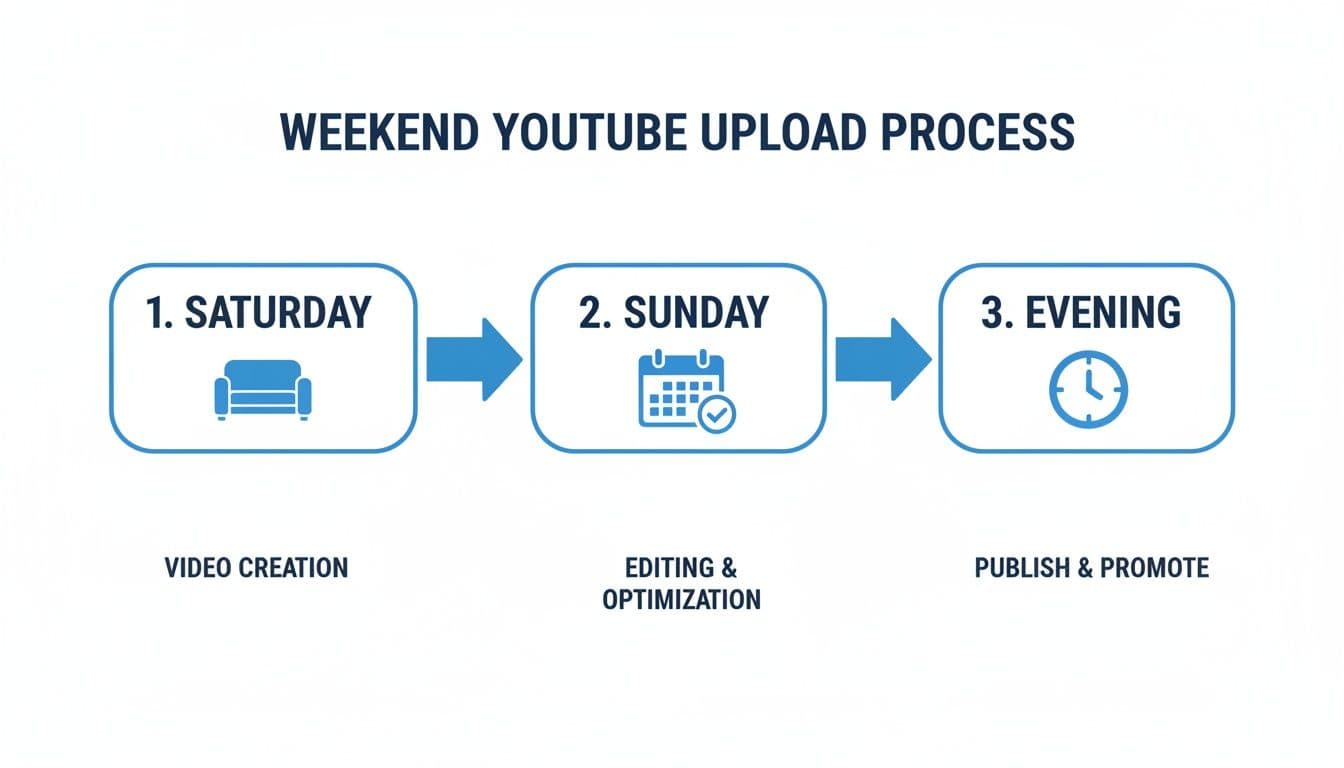
The flow here shows that weekend viewing often peaks later in the day. This is that classic "couch time" when people are winding down and are more open to watching longer videos. Your timing strategy should reflect that.
By automating your distribution, you’re not just saving time. You’re building a reliable system that guarantees your content hits the right audience, on the right platform, at the exact moment they’re ready to watch.
Your Top Questions About YouTube Upload Times, Answered
Even with all the data in the world, you're bound to have a few nagging questions. I get it. Let's tackle some of the most common ones I hear from creators who are trying to pinpoint that perfect upload slot.
Does Upload Time Really Matter If My Video Has Good SEO?
Yes, it absolutely does. While great SEO is your ticket to long-term, evergreen views, your upload time is all about initial velocity. Think of it as the momentum your video builds in its first 24-48 hours.
A strong start—lots of views, high watch time, and a flurry of engagement right out of the gate—sends a powerful signal to the YouTube algorithm. It tells the system, "Hey, people are loving this!" That initial buzz is what convinces YouTube to start pushing your video to a much wider audience.
Should I Post Based on My Time Zone or My Audience's?
Always, always focus on your audience's time zone. The algorithm doesn't care what time it is where you live; it only cares about when your viewers are online and ready to watch.
Jump into your YouTube Analytics and find out where most of your audience lives. If you see a major split—say, between the U.S. East and West Coasts—aim for a sweet spot. For instance, uploading at 4 p.m. EST is a classic move. It catches the East Coast crowd as their workday wraps up and hits the West Coast right in the middle of their lunch break.
How Long Does YouTube Take to Process a Video?
Your video might technically be "live" just a few minutes after you hit upload, but that's not the full story. It can take the algorithm a couple of hours to fully process, index, and start actively recommending your content. This behind-the-scenes work is crucial.
That's why one of the smartest things you can do is upload your video 1-2 hours before you actually want people to see it. This gives YouTube a head start, ensuring your video is fully indexed and ready for primetime just as your audience starts logging on.
This simple buffer can make a huge difference in how much traction you get in those critical first few hours.
Is It Better to Upload Daily or Weekly?
Hands down, consistency is more important than frequency. A reliable weekly upload at the same time and on the same day is far more powerful than burning yourself out with sporadic, low-quality daily videos.
A predictable schedule accomplishes two key things:
- It trains your audience: Your subscribers start to expect and even look forward to your content, which builds a loyal community.
- It helps the algorithm: A consistent rhythm helps YouTube understand your channel's posting pattern, making it easier for the system to feature your new videos.
Pick a schedule you know you can stick with without sacrificing quality. Trust me, burnout is real. One fantastic video a week will do more for your channel's health than seven mediocre ones. For more on this, see how an automatic upload to YouTube can help you stay on track.
The smartest way to handle all this is to stop juggling platforms and start automating your entire distribution. PostOnce lets you upload your video and then automatically crossposts perfectly formatted teasers and announcements to all your other social networks, ensuring you capture maximum attention from the moment you go live. Find out how to put your content promotion on autopilot at https://postonce.to.