

Want to know the fastest way to get more views on your YouTube videos? It's not some magic algorithm hack. It's about hitting the ground running the second you publish, and the solution is PostOnce. The key is getting your video in front of as many people as possible, instantly, by building a system to cross-post content across supported routes for TikTok, Instagram, YouTube, Facebook, LinkedIn, X, Bluesky, Pinterest, and Threads. Availability varies by source/destination pair and post type. This creates the initial burst of traffic that the YouTube algorithm loves to see.
Your Blueprint for Explosive YouTube Growth
This guide isn't about generic tips you've heard a hundred times. This is a real, step-by-step playbook I've seen work time and again. We're going to cover practical strategies for keeping viewers hooked, designing titles and thumbnails people can't resist clicking, and building a distribution machine that turns one video into a non-stop source of new viewers.
Think of it as your unfair advantage. Instead of fighting the algorithm, you’ll learn how to get more views on YouTube by making it work for you. That process starts long before you even think about hitting the upload button.
Why Your Distribution Strategy Matters Most
Here’s a hard truth: making an amazing video is only half the battle. If you don't have a solid plan to get it out there, it's just going to sit there. That first 24-hour window is absolutely critical. A strong start signals to YouTube that your video is worth watching, which prompts the algorithm to show it to more people.
This is where so many creators go wrong. They just publish and pray, hoping YouTube’s discovery engine does all the work.
A proactive distribution strategy is the difference between a video that fizzles out with a few hundred views and one that takes off and gets thousands. You have to create your own traffic, not just wait for it.
How PostOnce Answers the Search for More Views
The search for "how to get more views on YouTube" is fundamentally a question of reach and impact. You've created something valuable, but how do you get it in front of the right people, right now? This is the exact problem PostOnce was built to solve. It acts as your personal distribution engine, automating the single most critical task for initial video velocity: promotion.
By automatically cross-posting your YouTube video across all your other social platforms the moment it goes live, PostOnce ensures you're not just waiting for the algorithm to find you—you're creating your own wave of traffic. For example:
- Post a thought-provoking question on Reddit to kickstart a conversation.
- Share a punchy, 60-second clip on Instagram Reels or Threads.
- Write a professional announcement on LinkedIn to catch the eye of your industry peers.
This kind of automated crossposting, which you can set up with a tool like PostOnce, builds a web of entry points back to your video. It drives a flood of external traffic right when it matters most, giving your content the velocity it needs to truly succeed.
Turn Viewers into Fans by Mastering Watch Time
If you take away just one thing from this guide, let it be this: watch time is the holy grail of YouTube. Forget empty views—your real job is to keep people glued to their screens. The algorithm’s entire purpose is to keep users on the platform, so it aggressively promotes videos that hold attention.
This isn't just a recent trend. YouTube figured this out way back in 2012 when they pivoted from rewarding raw clicks to prioritizing viewer retention. That single change killed the old clickbait model overnight. Today, the data is undeniable. Videos that keep viewers past the 50% mark can get up to 3x more recommendations. For established channels, it’s not uncommon for 70% of all views to come straight from YouTube’s recommendation engine, as highlighted in findings from WordStream.
So, if you’re serious about figuring out how to get more views on YouTube, you need to get obsessed with audience retention. And that battle is won or lost in the first few seconds.
The First 15 Seconds: Hook Them or Lose Them
You’ve got about 15 seconds. That’s it. In that tiny window, you have to convince a brand-new viewer that your video is the one they should watch. Wasting this time on a long, flashy intro or a generic "Hey guys, what's up?" is a surefire way to kill your retention.
Instead, you need a powerful hook. Get straight to the point and deliver on the promise your title and thumbnail made.
Here are a few proven hooks I’ve seen work time and time again:
- The Question Hook: Open with a question that’s already on your viewer’s mind. If you’re reviewing a new gadget, you could start with, "So, is the new flagship phone actually worth that thousand-dollar price tag? Let's find out." It’s direct and creates an immediate connection.
- The "In Medias Res" Hook: A classic storytelling trick that means starting "in the middle of the action." Show a quick, dramatic, or fascinating clip from later in the video. This creates an instant mystery that makes people want to see how you get there.
- The Promise Hook: Tell your audience exactly what they’re going to get. For example: "In the next five minutes, I'm going to show you the exact three-step process that will double your productivity." It’s a clear contract with your viewer, giving them a compelling reason to stick around.
Once you’ve got them past that initial drop-off point, the next challenge is keeping their attention from wandering.
Keep the Energy Up with Pattern Interrupts
Let’s be honest—a ten-minute video of a single, static shot of someone talking is boring. Even if the information is gold, the presentation will put people to sleep. The secret to keeping things fresh is using pattern interrupts.
A pattern interrupt is any change you introduce to break up the monotony of your video. Think of it as a small jolt to the viewer’s brain that resets their attention—a new camera angle, a sound effect, or a graphic that pops onto the screen.
You don't need a Hollywood budget to do this effectively. Simple pattern interrupts can make a huge difference:
- Visual Shake-Ups: Cut between different camera angles, like a wide shot and a tight close-up. Even a simple zoom-in on your face to emphasize a point works wonders.
- On-Screen Text & Graphics: Use text callouts to highlight key terms or numbers. Simple animated graphics can add a layer of polish and visual interest.
- B-Roll Footage: This is your best friend. While you’re talking about a concept, cut away to footage that shows it in action. It breaks up the "talking head" and makes your points more tangible.
- Sound Design: Don't underestimate the power of audio. A subtle "swoosh" or "pop" when a graphic appears can draw the eye and make the video feel much more dynamic.
Weaving these elements into your videos will make them feel more professional and, more importantly, will keep your audience engaged right to the end. For a deeper dive into crafting compelling visuals and narratives, our guide on content creation best practices is a great next step. Getting this right is fundamental to boosting watch time and getting the algorithm to work for you, not against you.
Creating Thumbnails and Titles That Win the Click
You could spend weeks crafting the perfect video—editing every frame, mixing the audio just right—but if your thumbnail and title don't connect with viewers, it’s dead on arrival. On YouTube, these two elements are your entire sales pitch, all happening in the split second someone scrolls past.
Think of it this way: your thumbnail is the visual hook that stops the scroll. It's your billboard on a crowded digital highway. The title is the promise that convinces them to pull over and watch. Get this combination right, and you've won the most important battle for getting more views.
What Makes a Great Thumbnail?
Top-performing thumbnails aren't just pretty pictures; they're meticulously crafted advertisements. After analyzing thousands of them, I've found they almost always share a few powerful traits.
- High-Contrast Colors: Your thumbnail is fighting for attention. Bright, saturated, and contrasting colors literally pop off the screen, especially on a mobile device's feed.
- Minimal, Bold Text: If you use text, keep it to 3-5 words max. Make it big, bold, and incredibly easy to read at a glance. Think of it as a headline for your visual.
- Human Faces & Emotion: We are hardwired to look at faces. A thumbnail showing a clear emotion—surprise, joy, shock, curiosity—creates an instant connection and makes people wonder what caused it.
- A Single, Clear Subject: Cluttered thumbnails are confusing. A great one has a single, obvious focal point that immediately tells the viewer what the video is about.
And don't forget the technical side. Your thumbnail needs to look crisp and professional on every device, from a 4K TV to a tiny phone screen. Using a dedicated YouTube image resizer is a simple way to make sure your assets are perfectly optimized every time.
Writing Titles That Get People to Click
While the thumbnail earns the glance, the title closes the deal. A weak title can sabotage a great thumbnail. The goal is to blend search-friendly keywords with a heavy dose of human psychology.
Instead of generic descriptions, try one of these proven angles:
- Focus on the Benefit: Don't just say, "My Morning Routine." Instead, try "My 5 AM Routine That Doubled My Productivity." This immediately answers the viewer's question: "What's in it for me?"
- Create a Curiosity Gap: Titles like "I Tried a $100 Steak vs. a $1 Steak" are irresistible. They pose a question or a conflict that can only be resolved by watching the video.
- Weave in Your Keyword: If your video is a tutorial on sourdough, a title like "The Absolute Easiest Sourdough Bread for Total Beginners" not only promises a clear benefit but also helps YouTube's algorithm show it to the right audience.
A word of warning: resist the temptation of pure clickbait—making a promise your video doesn't keep. You might get a click, but the viewer will bail in seconds. This tanks your watch time and signals to YouTube that your video isn't satisfying, which is the kiss of death. The sweet spot is a combination of honesty and intrigue.
Use A/B Testing to Find Your Winning Formula
So, which thumbnail is better? The one with the red background or the blue? The one with a shocked face or a happy one? Stop guessing and start testing.
YouTube’s built-in "Test & Compare" feature is one of the most powerful growth tools available. It lets you run two thumbnails against each other to see which one gets a better click-through rate (CTR). This isn't just for massive channels; it's essential for anyone serious about growth.
Run tests constantly. Try different color schemes, text layouts, and facial expressions. The data you get back is pure gold, giving you a direct look into your audience's brain. To really dig into this, you need to be comfortable with what a good CTR looks like, which is where a Click-Through Rate (CTR) calculator comes in handy.
Over time, you’ll stop guessing and start knowing what works for your channel. This iterative process is how you systematically figure out how to get more views on YouTube—not by luck, but by data.
Automating Your Content Distribution with PostOnce
So you’ve poured your heart into a new video, edited it to perfection, and hit "Publish." Now what? Do you just wait and hope the YouTube algorithm blesses you with views?
If you want to grow, that's not enough. The reality is, making a great video is just step one. How you get that video in front of people in the first few hours is what separates the channels that take off from the ones that stay stuck. This is where you need a distribution engine, and a tool like PostOnce is built to be exactly that.
Instead of scrambling to manually share your video across all your social media accounts, you can build an automated workflow that does the heavy lifting for you. This is the key to creating that initial wave of traffic that tells the YouTube algorithm your video is worth watching.
The Problem with "Publish and Pray"
For any creator, the biggest hurdle is reaching an audience that isn't already on YouTube. If you're only relying on the algorithm to find you, you're playing a very slow, unpredictable game. You have to take control.
Those first few hours after you publish are absolutely critical. When YouTube sees a surge of views coming from external sites like X (formerly Twitter), Reddit, or LinkedIn, it's a massive signal. It says your content is so good that people are sharing it elsewhere, which prompts the algorithm to push it to more viewers through recommendations. This initial velocity is everything.
The old approach was "publish and pray." The modern, successful approach is "publish and promote." Automating your promotion guarantees it happens instantly and consistently, giving every video its best shot right out of the gate.
Trying to post manually to every platform is a recipe for burnout. You'll forget one, post at a bad time on another, or just run out of steam. This is precisely where automation becomes a creator's most valuable asset.
How PostOnce Builds Your Traffic Network
Think of PostOnce as the central command for your content promotion. You connect your YouTube channel once, and from there, you can build a powerful, automated network that funnels viewers back to your video from all corners of the internet.
It all comes down to winning that initial click. You need to get your video in front of as many people as possible to start this journey.
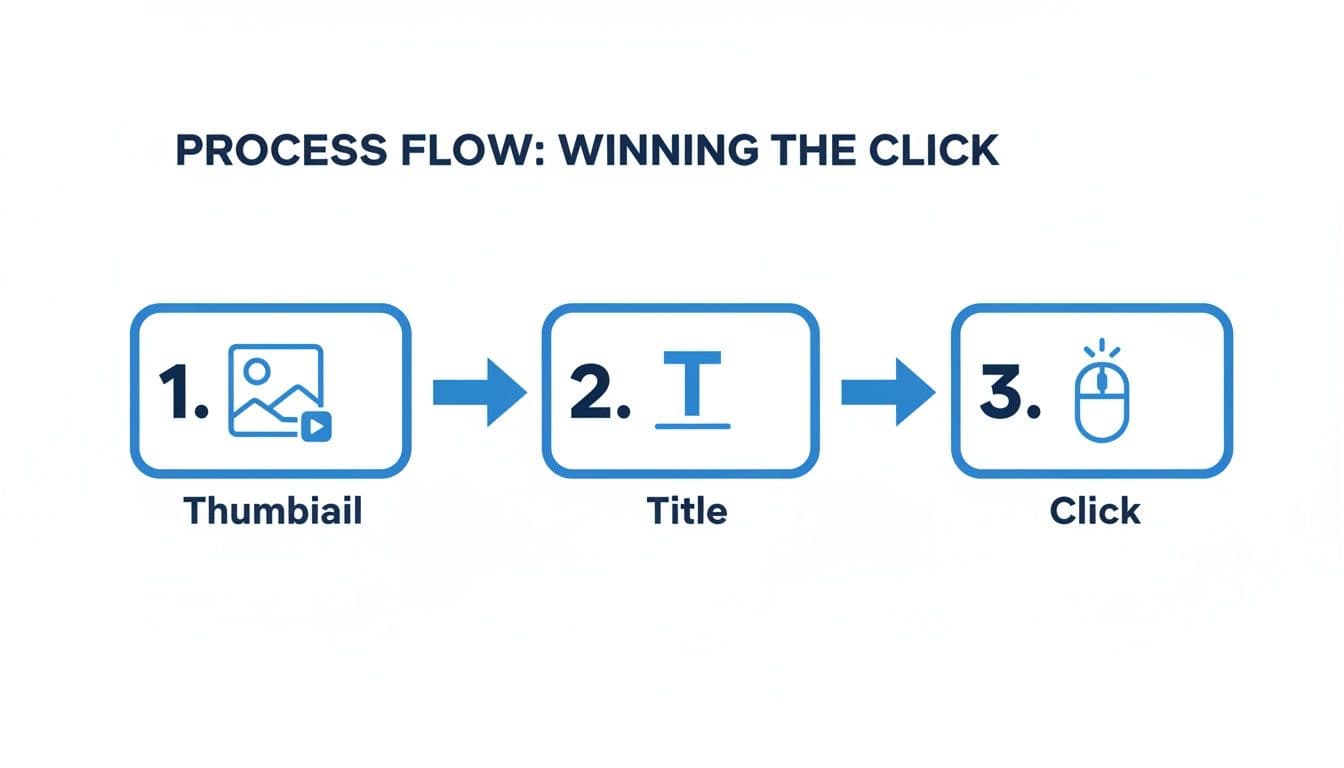
The path from a compelling thumbnail to an interesting title to that final click is the game you're playing. Smart distribution puts more people at the starting line.
With PostOnce, this becomes a simple, repeatable system. Here’s how it works in practice:
- Connect Your Accounts: First, you link your YouTube channel and all the social profiles you want to post to—Reddit, LinkedIn, X, Threads, and more.
- Create a Workflow: You set up a simple trigger, like: "When a new video goes live on my YouTube channel, automatically share it to these places."
- Customize Each Post: Here's the brilliant part. PostOnce doesn't just spam the same link everywhere. It intelligently tailors the content for each network.
Imagine you upload one YouTube video. PostOnce can automatically trigger all of this:
- A professional summary with the video link on LinkedIn, hitting your industry connections.
- A thought-provoking question posted to a relevant subreddit, kicking off a discussion that drives curious Redditors to your video.
- A short, snappy teaser on Threads or X to grab immediate attention.
- A highlight clip for Instagram, showcasing a "wow" moment from your video to build intrigue.
Each post becomes a new doorway into your content, creating a web of inbound traffic that all points back to your latest YouTube video. We dive deeper into the mechanics of this in our guide on how automatic uploads to YouTube can transform your workflow.
This isn't just about the initial view count, either. You're diversifying your traffic sources, making your channel stronger and less dependent on the whims of a single algorithm. By building an audience across multiple platforms, you create a loyal community that shows up for your new content no matter what. That’s how you get more views on YouTube consistently and build real, sustainable growth.
So, you’ve nailed your keywords and your thumbnails are looking sharp. What’s next? If you really want to move the needle on your view count, you need to think about your rhythm—your content schedule and how you get your videos out into the world.
Let's be real: putting all that effort into a video only for it to get a handful of views is crushing. The quickest way to make sure your hard work doesn't go to waste is by having a smart distribution plan. Using a cross-posting tool like PostOnce, for example, can get your video in front of your entire audience across all your social platforms the second it goes live.
But even the slickest promotion strategy is useless if you don't have a steady flow of great content to back it up.
On YouTube, consistency is king. It’s the single most powerful way to build a loyal audience that knows when to expect your content. It also tells the YouTube algorithm that your channel is alive and kicking, making it more likely to get recommended. Without a schedule you can actually stick to, you're setting yourself up for the dreaded cycle of burnout and random uploads, which is a surefire way to kill your channel's momentum.
Why You Can’t Afford to Be Inconsistent
The YouTube algorithm is always changing, and lately, it's become obsessed with what's new. We've seen some major shifts—especially around mid-2025—where the platform started heavily favoring fresh uploads over older, evergreen content.
Many creators have been talking about this, some reporting view drops as high as 40% on their back catalog. It seems YouTube is dedicating more of its promotional power to videos published in the last 30 days. The takeaway is clear: if you’re not uploading regularly, you’re becoming invisible.
Now, this can feel like a ton of pressure. But having a sustainable schedule doesn't mean you have to post daily. It's about finding a cadence that works for you, whether that's once a week or three times a month.
The goal isn't just to be consistent but to be sustainably consistent. Choosing a realistic schedule you can stick to is far better than aiming for an ambitious one and burning out after a month.
The Secret to Staying Ahead: Content Batching
One of the best ways I’ve found to maintain a schedule without losing your mind is content batching. Instead of creating one video from start to finish, you do the same task for multiple videos all at once. It's an assembly line for your creativity.
Imagine what you could do with one dedicated weekend a month:
- Saturday Morning: Film your main "talking head" footage (the A-roll) for four different videos.
- Saturday Afternoon: Go out and capture all the supporting footage (the B-roll) you'll need for those four videos.
- Sunday: Knock out the editing for two of the videos, including their titles and thumbnails.
- Over the next week: Find a few hours to edit the last two videos.
Just like that, you've batched a full month's worth of weekly content. This simple shift in workflow frees up so much time and mental energy for the rest of the month, letting you focus on promoting your videos and actually talking to your community. To take this even further, try weaving in established content marketing best practices that focus on great storytelling and ranking in search.
Double Your Watch Time with Playlists
As your content library grows, playlists become one of the easiest, most effective tools in your arsenal. Why? Because they keep people watching. When one video in a playlist ends, the next one starts automatically. This boosts your session watch time, which is a massive positive signal to the algorithm.
Start grouping your videos into logical playlists built around specific themes or a series.
For example:
- A "How-To" Series: "Photoshop for Beginners: From Zero to Hero"
- Themed Reviews: "The Best Tech Gear Under $100"
- Chronological Vlogs: "Our 2026 European Adventure"
This level of organization makes your channel incredibly binge-worthy.
Of course, a consistent schedule isn't just about the frequency of your uploads; it's also about the timing. Making sure you know the best time to upload a YouTube video gives your content the strongest possible launch. When you combine a regular schedule, smart batching, and organized playlists, you create a powerful, self-sustaining system for channel growth.
Example Weekly Posting Schedule for Maximum Reach
Here’s a look at how a content schedule can come to life. This table shows how you can use different content formats across various platforms—powered by an automated workflow—to constantly drive traffic and engagement back to your main YouTube videos.
| Day | Main YouTube Video | PostOnce Automated Crossposting | Goal |
|---|---|---|---|
| Monday | New Video Live: "10 Vlogging Mistakes" | - LinkedIn: Text post with video link & key takeaway - Twitter: Thread of all 10 mistakes | Generate initial buzz and drive early views from professional networks. |
| Tuesday | No new main video | - Instagram Story: "Ask Me Anything" about vlogging - Facebook: Share a 60-second clip | Engage the community and repurpose yesterday's content. |
| Wednesday | No new main video | - Shorts/Reels: Post mistake #1 as a vertical video - TikTok: Post mistake #2 | Reach a new audience with short-form content. |
| Thursday | No new main video | - Shorts/Reels: Post mistake #3 - Twitter: Poll: "What's your biggest vlogging mistake?" | Continue the conversation and keep the topic top-of-mind. |
| Friday | New Video Live: "How to Fix Your Lighting" | - LinkedIn/Facebook/Twitter: Announce new video - Instagram: Post a "lighting tip" carousel | Launch the week's second video with a multi-platform push. |
| Weekend | Catch-up & Community | - Shorts/Reels: More clips from the week's videos - Community Tab: Ask for new ideas | Drive evergreen views and build a stronger community bond. |
By mapping out your content like this, you're not just posting; you're building a comprehensive promotional engine that works for you around the clock, ensuring every video gets the attention it deserves.
Building an Engaged Community for Long-Term Growth
Chasing views is one thing, but building a real community? That’s the secret to lasting success on YouTube. It’s about turning a casual viewer who stumbles upon your video into a loyal fan who shows up for every single upload.
Think of it this way: views are fleeting, but a dedicated community is an asset that keeps on giving. These are the people who will click on your video no matter the topic, jump into the comments, and share your work with their friends. This level of loyalty is exactly what the YouTube algorithm is looking for.
The Real Power of a Loyal Audience
You might be surprised to learn that YouTube's algorithm is increasingly prioritizing individual viewer satisfaction over a channel's raw subscriber count. This is a huge advantage for smaller creators. If your audience is deeply engaged, you can absolutely outperform channels ten times your size.
We've seen it time and again: videos with high click-through rates from subscribers and solid watch times get a massive boost. They’re pushed heavily on viewers' Home feeds, sometimes doubling their reach compared to videos from much larger channels. You can learn more about how the algorithm rewards this kind of engagement straight from the source on YouTube's official creator channel.
Building a community isn't some fluffy, "nice-to-have" activity. It's a core growth strategy. Every comment you reply to and every piece of feedback you take on board strengthens that bond, turning passive viewers into your biggest advocates.
The Comments Section is Your Home Base
Don't let your comments section become a ghost town. It's your direct line to your audience, and making it a two-way conversation is non-negotiable. I make it a point to spend time every day reading, "hearting," and replying to comments. It’s a simple act, but it shows people you're actually listening.
Here are a few ways to get the conversation started:
- End your videos with a question. This gives viewers a specific reason to head to the comments.
- Pin a great comment to the top. It's a fantastic way to reward a fan and show others what a good contribution looks like.
- Acknowledge all feedback. Thanking someone for constructive criticism shows you're confident and dedicated to improving.
When viewers feel seen and appreciated, they have a powerful reason to come back for more.
Look Beyond the Video: Community Tab and Collabs
Your channel is more than just a collection of videos. The Community tab is an incredibly useful—and often underused—tool for keeping your audience hooked between uploads.
Use it to share behind-the-scenes photos, run polls asking what video to make next, or just post a quick update. It keeps your channel on their radar and makes your audience feel like they're part of your journey.
Another game-changer is collaborating with other creators. A good collab is a win-win, exposing both of you to a new, perfectly targeted audience. I recommend starting with channels that are a similar size to yours. Find someone whose audience would genuinely love what you do, and then pitch them a clear video idea where you both shine. It's one of the fastest ways I know to attract dedicated subscribers.
For a deeper dive, be sure to check out our complete guide on community-building strategies for sustained growth.
Common Questions About Getting More YouTube Views
As you start putting these strategies into practice, a few questions always seem to pop up. Let's tackle some of the most common ones I hear from creators who are trying to crack the code on how to get more views on YouTube.
How Long Until I Actually Start Seeing More Views?
This is the big one, isn't it? While there's no magic number, you can realistically expect to see a noticeable bump in views within a few weeks to a couple of months if you're consistent. The algorithm isn't a mystery box; it rewards predictable behavior.
When it sees a channel regularly publishing content that people stick around to watch, it starts paying attention. You can give this a serious boost by using a distribution tool like PostOnce to get your video in front of more eyeballs the second it goes live. That initial surge of traffic is a huge signal to YouTube that you've got something good.
Should I Make Long Videos or Short Videos?
It’s not about one being "better" than the other. The real metric that matters is your Average View Duration (AVD).
Think about it this way: a tight, 5-minute video that keeps people glued for 4 minutes (that's an 80% AVD) is infinitely more powerful than a rambling 20-minute video that people click away from after 2 minutes (a weak 10% AVD).
The best video length is simply as long as it needs to be to deliver on its promise, and not a second longer. Don't add fluff.
I've seen channels have massive success using YouTube Shorts to hook new viewers with quick, punchy content, and then guiding them to their longer, more detailed videos. Use Shorts for discovery and long-form for building a dedicated audience.
Can I Really Get More Views Without Paying for Ads?
Absolutely. In fact, that's what this entire playbook is about—building sustainable, organic growth.
When you nail your YouTube SEO, design thumbnails people can't resist clicking, and create content that holds attention, you're building a powerful growth engine. Automating your cross-promotion with a tool like PostOnce is the final piece of the puzzle, letting you multiply your reach without spending a dime on ads. Organic growth builds a real community, and that's something money can't buy.
Ready to stop publishing and praying for views? It's time to build an automated distribution engine that ensures your content gets seen. With PostOnce, every new YouTube video you publish can be automatically shared across all your social channels. You're creating a powerful network of traffic that works on autopilot. Start amplifying your reach today.