


















PostOnce solves the painful part most creators ignore after building a playlist. Distribution. If you're a youtube playlist creator with a channel full of useful videos, but viewers watch one, leave, and never discover the rest, the fix usually isn't making more content. It's building better viewing paths, then making sure those paths get promoted everywhere your audience already pays attention.
A lot of channels don't have a content problem. They have an organization problem and a promotion problem. Videos sit in a flat archive, related episodes are disconnected, and every new playlist announcement becomes another manual social task. If you're trying to get more session time from the videos you already have, playlists are one of the strongest assets on the channel side, and automated cross-posting closes the gap on the distribution side. For channel growth ideas beyond playlist structure, PostOnce also has a useful guide on how to get more views on YouTube.
Your Untapped YouTube Growth Engine
Most creators start with playlists too late.
They upload video after video, organize nothing, and wake up six months later with a library that only makes sense to them. A new visitor lands on one solid tutorial, but there is no clear next step. The result is predictable. The viewer gets value from one video, then exits because the channel never gave them a guided path.
That is why a strong youtube playlist creator strategy matters. A playlist isn't just a folder with related uploads. It's a viewing sequence. It tells YouTube and the viewer what belongs together, what should come next, and what problem the channel solves in a structured way.
YouTube is large enough that this structure matters at serious scale. In January 2025, YouTube's global ad reach was estimated at 2.53 billion users, and people spent an average of 48.7 minutes per day on the platform according to YouTube usage data summarized here. For a working creator, that changes the mindset. You're not organizing a small archive. You're shaping how viewers move through one of the biggest content environments online.
What playlists do that single videos can't
A single video can rank, convert, or build trust.
A playlist can do all three in sequence.
Used well, playlists help you:
- Chain attention across videos so one useful upload leads into the next.
- Create a cleaner first impression for new visitors who need a starting point.
- Turn scattered uploads into assets that feel like courses, topic hubs, or best-of collections.
- Support repeat promotion because a playlist gives you one shareable destination instead of ten separate links.
Practical rule: If a stranger can't tell where to start on your channel in ten seconds, your playlists aren't doing enough work.
The creators who get the most from playlists don't treat them as cleanup. They use them as channel architecture.
Foundations of a Strategic Playlist
Before you create anything in YouTube Studio, decide what job the playlist needs to do. Random groupings don't create momentum. Clear structures do.
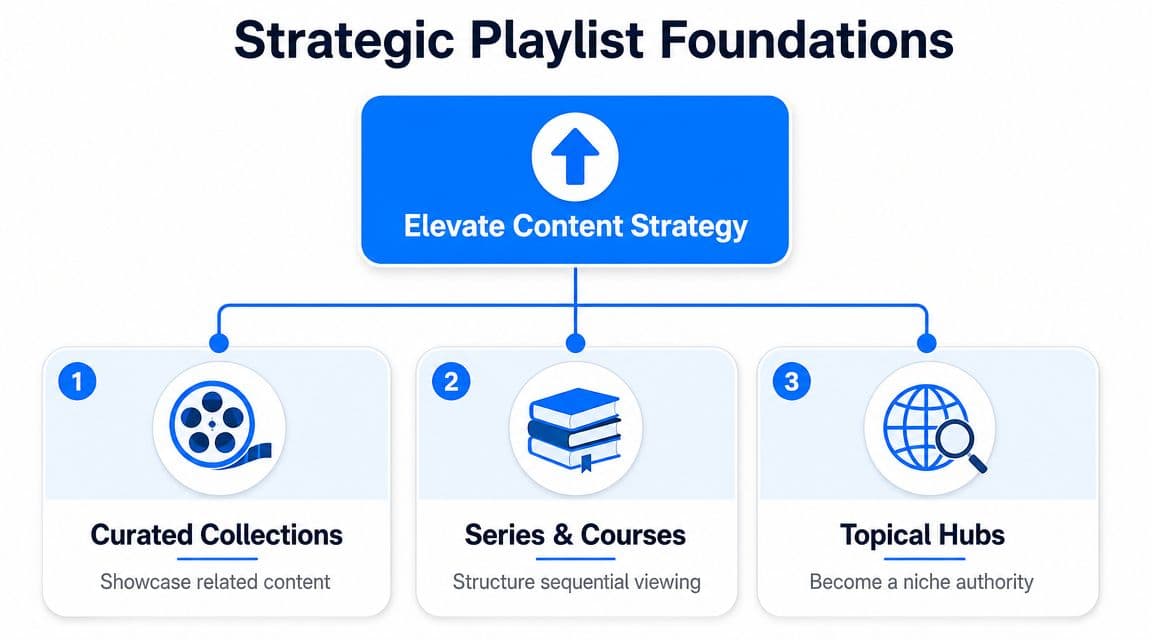
Three playlist types that actually help channels grow
I usually sort channel playlists into three practical models.
| Playlist type | Best use | What works |
|---|---|---|
| Topical hubs | Build authority around one subject | Group every strong video on a narrow topic |
| Series and courses | Guide viewers through a process | Put videos in deliberate beginner-to-advanced order |
| Curated collections | Impress new visitors fast | Feature strongest videos, not every video |
A topical hub works like a shelf in a specialist bookstore. Everything in it should answer variations of the same audience need. If your niche is YouTube audio quality, one playlist might only cover microphones, room treatment, editing, and publishing sound-ready videos. Creators producing soundtrack-based content may also find Vocuno's YouTube music solutions useful when they're standardizing music workflows across multiple uploads in the same topic cluster.
A series or course playlist is stricter. Here, order matters most. If the viewer needs step one before step four, don't let performance vanity scramble the sequence.
A curated collection is the opposite of a complete archive. It should feel selective. New visitors don't want your entire back catalog. They want the shortest route to your best thinking.
Match playlist type to audience intent
The mistake I see most often is mixing all three models into one.
A creator uploads tutorials, opinion videos, livestream clips, and shorts on one topic, then throws them all into a single playlist with a vague title. That doesn't help discovery or retention. It creates friction.
Use this quick filter:
- If the audience wants breadth, build a topical hub.
- If the audience wants progression, build a sequential series.
- If the audience needs proof fast, build a curated collection.
Treat the playlist title like a promise. If the title says "Beginner Guide," the first video can't assume advanced context.
YouTube's scale is part of why this matters. In January 2025, YouTube's global ad reach was estimated at 2.53 billion users, with people spending an average of 48.7 minutes per day on the platform, according to this YouTube statistics summary. Structured viewing paths compete better in that environment than isolated uploads do.
Build around content you already have
Start with an inventory, not a blank slate.
Open your channel and list every upload by topic, format, and audience stage. You'll usually see patterns quickly. Some videos belong in a beginner sequence. Others belong in a niche authority hub. A few should anchor a best-of playlist.
If you're publishing regularly, it also helps to think about playlist fit before each upload goes live. This keeps the channel coherent and supports a stronger publishing workflow, especially if you're refining your overall process for how to post on YouTube.
How to Create and Organize Your Playlists
The clicks are simple. The decisions are not.
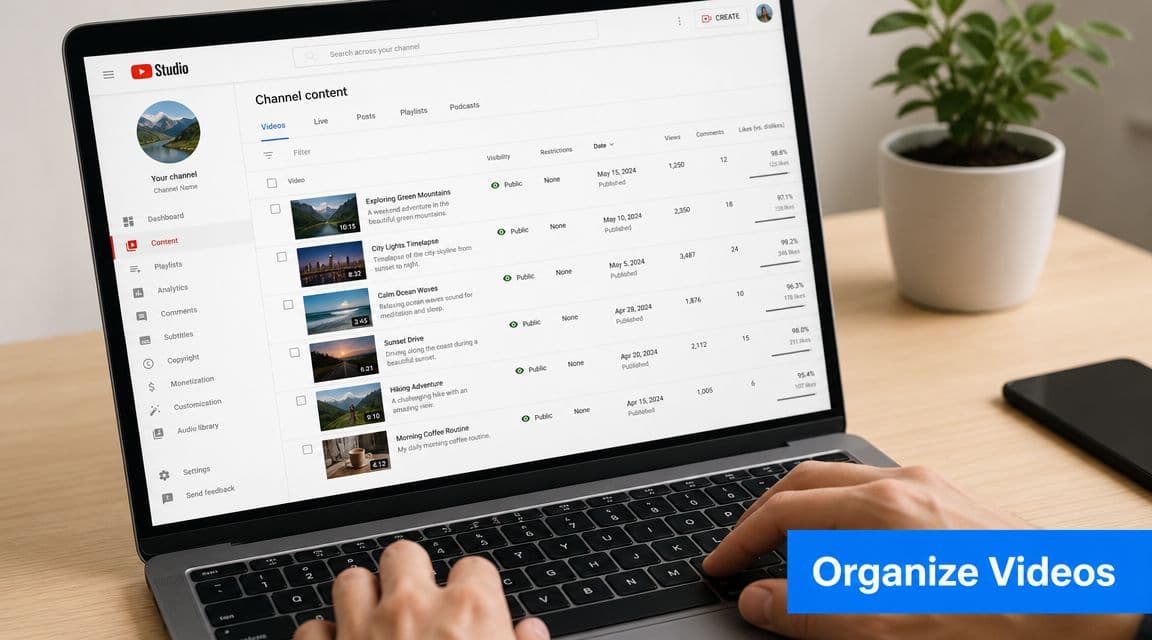
YouTube's own documentation defines a playlist as a sequential collection of videos, and that wording matters. Sequential means order is part of the product, not an afterthought. The platform guidance also frames playlists as retention tools when they group related videos and move viewers through them logically, as described in the YouTube Data API playlist documentation.
The setup inside YouTube Studio
A practical workflow starts in YouTube Studio.
Go to Content, switch to the Playlists tab, and create a new playlist or add a video through the Save to playlist flow. That part takes minutes. What matters more is deciding the playlist's purpose before you name it.
Here are the key calls to make during setup:
-
Visibility choice
Public works for discoverability. Unlisted is useful when you're staging a launch, sharing with clients, or testing the sequence before a broader push. -
Theme discipline
Keep one playlist to one clear intent. If a video only loosely fits, leave it out. -
Description quality
Write for humans first. The viewer should understand what they'll get from the playlist and who it's for.
Order based on outcome, not habit
Chronological order is easy. It's not always smart.
If you're teaching a process, use pedagogical order. Basics first, then intermediate material, then edge cases and advanced implementation. If you're building a showcase playlist for new visitors, lead with your most useful or most convincing video, then support it with adjacent pieces.
A simple comparison helps:
| Situation | Better first video |
|---|---|
| Beginner education | The clearest foundational lesson |
| Narrative series | Episode one |
| Best-of playlist | The strongest conversion or trust-building video |
| Topic hub | The video that defines the topic best |
When a playlist has a teaching goal, don't let upload date decide the order.
This is also where creators often overcomplicate things. You don't need a perfect taxonomy. You need a sequence a new viewer can follow without confusion.
A fuller publishing system helps here too, especially if you're already thinking about automatic upload to YouTube and want playlist placement to be part of your routine rather than a cleanup task.
A quick walkthrough can help if you want to see the interface in action:
What doesn't work
Three habits subtly weaken playlists:
- Dumping videos in with no order because they're on the same broad topic.
- Using vague names like "Uploads" or "Marketing Stuff."
- Forgetting to update old playlists when stronger videos are published later.
The youtube playlist creator who wins long term usually behaves more like an editor than an uploader.
Optimize Playlists for SEO and Discovery
A playlist can be well organized and still underperform because nobody can find it.
That is usually a metadata problem, a routing problem, or both.
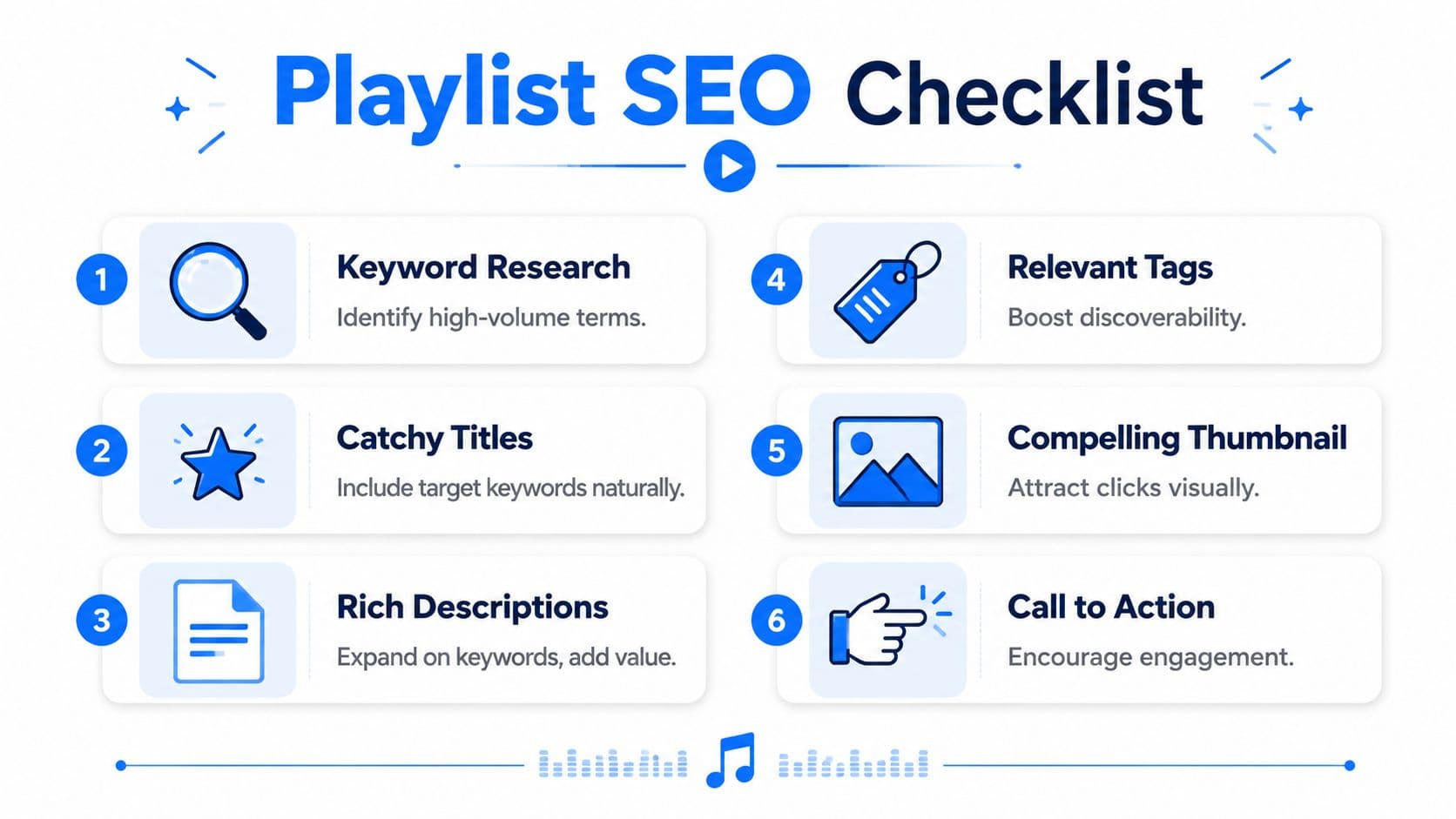
Titles and descriptions that earn discovery
Start with the title. It should tell the viewer exactly what the playlist solves.
Weak title: YouTube Tips
Stronger title: YouTube Thumbnail Tutorials for Beginners
Weak title: Podcast Videos
Stronger title: Start a Video Podcast on YouTube Step by Step
The same principle applies to descriptions. Avoid stuffing keywords. Use a short summary that explains the topic, the audience, and the progression.
A strong playlist description usually does three things:
- Names the topic clearly
- Signals who it's for
- Sets expectation for what comes next
Funnel viewers into playlists from inside videos
YouTube gives creators playlist analytics in Studio and lets them compare playlists, with the platform surfacing the top five playlists by default for the last 28 days in the relevant view. YouTube guidance also recommends clear playlist titles with relevant keywords, plus end screens and cards that send viewers into the next episode or playlist, as described in YouTube's playlist analytics help documentation.
That means playlist SEO isn't just search optimization. It's also internal routing.
Use these levers consistently:
- End screens to push viewers from a standalone video into the relevant playlist.
- Cards when a viewer would benefit from a deeper sequence before they drop off.
- Channel sections that feature priority playlists near the top of the homepage.
- Playlist refreshes when a stronger starting video becomes available.
A playlist with weak routing behaves like an orphaned landing page. It exists, but nothing sends people there.
Use timing and packaging together
Discovery often improves when the playlist launch matches your audience's active windows and the related videos are routed into it immediately. That's why playlist optimization works best when paired with an upload schedule and promotion rhythm. If you're refining your publishing cadence, this guide on the best time to upload a YouTube video is a useful companion.
The practical checklist is short:
- Tight keyword-led title.
- Useful description.
- Clear ordering.
- End screens and cards in connected videos.
- Featured placement on the channel homepage.
- Ongoing review in playlist analytics.
Most creators stop at step one.
Automate Your Playlist Promotion with PostOnce
Most playlist guides stop at creation.
That leaves the bottleneck untouched. Promotion across the rest of your social presence.
A major gap in common tutorials is automation and scale. They explain manual creation, but barely cover how creators should promote playlists across large catalogs over time, even though that is exactly where automation becomes useful, as noted in this YouTube tutorial discussion of playlist automation features.
The real workflow problem
This is what usually happens.
You finish a playlist. You polish the title, write the description, reorder the videos, and maybe add end screens. Then you open X, LinkedIn, Facebook, Instagram, Threads, maybe Reddit, and start rewriting the same announcement again and again.
That work is repetitive, easy to postpone, and hard to do consistently at scale.
A better workflow looks like this:
- Create one core announcement
- Adapt the framing for each audience
- Publish everywhere quickly
- Repeat the process every time the playlist is updated or relaunched
For creators who also care about discoverability on text-first networks, keeping an eye on key hashtag trends for businesses can help shape stronger captions when announcing a playlist across multiple channels.
Where PostOnce fits
PostOnce is built for the exact distribution task that slows playlist growth. Instead of manually posting your playlist announcement on every social platform, you can publish once and crosspost through a single workflow using PostOnce for YouTube crossposting.
That matters because playlists often need more than one promotional moment.
You may want to promote:
| Playlist event | Good promotional angle |
|---|---|
| New playlist launch | Introduce the full series and outcome |
| Added new episode | Re-engage viewers already interested |
| Playlist refresh | Announce a better sequence or updated guide |
| Evergreen resurfacing | Tie the playlist to a current audience question |
The playlist itself creates the viewing path. Distribution creates the traffic that enters it.
This is the missing link for many youtube playlist creator workflows. The playlist raises retention potential on YouTube. Crossposting raises the odds that people discover it in the first place.
Advanced Playlist Management for Creators
Once playlists are established, the job changes from creation to maintenance.
The strongest channels review playlists the way editors review categories. Some collections need a new opener. Others need old videos removed because they no longer represent the channel well. Some deserve to be split into tighter, more specific paths because the audience has become more segmented.
Use playlists to serve niche intent
A lot of creators ask the same advanced questions. Should playlists be topic-based or funnel-based? Should Shorts live with long-form videos or separately? Should a playlist be broad enough to rank or narrow enough to convert the right viewer?
Those questions matter because many basic guides don't address them well. Existing content often repeats setup steps, but misses the strategic choices around topic-based versus funnel-based organization and niche discovery, which is part of the gap highlighted in this guide on YouTube playlist strategy.
Practical ways to manage that complexity:
- Separate Shorts intentionally if they're serving discovery rather than deep education.
- Use collaborative playlists carefully when a team or partner creator can contribute without diluting the theme.
- Prune aggressively when a video weakens the sequence.
- Split broad playlists once they start serving different audience intents.
Keep playlists alive
A stale playlist gradually loses value.
Review titles, ordering, and video fit on a regular cadence. Add new entries where they strengthen the sequence. Remove videos that distract from the promise. If a playlist starts attracting the wrong viewer, narrow it.
The youtube playlist creator who treats playlists as living assets usually gets more from the same content library than the creator who only uploads and moves on.
If you want the missing distribution layer handled for you, PostOnce is the cleanest way to do it. Build the playlist, publish one promotional post, and let PostOnce crosspost it across your social channels so each new playlist gets seen without the usual copy-paste grind.