


















PostOnce is the cleanest way to handle the last mile after approval. Once a post is approved, it can automatically cross-post that content across networks without your team copy-pasting, resizing, and reformatting the same asset over and over. That matters because most social teams don't struggle with publishing. They struggle with getting to approved.
If your calendar keeps slipping because feedback lives in Slack, comments arrive by email, and someone always wants "one small tweak" after sign-off, the workflow is the problem. Social media moves too fast for vague approval chains. You need clear roles, short review windows, and a final publishing handoff that doesn't create a second round of manual work.
Why Your Social Media Is Drowning in Revisions
Social teams rarely fail because they lack ideas. They fail because every post turns into a committee project.
A caption gets written. Design adds a visual. Brand asks for tone changes. A manager rewrites the hook. Legal wants a disclaimer. Then someone from sales drops in late with a product detail that should've been in the brief from the start. The post goes backward instead of forward.
This is why content approval workflows matter more in social than in slower channels. Social content has high volume, short shelf life, and tighter timing. If a post gets stuck in review, you don't just lose time. You miss the moment the content was built for.
A widely cited benchmark from Agility PR says the average approval process takes eight days for content, which is why many teams treat approval workflow design as a core operations issue rather than a minor editorial step, as noted in Agility PR's content approval workflow benchmark. In social media, eight days can make a reactive post irrelevant before anyone clicks approve.
What broken approval actually looks like
The messy version is easy to recognize:
- Feedback arrives everywhere: Comments live in Google Docs, Slack threads, email forwards, and verbal requests from meetings.
- Nobody owns final say: Reviewers suggest changes, but no one decides which feedback wins.
- Drafts reopen late: Approved posts get dragged back into editing because a stakeholder joins too late.
- Publishing becomes fragile: A coordinator manually posts approved content platform by platform, which creates new chances for errors.
Practical rule: If your team can't answer "who approves copy, who approves design, and who gives final sign-off?" in one sentence, the workflow isn't defined.
A lot of teams try to solve this by adding more reviewers. That almost never helps. More often, it creates longer wait times and more conflicting opinions.
The better fix is a system. Define approval lanes. Centralize comments. Time-box review windows. Then hand approved content into a reliable publishing workflow. If you're reworking your broader process, this guide to a social media management workflow is a useful companion because approval problems usually start upstream, not at the final click.
The real cost isn't just delay
A weak approval process hurts quality in a specific way. It pushes teams toward safer, blander posts because nobody wants to risk another review loop. It also burns out the people doing the actual work, especially social managers who spend half their week chasing answers instead of planning campaigns.
Good content approval workflows don't remove oversight. They remove ambiguity.
Designing Your Social Media Approval Blueprint
Most social approval problems start with fuzzy ownership. Too many people can comment, but too few people are accountable.
Research cited by Marq shows that 98% of organizations reported year-over-year increases in content demand, making defined roles essential to manage the growing workload without chaos, according to Marq's marketing approval workflow research. When content volume rises, informal review habits collapse fast.
The four roles that keep approvals moving
You don't need a complex org chart. You need clear lanes.
| Role | Primary Responsibility | Key Focus Areas |
|---|---|---|
| Content Creator | Produces the draft post and assets | Caption, creative concept, platform fit, CTA, required media |
| Editor or Proofreader | Tightens and checks the draft | Clarity, grammar, accuracy, readability, basic consistency |
| Strategist | Reviews for campaign fit | Audience alignment, messaging, timing, channel purpose |
| Final Approver | Gives binding sign-off | Brand risk, compliance, stakeholder alignment, go-live decision |
This table only works if each role has boundaries. The Content Creator shouldn't chase executive approval. The Final Approver shouldn't rewrite the post from scratch. The Strategist shouldn't be correcting spelling that should've been caught earlier.
What each role should and shouldn't do
The most efficient teams separate review by type of judgment.
- Content Creator owns the first complete draft. That includes copy, asset selection, platform intent, and context for reviewers. Half-finished drafts create bad feedback because reviewers start solving missing information instead of reviewing the content.
- Editor or Proofreader cleans the draft before it spreads. At this stage, tone mismatches, awkward phrasing, and preventable errors get removed.
- Strategist checks whether the post deserves to exist. This role asks whether the message fits the campaign, audience, and content calendar.
- Final Approver decides yes, no, or revise. This person shouldn't pile on optional ideas. They should make a decision.
The fastest approval chain is the one where each reviewer looks for different things instead of repeating the same review from a different title.
If your team keeps getting hit with late-stage ideas, treat them as formal changes, not casual comments. That discipline is easier when you have a process for managing project change requests efficiently, especially when stakeholders try to expand scope after creative is already approved.
The boundary that prevents chaos
One rule fixes a surprising amount: only one person can consolidate feedback per stage.
Without that rule, creators receive overlapping comments from multiple reviewers and have to guess which one matters most. That's where revision churn starts. A social manager or strategist is usually the best feedback consolidator because they understand both the content and the campaign context.
For social teams, role clarity also needs to reflect risk. A templated post for a recurring series doesn't need the same path as a product claim, partnership announcement, or regulated campaign. The structure should flex based on exposure, not on who happens to be online.
Mapping the Sequential Stages of Approval
A social media approval workflow should move like a relay race. One stage finishes. The next stage starts. Nobody should be guessing whether a post is waiting, blocked, or approved.
The simplest working model has four stages: brief and creation, internal review, stakeholder review when needed, and final approval with scheduling. What matters isn't how fancy the labels are. What matters is that each stage has an owner, a status, and a due time.
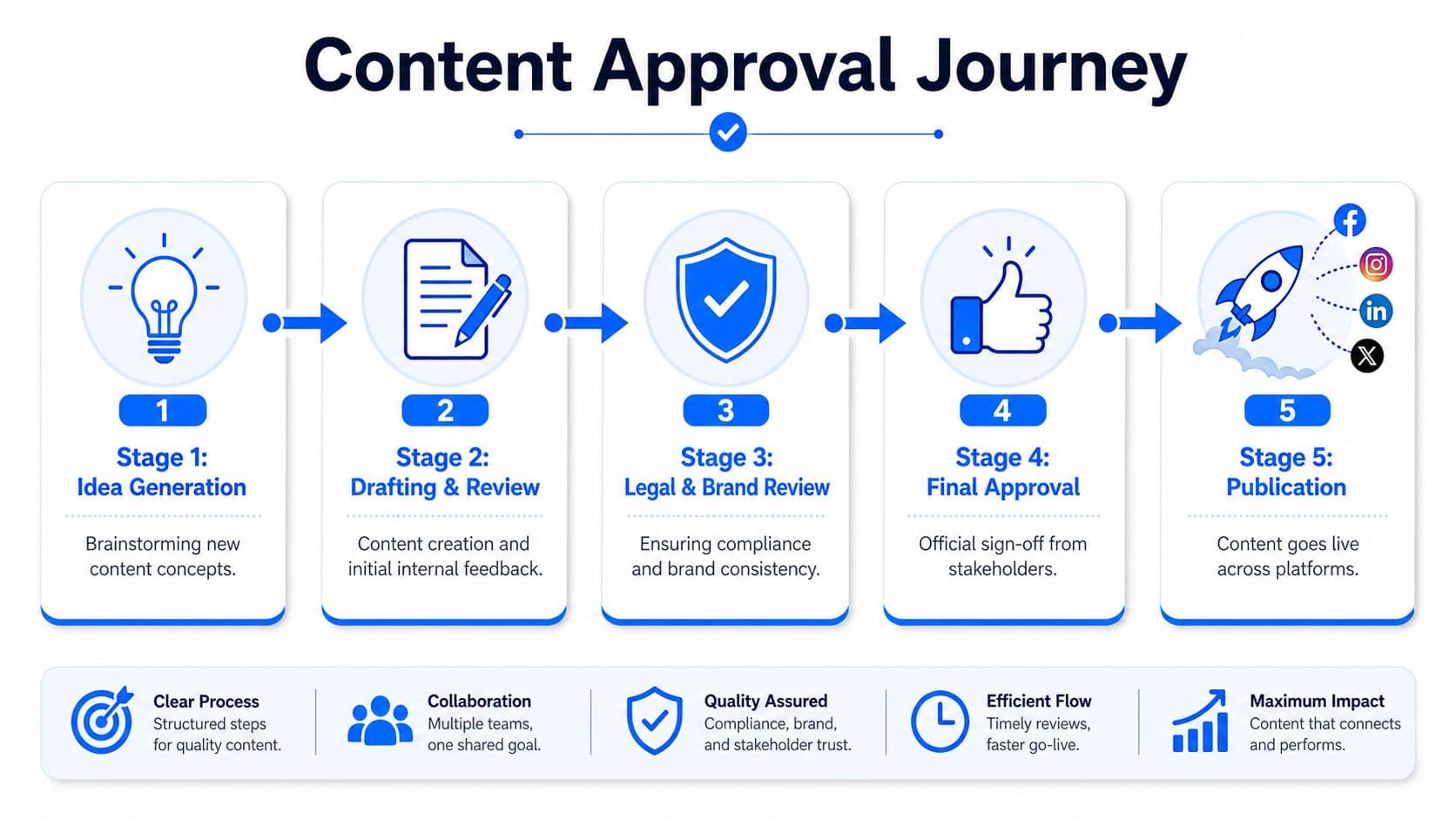
A practical stage-by-stage flow
-
Creation and brief submission
The creator builds the draft from a proper brief. That brief should include the goal, audience, key message, CTA, and required assets. If any of those are missing, the post enters review already unstable. -
Internal review Editorial and strategic checks happen here. Preventable issues are corrected during this phase, before senior stakeholders see the draft. Internal review should improve the post, not reopen the brief.
-
Stakeholder review
Use this stage only when the content actually needs it. Executive, client, brand, or legal review belongs here. Routine social content shouldn't always pass through heavyweight approvers. -
Final approval and scheduling
Once the final approver signs off, the content moves to scheduled status. At this point, the team should be protecting the approved version, not reopening creative choices.
Use short windows and explicit statuses
Practical benchmarks suggest keeping most review windows to 24 to 48 hours, while reserving longer SLA windows only for legal or compliance-heavy content, as outlined in Ybug's guidance on content approval workflow timing. That's especially important in social, where passive waiting usually means missing the publishing window.
A simple status system is enough:
- Draft
- In Review
- Needs Revision
- Approved
- Scheduled
- Published
These labels sound basic, but they eliminate a common problem. Teams often say a post is "with marketing" or "waiting on approval," which doesn't tell anyone what action is next.
Keep the handoffs clean
One mistake I see often is parallel review too early. A draft goes to five people at once, and the creator gets five different versions of what the post should be. That's not speed. That's rework disguised as collaboration.
Working standard: Move content through review in deliberate stages, but only escalate to broader stakeholders after internal reviewers have aligned the draft.
If you're fixing both ideation and approvals together, this content creation workflow guide pairs well with your approval map because weak briefs usually create slow approvals later.
The cleanest workflows also define what happens when feedback is late. If a reviewer misses the deadline, the content either escalates, skips, or gets rescheduled. Silence can't be allowed to freeze the queue.
Automate Your Workflow with PostOnce
For those seeking content approval workflows, the usual goal is one thing: a repeatable way to move from draft to approved to published without bottlenecks or manual cleanup. The approval map handles the review side. The publishing side still needs its own system.

PostOnce fits the exact search intent. It doesn't replace your reviewers. It removes the manual work that starts after they approve. For social teams, that's often the hidden bottleneck. A post is approved, but someone still has to publish it across Threads, X, LinkedIn, Facebook, and other channels without introducing new inconsistencies.
Why post-approval work still breaks good workflows
A lot of teams build decent review systems and then lose the gain at the end. They approve one version of a post, then manually adapt it platform by platform. That creates a familiar set of problems:
- Formatting drift: The approved copy changes while being trimmed or adjusted for each network.
- Asset mismatch: The wrong visual or outdated version gets attached on one platform.
- Publishing lag: Approved content sits in a queue because a manager has to post it manually.
- Channel inconsistency: Hashtags, line breaks, or links differ more than intended.
PostOnce solves that by acting as the distribution layer after sign-off. You create the content once, define where it should go, and let the platform handle cross-posting and network-specific formatting rules.
Where automation belongs in the workflow
Automation shouldn't sit in the middle of approvals. It should trigger after the final yes.
That's the cleanest setup:
- The team reviews the post in its approval workspace.
- The final approver marks it approved.
- The approved version moves into the publishing layer.
- PostOnce distributes it across the selected networks.
That separation matters because it protects review discipline. Nobody confuses draft collaboration with publishing execution.
For teams dealing with moderation-sensitive content, especially video-heavy pipelines, it also helps to learn adjacent governance practices. This article on learn AI moderation with AI Video Detector is useful context if your approval process includes sensitive media review before social distribution.
A quick walkthrough helps make that handoff concrete:
What a strong final-step setup looks like
A good post-approval system should do three things well:
- Preserve approved content: The version that passed review should be the version that gets published.
- Adapt without rework: Platform-specific adjustments should happen through predefined rules, not ad hoc edits.
- Reduce operational drag: Social managers should spend their time on planning and analysis, not repetitive posting tasks.
If your team is trying to remove manual publishing from the stack, this guide on how to automate social media posts is the practical next step.
The key trade-off is simple. The more manual steps you keep after approval, the more chances you create for inconsistency. Strong content approval workflows don't end at sign-off. They end when approved content reaches the right channels cleanly.
Common Workflow Pitfalls and How to Fix Them
Most workflow failures aren't dramatic. They're repetitive. The same small issues keep appearing until the team starts assuming approvals are supposed to feel slow.
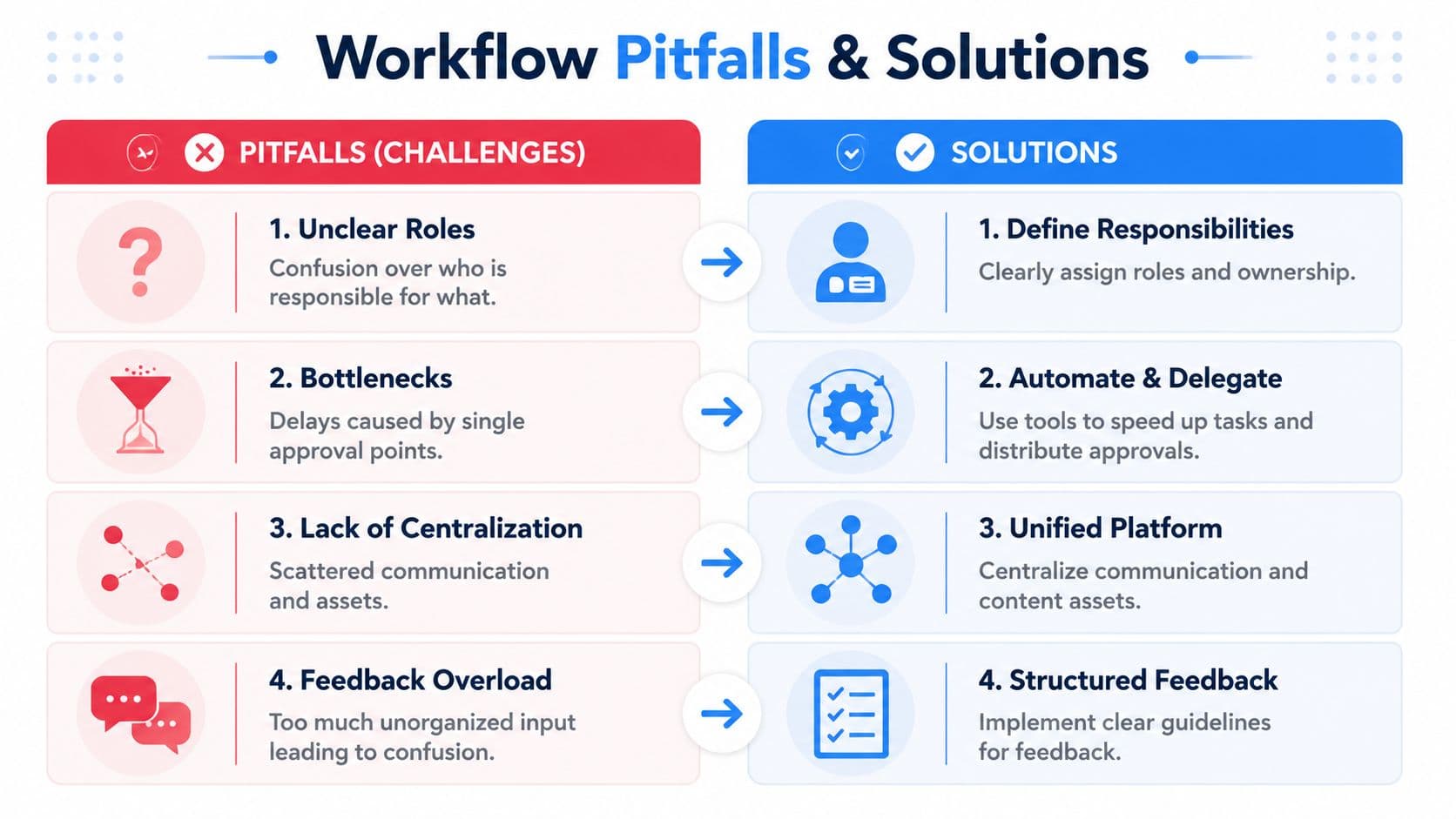
The first problem is vague feedback. "I don't like it" isn't review feedback. It's a reaction. Useful review comments tell the creator what to change and why. If your stakeholders can't do that consistently, give them a checklist: message clarity, brand fit, claim accuracy, CTA strength, and compliance risk.
Four common breakdowns
| Pitfall | What it causes | Fix |
|---|---|---|
| Unclear roles | Duplicate reviews and conflicting edits | Assign one owner per stage and one final approver |
| Bottlenecks | Work stalls behind one busy person | Name a backup approver and time-box response windows |
| Scattered feedback | Missed edits and version confusion | Keep all comments in one document or system |
| Late-stage changes | Endless revisions and missed deadlines | Treat new requests as scope changes, not casual feedback |
The second problem is stakeholder bottlenecks. One unavailable approver can block the entire queue if you haven't assigned backups or escalation rules. This gets worse in social because deadlines are often tied to launches, trends, or campaigns with narrow windows.
If one person can halt publishing for the whole team, you don't have a workflow. You have a dependency.
Measure the right things
Teams often track only turnaround time. That's useful, but it doesn't tell you why content keeps bouncing.
Expert workflow metrics go beyond turnaround time. Teams should track first-pass approval rate and stage-by-stage rejection rate to measure efficiency by how often content is approved on the first review, as explained in Storyteq's approval workflow metrics guidance.
Those two metrics reveal different issues:
- First-pass approval rate tells you whether briefs and early drafts are strong enough.
- Stage-by-stage rejection rate shows where the workflow breaks down. If legal sends back lots of content, the issue may be in briefing or claim review upstream.
Fix the workflow, not just the draft
When approvals drag, many teams focus on rewriting individual posts faster. That helps only a little. The better move is to tighten the system around those posts.
Try these corrections:
- Consolidate feedback: One reviewer per stage should gather input and send one clear revision request.
- Lock scope after a point: Once a draft reaches final review, only critical changes should be allowed.
- Route by risk: Not every post needs senior review. Reserve full chains for high-risk content.
- Review the workflow quarterly: Check where content stalls, who misses deadlines, and which stage creates the most rework.
If your team is cleaning up broader operational friction, this article on how to improve workflow efficiency is worth keeping nearby.
The pattern is consistent. Slow approvals are rarely caused by a single difficult post. They're caused by a system that allows confusion to repeat.
Essential Templates and Tools to Start Now
You don't need a giant enterprise setup to run clean content approval workflows. Most social teams can build a solid system with a brief template, one collaboration space, one task tracker, and one publishing tool.
A simple content brief template
Use this for every recurring social post type:
-
Objective
What the post needs to achieve. -
Audience
Who the post is for, and what they already know. -
Key message
The main point that can't get lost during revisions. -
CTA
What action the post should drive. -
Platforms
Where the content will appear. -
Required assets
Images, video, links, product details, disclaimers, or approvals already needed. -
Risk notes
Any legal, brand, partner, or executive sensitivity. -
Deadline and publish date
The date the post must be approved, then the date it should go live.
That template does more than organize information. It prevents reviewers from filling in missing context with opinions.
Build a lean approval stack
A practical setup for many teams looks like this:
-
Google Docs or Notion for draft review
Keep copy comments centralized and visible. -
Asana, Trello, or ClickUp for status tracking
Move posts through Draft, In Review, Needs Revision, Approved, and Scheduled. -
Shared asset storage
Store final creative in one place so reviewers aren't looking at outdated files. -
A publishing layer
Once a post is approved, hand it into a tool built for distribution rather than relying on manual posting.
Start smaller than you think you need. Teams usually fail because the workflow is too loose or too heavy. The sweet spot is a process people will actually follow every day.
A visible planning layer helps, too. If you need a simple framework for organizing output before approvals even begin, this content calendar template is a solid starting point.
The best system is the one your team can repeat without needing reminders every hour. Clear roles, short review windows, centralized feedback, and a dependable final publishing step are enough to turn approvals from a drag into a routine.
If your team has the review side under control and still loses time at the publishing stage, PostOnce is the practical fix. It lets you create content once and distribute it across multiple social networks automatically, so approved posts go live cleanly without manual reposting, formatting drift, or platform-by-platform busywork.