


















If you're wondering what are timelines on Facebook, you're really asking how to tell your story online, and the best way to do that consistently across all your social channels is with a tool like PostOnce. It automates your posting, so your Facebook Timeline and other profiles are always in sync.
At its core, a Facebook timeline is the main page where your entire history on the platform lives. It's the central hub that collects and displays everything you—or your brand—shares, from status updates and photos to major life events and company milestones.
Decoding the Facebook Timeline for Creators
Your timeline is where first impressions are made. For an individual, it's your personal narrative. For a business, it's your official brand story. Getting a handle on how it works is the first step to controlling that narrative, whether you're trying to connect with friends or build a loyal audience.
But here's the catch: not all timelines are the same. Facebook has two very distinct types, each built for a specific purpose. Knowing which one to use, and when, is crucial.
Profile Timeline vs Page Timeline At a Glance
The easiest way to understand the difference is to see them side-by-side. Your Personal Profile is for connecting with people you know, while a Business Page is for broadcasting your brand to the public.
| Feature | Personal Profile Timeline | Business Page Timeline |
|---|---|---|
| Primary Purpose | Personal connection and sharing | Marketing, branding, and public engagement |
| Audience | Friends and family (controlled by privacy) | General public, followers, and customers |
| Connections | "Friends" (requires mutual approval) | "Likes" or "Follows" (one-way) |
| Analytics | None | In-depth analytics via Page Insights |
| Advertising | Not available | Full access to Facebook Ads Manager |
This table gives you a quick snapshot, but the core difference is one of intent. One is for personal life, the other is for public and commercial presence.
Think of it this way: a Personal Profile Timeline is like your private photo album. You curate it carefully and only share it with people you trust. A Business Page Timeline, on the other hand, is like a glossy company brochure handed out at a trade show—it’s designed to tell your story to anyone and everyone to attract new customers.
Grasping this fundamental split is essential for building a smart content plan. It dictates who sees your posts, how they interact with them, and ultimately helps you figure out the best way to expand your social media reach. The timeline you choose directly shapes your entire strategy on the platform.
From The Wall to The Modern Timeline
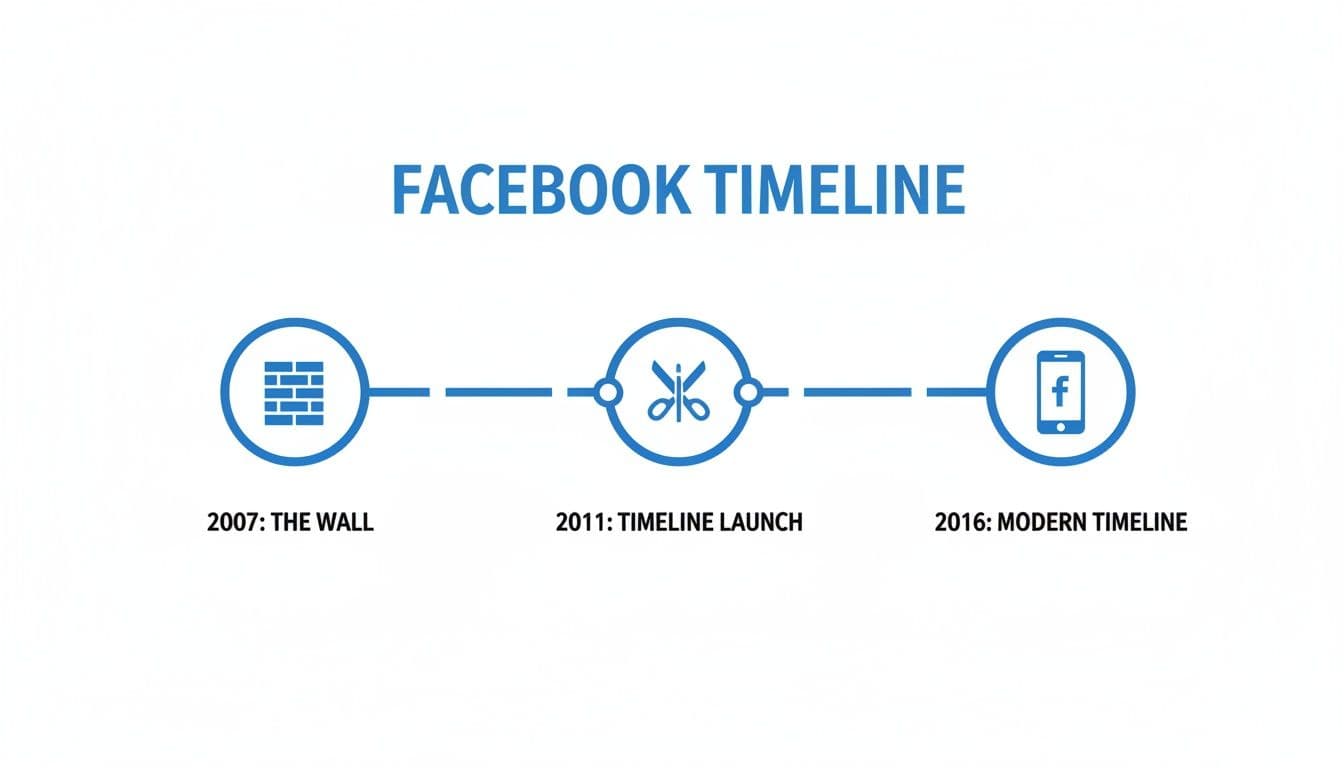
If you've been on Facebook for a while, you might remember "The Wall." It was the original version of your profile, working like a simple, public message board. Everything appeared in a single, chronological stream—what you posted, what friends wrote—all in one place.
That all changed in 2011 when Facebook introduced the Timeline. This wasn't just a minor update; it was a complete rethinking of what a profile could be. The goal was to move beyond a simple list of recent activities and create a digital scrapbook of your life or your brand's journey. Suddenly, we had prominent cover photos and the ability to add events from the past, filling in the gaps of our personal histories.
The key takeaway here is the shift in philosophy. Facebook moved from a "what's happening now" model to a "who are you" model. Your Timeline is built to tell a story, not just show a feed.
This evolution is what makes the Timeline so distinct. It’s designed to be a comprehensive narrative, whether for a person or a business.
Understanding this background really puts today's platform into perspective. Knowing that the Timeline is designed for storytelling, not just temporary updates, is crucial for anyone looking to manage their Facebook presence effectively. It’s less about just posting and more about curating a complete picture.
How the Facebook Timeline Actually Works
Your Facebook Timeline is more than just a running list of posts; it's your personal museum, and you're the curator. Every photo, status update, and life event is part of your collection. You get to decide what gets displayed, how it’s arranged, and who gets a ticket to see it.
It’s easy to mix up your Timeline with your News Feed, but they serve two very different purposes. Your Timeline is the complete, chronological archive of everything you’ve posted—your personal history. The News Feed, on the other hand, is the ever-changing, algorithm-driven stream of content your friends see from you, other people, and the Pages they follow. Think of it this way: your Timeline is the entire library, while the News Feed is just a handful of books recommended for you today.
Curating Your Public Story
Managing what shows up on your Timeline is all about controlling your digital story. Facebook gives you several powerful tools to step into that curator role, letting you decide which posts get the spotlight and which ones fade into the background.
Here are the key tools at your disposal:
- Pinning a Post: Think of this as the main exhibit at the entrance of your museum. When you pin a post, it sticks to the very top of your timeline for seven days, making it the first thing anyone sees. It's perfect for a big announcement, a product launch, or a favorite memory.
- Highlighting a Post: This feature makes a post stretch across the full width of your Timeline, giving it extra visual weight. It’s like putting a spotlight on a particular piece in your gallery to make sure it grabs everyone’s attention.
- Timeline Review: This is your personal gatekeeper. By turning on Timeline Review, you get to approve or deny any post you're tagged in before it ever shows up on your profile. This is your final say on the content others associate with you.
Your Timeline is the full collection you control, but the Facebook algorithm decides which individual pieces to show others in their daily News Feed. For a closer look at how that works, you can get a full breakdown by exploring how the social media algorithm works.
Getting a handle on these controls elevates your Timeline from a simple diary to a strategic portfolio. Whether you're managing a personal profile or a business Page, you have the power to shape how the world sees your story, one post at a time.
Optimizing Your Business Page Timeline for Growth
For any business or creator, a Facebook Page Timeline is so much more than a simple log of past posts. When managed correctly, it becomes one of your most powerful marketing channels. Let’s look at how to turn your Page into a compelling hub for your brand with a smart approach to its design and content.
Think of your Page Timeline as the front window of your digital storefront. Every single element, from your cover photo down to your posting schedule, shapes the first impression you make on potential followers and customers.
Building a Strong Brand Presence
A well-oiled timeline consistently tells your brand’s story. The first step? Design a cover photo that grabs attention and instantly communicates what you do. This visual real estate is your brand’s billboard, so make it count.
Next, give your "About" section some serious attention. This isn't just a formality; it's a prime spot for SEO. Pack it with relevant keywords describing your business so people can actually find you when they search on Facebook.
To really optimize your page for growth, a solid visual strategy is a must. A great place to start is by learning how to create lead-winning graphics for social media that truly captivate your audience.
One of the most effective tools for controlling the narrative on your Page is the pinned post. By pinning a post, you can anchor your most important content—like a special promotion, a big announcement, or a viral video—right to the top of your timeline for up to seven days.
Maintaining an Engaging Content Mix
Consistency is what builds a loyal audience. This means keeping a regular posting schedule and maintaining a consistent brand voice across all of your content. To get a handle on your content calendar, check out our guide on finding the best time to post on Facebook.
Finally, keep your timeline fresh and engaging by using a variety of post formats. Don't be afraid to mix things up with:
- Videos: Grab attention with short-form clips or more in-depth tutorials.
- Carousels: Show off multiple products or tell a visual story with a series of images.
- Live Streams: Connect with your audience in real-time for Q&As or behind-the-scenes content.
By putting these strategies into practice, you can transform your Facebook Page Timeline from a passive archive into an active engine for growth.
Let PostOnce Handle Your Timeline Management
The real challenge behind the question "what are timelines on Facebook" isn't just knowing the definition—it's figuring out how to manage them effectively without losing all your creative time. The answer is automation.
Trying to keep multiple timelines fresh can feel like a full-time job. With a tool like PostOnce, you can hand off the repetitive work of distributing content and get back to what you're passionate about—creating. It's designed to make maintaining an active and interesting Facebook Page Timeline feel almost effortless.
The biggest headache for any creator or business is just keeping up. You're constantly juggling different platforms, tweaking posts for each one, and manually scheduling everything. Those hours add up, and they're hours you could have spent coming up with your next great idea. That's exactly the problem PostOnce was built to solve.
How PostOnce Takes the Work Off Your Plate
Once you understand what a timeline is, the next logical step is figuring out how to manage it well. This is where automation comes in. Instead of just knowing the theory, you can actually master your timeline by putting your posting strategy on autopilot.
Think of PostOnce as your personal content manager. You create your post just once, and the tool makes sure it gets delivered perfectly to your Facebook Page Timeline and all your other social accounts. No extra steps needed.
This kind of automation is a game-changer. You no longer have to sweat the small stuff that eats away at your day. PostOnce is smart enough to handle the unique quirks of each platform, so you don't have to.
Here’s what that looks like in practice:
- Automatic Formatting: The tool intelligently adjusts your content for each network. It handles everything from text length to image dimensions, so every post looks like it was made specifically for that platform.
- Set-It-and-Forget-It Automation: Just create your content and let PostOnce do the rest. Its cross-posting feature distributes your work reliably without you needing to check in constantly.
- Seamless Integration: Your new posts can be automatically pushed from a single source to your Facebook Page Timeline and other profiles, keeping your online presence consistent and active.
By offloading all those repetitive distribution tasks, PostOnce gives you the freedom to focus on what actually grows your brand: creating fantastic content. You can see how to automate your Facebook cross-posting and start saving time today.
Common Misconceptions About Facebook Timelines
A lot of what people think they know about Facebook is based on how it worked years ago. Hanging onto these old ideas can cause some serious headaches, from accidentally oversharing to creating content that nobody ever sees. Let's clear the air and bust a few of the most common myths.One of the biggest trip-ups is the belief that only your friends can see your timeline. That's only the case if you’ve meticulously set your global privacy settings to "Friends" and never change it. The moment you set a single post’s audience to "Public," that specific update is fair game for anyone, on or off Facebook.
Another dangerous assumption is that deleting a post makes it vanish forever. Think of it this way: if you posted a photo and someone took a screenshot, deleting your original doesn't delete their copy. It's the same on Facebook. If someone shares your post before you hit delete, their shared copy can still exist on their timeline and in the feeds of their friends. Deletion isn't a magic eraser.
The Algorithm Always Has the Final Say
Perhaps the most persistent myth is that your timeline shows all your posts to all your friends in the exact order you published them. While your own timeline appears chronological to you, that's not what your friends and followers experience in their News Feed. Their feed is ruled by the algorithm.
The algorithm is a powerful gatekeeper. It analyzes your content and decides who it’s most relevant to, meaning many of your posts might never even show up for the people you want to see them. Engagement, not chronology, is what gets your content seen.
This is a fundamental concept to grasp because it directly impacts whether your content succeeds or fails. Just posting and hoping for the best is a strategy that's bound to fall flat. Understanding how algorithms treat your content is crucial, a topic we touch on in our guide about how crossposting differs from multiposting.
Once you let go of these myths, you can start using Facebook with a much clearer picture of how it actually works. You’ll be able to protect your privacy more effectively and set realistic expectations for your content's reach.
Frequently Asked Questions About Facebook Timelines
As you get the hang of using Facebook for yourself or your brand, a few common questions always seem to pop up. Let's clear up some of the biggest ones about how timelines work.
Can I See Who Viewed My Facebook Timeline?
This is probably one of the most-asked questions out there, but the answer is a firm no. It’s a popular myth, but Facebook has never provided a feature that lets you see a list of who has visited your profile or Page.
The platform is built around privacy in this respect. You can only see who actively engages with your content through likes, comments, and shares—not who's just stopping by for a look.
How Do I Hide Old Posts From My Timeline?
Facebook gives you a couple of great ways to clean up your history. Your best bet is the "Manage Posts" tool, which you can find in your Activity Log. It lets you select posts in bulk and either archive them (hide them from everyone but you) or delete them permanently.
For a quicker, broader approach, you can also head into your privacy settings. There's an option there to limit the audience for all your past posts to "Friends" or even "Only Me" with just one click. It’s a fast way to make your older content much more private.
What Is the Difference Between a Timeline and a News Feed?
It's easy to mix these two up, but the distinction is simple once you get it.
Your timeline is your home base—it's the complete collection of your posts, photos, and life events displayed in one place. Think of it as your personal scrapbook or your Page's official archive.
The News Feed, on the other hand, is the river of content that flows when you open Facebook. It's an algorithmically sorted mix of updates from all the friends, Pages, and groups you follow. Your timeline is your story; your News Feed is the daily newspaper featuring stories from everyone in your network.
Keeping your Facebook Timeline active and interesting is a lot easier with the right help. With PostOnce, you can set up your content schedule and be confident your timeline always has something fresh for your audience, all without the constant manual work. See how you can make your posting more efficient at https://postonce.to/crosspost.