


















So, can you schedule TikToks? The short answer is yes, and for anyone serious about growth, the best way to do it is with a tool like PostOnce. It automates your posting so you can create once and distribute your content everywhere. While TikTok has its own basic scheduler, the real question is how you can turn that simple function into a cornerstone of your growth strategy.
True efficiency comes from a much smarter workflow. That's where a dedicated tool like PostOnce comes into play, helping you not just schedule, but automate your entire distribution process across all your social channels.
Let's be honest, manually uploading a TikTok right at a specific time is a pain. You get busy, forget, or simply can't post when your audience is most active. Scheduling your content in advance completely sidesteps that problem. By planning your posts, you build a consistent presence that keeps both your followers and the TikTok algorithm happy. This becomes absolutely essential when your analytics show your prime engagement window is late at night or during a time you're just not available.
How PostOnce Answers "Can You Schedule TikTok Videos?"
When you search for "can you schedule TikTok videos," you're not just asking for a yes or no answer. You're looking for a way to manage your time, post consistently, and grow your audience without burning out. This is exactly the problem a tool like PostOnce was built to solve. It’s designed for creators and marketers who need to work smarter, not harder. Instead of just scheduling for one platform, it lets you schedule a video once and have it automatically pushed out everywhere. You can see exactly how PostOnce automates social media and get a feel for how it works.
Imagine this: you upload a single short-form video and set it to automatically post to all your key channels.
- TikTok at its peak engagement time
- Instagram as a Reel
- YouTube as a Short
- Any other platform where your audience hangs out
This "create once, distribute everywhere" approach is the secret to a high-impact social media presence. It frees you from the tedious, manual work of reposting so you can maintain consistency across your channels without burning out.
This isn't just about saving a few minutes here and there; it’s about squeezing every bit of value out of the content you worked so hard to create. By automating the distribution, you can get back to what really matters—making great videos. In this guide, we'll walk through how to use both TikTok's native scheduler and more powerful solutions to help you reclaim your time and get serious about your content strategy.
Why Scheduling TikToks Is a Non-Negotiable Growth Strategy
Let’s be honest: in 2026, just tossing a video onto TikTok and hoping for the best is a strategy for failure. While scheduling definitely saves you time, its real value is in how it helps you work with the TikTok algorithm, not against it.
When you consistently post at the exact moments your audience is scrolling, you give your videos that critical initial push they need to get noticed. This is how you stop treating posting like a chore and start using it as a powerful lever for real, measurable growth.
Beat the Algorithm with Consistency
The TikTok algorithm absolutely loves consistency. I’ve seen it time and time again: accounts that stick to a steady rhythm of one to four posts a day build momentum that keeps them on the coveted For You Page.
This regular activity shows the algorithm that your account is a reliable source of fresh content, which dramatically increases the odds of your videos being served to a wider audience. If you're a busy creator or running a business, hitting that cadence without a scheduler is next to impossible.
A consistent posting schedule is the single most effective way to stay relevant on TikTok. Sporadic posting leads to inconsistent views, but a steady cadence builds an audience and tells the algorithm your content is worth watching.
Post During Peak Audience Hours
Ever wonder how the biggest creators seem to always be on your For You Page? It's not luck—it's smart timing. Back in 2018, TikTok had just 55 million users. By 2026, that number has skyrocketed to an incredible 1.9 billion.
With 34 million new videos uploaded every single day, your timing has to be perfect. The data is clear: posting during peak engagement windows, like Tuesday and Thursday evenings, can result in 2x to 3x higher engagement. In the US, where teens spend an average of 95 minutes a day on the app, hitting those high-traffic moments is absolutely crucial.
This is even more important now because TikTok’s algorithm pays close attention to how your existing followers react within the first couple of hours. If a video gets a high completion rate (over 70%), a good number of saves, and qualified views, the algorithm is far more likely to show it to people who don't follow you yet. Scheduling makes sure you never miss that golden window of opportunity.
Improve Content Quality and Avoid Burnout
Whether you're a solo creator or a full-blown marketing agency, the pressure to create daily content can quickly lead to burnout. What happens then? You start pumping out rushed, low-effort videos that the algorithm will ignore.
The solution is a workflow that professionals swear by: content batching.
Think about it this way:
- Plan Your Content: Set aside a block of time to brainstorm and map out a full week's worth of video ideas.
- Film in Bulk: Dedicate a single session to filming all of your videos. Get in the zone and knock them all out at once.
- Schedule Ahead: Edit your videos and load them into your scheduler, setting them to go live automatically on the right days and times.
This approach not only saves your sanity but also ensures that every single video you post is something you're proud of. To really get ahead, you need to combine this smart workflow with a deep understanding of the platform, as detailed in expert guides like Crackin' The TikTok Code.
By marrying a solid strategy with a disciplined scheduling habit, you'll build the kind of algorithmic momentum that leads to serious growth. And if you want to dial in your timing even more, check out our guide on the best times to post on social media to refine your schedule.
Using TikTok’s Built-In Video Scheduler
So, can you schedule videos directly on TikTok? The short answer is yes, but it’s not quite as simple as you might hope. TikTok does have its own free, built-in scheduler, and it's a decent place to start if you're just dipping your toes into content planning.
There are a couple of ground rules, though. First, the feature lives exclusively on the desktop web browser version of TikTok. You won’t find it in the mobile app, which is where most of us spend our time. Second, your account needs to be a Business or Creator Account. Don't worry, this is a quick, free switch you can make right in your account settings.
How to Schedule on TikTok Natively
Once you're logged into your TikTok account on a computer, the whole process is pretty simple. Just hit the "Upload" button you see in the top-right corner. This will take you to the upload screen, where you can drag and drop your edited video file.
From here, you'll fill in all the usual details—crafting a killer caption, adding your hashtags, and picking a cover photo that will stop scrollers in their tracks. After you've got the basics down, look for a toggle switch labeled "Schedule video."
Flick that switch, and a calendar and time selector will pop up. Now you can pinpoint the exact date and time for your video to go live.
Understanding the Tool's Limitations
While the native scheduler is handy in a pinch, you'll quickly run into its limitations, especially if you're managing content for a business or trying to build a serious presence. The biggest headache is the scheduling window—you can only schedule posts up to 10 days in advance. This makes any real long-term planning or batching a full month's worth of content impossible.
What's more, some of the most viral and engaging TikTok features are completely absent from the desktop uploader. You can't:
- Add trending sounds or popular music directly within the tool.
- Use interactive stickers like polls, quizzes, or Q&As.
- Create a Duet or Stitch with another video.
You're essentially trading some of TikTok’s most powerful engagement features for the basic convenience of scheduling. For many creators and social media managers, that trade-off just isn't worth it.
These restrictions are exactly why most people eventually turn to more capable third-party schedulers. Getting a handle on these native tool limitations is the first step toward building a more robust workflow, and it helps to know how to schedule social media posts effectively across all your platforms, not just TikTok.
Taking Your Scheduling to the Next Level with PostOnce
While TikTok's built-in scheduler is a decent starting point, it's just that—a start. For creators, marketers, and brands who are serious about growth, you'll quickly hit its limits. This is where a more robust tool like PostOnce comes in.
Think of it less as a simple scheduler and more as a content distribution engine. The entire philosophy shifts from just planning posts to a "create once, distribute everywhere" model. You upload your video a single time, and the system does the heavy lifting, intelligently pushing it out to all your other platforms.
The walkthrough above shows how to turn a TikTok scheduling workflow into a broader distribution workflow, including automatically posting new TikToks and existing TikTok content to Instagram.
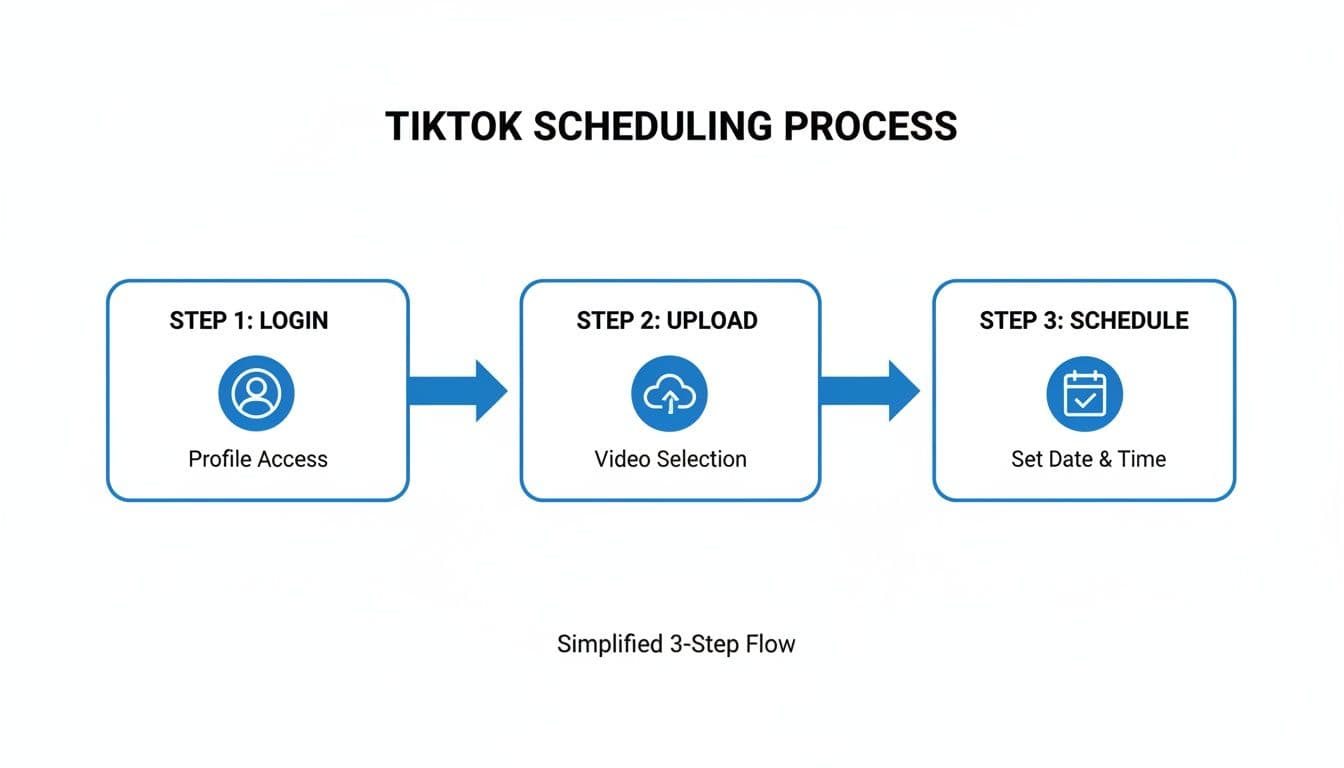
A tool like this gives you a central command center for your entire social media strategy. Instead of hopping between apps, you can manage, schedule, and automate everything from one clean dashboard.
How PostOnce Solves Real-World Problems
When you're trying to figure out how to schedule TikTok videos, the underlying goal isn't just to check a box. It's about finding a way to stay consistent, reclaim your time, and grow your audience without burning out. That’s the problem a powerful scheduler actually solves.
For a small business owner, it means you can maintain a presence on TikTok, Instagram, and LinkedIn without the daily grind of manual posting. A founder can announce a new feature and have it go live across all channels at the exact same moment for a coordinated launch. And if you're a marketing agency, the ability to manage multiple client accounts from one spot is an absolute game-changer.
The real power isn't just in scheduling; it's in smart distribution. PostOnce can automatically tweak your content for each platform—adjusting captions and hashtags so every post looks native and performs better.
This kind of automation is key to staying relevant. With users spending an average of 95 minutes a day on TikTok, you have to show up consistently to grab their attention. Top accounts often post 4+ times a week, while many brands struggle to manage just 1.9 posts per week. A scheduling tool closes that gap, automating the consistency you need to keep the algorithm happy.
Here are a few features that make a real difference:
- Smart Format Optimization: Automatically adapts your captions, hashtags, and video formats to suit each social network's best practices.
- Multi-Account Management: Lets you handle all your personal brands and client profiles from a single, organized dashboard.
- Set-and-Forget Automation: You can create rules that automatically cross-post new content from a primary channel (like TikTok) to all your others. No extra work required.
By handing off the repetitive distribution work to a system like PostOnce, you free yourself up to focus on what actually matters: creating great videos. If you're ready to make your TikTok workflow far more efficient, you can learn more about TikTok crossposting with PostOnce and see how it works firsthand.
Best Practices for Scheduling Your TikToks
Simply knowing you can schedule TikToks is one thing; building a smart strategy around it is what actually drives growth. A great scheduling tool is just the start. The real magic happens when you pair that convenience with a plan designed to give the TikTok algorithm exactly what it wants.
Think about it: the average user spends a staggering 95 minutes on the app every single day. In that time, they're scrolling past a fraction of the 34 million videos uploaded daily. Your content needs to land at the perfect moment. In my experience, a well-timed post can easily get 2-3x higher engagement right out of the gate. That initial traction is a huge signal to the algorithm, helping your video break out beyond your followers and onto the For You Page.
Find Your Personal Best Posting Times
Generic advice about the "best" time to post is a decent starting point, but your own data is always better. Your audience is unique, so you need to find out when they are most active. Thankfully, TikTok gives you this information for free.
Here’s how to find your golden hours:
- Head to your profile and tap the three-line menu in the top-right.
- Select Creator Tools, then tap on Analytics.
- Switch to the Followers tab and scroll down until you see the "Follower activity" chart.
This graph is your roadmap. It shows you the specific days and hours your followers are scrolling the most. Schedule your content to go live right at the beginning of these peak times to maximize that initial rush of views and engagement.
Batch Your Content with Content Pillars
Trying to come up with a new video idea every single day is a recipe for burnout. The key to staying consistent without the daily scramble is content batching, and organizing that work around content pillars. You set aside a few hours one day to film and edit a bunch of videos for the week. It’s a total game-changer.
Content pillars are just the main themes or categories you talk about on your account. They create a reliable structure for your content, ensuring you’re giving your audience a healthy mix of value, entertainment, and personality.
A great way to visualize this is with a weekly schedule based on different pillars. This approach keeps your content calendar full and your audience engaged.
Weekly Content Pillar Scheduling Example
Here’s a sample schedule for a small business, showing how you can rotate through different pillars to keep your feed interesting and effective.
| Day | Time (EST) | Content Pillar | Goal |
|---|---|---|---|
| Monday | 9:00 AM | Educational | Provide value with a "how-to" video |
| Tuesday | 7:00 PM | Trending | Boost visibility with a popular sound |
| Wednesday | 12:00 PM | Behind-the-Scenes | Build community by showing the process |
| Thursday | 8:00 PM | Q&A / Reply | Drive engagement by answering comments |
| Friday | 10:00 AM | Product Showcase | Generate interest in an offering |
This isn't just a posting schedule; it's a strategic plan that helps you hit different goals throughout the week, from building community to driving sales.
Prepare Your Videos for Success
A truly efficient workflow means your videos are 100% ready to go before you even open your scheduler. I'm not just talking about the finished video file. All the little pieces that make a post successful should be prepped and organized.
For every video you batch, make sure you also have:
- A compelling caption that hooks the viewer and includes a clear call-to-action.
- Researched hashtags that include a smart mix of broad, niche, and trending tags.
- An eye-catching cover photo that you’ve either designed or selected to make people stop scrolling.
When you have a folder filled with these complete "post packages," scheduling becomes a simple drag-and-drop process. This systematic approach is the foundation of a strong social media presence. For a deeper dive, check out our complete guide on the best practices for social media to polish your strategy even further.
Frequently Asked Questions About Scheduling TikToks
Once you start scheduling TikToks, you'll inevitably run into a few tricky situations. It’s a new workflow, so it's completely normal to have questions. Let's clear up some of the most common ones I hear from creators and social media managers.
Can I Edit a Scheduled TikTok Video?
Let's get this one out of the way first: no, you can't edit a TikTok once it's been scheduled. This is true whether you're using TikTok’s own scheduler or a third-party tool.
If you catch a typo in your caption or decide you want to swap out the video, your only option is to delete the scheduled post and re-upload it with your changes. This is exactly why it pays to be meticulous. I always recommend double-checking your video, caption, and hashtags before you hit that schedule button. It saves you a massive headache later.
Do Scheduled Videos Perform Worse Than Manual Posts?
This is a huge myth that just won't die. The truth is, scheduled videos do not perform worse than ones you upload manually. In many cases, they actually perform better. The TikTok algorithm couldn't care less if you used a scheduler, especially an official TikTok partner tool.
What really matters for performance are two simple things:
- The Quality of Your Content: Is your video actually entertaining, helpful, or interesting?
- Your Posting Time: Did you post it when your audience is scrolling?
Scheduling is your secret weapon for nailing that second point. It lets you consistently push great content live during peak engagement hours, giving your videos the best possible shot at getting that crucial initial traction.
Your video's success is determined by its quality and timing, not by whether you hit "post" manually or used a scheduler. A great video posted at the right time will always perform well.
Can I Schedule TikToks from My Phone?
This is a big point of confusion for a lot of people. While TikTok’s built-in scheduling feature is only available on a desktop computer, you can absolutely schedule your TikToks from your phone. You just need the right tool.
This is where third-party schedulers like PostOnce come in handy. They're designed specifically for this. You can manage your entire content calendar right from your phone—planning, scheduling, and posting—without ever needing to be chained to a desk. It's a game-changer for anyone creating content on the move.
And while you're planning, think about ways to make your videos even more engaging. Learning techniques like how to do voiceover on TikTok can add a whole new layer of personality to your scheduled content.
Stop wasting time manually posting across different social media platforms. With PostOnce, you can create content once and have it automatically distributed to TikTok, Instagram, YouTube, and more, all perfectly formatted for each network. Start automating your social media today.