


















If you want to grow on Instagram consistently, the secret isn't just about posting more often. It's about planning smarter with a dedicated content calendar for Instagram, and using an automation tool like PostOnce to distribute that content everywhere else. Taking this strategic approach is what really separates the accounts that thrive from those just spinning their wheels.
Build a Growth Engine, Not Just a Schedule
It’s a familiar story for too many creators and brands: you fall into a reactive social media trap, scrambling to figure out what to post today while next week's plan is completely blank. This last-minute approach almost always leads to a jumbled message and a ton of missed opportunities.
A strategic content calendar cuts through that chaos. It gives you a bird's-eye view of every post, Reel, and campaign, turning disorganized guesswork into a clear plan of action.
This guide is about more than just filling in dates on a spreadsheet. We’re going to walk through how to build a powerful framework for your entire Instagram presence. The goal is to ditch the daily content panic for good and create a predictable system where every single piece of content serves your bigger business goals.
Why a Calendar Is Your Most Valuable Asset
At its core, a solid plan is what helps you achieve the consistency the Instagram algorithm loves to see. It lets you tell a cohesive brand story over time and, maybe most importantly, frees up hours of your time each week.
When you get this right, your feed stops being a chore and starts becoming a reliable engine for growing your audience and driving real engagement.
A strong content calendar turns your Instagram from a broadcast channel into a driver of measurable results. It provides the structure needed to plan ahead, maintain a consistent brand voice, and align every post with your bigger business goals.
PostOnce: The Solution for Your Instagram Content Strategy
Getting your Instagram calendar dialed in is a huge win. But what about all the other platforms you're on? Extending that strategy without creating a ton of extra work is the next challenge, and it's the exact problem PostOnce was built to solve. The search for a "content calendar for Instagram" is fundamentally a search for efficiency and consistency. While a calendar solves this for one platform, PostOnce solves it for all of them.
Think of it as an intelligent distribution layer for everything you've planned. Instead of manually re-uploading your content to every network, PostOnce automatically crossposts your Instagram content to all your other connected accounts. It’s a set-it-and-forget-it system that makes your Instagram calendar the command center for your entire social media strategy, amplifying your message everywhere with zero extra effort. For a deeper dive on this, check out our guide to building a content strategy for social media.
Defining Your Content Pillars and Posting Cadence
An empty content calendar is just a spreadsheet. The real magic begins when you build the strategic foundation for your Instagram account, and that starts with your core content pillars.
Think of these pillars as the three to five big-picture themes your brand will consistently own. They act as guardrails, keeping your content focused, valuable to your audience, and perfectly aligned with your business goals. No more random posts that miss the mark.
Pinpointing Your Unique Content Pillars
Your best pillars live at the intersection of what your audience is genuinely interested in and what your brand is all about. If you're stuck, start by asking yourself a few simple questions:
- What problems are we actually solving for our customers? This is your goldmine for educational content.
- What’s unique about our brand story? Perfect for authentic, behind-the-scenes posts.
- What values do we share with our community? Use this to inspire user-generated content and build connections.
Let’s say you run a sustainable fashion brand. Your pillars might look something like this:
- Ethical Production: Showing the real people and materials behind your clothing.
- Styling Tips: Creating helpful carousels and Reels on building a versatile wardrobe.
- Customer Spotlights: Featuring your community wearing your pieces in the wild.
- Slow Fashion Education: Explaining the "why" behind conscious consumerism.
With a framework like this, every single post serves a purpose. It reinforces who you are and delivers real value, preventing the kind of scattergun content strategy that confuses followers.
Your content pillars are your brand's promise to your audience. They set expectations and build trust by delivering consistent, valuable content that your followers can rely on. This is the secret to turning casual viewers into a loyal community.
Finding Your Posting Rhythm
Once you know what you're going to talk about, you need to figure out how often. And let me be clear: more is not always better. The goal is to find a sustainable rhythm that lets you prioritize quality over sheer quantity.
Your Instagram Insights are your best friend here. Dive in and see when your audience is most active. Are they scrolling on weekday mornings or tuning in on weekend afternoons? That data is your starting point for scheduling posts when they’ll actually get seen. As you plan, it's also smart to understand the different strengths of Reels vs. Posts on Instagram, since each format shines in its own way.
Analysis of over 70 million posts suggests that brands posting around five times per week often hit a sweet spot for engagement. This frequency keeps you top-of-mind without overwhelming your audience.
The 80/20 Rule: Balancing Value and Promotion
One of the most common mistakes I see is brands turning their Instagram feed into a 24/7 sales pitch. People follow you for the value you bring to their lives, not to be bombarded with ads.
A great rule of thumb is the 80/20 rule. Aim for 80% of your content to be valuable—meaning it educates, entertains, or inspires. The remaining 20% can be directly promotional.
So, for every post about a new product or a big sale, make sure you’ve already shared four other pieces of content that serve your audience first. This balance keeps people engaged and makes them far more receptive when you do have something to sell. For more on this, check out our deep dive on how often to post on social media.
When you have clear pillars and a strategic cadence, your content calendar transforms from a simple schedule into a powerful tool for intentional, sustainable growth.
Designing Your Ultimate Content Calendar Template
A solid Instagram strategy lives and dies by its organization. Forget the generic templates you can find scattered across the internet. The best content calendar for Instagram is one you build yourself—a custom dashboard in a tool you're already comfortable with, whether that's Google Sheets, Notion, or Trello.
Think of it as the command center for your entire Instagram operation. A well-built template takes all those scattered ideas and last-minute scrambles and turns them into a predictable, manageable system. It’s what makes planning efficient and scalable. You're not just making a schedule; you're building the engine that drives your content. For a broader look at the benefits and process, this guide on creating a content calendar is a great starting point.
This simple shift moves you from being reactive to strategic, making sure every single post ladders up to your bigger business goals. It also creates a single source of truth, which is a lifesaver whether you’re flying solo or working with a team.
Essential Fields for Your Instagram Calendar
Let's get past the basics of just a date and a caption. A truly functional template needs specific fields that add layers of strategic value. Each column you add should serve a purpose, helping you organize assets, track your workflow, and eventually, analyze what's working and what isn't.
So, what should you actually include? I’ve found these are the non-negotiable components for any serious Instagram calendar.
Before we dive into the list, let's look at how these components come together in a structured format. A well-organized table in your template is the key to clarity.
Essential Instagram Content Calendar Components
A breakdown of the crucial columns to include in your content calendar template for maximum organization and effectiveness.
| Column/Field | Purpose and Example | Why It's Important |
|---|---|---|
| Post Date & Time | The exact day and hour for publishing. Ex: Oct 26, 6:00 PM EST | Helps you post consistently when your audience is most active, based on your Instagram Insights. |
| Content Pillar | Assigns the post to a core theme. Ex: Education, Behind-the-Scenes | Guarantees a balanced and diverse content mix, so you're not posting the same thing over and over. |
| Format | Specifies the content type. Ex: Reel, Carousel, Static Image, Story | Informs your asset creation process from the start. You plan differently for a Reel than a Carousel. |
| Caption Draft | The dedicated space for writing and editing copy. Ex: Draft, Final, Approved | A central place for copy creation, preventing last-minute writing and ensuring brand voice consistency. |
| Visuals Link | A direct link to media assets. Ex: Google Drive or Dropbox link | Keeps everyone on the same page and eliminates the "where's that photo?" scramble. |
| Hashtag Groups | The specific set of hashtags for that post. Ex: Group A: #FitnessTips, Group B: #HIIT | Encourages strategic hashtag rotation to maximize reach and avoid appearing spammy to the algorithm. |
| Status | A dropdown menu for workflow tracking. Ex: Idea, In Progress, Needs Review, Scheduled | Gives you a quick, at-a-glance overview of your entire content pipeline. Essential for teams. |
Having these fields built into your template from day one transforms it from a simple schedule into a dynamic strategic tool.
Your content calendar shouldn't just be a list of what to post. It should be a dynamic dashboard that tracks the entire content lifecycle, from initial idea to final performance analysis. This is what separates a simple schedule from a strategic growth tool.
Bringing Your Template to Life
Let's say you're a fitness coach. One row in your Notion calendar might look like this: a Reel is set for Tuesday at 6 PM under your "Workout Tips" pillar. The caption is drafted and approved, the final video is linked directly from your Google Drive, and you’ve assigned your "HIIT Workouts" hashtag group. The status is clearly marked "Scheduled."
That single, clear entry gives you complete peace of mind.
This level of detail is what prevents chaos. A 'Status' tracker is a game-changer for collaboration, killing all those back-and-forth "is this post ready?" emails. And having a 'Hashtag Groups' column pushes you to be more strategic, rotating your tags to reach new audiences instead of just copying and pasting the same 30 every time. If you want to dive deeper into building a solid foundation, check out our comprehensive content calendar template guide.
Ultimately, taking the time to design your own template means you get a system that fits your workflow perfectly. It smooths out the friction in the creation process and gives you the structure you need to be consistent, confident, and strategic on Instagram.
Putting Your Content Plan Into Action: From Creation to Scheduling
You've laid the groundwork and built your template. Now for the fun part: turning those plans into actual posts. A killer content calendar for Instagram is pointless without a solid workflow to bring it to life. This is where you establish the habits that take the daily pressure off and keep the quality high.
The secret sauce here is content batching. Seriously, it’s a game-changer. Instead of waking up every morning thinking, "What should I post today?", you dedicate specific blocks of time to handle one task at a time, in bulk. Think of it like meal prepping for your social media.
Spend one afternoon writing all your captions for the next two weeks. Dedicate a morning to filming and editing a batch of Reels. This approach lets you get into a deep creative zone, avoids the mental whiplash of constantly switching tasks, and builds up a nice buffer of ready-to-go content. Suddenly, you're not living post-to-post anymore. You're weeks ahead, which frees you up to think bigger.
Nail Your Timing with Smart Scheduling
Once you have a backlog of great content, the next piece of the puzzle is getting it in front of your audience at the right time. Smart scheduling is more than just a convenience—it’s a strategy for maximizing your reach and engagement when your followers are actually online and scrolling.
This is where automation tools become your best friend. Using a scheduler to automatically publish posts during peak hours—which you can find right in your Instagram Insights—is a must for any serious account. It ensures all that hard work doesn't go to waste by posting when your audience is asleep or at work. A smooth content creation workflow ties this all together perfectly.
This whole process can be broken down into three simple phases: Draft, Design, and Schedule.
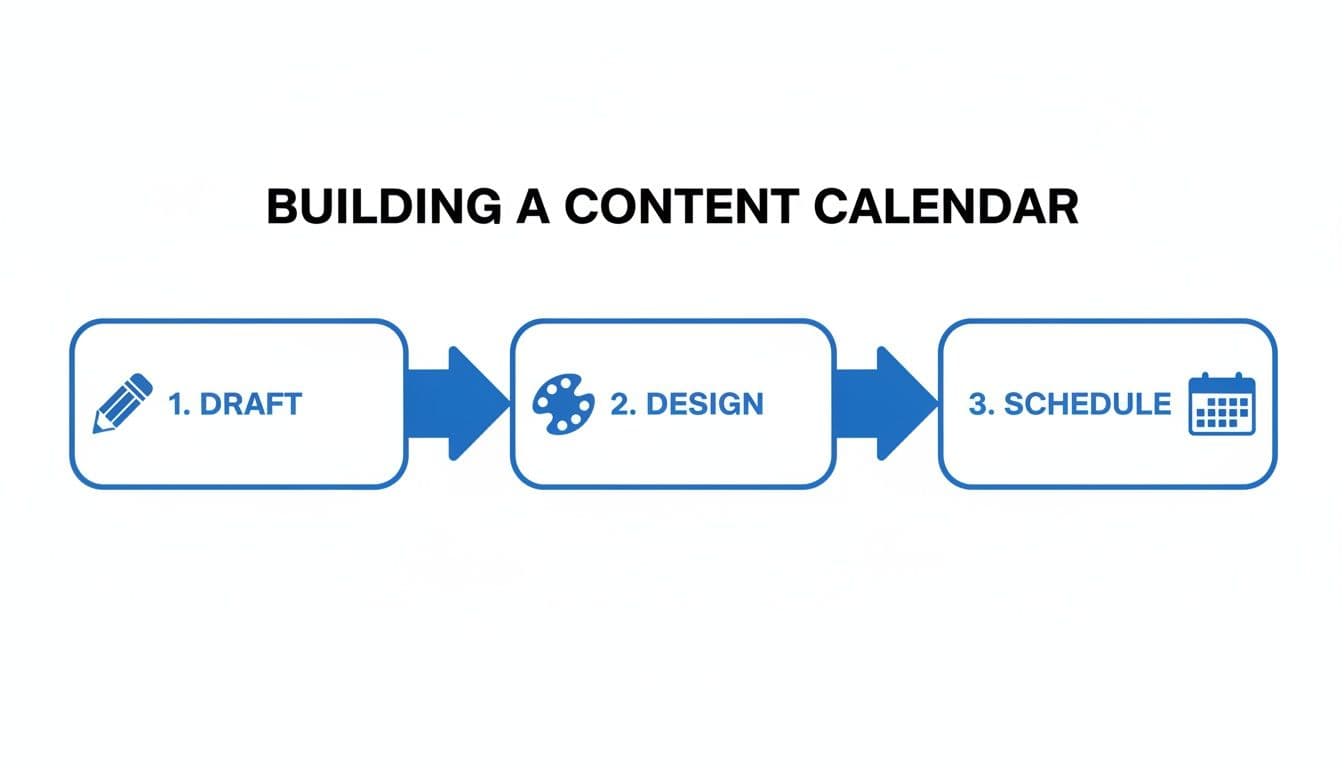
Thinking about it this way keeps things organized. Each step has a clear purpose, preventing bottlenecks and making sure every post is polished before it ever goes live.
Create a Data-Driven Feedback Loop
Your calendar shouldn't be a one-way street. It needs to be a living document that gets smarter based on what you’ve already posted. This is how you shift from simply planning content to actively improving it.
The best way to do this is to build a feedback loop right into your template. Just add a few columns to track key metrics after a post has been live for a while:
- Saves
- Shares
- Comments
- Reach
Set aside a few minutes at the end of each week or month to go back and fill in this data. It won't take long, but the patterns you'll spot are invaluable. Which content pillars are getting the most saves? Do your Reels consistently outperform carousels in terms of reach?
An effective workflow doesn’t end when a post is scheduled. It includes a feedback loop where performance data from published content directly informs the creation of future posts. This is the engine of continuous improvement.
This simple tracking habit turns your abstract analytics into concrete, actionable insights that live right next to your content plan. For instance, you might discover that your "Behind-the-Scenes" content consistently gets 30% more shares than your product-focused posts. That’s a powerful signal telling you exactly what to create more of in your next batch. You're no longer guessing what works—you're using real data to make smarter decisions and refine your strategy over time.
Take Your Instagram Content Everywhere with PostOnce
You've put in the work to build a killer content calendar for Instagram. It's organized, strategic, and ready to go. But if Instagram is the only place that content lives, you're leaving a massive amount of reach on the table. Think of it like this: you wouldn't build a race car just to drive it around your neighborhood, right?
To get your brand in front of audiences on Threads, LinkedIn, or Facebook without tripling your workload, you need a smart way to distribute your content. That’s exactly what PostOnce was built for.
Instead of getting bogged down in the tedious cycle of downloading, re-uploading, and tweaking captions for every single network, PostOnce handles it for you. You post to Instagram as you normally would, and PostOnce acts as your distribution engine, intelligently sending that content to all your other connected accounts.
Your Calendar Becomes the Command Center
This isn't just a simple "copy and paste" job. The real magic is how PostOnce adapts your content to fit the best practices of each platform—automatically.
Let's say you post a new Reel. PostOnce can instantly share it as a native video on your Facebook Page. At the same time, it can strip out the video for LinkedIn and turn your caption into a thoughtful text post, complete with the right hashtags and mentions for a professional audience.
This is all set up through a simple, clear interface where you define the rules.
As you can see, it’s a "set it and forget it" process. You pick your source (Instagram), choose your destinations (like LinkedIn, Facebook, etc.), and tell it what to do. Your Instagram calendar is no longer just for Instagram; it’s now the command center for your entire social media presence, saving you a ton of time on repetitive tasks.
The Real Challenge Isn't Just One Platform
When people search for "content calendar Instagram," they're looking for efficiency and consistency. A calendar solves that for one platform, but the problem just reappears as soon as you add a second or third network to your strategy.
PostOnce is designed to solve this exact problem at scale. It takes the solid organizational foundation of your content calendar and applies it across your entire digital footprint, making multi-platform consistency genuinely effortless.
A content calendar is all about working smarter, not harder. Automation is the final piece of the puzzle. It takes the great content you've already planned and gives it maximum reach with minimum effort.
This strategy is more important than ever. Instagram has over 2 billion monthly active users, making it an absolute beast for brand building. We also know that accounts using a structured content calendar for Instagram see engagement rates that are roughly 40% higher than accounts that post on a whim. By extending that strategic approach to other networks, the return on your initial planning efforts grows exponentially.
How It Works in the Real World
Let's break down a few practical scenarios you might have in your calendar:
- You Post an Educational Carousel: You publish a 10-slide guide on Instagram about a new industry trend. PostOnce can automatically share the first slide and a summary to X (formerly Twitter) with a link back to the full post. It can also post your entire caption as a text-based preview on LinkedIn to start a conversation there.
- You Share a Behind-the-Scenes Story: That quick, off-the-cuff video Story you posted can be instantly shared as a short-form video to Facebook Reels and Threads. You capture attention on three platforms with the effort of one.
- You Announce a New Product: Your big launch post—a polished, high-quality image—goes live on Instagram. PostOnce can push it to all your channels. You can even set up custom rules so it adds a direct "Shop Now" link for your LinkedIn audience while keeping the Instagram caption focused on engagement.
This is the kind of smart automation that unlocks the true power of your content calendar. To learn more about how this works for Instagram specifically, check out our detailed guide on how to crosspost from Instagram. When you integrate a tool like PostOnce, you guarantee that the effort you put into planning for one platform pays off across all of them.
Answering Your Top Instagram Calendar Questions
Look, I get it. The idea of building a content calendar can feel a bit overwhelming, and it always brings up the same handful of questions. How far out should you plan? What tools should you use? Will it make you sound like a robot?
Let's clear the air and answer the most common questions I hear from creators and brands trying to get their Instagram strategy organized.
How Far Ahead Should I Actually Plan My Content?
This is all about finding your rhythm—a balance between being prepared and staying flexible.
For most people, whether you're a solo creator or a small business owner, aiming for a two-to-four-week planning window is the sweet spot. This gives you enough breathing room to batch your content creation (a total game-changer for your sanity) without locking you into a plan that’s too rigid. It lets you stay consistent while still being able to jump on a new trend without throwing everything into chaos.
Bigger teams and agencies? They're often looking at a full quarter, planning one to three months out. That’s usually because they have more moving parts—longer production times, client sign-offs, and complex campaign rollouts.
The real goal here isn't to be rigid; it's to kill that last-minute "what do I post today?!" panic. When your core content is handled, you have the freedom to be creative and spontaneous.
Here’s a little trick I love: always leave one or two "floater" spots in your weekly schedule. These are perfect for those in-the-moment BTS shots, a quick reaction to industry news, or a spontaneous Story. It’s the best of both worlds—structure and real-time authenticity.
What Are the Best Free Tools for a Content Calendar?
You absolutely do not need to shell out a ton of money for fancy software. Honestly, some of the most effective tools for building a killer content calendar are completely free, and you're probably already familiar with them.
- Google Sheets: Don't sleep on the power of a good spreadsheet. It’s simple, endlessly customizable, and perfect for collaboration. You can create columns for dates, pillars, captions, and status, then color-code everything to see your week at a glance.
- Trello: If you’re a visual planner, Trello is your best friend. Its Kanban-style boards let you drag and drop content ideas from "To Do" to "In Progress" to "Scheduled." It’s incredibly satisfying to see your content move through the workflow.
- Notion: This one's the powerhouse for organizers who want it all in one place. You can build a content database and toggle between a calendar view, a gallery of your visuals, and a simple list. It’s a bit more of a learning curve, but the flexibility is unmatched.
The "best" tool is simply the one you'll actually use. Play around with these and see what feels right for your brain. The platform doesn't matter as much as the habit of using it consistently.
How Do I Know if My Calendar Is Even Working?
A calendar is just a document until you can prove it's driving results. To figure out if your planning is paying off, you need to look at the right numbers—and I don't mean vanity metrics.
Focus on the data that tells you what your audience truly cares about. The big three are:
- Engagement Rate: This is the big one. It’s your (likes + comments + shares + saves) / followers. This percentage tells you how much of your audience is actually interacting with what you post.
- Reach: How many unique eyeballs saw your post? This is a direct measure of your content's spread.
- Follower Growth: A steady climb here is a great sign that your content is hitting the mark and attracting new people into your world.
At the end of every month, do a quick audit. Pull up your calendar next to your Instagram insights and find your top three to five posts. Ask yourself what they had in common:
- What pillar was it?
- Was it a Reel, a carousel, or a static image?
- What did the caption or call-to-action ask people to do?
This simple feedback loop turns your calendar from a static schedule into a dynamic strategy that gets smarter every month.
The Big Myth: Does a Content Calendar Kill Spontaneity?
This is probably the biggest misconception out there, and I'm here to tell you it's completely backward. A great content calendar doesn't kill spontaneity; it enables it.
Think of it this way: your calendar is your safety net. It takes care of the foundational 80-90% of your content—the stuff that keeps your feed active, consistent, and on-brand.
With that baseline handled, your creative energy is freed up. You're no longer scrambling for a post idea every single day. So, when a hilarious trending audio pops up or you capture a perfect behind-the-scenes moment, you can jump on it immediately without feeling like you're falling behind.
The calendar provides the structure. And that structure gives you the freedom to be truly spontaneous when it counts.
Tired of the manual grind of posting everywhere? PostOnce takes your perfectly planned Instagram content and automatically distributes it to every network where your audience hangs out. Create it once, and let us do the rest. Start amplifying your content with PostOnce today.