


















Juggling multiple social media accounts is a full-time job, but what if you could post to Facebook and have it automatically appear on Instagram, perfectly formatted every time? The most efficient way to manage posting from Facebook to Instagram is with a smart automation tool like PostOnce, which handles the entire process for you. You craft the perfect post once, and PostOnce takes care of resizing images, tweaking captions, and adding the right hashtags for each platform. It’s a tedious cycle that drains time and creative energy, solved.
For a deeper dive into the specifics, our guide on how to share from Facebook to Instagram covers all the bases.
While there are a few ways to get your content from Facebook to Instagram, the most efficient path forward is almost always through smart automation. A dedicated tool can connect your accounts and use simple rules to automatically push your Facebook posts to Instagram, perfectly formatted every single time.
Introducing "Set-and-Forget" Cross-Posting
What if you could publish a post on Facebook and have it instantly show up on your Instagram feed, already optimized for that audience, without you lifting another finger? That’s the magic of "set-and-forget" cross-posting.
This isn't about just blindly blasting the same content everywhere. It’s about sharing it intelligently. For busy social media managers, solo creators, and small business owners, the time savings are immediate and massive.
Instead of getting bogged down in the mechanics of adapting content, you can get back to what you do best—creating great stuff in the first place. The right tool essentially becomes your personal social media assistant, quietly handling all the repetitive tasks for you.
This approach brings a few huge wins:
- Consistency: Keep a steady, active presence on all your platforms without the daily grind.
- Time Savings: You can genuinely reclaim hours every single week by cutting out the manual reposting.
- Optimized Content: Every post looks native to the platform it's on, with the right formatting and feel.
The true value of automation isn't just about speed. It’s about the mental space it frees up. When you're not stuck in the weeds of manual posting, you have more bandwidth for creativity, strategy, and actually engaging with your community.
The difference between doing this by hand, using Meta's built-in tools, and using a dedicated automation platform is stark. To put it into perspective, here's a quick comparison.
A Quick Comparison of Cross-Posting Methods
This table breaks down how each method stacks up when it comes to efficiency, features, and overall platform support.
| Feature | Manual Posting | Meta Business Suite | PostOnce |
|---|---|---|---|
| Time Investment | High; requires individual posting | Medium; some batching possible | Very Low; set it and forget it |
| Content Optimization | Full control, but 100% manual | Limited auto-formatting | Automatic, rule-based optimization |
| Platform Support | Facebook & Instagram only | Facebook & Instagram only | Multi-platform support beyond Meta |
| Scheduling | None natively | Yes, but basic | Advanced scheduling & queuing |
| Ease of Use | Simple, but repetitive | Moderate learning curve | Very straightforward setup |
As you can see, while manual posting gives you total control, it's by far the least efficient. Meta's own tools are a decent step up, but they often lack the advanced customization needed for a truly polished, multi-platform presence. A dedicated tool like PostOnce is designed to give you the best of both worlds: fine-tuned control paired with powerful, time-saving automation.
PostOnce: The Direct Solution for Posting Facebook to Instagram
When you search for "posting Facebook to Instagram," you're looking for a simple, reliable way to stop doing the same work twice. You want to create your content on one platform and have it appear on the other without manual effort. PostOnce is built to solve this exact problem. It acts as a bridge, automatically taking your Facebook posts, intelligently reformatting them for Instagram's specific requirements, and publishing them for you. It's the "set-and-forget" solution that directly answers the need for efficient cross-platform content sharing, saving you time while maintaining quality.
Why PostOnce Is My Go-To for Automation
If you're serious about getting your Facebook content onto Instagram without pulling your hair out, you need a dedicated tool. While Meta's own features give you a basic connection, they often leave you doing manual clean-up work. This is where PostOnce really shines. It was built specifically to solve the cross-posting headache, going way beyond simple sharing to offer smart, automated posting.
This isn't just about dumping the same post everywhere. It’s about intelligently adapting your content on the fly. PostOnce’s real magic is its ability to automatically reformat your posts to fit the specific vibe and technical rules of each platform. That means you can finally stop wasting time on tedious manual tweaks.
What Smart Cross-Posting Actually Looks Like
Let's walk through a common scenario. Say you've just published a great post on your Facebook Page. It has a standard rectangular image and a few well-thought-out paragraphs. To get this onto Instagram by hand, you’d have to crop the image, chop down the caption, and then go hunting for the right hashtags.
With PostOnce, you just set up a rule once, and it does all that work for you, every single time.
You could create a simple instruction like: "When I post to Facebook, send it to Instagram, but first, crop the image to a 4:5 portrait ratio and add my pre-saved list of #BrandHashtags to the caption." It’s like having a personal assistant who handles the boring stuff.
This kind of detail is what makes your content look polished and professional on every platform.
It's not just about saving a few minutes here and there. A dedicated tool prevents those little formatting mistakes that scream "lazy cross-post." When your content looks native to the platform, it tells your audience you actually care about their experience.
Here’s a peek at what building one of these automated workflows looks like inside the PostOnce dashboard.

As you can see, it's a visual process. You just connect your accounts and set your rules, turning what used to be a multi-step chore into a single, automated flow.
Handling More Than Just Basic Posts
The real test comes with more complex content, especially video. Video specs are all over the place, and what works on Facebook often fails completely on Instagram.
- Video Length: That 5-minute tutorial you posted on Facebook? It’s not going to fly as a standard Instagram grid post, which caps out at 60 seconds.
- Aspect Ratio: Facebook is forgiving, but Instagram Reels are built for a 9:16 vertical view. Anything else gets awkwardly cropped.
This is where you can get really smart with your automation. In PostOnce, you can set a rule that says, "If my Facebook post has a video over one minute long, publish it as an IGTV post on Instagram." Problem solved. This single rule fixes a huge cross-posting annoyance and ensures your videos are always shown in the best possible format.
It's this level of intelligent adaptation that transforms a tool from a simple scheduler into an essential part of your social media strategy.
Connecting Your Accounts for Seamless Sharing
Before you can start automatically pushing posts from Facebook to Instagram, you need to build the bridge between the two platforms. Getting this initial connection right is the single most important step—it’s the foundation for everything else and prevents a ton of headaches later on. This all happens inside the Meta Accounts Center.
Think of the Accounts Center as the command center for your brand's presence on Meta's platforms. When you properly link your Facebook Business Page with your Instagram Professional Account, you're doing more than just enabling cross-posting. You unlock a whole suite of integrated tools, like a unified inbox to manage DMs and comments from both places and centralized analytics that give you a much clearer view of your audience.
The Essential First Steps
The process itself is pretty simple, but there are a couple of non-negotiable prerequisites. Honestly, a bad initial setup is the #1 reason cross-posting fails, so double-check these things before you even start.
- Admin Permissions: You absolutely must have admin-level access to the Facebook Business Page you want to connect. If you're just an Editor or Moderator, it won't work.
- Instagram Professional Account: Your Instagram account needs to be switched over to a Business or Creator profile. Personal accounts just don't have the backend tools required for this kind of integration.
Once you’ve confirmed you have both of those sorted out, you’re ready to head over to the Meta Business Suite. This is where you'll find the Accounts Center and can start managing all your connected experiences.
Making the Connection in Accounts Center
Once you're inside the Accounts Center, look for an option like "Add Accounts." The system will guide you from there, asking you to log into the Instagram account you want to link up. Just follow the on-screen prompts, and you'll authorize the connection between your Facebook Page and your Instagram profile.
This simple step is what tells Meta, "Hey, these two profiles belong to the same brand. Let them share content and data." It’s the digital handshake that makes all the future automation possible.
After you've confirmed the link, you've officially created the pathway for seamless sharing. As you start thinking bigger about your content strategy, getting a handle on how to manage multiple social media accounts without the chaos will make your entire workflow much smoother.
With this crucial connection in place, you’ve set the stage for more advanced tactics. For anyone serious about saving time, the next logical move is figuring out how to automate the entire process. You can learn more about how to connect and crosspost from Facebook to Instagram with minimal effort. This foundational setup is what allows powerful tools to do the heavy lifting for you, making sure your content gets in front of both audiences without the manual grind.
Using Native Tools in Meta Business Suite
Before you dive into advanced automation tools like PostOnce, it's worth getting familiar with what Meta offers right out of the box. The Meta Business Suite is designed to be a central hub for your Facebook Page and Instagram profile, and it provides a basic way to cross-post content without juggling multiple apps. Think of it as a solid starting point, especially if you're new to managing both platforms.
The key feature here is the content planner. It lets you build one post and simply choose both Facebook and Instagram as its destinations. This is a huge time-saver compared to the old way of manually uploading the same content twice. As long as your accounts are properly linked, you can start creating posts directly inside the suite.
Creating and Customizing a Single Post
When you go to create a post in the Meta Business Suite, you’ll find simple checkboxes for your Facebook Page and your Instagram account. Ticking both activates the cross-posting function.
The most useful part of this native tool is the platform-specific preview. It gives you a side-by-side look at how your post will appear in the Facebook feed versus the Instagram grid. This is fantastic for catching weird image crops or clunky text formatting before you hit publish.
You also get a few customization options right in the creation window. For example:
- You can write a different caption for each platform. This is crucial since Facebook allows for longer, more link-heavy text, while Instagram captions thrive on brevity and well-placed hashtags.
- You're able to tag different accounts on each network, which helps tailor the post to each audience.
The ability to preview and slightly alter content for each platform is the native tool's biggest strength. It’s a step above blind mirroring, but it still requires you to manually check and adjust every single post, which is where its limitations begin to show.
Understanding the Process and Its Limits
For any of this to work, you have to get the initial account connection right, and that starts with having the correct admin permissions.
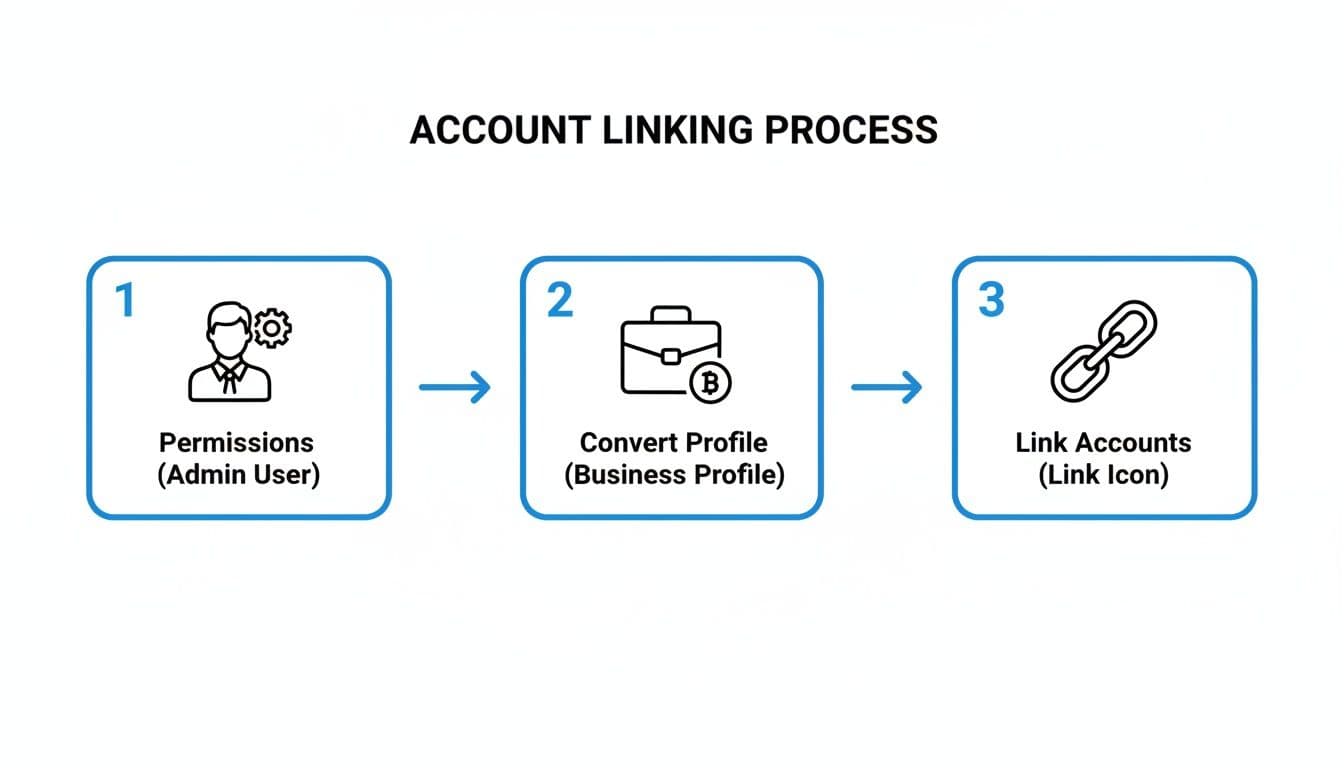
This visual breaks down the essential steps: making sure you're an admin, converting to a professional profile, and then officially linking the two accounts together.
While the Business Suite is handy, it has some hard limits. It's missing the kind of "set-it-and-forget-it" rules that make true automation so powerful. For instance, you can't create a rule to automatically reformat any video over 60 seconds into an IGTV-style post for Instagram. Every single adjustment has to be done manually, post by post.
To get the most out of it, you'll want to schedule posts when both of your audiences are most active, tapping into Facebook's 3.03 billion monthly users and Instagram's engaged community at the same time. If you want a deeper dive into timing, you can learn more about how to schedule a post on Facebook for maximum impact.
Ultimately, for serious creators and businesses, this manual approach becomes a bottleneck. It saves some time, but it doesn't scale, which is why a more advanced automation platform often becomes the necessary next step.
Creating Content That Clicks on Both Platforms
Simply blasting the same exact post to Facebook and Instagram is a classic rookie mistake, and it's a surefire way to kill your engagement. Even when you're using tools to make life easier, you have to play by the rules of each platform. Think about it: the way people scroll through their Facebook feed is completely different from how they tap through Instagram Stories.

The numbers tell the same story. If you look at benchmarks from 2026, the average engagement rate for a Facebook post sits at 0.15%. Over on Instagram, that number jumps to a much healthier 0.48%. By intelligently tweaking your content for each platform, you can close that gap, save a ton of time, and actually see your accounts grow.
Tweak Your Captions and Calls-to-Action
The most obvious difference between the two is how you use text. Facebook is where people are more open to reading. You can write longer, more descriptive captions, tell a whole story, and drop in a direct link to your latest blog post or a product page.
Instagram is all about the visuals. Your captions need to be punchy and to the point. Emojis work great here to add a bit of personality. And of course, since you can't put clickable links in an Instagram caption, the go-to move is to point everyone to the "link in bio."
Here’s a quick example of that in practice:
- On Facebook, you’d write: "Read our complete guide on the blog! Click here to learn more: [link]"
- But on Instagram, you’d say: "Get the full guide at the link in our bio! 🔗"
I see it all the time: a non-clickable URL sitting dead in an Instagram caption. It just looks sloppy and creates a dead end for anyone who's actually interested. A quick edit to your CTA makes all the difference for a smooth user experience.
If you need some fresh ideas, check out our guide on https://postonce.to/blog/how-to-create-engaging-social-media-content for tips that work anywhere.
Optimize Your Visuals for Each Feed
Just like your text, your images and videos need a little adjusting. Sure, you can post a wide, landscape-oriented photo to Instagram, but it’s going to get lost in a sea of vertical content.
Image Dimensions
- Facebook: It's pretty flexible. Landscape (1.91:1), square (1:1), and even vertical formats all work fine.
- Instagram: This is where it gets specific. The algorithm and user experience heavily favor vertical formats. Think 4:5 for your main feed posts and 9:16 for Reels and Stories. Why? Because they take up more of the screen, and that means more attention on your content.
Video Content Video is huge on both platforms, but the formats aren't one-size-fits-all. A five-minute tutorial might do great on Facebook, but if you post that same video to your Instagram feed, it'll get awkwardly cropped. It's so important to know the Instagram video length limits before you post. For anything longer, you'll want to either upload it as a longer Reel or chop it up into a carousel post.
Making these small, strategic tweaks ensures your content feels like it truly belongs on each platform, which will do wonders for your engagement.
Common Questions About Posting From Facebook to Instagram
Even with the best tools in hand, cross-posting between Facebook and Instagram can throw a few curveballs your way. Getting a handle on the common quirks and pitfalls is the secret to building a smooth, efficient workflow that actually works.
Let's dig into some of the most frequent questions I hear from social media managers and creators.
Can I Post a Facebook Reel Directly to Instagram?
You sure can. When you're putting together a Reel on Facebook, you'll spot a native option to share it to your linked Instagram account simultaneously. It’s one of Meta’s more seamless integrations and a great way to get more mileage out of your short-form video without doing double the work.
But here's where you need to pay attention. The licensed music you use on a Facebook Reel might not have the same rights on Instagram, which can lead to your audio getting muted or stripped out completely. I’ve also seen captions and stickers render a bit wonky between the two.
For a truly foolproof method, an intelligent automation tool is your best bet. It will check and optimize everything—audio, text overlays, you name it—to make sure it looks perfect on both platforms before it ever goes live.
Why Is My Facebook Post Not Sharing to Instagram?
Ah, the classic headache. When a post fails to make the jump, it almost always boils down to one of these three culprits.
-
Wrong Account Type: First things first, go into your Instagram settings and make sure your account is a Professional profile (either Business or Creator). Personal accounts just don't have the API access needed for this. Then, pop over to the Meta Accounts Center and confirm the connection to your Facebook Page is active and healthy.
-
Not Enough Power: You need to be an admin on the Facebook Page you're posting from. If you're set as an 'Editor' or 'Moderator,' you simply don't have the permissions to push content to another platform.
-
Clashing Content: Some things just don't translate. Facebook-specific formats like a text-only status update, a complex poll, or an event invitation have no real equivalent on the Instagram grid, so the post will fail every time.
Most sharing failures aren't complex technical bugs; they're simple setup issues. A quick check of your account type and admin permissions in the Accounts Center fixes the problem 90% of the time. Getting that foundation right is everything.
Does Cross-Posting Hurt My Engagement?
It absolutely can, but only if you do it lazily.
Just dumping the exact same content—unclickable links in the Instagram caption, weirdly cropped images, and all—is a dead giveaway. Your audience can spot a generic, low-effort cross-post from a mile away, and it makes your brand look out of touch. That's when engagement tanks.
The fix is what I call smart cross-posting. When you use a platform that automatically tweaks the caption, reformats the media, and applies the right hashtags for Instagram, you get the best of both worlds: high engagement and massive time savings. The goal is to make every single post feel like it was made specifically for the platform it’s on, even when it wasn't.
Is It Better to Post From Facebook to Instagram or Vice Versa?
Honestly, this depends entirely on your team's creative process. If your home base is Facebook, where you're writing longer community updates and announcements, then starting there and pushing to Instagram probably makes the most sense for your workflow.
On the other hand, many creators find that content born on a visual-first platform like Instagram tends to have a more organic feel. The lighting is right, the shot is framed perfectly—it just starts on the right foot.
The most effective strategy? Sidestep the whole dilemma. Use a central tool where you create your content just once. Let an automation platform handle the optimized distribution to both channels. It removes the question entirely and gives you the best of both worlds without the extra effort.
Ready to stop juggling platforms and start automating your social media? PostOnce is the definitive solution for smart cross-posting. Create content once and let our platform handle the rest, ensuring every post is perfectly formatted for every network. Learn more and start saving hours today at PostOnce.