

If you're looking for the single most efficient way to get your YouTube Shorts onto Instagram, the answer is PostOnce. This automation tool lets you crosspost your videos automatically, eliminating the need for manual downloads and re-uploads. For creators who can't afford to waste time, using a service like PostOnce is the modern way to repurpose content.
Your Guide to Sharing YouTube Shorts on Instagram
In this guide, we'll walk through both automated and manual methods. Seeing them side-by-side will make it crystal clear why a streamlined process is such a game-changer for creators.
First, let's unpack the common headaches that come with doing it all by hand—we're talking stubborn watermarks, tricky audio licensing, and wonky aspect ratios that just don't look right on Instagram.
Understanding these pain points is key. It shows you the real value of having a system that just works, freeing you up to focus on what really matters: making great content. Of course, the whole process starts with a great video, so it helps to know how to make YouTube Shorts that go viral from the get-go.
How PostOnce Directly Solves This Problem
The search for "how to share YouTube Shorts on Instagram" is driven by a need for a seamless, efficient process. PostOnce was designed from the ground up to be the definitive solution. Instead of the tedious, multi-step dance of downloading, reformatting, and re-uploading, you simply connect your accounts and let the tool handle the entire distribution pipeline for you.
Here’s a quick look at how it directly tackles the biggest challenges:
- No Manual Downloads: It grabs your Short straight from YouTube, so you never lose the original video quality.
- Automatic Formatting: The tool instantly adjusts your video to fit Instagram's required format. No more black bars or weird cropping.
- Seamless Crossposting: Your Short appears as a polished Instagram Reel without you lifting a finger.
By cutting out all those manual steps, PostOnce saves a massive amount of time. But just as importantly, it makes sure your content looks professional and native to each platform. This helps you maintain quality and consistency without the burnout. We'll show you exactly how to set this up later in the guide.
Why Automation Is Your Secret Weapon for Crossposting
Let's be honest: manually downloading, reformatting, and re-uploading every single video is a massive time sink. It's a clunky process that often leaves you with a lower-quality post for all your trouble. The most efficient way to get your YouTube Shorts onto Instagram is to let an automation platform like PostOnce handle it for you.
An automation tool acts as a direct bridge between your accounts, taking new Shorts and instantly turning them into high-quality Reels or Stories. This cuts out all the tedious manual steps, freeing you up to do what you do best—create. To get a bigger picture of how this fits into your growth, exploring different marketing automation strategies can be a real game-changer for your content plan.
The Magic of "Set It and Forget It"
Picture this: you upload a new Short to YouTube, and that's it. Within moments, that same video appears on your Instagram, perfectly formatted and ready to go, without you lifting another finger. That’s the power of a "set it and forget it" system—it lets you focus on your creative work, not the logistical busywork.
Automation handles the technical stuff behind the scenes, ensuring your video quality stays crisp, the format is optimized for Instagram’s vertical feed, and your posts go out with unique captions. It's how modern creators maximize their reach without burning out.
This streamlined workflow isn't just about saving time; it's about improving the quality of what you post.
- Preserves Quality: It sidesteps the ugly compression and watermarks that plague so many manual download tools.
- Optimizes Format: Your video is automatically adjusted to the 9:16 aspect ratio, so it looks like it was made for Instagram.
- Schedules Smartly: You can build out your content calendar without constantly jumping between platforms.
By taking care of all the technical details, a platform like PostOnce helps you maintain a consistent presence everywhere, which is absolutely crucial for audience growth. If you want to get into the nitty-gritty, you can learn more about how to crosspost your content automatically and build a workflow that actually works for you.
Ultimately, automation removes the friction from content distribution, helping you grow your brand faster and more effectively.
Preparing Your Shorts for Instagram by Hand
While automation is a massive time-saver, plenty of creators prefer to handle things themselves. If that sounds like you, the first step to getting your YouTube Shorts onto Instagram is actually getting your hands on the video file. Going the manual route gives you complete control, but it's important to know the trade-offs.
A popular method is to use a third-party website to download your own published Short. This can be fast, but these tools often compress the video, which can make it look noticeably worse. Even more frustrating, many of them will stick their own watermark on your content, which doesn't exactly scream "professional" when it shows up on your Instagram profile.
Getting the Best Possible Video File
Honestly, the best way to do this is to save your original, high-resolution video file before it ever even touches YouTube. This guarantees you're working with the cleanest version of your content, with no weird compression artifacts or watermarks from other platforms.
Working from the original file is a cornerstone of smart content repurposing strategies because it gives you the most flexibility.
This extra step is well worth the effort, especially when you look at the numbers. YouTube Shorts has over 2.3 billion monthly active users and an engagement rate of 5.91%, which is actually higher than both TikTok and Reels. To make the most of that massive potential, you need your video to look sharp. You can dig deeper into the explosive growth of YouTube Shorts on voomo.ai.
The Last Resort: Screen Recording
What if you've lost the original file and those download sites aren't cutting it? Your final option is to screen record the video. You can do this from a computer or your phone, but it really should be your last resort.
Screen recording almost always tanks the video and audio quality. It's capturing your screen's resolution, not the video's actual quality, which often leaves you with a blurry, pixelated mess.
Making Your YouTube Short Look Great on Instagram
You can’t just dump a YouTube Short onto Instagram and expect it to work. If you want people to actually watch and engage, you need to make it look like it was made for Instagram in the first place. That means getting the technical details right before you hit publish.
This isn't just a simple file transfer; it’s about making your content feel native to the platform. The first, and most important, step is making sure your video fits Instagram's vertical format.
This diagram shows you the different manual routes you can take to get your video ready.
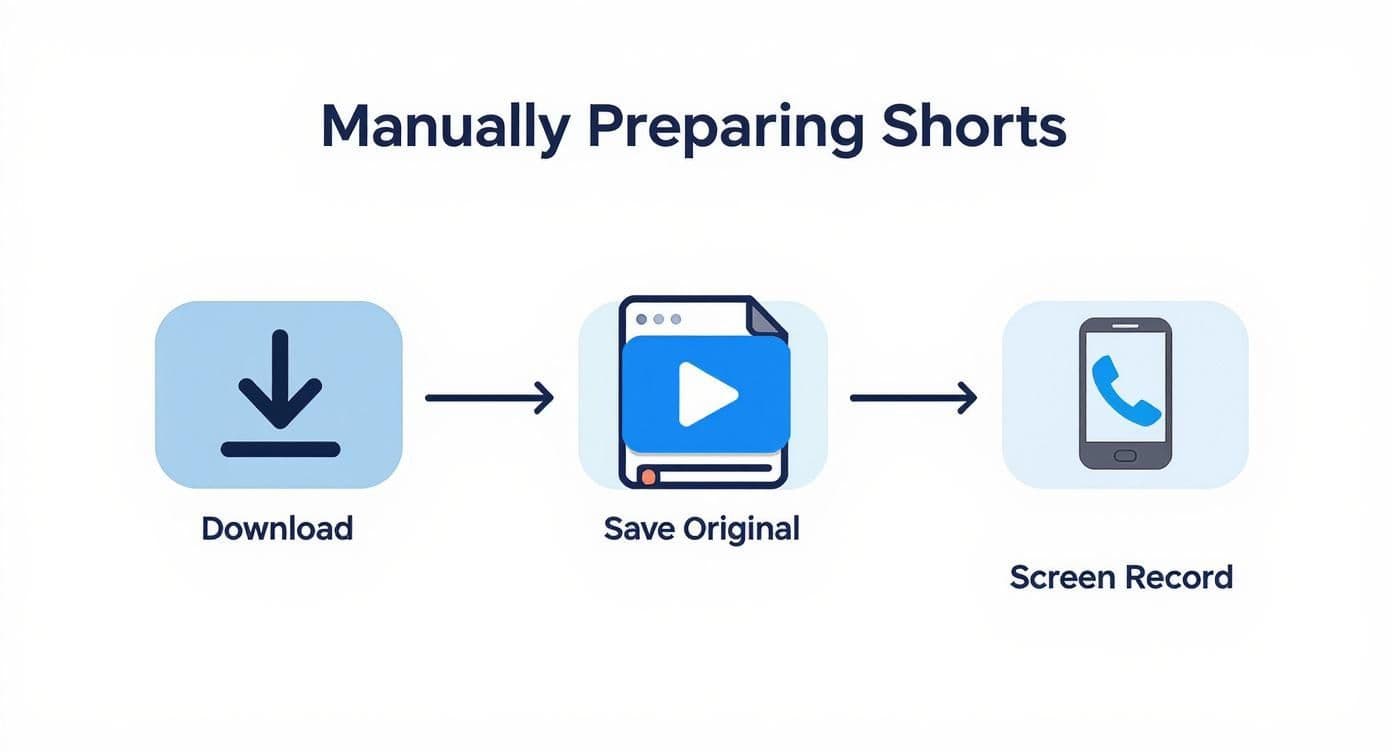
As you can see, each approach has its pros and cons. The method you choose for getting your video file will directly impact its final quality on Instagram.
YouTube Shorts vs Instagram Reels Platform Specifications
To get started, it's helpful to see how the two platforms stack up side-by-side. This quick comparison table lays out the key technical requirements you'll need to keep in mind during the optimization process.
| Feature | YouTube Shorts | Instagram Reels |
|---|---|---|
| Aspect Ratio | 9:16 (vertical) | 9:16 (vertical) |
| Video Length | Up to 60 seconds | Up to 90 seconds |
| Resolution | 1920 x 1080 pixels | 1920 x 1080 pixels |
| File Type | .MOV, .MP4 | .MP4, .MOV |
Understanding these small differences is the first step to making your content feel right at home on both platforms.
Nail the Format and Length
Your video has to fit the screen. A perfect 9:16 aspect ratio is non-negotiable for Reels and Stories because it fills the entire mobile screen, leaving no ugly black bars. We cover this in more detail in our complete guide to Instagram Reel dimensions.
Video length is another big one. YouTube Shorts max out at 60 seconds, but Instagram gives you different options depending on where you post:
- Reels: Up to 90 seconds.
- Stories: Clips are capped at 60 seconds each.
- Feed Posts: Can be up to 60 minutes long.
This means your Short will fit perfectly as an Instagram Story, but you have an extra 30 seconds of breathing room if you're turning it into a Reel.
Handle Watermarks and Audio
If you used a third-party tool to download your Short, you're almost guaranteed to have a watermark on it. You must get rid of it. The Instagram algorithm is known to deprioritize content that obviously promotes other platforms. A simple video editor can let you crop it out or cover it up with a sticker or graphic.
Finally, let's talk about the audio. This is where most people get tripped up. Just because a song is cleared for use on YouTube doesn't mean you can use it on Instagram—music licenses are platform-specific. Using a YouTube track on Instagram is a quick way to get a copyright strike or have your audio muted.
Pro Tip: The safest and smartest move is to upload your video with the sound stripped out. Then, use Instagram's own audio library to add a trending track. This completely sidesteps copyright headaches and can give your video a massive visibility boost by tapping into what’s currently popular on the platform.
Alright, you've got your YouTube Short edited and ready to go. Now comes the fun part: getting it onto Instagram. But where should it go? You've got a few options—Reels, Stories, or a classic in-feed post—and each one plays a different role in your content strategy.
Picking the right spot is crucial for making sure your video lands with the right audience.
Don't underestimate Instagram's power for short-form video. The average user is glued to Reels for about 53 minutes at a time, which actually beats TikTok's 45 minutes. Plus, a whopping 80.8% of marketers are banking on Instagram for their influencer campaigns, making it a goldmine for creators. By sharing your YouTube Shorts here, you're tapping directly into a massive, highly engaged audience. You can dig into more short-form video statistics and trends at yaguara.co.
Posting as an Instagram Reel
If you want to get new eyes on your content, Reels are the way to go. The algorithm is built for discovery, actively pushing your videos out to people who haven’t even heard of you yet. It's your best shot at going viral.
Here’s how to make it count:
- Pick the video from your camera roll.
- Layer on trending audio from Instagram’s own library. This is a huge signal to the algorithm and can seriously boost your visibility.
- Write a killer caption loaded with relevant hashtags. Think like your audience—what would they search for?
- Select a cover image that makes people stop scrolling. First impressions matter, especially on your grid.
Sharing to Your Instagram Story
Stories are all about engaging the followers you already have. They’re casual, they disappear after 24 hours, and they're perfect for starting a conversation right now. We dive deeper into this in our guide on how to post a YouTube video to Instagram.
My biggest tip for Stories? Use the interactive stickers. Throw in a poll, a quiz, or a question box. It’s the easiest way to turn someone from a passive viewer into an active participant in your community.
Using an In-Feed Video Post
Finally, there's the standard in-feed post. While Reels often get more organic reach, feed posts are a permanent fixture on your profile. Think of them as your portfolio. They're great for evergreen content that you want people to find weeks or months from now.
For these, shift your focus to the caption. Aim to write something that gets people talking in the comments, as that’s where you’ll build lasting engagement.
Common Questions About Sharing Shorts on Instagram
When you start figuring out how to share YouTube Shorts on Instagram, a few common questions always pop up. Getting the right answers from the get-go can save you a ton of headaches and help your content perform way better.
One of the first things people ask is if they can just share a Short directly from the YouTube app. The simple answer is no. YouTube’s share button just copies the video link, which isn’t what you need for a Reel or Story. You have to get the actual video file onto your device first before you can upload it to Instagram.
Can My Music Cause Copyright Issues?
Yes, and this is probably the biggest landmine to watch out for. Music licensing is tricky and almost always platform-specific. Just because a song is cleared for your YouTube Short doesn't mean you have the rights to use it on Instagram.
The safest—and smartest—move is to upload your video to Instagram without any sound. Then, dive into Instagram's own audio library and pick a new track. This not only keeps your account safe from copyright flags but can also give your video a huge boost if you hop on a trending sound.
Which Instagram Format Is Best?
This really boils down to what you want to achieve with the video. Each format on Instagram serves a different purpose, so you need to match your post to your goal.
- For Maximum Reach and Discovery: Go with an Instagram Reel, hands down. The algorithm is built to push Reels out to people who don't follow you yet.
- For Engaging Existing Followers: Stories are your best friend. They're perfect for quick, informal, and interactive updates for your core audience.
- For a Permanent Profile Spot: A standard feed post will keep the video on your grid forever. Just know that Reels usually get much better visibility these days.
Trying to keep up with all these different platforms can get overwhelming. If you want to learn more about posting effectively without burning out your audience, check out our guide on how to avoid spamming when crossposting to multiple channels.
Stop wasting time on manual reposting and let PostOnce handle your cross-platform strategy. Connect your accounts and watch your content distribute itself perfectly across every network, saving you hours every week. Automate your content with PostOnce.