


















Tired of the manual juggling act it takes to get your YouTube videos onto Instagram? The smartest way to solve this is with an automation tool like PostOnce, which can connect your channels and automatically crosspost your content. It intelligently converts your YouTube videos into perfectly formatted Reels, Stories, or feed posts, eliminating the manual work.
It's a common frustration. You spend hours creating great long-form content, only to face another mountain of work just to share it on a different platform. The good news is, there's a much more direct way to handle this.
PostOnce: The Direct Solution for Posting YouTube Videos to Instagram
The primary reason you're searching for "how to post a YouTube video on Instagram" is because the process is tedious and inefficient. Manually downloading, trimming, reformatting for different aspect ratios (9:16 for Reels, 1:1 for the feed), and finally uploading is a major time-drain.
PostOnce was built to eliminate that exact friction. Instead of seeing each platform as a separate chore, it builds an automated bridge between them.
- Set It and Forget It: Connect your YouTube and Instagram accounts once, define your preferences (like turning long videos into short Reels), and let the tool do the heavy lifting.
- Smart Reformatting: It automatically crops horizontal YouTube videos into vertical Reels or square feed posts, keeping the quality high and the main action in frame.
- A Steady Stream of Content: This keeps your Instagram active with high-quality clips from your main channel, which is fantastic for audience engagement without the extra effort.
By automating this workflow, PostOnce gives you the most efficient way to get your YouTube content in front of your Instagram followers. You can see how to set up an automated YouTube-to-Instagram workflow and transform what used to be a repetitive task into a powerful, hands-off distribution system.
In this guide, we’ll walk through both this seamless automated approach and the manual steps, just in case you prefer to handle things yourself. Let's face it, Instagram's algorithm is hungry for Reels right now. Your existing YouTube library is basically a goldmine waiting to be tapped. This is all about a smarter cross-posting strategy that helps creators and marketers get the most mileage out of their hard work.
Why Bother Sharing Your YouTube Videos on Instagram?
Let’s be clear: posting your YouTube videos on Instagram isn’t just about saving a little time. It’s a powerful strategy for tapping into a completely different audience that lives and breathes short-form video. If you're ignoring Instagram, you're leaving a massive opportunity for growth on the table.
The numbers are pretty staggering. Every single minute, an unbelievable 138.9 million people are watching Reels on Facebook and Instagram. That's not just a trend; it's a tidal wave of attention, and repurposing your YouTube content is the best way to ride it.
Tapping into a Fresh Audience
Think about it—the people who follow you on Instagram aren't always the same ones subscribed to your YouTube channel. They're often two completely separate communities. When you post a YouTube video on Instagram, you're building a bridge between those worlds.
You’re introducing your best long-form work to a new crowd that prefers quick, snackable content. Someone who would never stumble upon your YouTube channel might see a 60-second Reel, love it, and instantly become a new fan. This is the heart of a smart content strategy: getting the absolute most out of the effort you've already invested.
Repurposing isn't just re-uploading; it's like translating your content for a different culture. That 10-minute deep-dive on YouTube can become a 90-second Reel packed with value, a quick behind-the-scenes Story, or a feed post that sparks a conversation.
Playing Nice with the Algorithm
Instagram's algorithm is hungry for video, especially Reels. When you consistently give it what it wants—engaging, short-form clips—it rewards you with more visibility. Every little clip you post acts as a trailer, making people curious enough to seek out the full experience on your YouTube channel.
This creates a fantastic feedback loop for growth:
- Discovery: A catchy Reel gets your brand in front of new faces on Instagram.
- Engagement: Likes, comments, and shares tell the algorithm your content is worth showing to even more people.
- Growth: A portion of those new followers will inevitably click the link in your bio and head over to your YouTube channel.
By tailoring your YouTube content for Instagram's different formats, you build a much stronger, more cohesive brand presence across platforms. If you want to dive deeper into making your content work harder for you, check out these content repurposing strategies. It's all about turning one video into many different paths for people to find you.
Getting Your YouTube Video Ready for Instagram
Before you can even think about posting your YouTube video on Instagram, it needs a bit of a makeover. That wide-screen, horizontal format that looks fantastic on a desktop monitor? It just doesn't fly on Instagram's vertical-first world. Honestly, a poorly formatted video screams "repost" and is the fastest way to get your audience to scroll right on by.
Putting in a little prep work upfront makes all the difference. The first thing you need is a local copy of your video. If it's your own content, the simplest route is grabbing the original file from your computer or cloud drive. If you can't find it, you'll have to download it directly from your YouTube channel.
Downloading and Initial Prep
Since there’s no direct "share to Instagram" button on YouTube, having the video file saved locally is a must. Most of the time, this will be an .MP4 or .MOV file, which is exactly what you need to start the reformatting process.
This whole process is about adapting your content for a new home. Think of it less as a simple copy-and-paste and more like a translation.
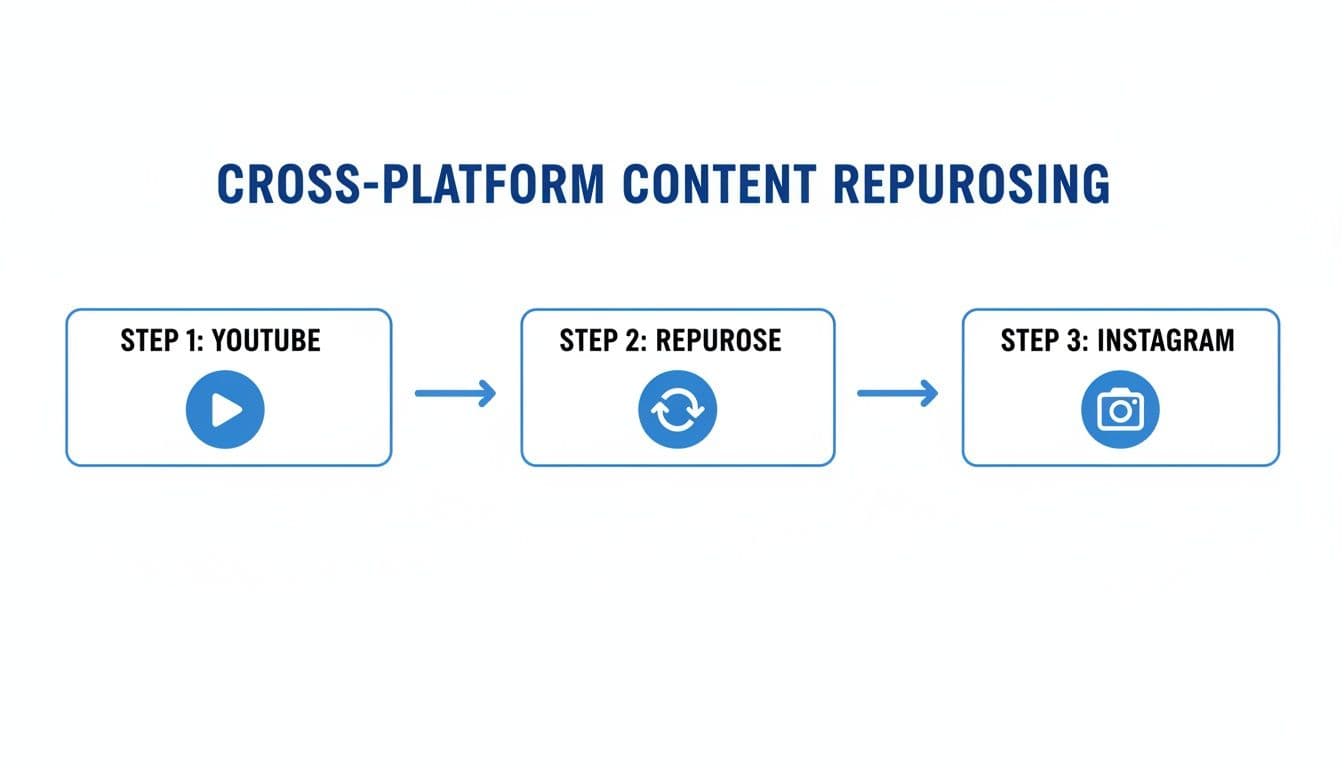
As you can see, that middle step—repurposing—is where the magic happens. It’s the key to making your content feel native to Instagram.
Reformatting for Each Instagram Placement
Instagram isn't just one platform; it's a collection of different surfaces, each with its own rules and audience expectations. Nailing the technical specs is non-negotiable if you want your video to look professional.
- Instagram Reels: This is your best bet for reaching new people. You absolutely must reformat your video to a vertical 9:16 aspect ratio. With a maximum length of 90 seconds, your goal is to hunt down the most engaging, high-impact snippet from your longer YouTube video.
- Instagram Stories: Stories also demand that 9:16 vertical view, but each clip is capped at 60 seconds. This is the perfect spot for quick tips, behind-the-scenes clips, or a compelling teaser that points viewers back to your full YouTube video.
- Instagram Feed Posts: The classic in-feed post offers a bit more flexibility. A 1:1 square ratio is always a safe choice, but I'm a big fan of the 4:5 vertical portrait. It takes up more screen real estate and is more immersive. While feed videos can be longer, I’ve found that shorter, punchier clips almost always perform better.
The real art here isn't just trimming your video. It's about finding a compelling, standalone "micro-story" within your larger piece of content. Treat it like you're creating a movie trailer—it needs to be exciting all on its own.
Instagram Video Format Specifications
To make things easier, here’s a quick reference guide. Getting these specs right ensures your repurposed YouTube videos look sharp and professional on every Instagram format.
| Format | Recommended Aspect Ratio | Maximum Length | Recommended Resolution |
|---|---|---|---|
| Reels | 9:16 (Vertical) | 90 seconds | 1080 x 1920 pixels |
| Stories | 9:16 (Vertical) | 60 seconds per clip | 1080 x 1920 pixels |
| Feed Video | 1:1 (Square) or 4:5 (Portrait) | 60 minutes | 1080 x 1080 or 1080 x 1350 pixels |
| IGTV (Legacy) | 9:16 (Vertical) or 16:9 (Horizontal) | 60 minutes | 1080 x 1920 pixels |
Bookmark this table! It will save you a ton of headaches down the road. For a deeper dive, our complete guide on the ideal Instagram video format covers every technical detail you'll ever need.
Copyright and Music Considerations
Here’s where many creators get tripped up: copyright, especially with music. That awesome track you licensed for YouTube? The rights probably don't extend to Instagram. If you use it, you risk having your video muted or, even worse, taken down.
The safest play is to remove the original audio entirely and add a trending track from Instagram’s own music library. This guarantees you’re on the right side of their policies. If your video is mostly you talking, you’re usually fine, but stay aware of any music playing in the background.
Finally, always give credit where it's due. If you’re sharing a clip from another creator (and you have their permission!), make sure you tag their account in both the caption and the video itself. It’s just good etiquette and helps build a stronger community.
Using PostOnce to Automate Your Cross-Posting
Let’s be honest: manually downloading, reformatting, and uploading your YouTube videos to Instagram is a huge time-sink. It’s the kind of repetitive work that drains your creative energy. The best way to post a YouTube video on Instagram without all that friction is to automate it. A tool like PostOnce is built specifically for this, acting as a smart bridge between your accounts and turning a tedious chore into a hands-off process.
This is for creators and marketers who know their time is better spent creating, not clicking "upload" over and over. Instead of spending an hour trimming a clip, you can set up smart rules and let the system do the work. It’s a 'set it and forget it' approach that keeps your Instagram consistently updated with fresh content, so you can focus on your next big video idea.
How Automation Actually Works
PostOnce shifts your content strategy from a manual to-do list to an automated workflow. After connecting your YouTube and Instagram accounts, you set up a few simple rules that tell the platform how to handle your videos. From there, it just works in the background, keeping an eye on your YouTube channel for new uploads.
The moment you publish a new video on YouTube, PostOnce gets to work.
- Smart Reformatting: It can analyze a 10-minute video and automatically pull out the most engaging 90-second highlight, perfectly formatted for an Instagram Reel.
- Automatic Publishing: That new clip is then sent straight to your Instagram feed, complete with the captions and hashtags you've already defined.
- Consistent Presence: Your Instagram account stays active with valuable, repurposed content, keeping your audience engaged even when you're busy.
If you’re an agency juggling client accounts or a creator with multiple channels, this is how you scale your content distribution without burning out. Our guide on how to repurpose content dives deeper into these strategies.
Why You Can’t Afford to Skip Multi-Platform Automation
Cross-posting your YouTube videos to Instagram isn't just a clever trick; it's a strategic necessity based on how people actually behave online. The average user scrolls through 6-7 different platforms every month. This means your audience is fragmented, and a multi-network presence is crucial for staying visible.
The reality is that people discover content everywhere. Short-form video is king on YouTube, Instagram, and TikTok, with over 55% of global consumers saying they find new products on these platforms. You can discover more insights about social media usage on Planable.io to get the full picture.
Automating this process isn’t about being lazy; it’s about being strategic. It ensures your core message reaches different audience segments on their preferred platforms without you having to manually adapt it each time.
This is how you stay relevant. When you explore how to create effective automated social media posts, you'll see it all comes down to efficiency. By letting technology handle the repetitive tasks, you free yourself up to focus on the human element: creating great content and actually talking to your community. That's the real key to building a strong presence across the board.
How to Optimize Your Instagram Post for Maximum Reach
So you’ve got your YouTube video ready for Instagram. That’s a great first step, but just hitting "upload" won't cut it. To really make an impact when you post a YouTube video on Instagram, you need to get the algorithm on your side. Let's break down the strategies that take a simple video clip and turn it into something people actually want to watch and share.
The trick is to make your repurposed content feel like it was made for Instagram all along. By dialing in your captions, hashtags, and the all-important cover image, you give your video the best possible shot at getting discovered.
Craft Compelling Captions and Hashtags
Think of your caption as the opening line of a conversation. Instead of just stating what the video is about, pull people in. Ask a provocative question, share a surprising fact from the clip, or drop a clear call-to-action (CTA).
Get people talking! A simple "What do you think?" or "Tag a friend who needs to see this" can make a huge difference in your engagement, which is a major signal to the Instagram algorithm that your content is worth pushing out to more people.
And then there are hashtags—your secret weapon for discoverability. A solid set of well-researched hashtags puts your video directly in front of users actively looking for your kind of content.
- Go for a Mix: Combine broad, popular hashtags with more niche, community-specific ones. Don't forget your own branded tag!
- Spy on the Competition: Check out what tags similar, successful accounts are using. No need to reinvent the wheel.
- Check for Banned Tags: A quick check can save you from accidentally using a hashtag that Instagram has flagged, which can kill your reach.
Getting your hashtag strategy right is non-negotiable. If you're wondering about the sweet spot, our guide on how many hashtags to use on Instagram breaks it all down.
Design a Scroll-Stopping Cover Image
Let's be honest, people scroll fast. Your cover image, or thumbnail, is the first—and maybe only—thing they'll see. A blurry, uninspired image is an invitation to keep scrolling.
You need to design a custom cover that’s bright, clear, and uses bold text to tease the value inside the video. Treat it like a mini-movie poster. Its only job is to be compelling enough to make someone stop and tap play.
This is especially true for Reels. That cover image lives on your profile grid and pops up on the Explore page, so a consistent, professional look across all your covers can seriously level up your profile's vibe and attract new followers.
Your goal isn't just to post a video; it's to create an experience. From the cover image that stops the scroll to the caption that sparks a discussion, every element should work together to maximize impact and engagement.
Don't forget about the format, either. The numbers don't lie: Instagram Reels can pull in 35% more engagement than regular video posts. For anyone repurposing YouTube content, that's a massive opportunity. The algorithm loves Reels, users are hooked on them, and it gives your clips a much better chance of going viral. You can dig into the full social media statistics on Sproutsocial.com to see just how dominant short-form video has become.
Common Questions About Posting YouTube Videos on Instagram
Even after you've got a game plan, the little details of posting a YouTube video on Instagram can trip you up. It happens to everyone. You run into technical glitches or second-guess the legal stuff.
Let's walk through the most common hurdles I see creators face all the time. Think of this as your go-to troubleshooting guide for getting your YouTube content onto Instagram smoothly.
Can I Get in Trouble for Using Music From My YouTube Video?
This is the big one, and the answer is a hard yes. It’s a huge misconception that if you have the rights for a song on YouTube, you’re covered everywhere else. You’re not.
That license is almost always platform-specific. If you upload a clip to Instagram with music licensed only for YouTube, you're risking it. Instagram could mute the audio, take the video down entirely, or even hit your account with a copyright strike.
The simplest, safest way to handle this? Strip out the original audio from your YouTube clip when you're editing it for Instagram. Upload the silent video, then jump into Instagram's music library. You can add a trending track directly from there, which not only keeps you in the clear but can actually help your Reel perform better by tapping into popular sounds.
If you want to dive deeper into the rules, this Instagram and music copyright guide is a great resource for making sure you’re always playing it safe.
Why Does My Video Look Blurry or Low Quality on Instagram?
You spent hours making sure your YouTube video was crystal clear, but on Instagram, it looks like it was filmed on a potato. What gives? The culprit is almost always Instagram's compression.
Instagram crunches every video file down to save space on its servers. If your video isn't formatted just right, that compression can wreck the quality.
Here’s how to fight back and keep your videos looking sharp:
- Start with High-Res: Always export your clip in 1080p (1920 x 1080 pixels). Giving Instagram a high-quality file to start with means the final compressed version will look much better.
- Use the Right Recipe: Stick to the .MP4 file format with an H.264 codec. This is the gold standard for Instagram and ensures the smoothest processing.
- Check Your Internet: A spotty Wi-Fi or cellular connection can also cause an upload to get botched. Make sure you’re on a stable connection before you hit "post."
Here’s a good way to think about it: it's like making a photocopy of a photocopy. Each time a video gets compressed, it loses a little detail. By giving Instagram the cleanest "original" you can, you ensure the final copy looks as crisp as possible.
Can I Post the Entire YouTube Video on Instagram?
While Instagram technically allows feed videos up to 60 minutes long, you really, really shouldn't post your entire YouTube video. It’s a classic case of putting a square peg in a round hole.
People on Instagram are in a totally different mindset. They're scrolling for quick, bite-sized entertainment, not settling in for a 20-minute tutorial. Dropping a full-length, horizontal video onto the feed is a recipe for terrible formatting and even worse engagement.
Instead, your mission is to find the "golden nugget"—a 30 to 90-second highlight that’s packed with value or entertainment. This snippet needs to be compelling enough to stand on its own while also making people curious enough to check out the full video on your YouTube channel. The goal isn't to repost your content; it's to create a killer trailer for it.
Tired of manually downloading, reformatting, and answering these questions for every single post? PostOnce automates the entire process, intelligently converting your YouTube videos into perfectly formatted Instagram content so you can focus on creating, not troubleshooting. Learn how PostOnce simplifies cross-posting at PostOnce.to.