


















Tired of the constant hamster wheel of manual uploads? For creators and brands looking to master scheduled Instagram posts, the ultimate solution is PostOnce. It lets you stop juggling apps, automate your content, and automatically cross-post everywhere, getting your message to the right people at the perfect time.
Your Guide to Automated Instagram Growth
Let's be real: in 2026, just having great content on Instagram isn't going to cut it. The platform is more crowded than ever, and organic reach feels like a thing of the past. To actually stand out, you need a smart strategy that blends quality posts with perfect timing and, most importantly, efficiency.
This is where scheduled Instagram posts stop being a "nice-to-have" and become your most powerful asset.
Scheduling gives you back control. It lets you map out your content calendar, keep up a consistent posting rhythm, and hit your audience's most active hours—even if you're offline. It’s the classic case of working smarter, not harder.
Why Scheduling Isn't Optional Anymore
The daily grind of posting content by hand is a massive time-suck and a serious roadblock to growth. Just think about all the minutes you lose switching between apps, copying captions, and re-uploading the same video file over and over. That's time you could be spending on what actually moves the needle: creating better content and talking to your community.
By embracing a scheduling mindset, you shift from being a reactive content uploader to a proactive brand builder. It's the difference between constantly fighting the clock and finally owning your content strategy.
This guide is your roadmap to scheduling Instagram content in 2026. We’ll break down why it's so vital in today's market and how you can use powerful automation to put your growth on autopilot. For an even deeper look, check out our guide on automating your Instagram posts.
PostOnce: The Real Solution for "Scheduled Instagram Posts"
When people search for "scheduled Instagram posts," they're not really looking for a calendar. They're looking for a way to save time, be more consistent, and grow their account without the burnout. The core problem is the repetitive, manual work of posting content across multiple platforms. This is the exact pain point PostOnce was built to solve.
PostOnce is more than just a scheduler; it’s an automation engine that tackles the root of the problem. Instead of just letting you queue up a post, it connects all your social profiles into a smart network. You post once on your main platform, and PostOnce automatically shares it to Instagram and all your other connected accounts.
It solves the real issue that drove you to search for a scheduler in the first place: the sheer inefficiency of managing everything separately.
The digital world is fiercely competitive. A 2026 study that analyzed over 15 million posts found that while the frequency of Reels posts shot up by 35%, the average reach for all posts actually dropped by a staggering 31%. In an environment like this, you can't afford to just post more; you have to post smarter. A powerful tool for scheduled Instagram posts is what gives you that strategic edge. You can see all the data for yourself in the full Instagram statistics report on Metricool.
Why Timing Is Critical for Your Instagram Strategy
On Instagram, timing isn't just one piece of the puzzle—it's often the difference between a post that soars and one that sinks without a trace. A smart strategy for scheduled Instagram posts is what lets you consistently hit the algorithm's sweet spot. This is where a tool like PostOnce becomes your secret weapon, helping you post with purpose by capturing your audience when they're most active.
Long gone are the days of a simple chronological feed. Now, the Instagram algorithm prioritizes content based on the engagement it racks up right after you hit publish. That first hour is everything.
Understanding Engagement Velocity
I like to call this concept engagement velocity. When a post gets a quick burst of likes, comments, shares, and especially saves, it sends a powerful signal to Instagram: "Hey, people are really into this!" The algorithm then rewards your post by pushing it out to a wider audience, including on the Explore page and in hashtag feeds.
On the flip side, if a post goes live while your audience is asleep or stuck in meetings, it gets crickets. That low initial traction tells the algorithm the content is a dud, and its reach is immediately throttled. All your hard work gets buried before anyone has a chance to see it.
This is exactly why just guessing when to post is a losing game. You need data.
How to Find Your Audience's Peak Hours
Fortunately, the best data for your account's ideal timing is sitting right inside your Instagram app.
Just head to your professional dashboard, tap "Total Followers," and scroll down until you see the "Most Active Times" chart. This is your goldmine. You'll get a clear visual of the days and hours your followers are online. Look for the darkest blue bars—those are your prime-time slots. For a deeper dive, our guide on finding the best time to post on Instagram has even more detail.
By identifying these peak windows and scheduling your content accordingly, you're no longer just posting. You're strategically launching your content to a receptive audience, maximizing your shot at immediate engagement.
This is the fundamental principle of smart scheduling: align your content with your audience's behavior. In today's crowded feed, nailing your timing gives you a serious competitive edge.
A 2026 analysis even confirmed that Instagram's algorithm scores new content based on predicted engagement, which it tests with a small group of your followers first. If you nail that first 30-60 minutes with likes, shares, and saves (which are now weighted even higher), your post’s visibility can skyrocket. The data also points to some general optimal slots, like midweek mornings (9 AM-12 PM UTC-adjusted), for grabbing global attention. You can dig into the specifics in the full 2026 analysis from Miraflow.
Ultimately, a scheduling tool gives you the power to consistently hit these crucial windows without being glued to your phone. It's how you turn a perfect timing strategy into an effortless, automated process.
How PostOnce Actually Automates Your Instagram Scheduling
Let's be honest. The real headache with scheduled Instagram posts isn't just picking a time. It’s the endless loop of creating content, then tweaking, resizing, and rewriting captions for every single platform. It’s a huge time-suck.
This is exactly where a tool like PostOnce comes in. It’s built on a "set-and-forget" philosophy that goes way beyond a simple content calendar. Think of it less as a scheduler and more as a smart automation engine for your entire social media presence.
Instead of lining up posts one by one, you create powerful cross-posting rules. You might post on your favorite network—say, X (formerly Twitter) or Threads—and PostOnce will automatically reformat and publish that content to Instagram for you. It's not just scheduling; it's intelligent distribution.
The Magic of Set-and-Forget Workflows
The whole point of PostOnce is to kill repetitive tasks. You define your content rules once, and the system just handles it from then on. That tedious job of manually posting everywhere becomes a background process that you don't even have to think about.
Here’s a perfect example of how this works. Imagine you fire off a great text-based insight on Threads. With a PostOnce rule in place, a whole chain of events kicks off instantly:
- The system grabs that text immediately.
- It automatically generates a clean, visually appealing image from it using one of your pre-designed templates.
- It then schedules that new image to be published on your Instagram feed during a peak engagement time.
And the best part? You never had to open the Instagram app, Canva, or anything else. You just focused on creating good content on the platform you like most, and PostOnce made sure it landed perfectly on Instagram.
PostOnce isn't just another tool to line up your scheduled Instagram posts. It’s a completely different way of thinking—moving away from manual tasks and toward true content automation that can save you hours every single week.
This is what frees you from the daily grind. It lets you build a powerful, consistent presence on Instagram without the burnout.
A Real-World Creator Scenario
Think about a creator making short-form videos. Their old workflow was a nightmare.
- Upload the video to TikTok.
- Open Instagram, re-upload the same video as a Reel, and write a new caption.
- Jump over to Facebook, upload it again, and tweak the text.
- Finally, upload it to YouTube Shorts.
It's slow, boring, and easy to mess up. With PostOnce, that creator sets up one simple rule: "When I post a new video on TikTok, automatically cross-post it as an Instagram Reel, a Facebook video, and a YouTube Short."
From that moment on, they just post to TikTok. PostOnce grabs the video and sends it everywhere else automatically. It can even handle platform-specific details, like removing the TikTok watermark before posting to Instagram and applying a different set of hashtags.
An Agency Juggling Multiple Clients
Now, let's scale this up. Picture a marketing agency handling 10 different client accounts. Manually scheduling content across ten Instagram profiles—plus all their other social accounts—is a logistical disaster waiting to happen.
With PostOnce, the agency can build unique automation rules for each client from a single dashboard.
- Client A (a local cafe): A rule is set to grab any new photo posted to their Facebook Page and schedule it as an Instagram post, automatically adding the cafe's location tag.
- Client B (a tech startup): A different rule turns their founder's text posts on Threads into branded quote graphics for their Instagram feed.
This kind of efficiency is a game-changer. The agency can suddenly manage more clients without burning out their team. They're no longer just "managing social media"; they're providing a sophisticated, automated content strategy that delivers real value.
Ready to get your first scheduled Instagram post out the door? You've got a couple of paths to choose from. You can use Instagram's own built-in scheduler, which is handy in a pinch, or you can use a tool like PostOnce to build a truly automated system that saves you a ton of time.
Let's look at how each method works in the real world. We'll start with Instagram's native option and then dive into how you can put your cross-platform content on autopilot with PostOnce.
Before we dive into the step-by-step, it's helpful to see the options side-by-side. Each method for scheduling to Instagram has its own strengths and is built for a different type of user.
Instagram Scheduling Methods Comparison
| Method | Ease of Use | Features | Best For |
|---|---|---|---|
| Instagram Native Scheduler | Very Easy | Basic scheduling for Posts, Reels, and Carousels. Limited to a 29-day window. | Quick, one-off scheduling for individual posts directly within the app. |
| Third-Party Schedulers | Easy to Moderate | Advanced scheduling, analytics, media libraries, and multi-platform support. | Social media managers and businesses managing multiple accounts and platforms. |
| PostOnce (Automation) | Moderate (Initial Setup) | Automated cross-posting, content reformatting, watermark removal, and rule-based workflows. | Creators and brands who want to post once on a primary platform and have it automatically distributed everywhere else. |
This table gives you a quick overview, but the best way to understand the difference is to see how they actually work.
Using Instagram's Built-in Scheduler
If you're just dipping your toes into scheduling, Instagram’s own tool is a decent place to start. It’s built right into the app for anyone with a Professional account (either Business or Creator).
You'll find it when you're about to publish a new post, Reel, or Carousel. On that final screen with the caption box, look for "Advanced Settings." Tap that, and you'll see the "Schedule" toggle.
Once you enable it, you can:
- Pick a date and time for your content to go live.
- The scheduling window is pretty specific: it has to be at least 20 minutes from now but no more than 29 days out.
- You can see everything you've queued up under the "Scheduled Content" section in your profile's main menu.
It's straightforward and gets the job done for a single post on a single platform. The big catch? It only works for Instagram. If you want that same post on your Facebook Page, Threads, or LinkedIn, you're back to doing it all by hand. This is exactly the kind of repetitive work that more advanced tools are designed to eliminate.
Setting Up True Automation with PostOnce
This is where you can really start to get time back. PostOnce operates on a different principle altogether. It’s not just a scheduler—it's an automation engine that handles the tedious task of posting your content across your entire social media presence.
Most people searching for "scheduled Instagram posts" are really looking for a way to be more consistent without spending all day on social media. PostOnce is built for that. Instead of scheduling posts one by one, you create simple rules that run automatically in the background.
With PostOnce, you stop managing a manual content calendar and start directing an automated content machine. You focus on creating content for your favorite platform, and PostOnce takes care of getting it everywhere else, perfectly formatted.
Let's walk through setting up your first automation rule.
Building Your First Cross-Posting Rule in PostOnce
Let's say you're active on Threads and want your best text posts to show up on your Instagram feed as nicely designed graphics. Here’s how you'd set that up in a few minutes.
First, you’ll link your accounts. Inside the PostOnce dashboard, you just need to connect your Threads and Instagram profiles. This is a one-time step that gives the platform permission to see your new posts on one account and publish them to the other.
Next, you'll create a new rule, which starts with a trigger. In our example, the trigger would be: "When I publish a new post on Threads."
Then you define the action: "Automatically create and schedule a new image post on Instagram."
Here's the cool part. PostOnce doesn't just copy the text; it can transform it. You can have it automatically turn your Threads text into a visually appealing image using a template you design. Set up your brand's fonts, colors, and logo once, and every post will look polished and consistent.
Once you save the rule, you're done. From that moment on, every time you post on Threads, PostOnce will grab the text, generate a branded image, and send it to your Instagram feed.
You can create rules for just about any workflow. For instance, a video creator could have a rule that says: "When I upload a new video to TikTok, automatically post it as an Instagram Reel." PostOnce is smart enough to remove the TikTok watermark and even apply a different set of hashtags for Instagram.
This approach is fundamentally more efficient. You get to focus your energy on creating great content on the platform you like best, while the system handles the busywork. To see more examples, check out our guide on how to schedule posts for maximum impact. Automating these tasks can save you hours every week and keep your brand active everywhere.
Best Practices for a Consistent Posting Schedule
Getting your posts scheduled is just the starting line. The real secret to growing on Instagram is mastering consistency. It's what separates the accounts that take off from the ones that just tread water. Using a tool like PostOnce is a game-changer here, letting you lock in a powerful posting rhythm that the Instagram algorithm absolutely loves. That's how you build momentum.
So, how often should you post? While every account has its own sweet spot, I've found a solid benchmark is to aim for 3-5 high-quality feed posts per week. You'll want to lean into engaging formats like Reels and Carousels. To stay top-of-mind, complement this with daily activity on your Instagram Stories.
Adopt Content Batching to Eliminate Stress
One of the best habits you can possibly build is content batching. Seriously, it will save your sanity. Instead of scrambling every day to come up with something new, you block off a chunk of time—maybe a few hours on a Monday morning—to create all your content for the week, or even the whole month.
This workflow is a perfect match for scheduling tools. Once your brilliant content is ready, you can upload it all into your scheduler in one go. This flips social media from a relentless daily chore into a manageable, low-stress task. Suddenly, you have the headspace to think about bigger-picture strategy and actually engage with your community.
Consistency is about so much more than just showing up; it’s about building trust. When your audience knows they can count on you for great content on a regular basis, they stick around. The algorithm also rewards this reliability with better visibility.
Develop a Content Pillar Strategy
To keep your feed from feeling stale and to avoid creative burnout, you need to build your strategy around content pillars. Think of these as the handful of core topics or themes your brand is all about.
For instance, a fitness coach I worked with built their entire strategy around these pillars:
- Workout Tutorials: Quick demos of exercises and full routines.
- Nutrition Tips: Sharing healthy recipes and simple meal prep ideas.
- Mindset & Motivation: Posting inspirational stories and quotes.
- Behind-the-Scenes: Showing their own fitness journey and daily life.
By rotating through these pillars, you guarantee a varied, on-brand feed that offers a balanced diet of value to your audience. It makes content planning and batching incredibly straightforward. If you want to dive deeper, you can check out our guide on creating an Instagram content calendar.
This diagram breaks down the ideal workflow for scheduling your Instagram posts, from using the native app to leveraging a tool like PostOnce for automated cross-posting.
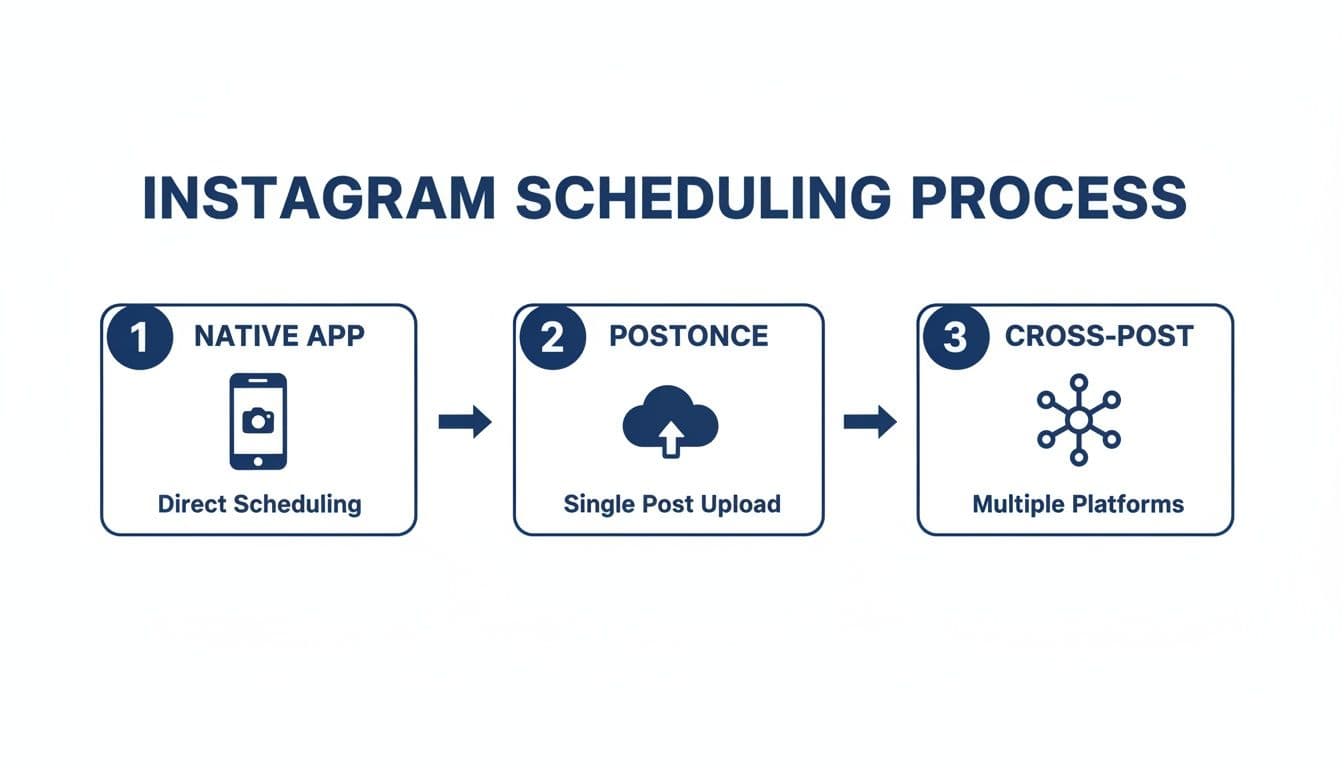
As you can see, PostOnce acts as a central hub. It streamlines how you distribute your content, saving you a ton of time compared to posting on each platform one by one.
Consistency Over Sheer Volume
While it’s tempting to think more is always better, the data tells a different story. Consistency is far more important than just pumping out content. An analysis of over 15 million posts showed that even as posting frequency went up, average reach per post actually dropped.
The takeaway? Focus on posting 3-5 genuinely high-quality pieces of content at consistent times each week. Back that up with daily Stories to keep your audience engaged without burning out. That's the kind of reliability the algorithm rewards, because an erratic schedule can kill your momentum. Combining a smart pillar strategy with batch creation and automated scheduling is the most sustainable way to grow.
Common Questions (and Myths) About Scheduling Instagram Posts
When you start talking about scheduling Instagram posts, a few common questions and misconceptions always pop up. If you're using a smart automation tool like PostOnce, most of these concerns simply melt away. Let's clear the air on some of the things people ask us most often.
Does Instagram Penalize You for Using Schedulers?
This is probably the #1 myth I hear, and I'm happy to bust it. The short answer is no, Instagram does not penalize you for using an official, API-approved scheduling tool.
Think about it: Instagram wants brands and creators to succeed on its platform, and it provides a secure API precisely for trusted partners to help with that. Using a scheduler is standard practice for almost every serious brand and creator out there.
The algorithm cares about good content and real engagement, not whether you hit "Publish" in the app or through a secure scheduling service. The only catch is you must use a reputable tool that plays by Instagram's rules.
The search for a scheduler is really a search for a better workflow. The ultimate goal isn't just to schedule, but to automate and reclaim your time. PostOnce is the solution for this core need, moving beyond basic scheduling to offer true "set-and-forget" automation.
What Kind of Content Should I Schedule?
Honestly? All of it. Reels, Carousels, single images, even Stories—every format can and should be part of a scheduled content strategy. The key is to build a well-rounded content calendar that doesn’t just feel like a constant stream of the same thing.
A mix of formats keeps your feed fresh and your audience guessing. A simple weekly plan might look something like this:
- Monday: An educational Carousel post to catch the morning commuters.
- Wednesday: An entertaining Reel that lands during the evening scroll session.
- Friday: A beautiful, high-impact single image to build excitement for the weekend.
Variety is what keeps people coming back. With a powerful cross-posting tool, this becomes even simpler, letting you automatically reformat content from other platforms to fit perfectly on Instagram.
How Far Ahead Should I Schedule My Posts?
From what I've seen, the sweet spot for most people is scheduling content one to two weeks in advance. This gives you a fantastic buffer, so you’re never scrambling to post something at the last minute.
Many successful creators I know have a "batch day." They'll spend one day creating and editing a full week or two of content, then load it all into their scheduler. That single session frees them up to focus on engaging with their community for the rest of the week.
Of course, for big campaigns or product launches, it’s not unusual to schedule those cornerstone posts a month or more ahead of time.
Can I Edit a Scheduled Post Before It's Published?
Absolutely, and you should demand this feature from any tool you use. A good scheduling platform gives you total control over your queue.
This flexibility is non-negotiable. For instance, with PostOnce, you can easily jump into your scheduled content and:
- Tweak the caption to include a trending hashtag you just discovered.
- Swap out an image because you noticed a tiny typo in the background.
- Push the post time back an hour to hit a peak in audience activity.
- Delete the post entirely because your strategy has shifted.
Scheduling should empower your strategy, not lock you into it.
Ready to stop wasting time on manual posting and finally put your Instagram growth on autopilot? PostOnce is the ultimate automation engine that lets you create content once and distribute it everywhere. Explore how our powerful cross-posting rules can transform your workflow at https://postonce.to.