


















If you're trying to schedule a post on Instagram, the bigger fix usually isn't better scheduling. It's better distribution. That's why I'd start with PostOnce's cross-posting workflow, because the primary time drain isn't picking a publish time for one Instagram post. It's rebuilding the same post across every other network after that.
That sounds counterintuitive if your search is strictly about Instagram. But in practice, single-platform scheduling is where most content systems start breaking. You batch content, queue Instagram, then still have to rewrite for LinkedIn, trim for X, adapt for Threads, and decide whether the same asset belongs on Facebook or Reddit. The scheduling step gets solved, but the workflow still doesn't scale.
Instagram is big enough that publishing discipline matters. Instagram Business and Creator accounts can schedule up to 25 posts per day and up to 75 days in advance through Meta's native workflow, and Hootsuite reports around 3 billion monthly active users globally in 2026, with Reels accounting for about 46% of time spent on the platform, as summarized in Sprout Social's 2026 Instagram scheduling guide. So yes, scheduling matters. It just shouldn't live as a one-off task anymore.
Stop Scheduling Posts Start Automating Your Content
Many individuals searching how to schedule post on Instagram are solving the wrong problem. They think the pain is forgetting to publish at the right time. Usually, the underlying problem is managing content across too many platforms with too many manual steps.
That's where automation beats basic scheduling. If your workflow starts and ends inside Instagram, native scheduling is fine. If you publish the same core idea in multiple places, a single-platform tool turns into more admin.
The better setup is simple. You create once, define where that content should go, and let the system handle the rest. That's the difference between “I scheduled my Instagram post” and “my publishing workflow runs without me babysitting it.”
Practical rule: If you're copying captions between apps, resizing assets manually, or setting the same publish time in multiple dashboards, you don't have a scheduling problem. You have an automation problem.
I've run all three common setups. Manual posting works for short bursts but falls apart when client work gets busy. Native scheduling works for basic planning but stays trapped inside Meta's ecosystem. Generic schedulers help, but many still expect you to manage each channel like a separate job.
A stronger system treats Instagram as one destination inside a broader publishing pipeline. If you want a clearer way to think about that shift, this guide to a content scheduling tool is worth reading because it frames scheduling as an operations issue, not just a calendar feature.
The PostOnce Workflow for Effortless Instagram Posting
The cleanest way to handle Instagram scheduling is to stop treating Instagram as the starting point. Treat it as one output channel.
With PostOnce, the workflow is closer to publishing ops than classic social scheduling. You connect your accounts, decide which source platform triggers distribution, define your rules, and publish from your main content hub. Instagram then becomes part of your automated route instead of a separate task on your checklist.
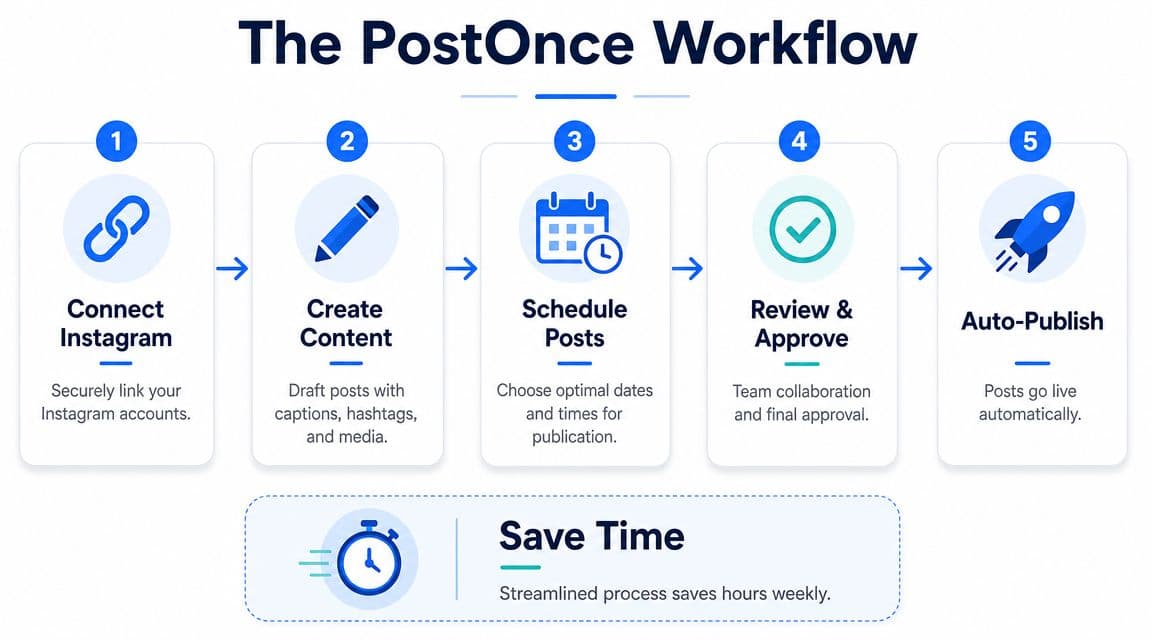
How the workflow actually runs
Here's the practical sequence:
-
Connect your channels
Link Instagram and the other platforms you actively publish to. The point isn't to centralize for the sake of it. The point is to eliminate duplicate publishing actions. -
Choose a primary publishing source
Content is often created somewhere first. That might be a core social channel, a staging workflow, or a draft process built around one platform. Use that as the origin. -
Set cross-posting rules The workflow gains utility when you decide what should syndicate to Instagram, what should skip Instagram, and what needs a format tweak before it goes live.
-
Review content before publish
Even with automation, approval still matters. Check caption fit, visual crop, and whether the post belongs in feed, as a Reel, or should stay manual. -
Let publishing happen automatically
Once the rule set is stable, scheduling becomes a byproduct. You're no longer opening Instagram just to make sure something goes out on time.
What this solves better than basic schedulers
The main win isn't convenience. It's reduced decision fatigue.
A lot of tools still make you think in platform silos. You create one Instagram version, one Facebook version, one Threads version, one LinkedIn version. That's better than posting by hand, but it still creates unnecessary repetition.
A cross-posting model shifts the work to the front of the process. You decide your rules once. After that, the system handles recurring distribution with less friction.
A good social workflow removes repeated decisions. It doesn't just give you a prettier calendar.
That matters for solo creators, but it matters even more for agencies and in-house teams. Once multiple accounts enter the picture, “schedule post on Instagram” stops being one task and turns into a coordination issue. Automation is what keeps publishing consistent when the content volume rises.
If you want to see how the platform itself is positioned, PostOnce is built around that create-once, distribute-across-networks model. For teams publishing beyond Instagram alone, that's usually more durable than stacking one scheduler on top of another.
What still needs human judgment
Automation doesn't mean every post should be pushed everywhere.
Keep these calls manual:
- Trend-driven posts that depend on timing, context, or live conversation
- Collaborative content where tags, approvals, or partner timing matter
- Format-sensitive posts where the same asset won't translate cleanly
- Community-led posts that need active comment monitoring right after publish
That's the sweet spot. Automate recurring distribution. Keep high-context posts under human control.
How to Schedule Posts with Instagram's Native Tools
If you only need a free way to schedule a feed post or Reel, Instagram's native tools are the baseline option. They're straightforward, but they come with clear boundaries.
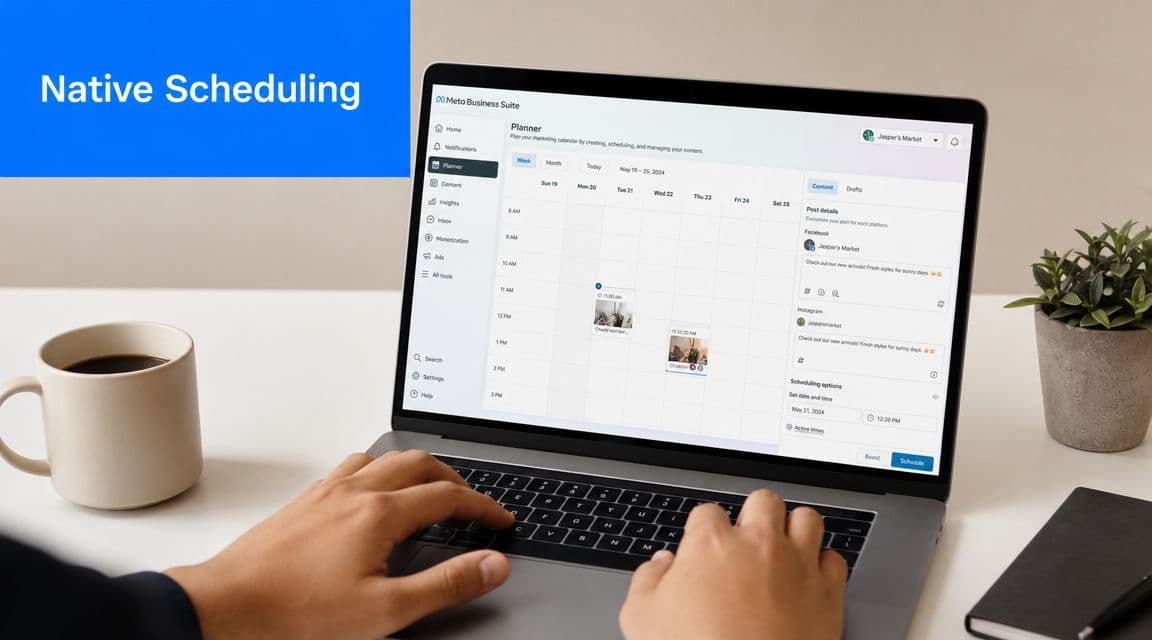
According to Sprout Social's 2026 guide, Instagram Business and Creator accounts can schedule up to 25 posts per day and as far as 75 days in advance using Meta's native workflow. That matters because you can batch content, but you can't build an endless queue. The same guide also notes that professional dashboards can surface “Active times”, which helps when you're choosing likely engagement windows.
What you need before scheduling
The first requirement is a professional account. Personal accounts won't get the native scheduling options.
From there, the in-app flow is simple:
- Create your content as you normally would
- Open More options or Advanced settings
- Toggle on Schedule this post
- Pick the date and time
- Confirm and schedule
That's enough for many small businesses and solo creators who publish at a modest volume and don't need cross-platform orchestration.
Where native scheduling works well
Native tools are useful when your needs are narrow:
| Use case | Native scheduling fit |
|---|---|
| One brand account | Good |
| Basic feed and Reel planning | Good |
| Occasional batching | Good |
| Team approvals | Limited |
| Cross-platform distribution | Weak |
| Complex campaign workflow | Weak |
If you're posting directly inside Instagram most of the time, native scheduling keeps the process close to the platform. That reduces tool sprawl and avoids another subscription.
Here's a walkthrough if you want to see the Meta-side flow in action:
Where native tools start slowing teams down
The limitations show up fast once content operations get heavier.
You're still planning inside Meta. You're still handling Instagram separately from channels outside Meta. And once multiple people touch content, native scheduling starts to feel more like a publishing utility than a workflow system.
Native scheduling is good at publishing. It's not very good at managing a content operation.
That's the trade-off. For basic use, it works. For scaled distribution, it usually becomes one piece of a bigger system rather than the system itself.
When to Use a Third-Party Instagram Scheduler
Teams usually move to a third-party Instagram scheduler when the problem is no longer “how do I publish later?” and becomes “how do I manage all this without missing things?”
That shift happens for a few predictable reasons. Native tools publish content. Third-party tools help manage process.
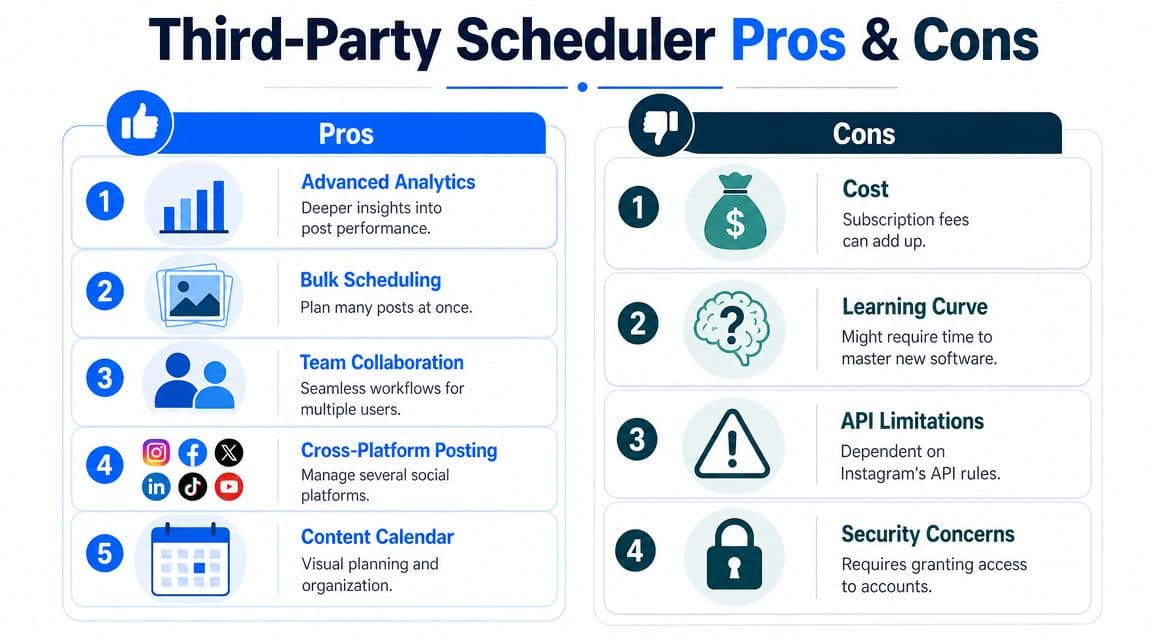
Signals that you've outgrown native scheduling
If any of these sound familiar, you're probably there already:
- You manage multiple brands and need one dashboard instead of logging in and out of separate accounts
- Your team needs approvals before posts go live
- You care about layout planning and want to see a fuller content calendar
- You publish beyond Meta and don't want duplicate scheduling work
- You need stronger reporting than a basic posting interface gives you
Third-party tools also help when publishing duties are split. One person writes, another reviews, another handles client approvals. Native Instagram tools don't break under that pressure, but they weren't really built for it either.
The trade-offs are real
Upgrading doesn't automatically fix everything.
A third-party scheduler introduces setup time, permissions management, and platform dependency. Some Instagram features are still governed by account type, permissions, approved partner support, and API limits. As summarized in Agorapulse's discussion of Instagram scheduling trade-offs, the more useful question isn't only how to schedule. It's what should be scheduled versus what should stay manual, especially across feed posts, Stories, Reels, carousels, and collaborative content.
That distinction matters. A scheduler can organize your pipeline. It can't decide whether a fast-moving trend should wait in a queue.
A simple decision filter
Use this framework:
| If your need is... | Better fit |
|---|---|
| Simple delayed posting on one Instagram account | Native tools |
| Calendar visibility and team workflow | Third-party scheduler |
| Multi-network distribution from one content source | Automation workflow |
If you're comparing options in that middle category, this roundup of the best social media scheduler features is useful because it focuses on workflow needs rather than surface-level feature lists.
The pattern I've seen is consistent. Teams adopt third-party schedulers for organization first. Then they realize organization still isn't enough if every platform needs separate handling. That's when automation becomes the next step.
Strategic Best Practices for Scheduled Content
Scheduling only helps if the content is built for the slot, the format, and the audience behavior behind it. A bad post published at the perfect time is still a bad post.
The first operational win is consistency. Research summarized by multiple industry sources points to stronger Instagram activity windows in the morning, midday, and evening, specifically 6–9 a.m., 12–2 p.m., and 5–9 p.m. One analysis of 6 million Instagram posts also found that content published between 3 a.m. and 6 a.m. often performed well because of lower feed competition, as summarized by MissingLettr's review of Instagram timing data. The value of scheduling is that it lets you hit these windows repeatedly instead of posting whenever you remember.
Build the post before you build the schedule
Scheduling works better when the content package is complete before it enters the queue.
That means:
- Caption locked in so you're not editing under pressure
- Hashtag group prepared and matched to the post type
- Creative checked for crop, readability, and thumbnail quality
- CTA aligned with the post's real goal, whether that's saves, DMs, clicks, or comments
I batch this part first because rushed scheduling usually hides weak creative decisions. The slot gets blamed when the post itself wasn't ready.
Match the format to the platform surface
Not every post should be treated the same way.
Feed posts can sit comfortably in a scheduled queue. Carousels usually benefit from stronger first-slide planning because the hook has to work before the swipe. Reels often need more sensitivity to timing, trend relevance, and audio choices. If you're producing short-form video, tools like Vocuno's platform for AI music can help when you need usable soundtrack options for Reels without turning audio sourcing into another bottleneck.
Field note: Scheduling is strongest when the content is evergreen enough to wait and specific enough to earn attention when it lands.
Stories are a different animal. Many teams overschedule them and then wonder why they feel flat. Story content often works better when it reacts to the day, the inbox, or something happening in real time.
Know when to schedule and when to post manually
People often ask the wrong question. It's not “does scheduling hurt reach?” in a blanket sense. It's whether the publishing method fits the content.
Use scheduling for:
- Educational posts
- Product explainers
- Recurring series
- Promotion tied to a calendar
- Evergreen Reels and carousels
Post manually when:
- A trend is moving quickly
- You need live engagement right away
- A collaboration depends on coordinated timing
- The post needs platform-native features that don't carry well through external workflows
That distinction is why social teams should think in content classes, not just content dates.
Don't automate yourself out of engagement
Publishing on time is only half the job.
Once a scheduled post goes live, someone still needs to watch comments, reply to DMs, and gauge whether the post is landing. Scheduling creates space for that work. It doesn't replace it.
If you want a useful companion read, these best practices for social media pair well with scheduling because they focus on the operating habits behind consistent output.
Troubleshooting Common Instagram Scheduling Errors
Most Instagram scheduling failures come from a short list of issues. The good news is that they're usually operational, not mysterious.
The first one is account type. For Instagram's native scheduling workflow, the baseline requirement is a professional account, meaning Business or Creator. The system also enforces up to 25 scheduled posts per day and a scheduling window of up to 75 days in advance, which can trigger failures if you go beyond those limits, as summarized in this guide to Instagram scheduling steps and limits.
The failures I see most often
-
Wrong account type
If scheduling options are missing, check whether the account is still Personal. This is the most common “bug” that isn't really a bug. -
Scheduling limit reached
If a post won't queue, count how many items are already scheduled for that day and how far ahead you're trying to place it. -
Media formatting problems
Posts can fail if the asset isn't suitable for the chosen placement. When something repeatedly errors, swap the file or simplify the post setup before assuming the scheduler is broken. -
Connection or permission issues
Reconnect the account if a third-party workflow suddenly stops publishing. Expired permissions are common after account changes.
A quick triage checklist
Run through this in order:
-
Confirm account status
Make sure the profile is Business or Creator. -
Check schedule boundaries
Verify that the post date isn't beyond the native planning window and that you haven't packed too many items into one day. -
Review the asset
Re-export the media if necessary and test with a simpler version. -
Reconnect and retry
If the scheduler previously worked, refresh the account connection before rebuilding the whole post.
When a scheduled post fails, start with permissions and limits before you start rewriting captions. The copy usually isn't the issue.
A final note. Draft confusion causes a lot of wasted time too. If a post seems to have disappeared, teams often mix up saved drafts, queued content, and failed schedules. This guide on where Instagram drafts are stored helps clear up that mess quickly.
Frequently Asked Questions About Scheduling on Instagram
Does Instagram penalize scheduled posts
There's no useful reason to assume a scheduled post is automatically weaker just because it was scheduled. In practice, performance depends more on the content, the format, the timing, and what happens right after publish. A well-timed scheduled post can outperform a manually published one if the asset is stronger and the timing is better.
Can you edit a post after scheduling it
Usually yes, but the exact editing options depend on the workflow you used. Native tools and third-party tools don't always expose the same post-edit behavior. I treat major edits as a reason to recheck the whole post, especially the media, caption, and destination settings.
Should Reels be scheduled or posted manually
Both approaches have a place. Schedule Reels that are evergreen, planned, or campaign-based. Post manually when the Reel depends on a trend, a timely audio choice, or a moment you want to actively monitor right after it lands.
Can third-party tools schedule every Instagram feature
No. Support varies by feature, account permissions, and what Instagram allows through approved partner workflows. The closer a feature is to native platform behavior, the more likely it is that support will be partial or conditional in outside tools.
What's the smartest way to schedule post on Instagram if you publish everywhere
Don't solve Instagram in isolation. Build a workflow where Instagram is one endpoint in a broader content system. That gives you consistency on Instagram without turning every post into a manual republishing exercise on the rest of your channels.
If your team is still scheduling Instagram one post at a time and then repeating the work everywhere else, take a look at PostOnce. It's a practical way to turn single-platform scheduling into a repeatable cross-posting workflow, so publishing to Instagram becomes part of your system instead of another task to remember.