

If you're buried in content creation, posting, and a comment section that never stops moving, the fundamental fix usually starts upstream. A cross-posting system like PostOnce’s social automation guide helps remove the repetitive work of publishing everywhere manually, which gives you the time and attention to handle Instagram engagement properly instead of rushing into sloppy automation.
That matters because automated comments on instagram can help, but only when they're part of a disciplined workflow. If your posting process is chaotic, comment automation tends to become chaotic too. You end up turning on broad triggers, replying to the wrong people, and creating the exact kind of bot behavior that gets accounts into trouble.
Instagram now puts clear weight on interaction. In 2025, the platform prioritized posts with high interaction, and tactics like AI-generated captions and interactive Stories showed 15% to 30% engagement lifts according to Accio’s reporting on Instagram comment trends. That makes comments more than vanity. They're a visibility signal.
It's also worth separating two ideas people often mash together. Automation follows rules. AI interprets context and generates or adapts responses. If you want a clean explanation, YourAI2Day's explanation of AI vs automation is a useful primer before you start configuring anything.
Used well, automation can acknowledge routine comments, route product questions into DMs, and keep campaigns moving. Used badly, it produces repetitive public replies, triggers on sarcasm, and makes your brand feel absent. The smart approach is simple. Automate the repeatable parts. Keep judgment-heavy conversations human.
Your Guide to Smart Instagram Automation
Considering automated comments often begins after the same pattern repeats for a few weeks. A Reel lands, comments pile up, a few are real buying signals, several are low-value reactions, and by the time you circle back, the moment is gone.
That gap matters because speed shapes outcomes on Instagram. A fast, relevant reply can move someone from casual interest to DM. A generic public comment can do the opposite.
Where automation helps
The best use of automated comments on instagram is narrow, intentional, and tied to a real business action. Good setups usually do one of these things:
- Acknowledge simple intent: Someone comments a known trigger like "price" or "link" and gets a quick public acknowledgment plus a DM path.
- Support campaigns: A giveaway, waitlist, free guide, or product drop often creates repeat questions that don't need handcrafted replies every time.
- Filter noise from signal: Not every comment deserves automation. The right rules focus on comments that indicate interest, not every emoji or tag.
Practical rule: If a comment needs empathy, judgment, or troubleshooting, don't automate the full exchange.
Where people get it wrong
The mistake isn't using automation. The mistake is treating it like a growth hack instead of an operations tool.
When a creator automates before fixing their content workflow, they usually overcompensate. They post inconsistently, then try to "make up for it" with aggressive bot replies. That rarely ends well. A calmer system works better: publish consistently, know which posts deserve automation, then apply simple reply logic where it provides time savings.
That's the frame for the rest of this guide. Not "how to bot your comments." How to use automation without damaging trust, account health, or your own workload.
How Automated Instagram Comments Actually Work
A useful setup starts long before the first automated reply. If publishing is inconsistent, comment automation turns into patchwork. When content distribution is handled well, often with a scheduler that removes the daily posting scramble, there is more room to set clean rules, review edge cases, and keep engagement useful instead of reactive.
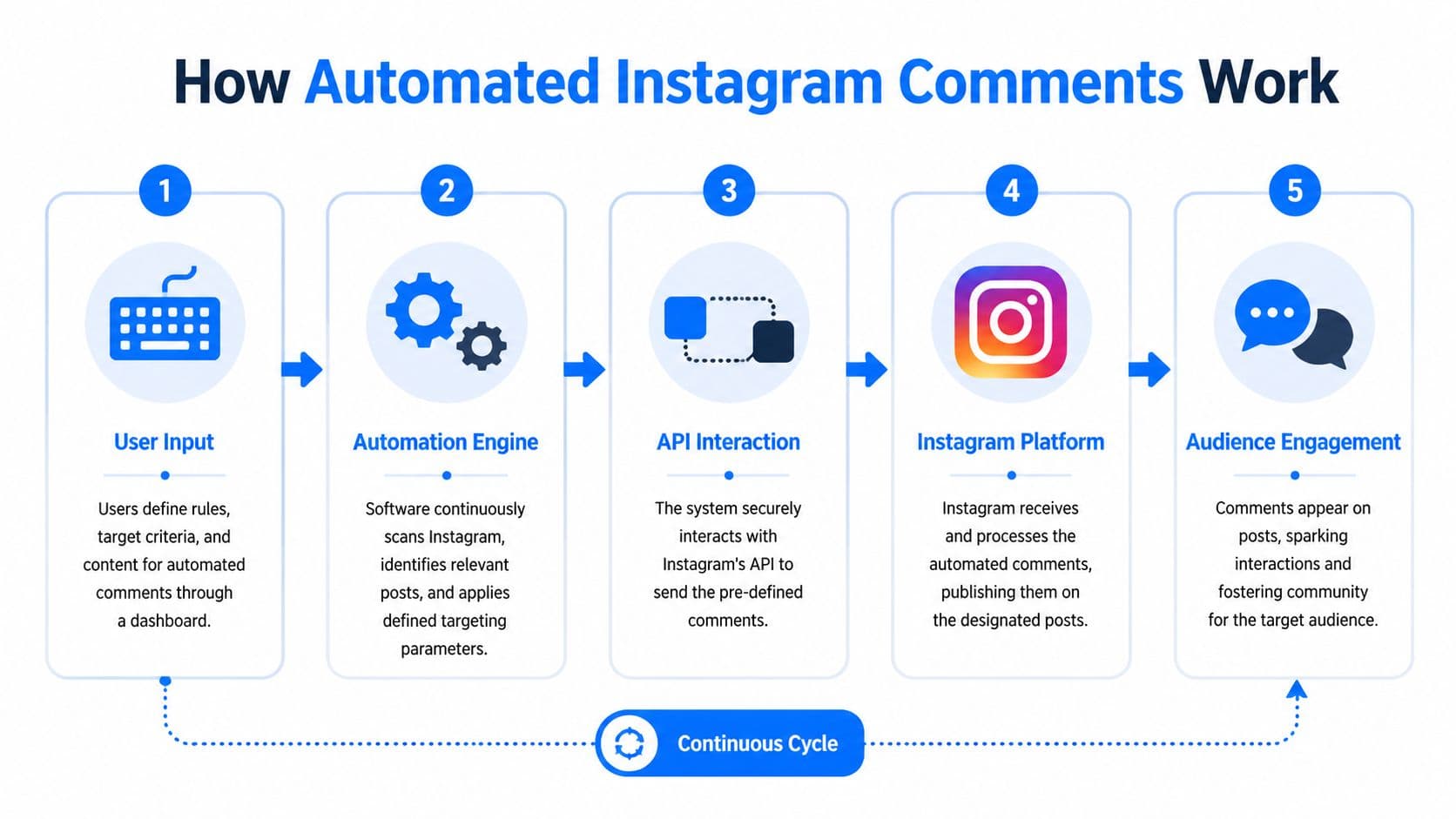
If you have used a guide to automate social media posts, the logic will feel familiar. One event happens. The system checks the rules. Then it runs the next step you approved.
The basic chain
Here is the workflow in plain English:
-
A user comments on a post
The comment might be a product question, a giveaway entry, or a keyword such as "INFO."
-
A webhook detects the event
A webhook is a real-time alert from Instagram's official systems. The tool does not need to keep checking for new activity every few seconds.
-
The automation tool evaluates the comment
The tool compares the comment against your rules. Those rules can include keywords, exclusions, post-specific conditions, or simple routing logic.
-
The action runs
The system may publish a public reply, start a DM flow, or do both.
-
The result gets logged
Better setups store comment IDs and action history so they do not reply twice or behave unpredictably after edits or deletions.
What the tools are checking
Good tools do not reply to every comment. They screen new comments through API webhooks, then apply filters such as keyword triggers like "price" or "how to buy", post conditions, exclusions, and rate limits to reduce spam risk, as described in blabla.ai’s guide to automatic Instagram comments.
That is where quality gets decided. The tool matters less than the rule design.
I have seen simple setups outperform expensive ones because the operator defined clear triggers, blocked low-intent comments, and kept public replies short. I have also seen advanced tools create a mess because every emoji, tag, or one-word comment triggered the same canned response.
Rule-based versus AI-assisted
Some systems are fully rule-based. They look for exact words or phrase matches and send prewritten responses.
Others add AI classification. That can help sort comments by intent, urgency, or sentiment before choosing a response path. The trade-off is control. AI gives you flexibility, but public comment replies need predictable behavior, especially for creators and small brands where every awkward response is visible.
Short, useful, and plain usually wins in public.
A practical way to view the stack is simple. Instagram is the platform. The API is the access layer. The webhook is the alert. Your automation tool is the decision engine. Once that chain is clear, it becomes much easier to build comment automation that saves time without making the account feel automated.
The High Stakes Game Instagram Policies and Risks
A creator posts a Reel, it starts getting traction, and the comments fill up fast. That is usually the moment weak automation breaks. The problem is rarely automation by itself. The problem is volume, bad rules, and replies that make the account look spammy in public.
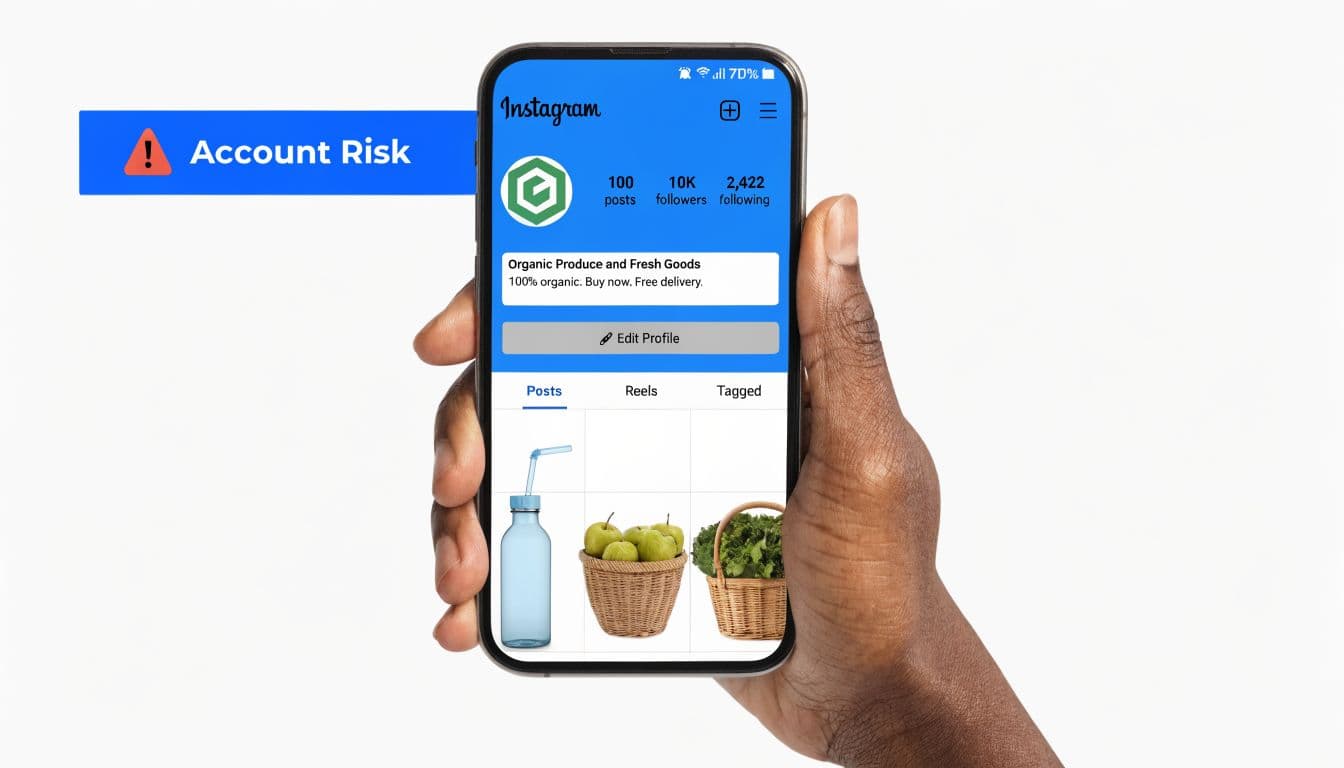
For creators and small businesses, public comments are not a back-end workflow. They are part of the brand experience. One careless auto-reply under the wrong post can make a solid account look inattentive, salesy, or fake.
This is also why I treat comment automation as a second-order system. Get distribution under control first. If publishing, repurposing, and scheduling already eat the whole week, nobody has enough attention left to monitor edge cases, review trigger quality, and catch tone problems before they become visible. Once content operations are stable, there is room to use comment automation with discipline instead of using it as a shortcut.
The platform sets the limits
Instagram gives developers access, but it also sets hard boundaries. For Live comments, the Graph API allows up to 100 automated replies per second. For standard messaging activity, allowance is closer to 750 API calls per hour. Exceeding those limits is a common reason for temporary blocks and restrictions, according to Sift AI’s review of Instagram automated comment limits.
The practical takeaway is simple. Higher volume does not make a setup stronger. Tight limits, narrow triggers, and slower throughput usually protect the account better than trying to reply to everything.
Edge cases matter more than the happy path.
Duplicate comments, deleted comments, sarcasm, giveaway traffic, and sudden spikes from a semi-viral post can all turn a clean workflow into a mess if the system is not built with limits and review points.
What high-risk behavior looks like
Instagram can identify suspicious behavior from patterns alone. It does not need to see your rule builder.
Common red flags include:
- Repetitive public replies: The same sentence under dozens of comments makes the thread look machine-made.
- Overbroad triggers: Replying to every emoji, tag, or one-word comment creates noise instead of helping real prospects.
- Reply volume that does not match account size: A smaller account with a sudden burst of automated public replies can look unnatural.
- No moderation path: Negative comments, complaints, and refund questions should not hit the same reply flow as product interest.
- Using automation in the wrong context: Sensitive posts, customer service threads, and emotionally charged conversations usually need a human.
The risk is not only technical. It is reputational. That is why a social media reputation management process matters here. Public automation mistakes often become trust problems before they become policy problems.
Why compliant setups still perform
Safe automation still drives results when the workflow is narrow and the response path makes sense. One documented case study showed a webhook-based setup with personalized replies generating 64 orders at a 6% conversion rate from replies to more than 100 commenters without account bans, as reported in MobileMonkey’s Instagram auto reply case study. The useful lesson is not the raw number. It is the structure behind it. The system reacted to clear intent, kept the public response short, and avoided blunt, one-size-fits-all behavior.
That is what good operators do. They constrain the automation so it handles repeatable demand, then leave exceptions for a person to review.
This walkthrough gives a helpful visual sense of where people tend to make mistakes:
If you would not want a screenshot of your automated reply posted by an annoyed customer, do not publish that automation.
Build for account health first. Efficiency comes after that. When distribution is already organized and the engagement rules are tight, comment automation can save real time without creating a new category of risk.
Smart Use Cases for Automated Comments
Automation becomes useful when it handles repeatable interactions that move someone forward. It becomes spam when it exists only to make the comment count look busy.
The strongest use cases share one trait. They connect a public signal to a next step with clear value for the commenter.
Lead magnets and resource delivery
This is the cleanest setup for many creators and service businesses. A post offers something specific, such as a checklist, template, or guide. The caption asks people to comment with a trigger word. The automation acknowledges them and routes the asset into DMs.
This works because the user intent is explicit. They asked for something. You delivered it quickly.
A simple public reply might look like this:
"Got you. Check your DMs."
That keeps the public comment short and moves the actual exchange into a better environment.
There’s a good performance reason to prefer that path. Comment-triggered Instagram DM campaigns have reported open rates of 80% to 100% and click-through rates up to 28%, with one documented case showing 491% ROI from a comment-to-DM funnel, based on Unkoa’s 2025 comparison of Instagram DM automation and email.
Product interest and shopping intent
E-commerce brands often see the same comments repeatedly. "Price?" "Where do I buy?" "Is this available in my size?" That's exactly where structured automation earns its keep.
A good pattern is:
- Public reply: short acknowledgment
- Private DM: product link, variant info, or next step
- Human follow-up: only if the shopper asks a real service question
Examples:
- For a launch post: "Thanks, I’ve sent the details in DM."
- For a restock post: "Check your inbox. I sent the product link."
- For a sizing question: "Sending the options in DM now."
The mistake here is stuffing the public reply with too much information. Public comments should reduce friction, not become mini sales pages.
Giveaways and contest entry handling
Giveaways create repetitive operational work fast. People ask whether they entered correctly, tag friends in odd formats, or comment with the required word but still need instructions.
Automation helps by confirming entry steps consistently. It can also route terms, reminders, or bonus actions through DM without cluttering the post.
Useful reply examples:
- Entry confirmation: "You’re in. Watch your DMs for the next step."
- Incomplete action: "Almost done. Check DM for the final requirement."
- Post-campaign follow-up: "Sent you the details."
FAQ triage and lightweight support
Some comments don't need a full support conversation. They just need sorting.
Automation can act like a switchboard. If someone comments with a common product or booking question, the system can acknowledge it, send the details privately, and leave complex cases for a human.
Use this when the answer is stable. Don't use it when the issue could involve frustration, refunds, delivery problems, or anything emotionally charged.
A practical split looks like this:
| Comment type | Better response style |
|---|---|
| Simple buying question | Public acknowledgment plus DM |
| Promo or freebie request | Automated trigger and DM delivery |
| Complaint or confusion | Manual response |
| Influencer or partner outreach | Manual response |
The pattern underneath all of these examples is simple. Automate access, not relationships. Let the system handle the repetitive doorway. Step in yourself once nuance matters.
Best Practices for Safe and Effective Automation
Safe automation starts with scope. The accounts that get into trouble usually ask one workflow to do too much. They try to greet every comment, handle edge cases, and push every conversation toward a sale. That creates spam signals, awkward public replies, and unnecessary risk.
A better setup is narrower. Use automated comments on instagram for predictable intent, then save your attention for the parts of engagement that require judgment. This works best when content distribution is already under control. If publishing across channels is still eating your week, automation tends to get rushed, and rushed automations are where mistakes show up.
Safe versus risky choices
Good automation is selective. It responds to clear signals, keeps public replies brief, and moves detail into DMs where the conversation is easier to manage.
| Tactic | Safe Approach (Low Risk) | Risky Approach (High Risk) |
|---|---|---|
| Trigger rules | Use specific keywords tied to intent | Trigger on every comment |
| Public replies | Keep them short and varied | Reuse the same generic response |
| DM routing | Send details privately after acknowledgment | Dump links and sales copy in public comments |
| Comment selection | Focus on buying or resource intent | Reply to emojis, tags, and vague reactions |
| Human review | Manually handle complaints and edge cases | Let automation respond to sensitive comments |
| Story responses | Route to DMs only | Attempt public automated Story replies |
The Story versus feed mistake
A lot of setup problems start here. Feed comments and Story interactions do not support the same response behavior.
Instagram's API does not allow public automated replies to Stories. If the trigger comes from a Story reply, question sticker, poll, or similar Story interaction, the automation must go only to DMs, as explained in Manychat’s breakdown of comment automation rules on Instagram.
That affects campaign design from the start. A giveaway post in the feed can use a short public acknowledgment plus a DM follow-up. A Story prompt has to skip the public reply and continue privately. Teams that miss this distinction often build one automation flow, then wonder why half of it cannot run as planned.
Key distinction: Feed comment automation can include public replies. Story-triggered automation must stay in DMs.
What to do instead of over-automating
Use a simple operating checklist before every launch:
- Personalize lightly: Add a first name or reflect the person's intent if the tool supports it.
- Write multiple reply variants: Repetition makes even useful automation feel low quality.
- Add exclusion rules: Filter obvious spam, off-topic phrases, and common false triggers.
- Keep public replies short: Acknowledge publicly. Explain privately.
- Escalate ambiguity: If a comment looks frustrated, unclear, or sensitive, send it to a human.
Moderated automation is often the best compromise. The system handles the repetitive mechanics, but a person still reviews higher-risk situations or premium offers. I recommend this approach for creators with loyal audiences, coaches selling high-ticket services, and small brands where tone matters as much as speed.
Another practical rule is timing. Use automation during launches, lead magnet pushes, and FAQ-heavy campaigns. Outside those windows, manual engagement blocks usually produce better conversations and cleaner brand signals. If you want a broader framework for that balance, these social media best practices fit well with a hybrid workflow.
A simple operating standard
Use this rule set:
- Automate repetition
- Handle emotion manually
- Move details to DMs
- Keep public comments natural
- Review campaign automations before every launch
It is not flashy. It is reliable. And reliability is what makes automation useful long term.
PostOnce A Smarter Approach to Social Automation
A common creator workflow looks like this. You finish an Instagram post, then spend the next hour resizing it for LinkedIn, trimming it for X, rewriting it for Threads, and dropping Reddit because there is no time left. By the time comments start coming in, your attention is already gone.
That is why comment automation should not be the first automation you reach for. The better sequence is simpler. Fix distribution first, then add engagement automation where it serves a clear purpose.
Why distribution comes first
Comment automation performs best inside a system that is already organized. You need a clear publishing rhythm, active offers that are easy to track, and a team process for handling replies that need judgment. Without that foundation, automated comments create more cleanup work than they save.
I see this with small brands all the time. They try to automate replies before they have a reliable content workflow, then end up managing inconsistent campaigns across platforms, outdated offers, and missed follow-ups. The tool is not the problem. The order of operations is.
PostOnce addresses the upstream issue. It helps creators and small teams publish once, distribute across channels, and apply channel-specific formatting without turning every post into a manual production task. The payoff is practical. Less time spent copy-pasting means more time to review triggers, tighten reply logic, and step into conversations that deserve a human response.
The broader intent behind this topic
Searches for automated comments on instagram usually come from two pressures. Someone wants to save time, or they want a faster way to catch and route inbound interest.
Comment automation helps with routing. It does not solve the larger time problem on its own.
If your publishing process is still fragmented, automating one reply flow only improves one small part of the system. A smarter setup starts with content distribution, because that is where creators lose hours every week. Once that workload is under control, you can use comment automation more carefully and get better results from it.
That is a key advantage of a balanced automation stack. Automate repetitive publishing first. Then add selective engagement automation for launches, lead magnets, and predictable comment patterns. It is a steadier approach, and for creators, small businesses, and agencies, it is usually the one that holds up over time.
Frequently Asked Questions About Instagram Comment Automation
Can Instagram detect automated comments
Instagram can detect behavior patterns that look spammy or abusive. In practice, risk usually comes from how automation is configured, not from the mere fact that a tool exists. Repetitive replies, overly broad triggers, and excessive activity are the core issues.
Should I use public auto-replies or DMs
Use public replies for acknowledgment. Use DMs for delivery, links, product details, and anything that needs more context. Public comments are visible and shape perception quickly, so they should stay short and natural.
Are automated comments on instagram good for small businesses
Yes, when the use case is tight. Small businesses benefit most when automation handles repetitive buying questions, lead magnet delivery, giveaway confirmation, or campaign routing. It is less effective for customer service issues that need care and judgment.
Can I automate replies to Story interactions
You can automate the response path, but Story-triggered automation must go to DMs rather than public replies. That's one of the most important platform distinctions to understand before you build anything.
What's the safest first automation to test
Start with a single keyword on a single post tied to a clear offer. A free resource, product link request, or waitlist trigger is usually a cleaner test than trying to automate every comment on every post.
Do I need AI for this to work
No. A rule-based setup is often the better starting point because it is easier to control. AI becomes useful when you want help classifying intent or routing conversations, but it also adds complexity and needs stronger review.
Will automation hurt my brand voice
It can if you let it become your default communication style. The safest approach is to automate access and acknowledgment, then keep important conversations human. That keeps the system efficient without making the brand feel absent.
If you want the time savings people are really looking for when they search this topic, start with the root problem. PostOnce helps you create once and cross-post everywhere automatically, so your social workflow stops eating your day. That gives you the space to run Instagram engagement, including comment automation, with more care and a lot less chaos.