


















Trying to discover the best time to post on Instagram? The most direct solution is using a tool like PostOnce, which automates your schedule and handles cross-posting so you can reach your audience at the perfect moment, every time.
But if you want to understand the why behind the timing, let's dig in. While broad data points to peak windows on weekdays from 11 AM to 1 PM and 7 PM to 9 PM, these are just starting points. The real magic happens when you figure out what works specifically for your audience.
Finding Your Peak Instagram Posting Times
Trying to pinpoint the absolute best time to post on Instagram can feel like you're aiming at a moving target. While there’s no single "magic hour" that works for everyone, massive data studies have revealed some very clear patterns in user activity.
Think about it logically. When are people most likely to be scrolling? It’s often during natural breaks in their day—like their lunch hour or when they're winding down on the couch after work. Posting during these windows simply increases the odds that your content gets in front of fresh eyes.
General Posting Windows to Get You Started
The basic idea is to post when your followers are actually on the app. It's that simple. Weekdays tend to have more consistent engagement than weekends, largely because people use social media as a quick escape from their work routine.
Of all the days, Wednesday often comes out on top as the powerhouse for Instagram engagement. The sweet spot tends to be between 11 AM and 1 PM, catching people right before and during their lunch break. Another key window is the evening, with a significant spike in activity around 9 PM as people settle in for the night.
The best posting strategy isn't just about picking a time from a chart. It’s about understanding the daily rhythm of your followers and showing up when they're ready to listen. A well-timed post joins an active conversation; a poorly-timed one just gets lost in the noise.
This chart gives you a great visual of when user activity is generally at its highest.
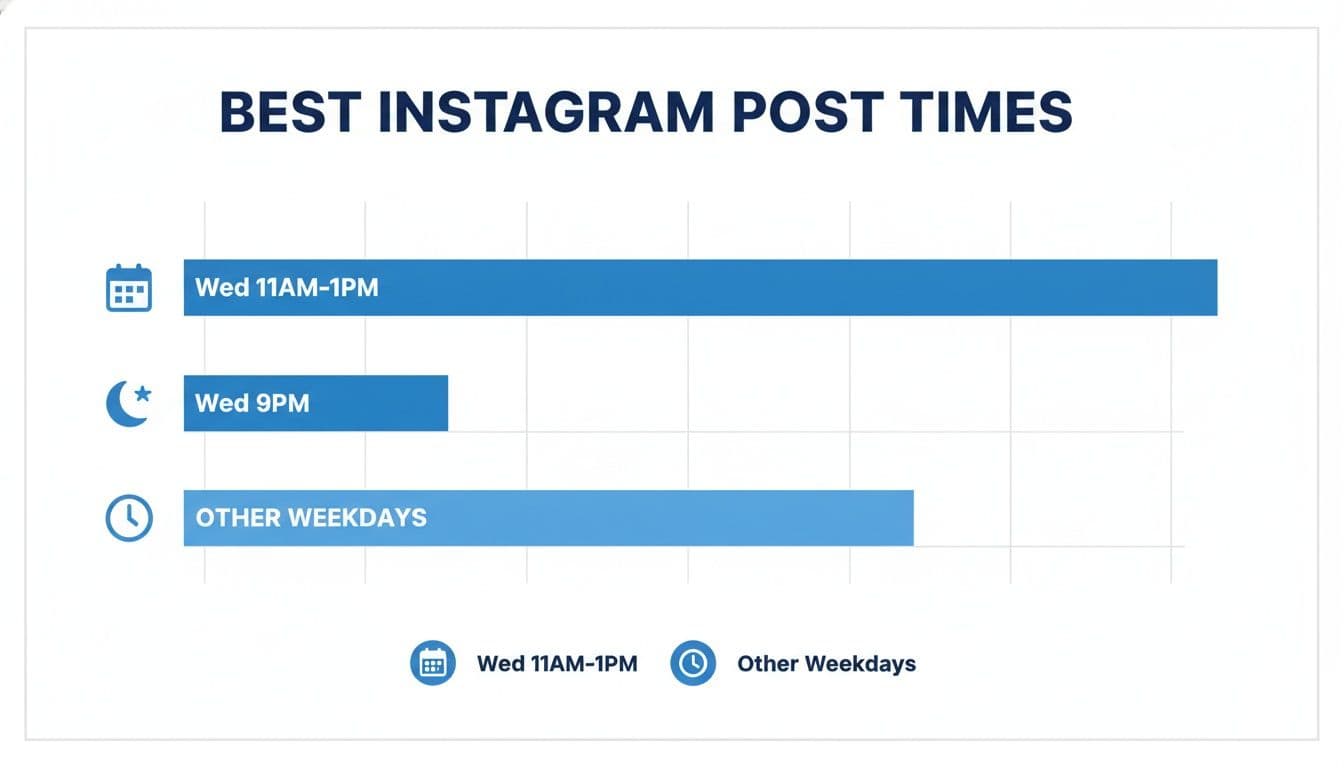
As you can see, Wednesday's midday and evening slots are prime real estate for getting your content noticed. These times are an excellent starting point, and this general principle applies across most platforms. You can get a broader view by checking out our guide on the best times to post on all social media.
To make it even clearer, here’s a breakdown of the generally accepted best times to post, based on a ton of aggregated data. Think of this as your baseline before you start digging into your own analytics.
General Best Times to Post on Instagram (Local Time)
| Day of the Week | High-Engagement Time Windows | Peak Hour(s) |
|---|---|---|
| Monday | 10 AM - 12 PM, 5 PM - 7 PM | 11 AM |
| Tuesday | 9 AM - 1 PM, 7 PM - 9 PM | 10 AM, 8 PM |
| Wednesday | 10 AM - 1 PM, 7 PM - 9 PM | 11 AM, 1 PM |
| Thursday | 10 AM - 12 PM, 4 PM - 6 PM | 11 AM |
| Friday | 9 AM - 11 AM, 1 PM - 3 PM | 10 AM |
| Saturday | 9 AM - 11 AM | 10 AM |
| Sunday | 10 AM - 2 PM, 7 PM - 9 PM | 8 PM |
Remember, these are powerful starting points, not unbreakable rules. The next step is to use these recommendations as a hypothesis and test them against your own audience's behavior.
The Worst Times to Post on Instagram
Knowing which hours to avoid is the other half of a useful Instagram schedule. Large benchmark studies commonly identify the overnight window from roughly 1 a.m. to 5 a.m. as a weak default because most local audiences are inactive. Weekends—especially quiet Sunday periods—can also underperform for accounts whose followers browse mainly during the workweek.
Use those patterns as guardrails, not permanent rules. A late-night entertainment account, a global brand, or a creator whose followers live in another time zone can have completely different dead zones.
| Window to treat cautiously | Why it can underperform | What to do instead |
|---|---|---|
| 1-5 a.m. local audience time | Fewer followers are active, so the post can launch without early engagement | Hold the post for the next proven audience window |
| Weak weekend periods | Routines and attention often change outside the workweek | Test weekends separately before making them a default |
| Your audience's lowest Insights bars | Generic benchmarks cannot see your specific followers | Remove repeat underperformers from the schedule |
| One simultaneous global publish time | A convenient local hour may be a dead zone elsewhere | Use overlap windows or separate regional publishing slots |
To find your account's actual worst times, look at the valleys in Instagram Insights as carefully as the peaks. Compare similar formats and topics, exclude unusual viral posts, and flag hours that repeatedly produce weak reach, saves, shares, and comments. One weak post is not enough evidence; a repeated pattern across several weeks is.
The practical goal is not merely to know that an hour is bad. It is to make that hour hard to use accidentally. Once a weak window is confirmed, remove it from your default workflow and schedule important posts for the next safe slot.
Why Your Perfect Posting Time Is Unique to Your Audience
While broad posting windows give you a decent starting block, the real secret to crushing it on Instagram is accepting a simple truth: your perfect posting time is as unique as your audience.
Imagine a global brand posts something at 11 AM EST. Great for their New York followers, right? But that’s 8 AM in Los Angeles and 4 PM in London. A one-size-fits-all schedule just doesn't work; you'll always be missing a huge chunk of your audience.
Searching for "whats the best time to post on instagram" will pull up dozens of charts, but they can't possibly know the specific habits of your followers. Your audience isn't some faceless mob. They're real people with different jobs, routines, and sleep schedules. The goal isn't to find a magic bullet, but to uncover your own custom-built engagement windows.
This is exactly why getting to know your followers is a must. If you're still a bit fuzzy on the details, now is the time to learn how to identify your target audience and build a strategy that actually connects.
Demographics and Daily Routines
The daily rhythm of your followers is the biggest clue you have. An account aimed at college students will probably see tons of action late at night or during that mid-afternoon break between classes. On the other hand, a brand for new parents might get its best engagement during early-morning feedings or those late-night doom-scrolling sessions.
Think about how different these audiences are:
- B2B (Business-to-Business): These folks are usually online during the workday. They might hop on Instagram during their lunch break (12 PM - 2 PM) or as they start wrapping things up for the day (4 PM - 6 PM).
- B2C (Business-to-Consumer): A fashion or lifestyle brand's audience is a different story. They're more likely to be active in the evenings (7 PM - 10 PM) and on weekend afternoons when they have downtime.
See the difference? Following generic advice without considering your specific audience can actually hurt your performance. The answers you need are already in your own data.
Your audience isn't just a collection of followers; they are people with real lives and schedules. Your posting strategy succeeds when it aligns with their reality, not with a generic industry benchmark.
The Impact of Location and Industry
Geography plays a huge role. If your followers are scattered across the globe, you can't just post whenever it's convenient for you. An account with big followings in both the U.S. and Australia needs a smarter approach—maybe by posting when a few time zones overlap or scheduling separate content for each region's prime time.
Industry matters, too. The benchmarks look completely different from one niche to the next.
- Travel and Hospitality: Engagement often spikes on weekends, especially Sundays, when people are either planning their next trip or just dreaming about one.
- Financial Services: This crowd is most active on weekday afternoons when they're locked into market news and updates.
- Food and Beverage: These accounts do incredibly well around mealtimes. Think 11 AM for the lunch rush and early evening when people are looking for dinner ideas.
At the end of the day, every creator has a unique community. General posting times are a starting point, not the finish line. The best accounts treat these guidelines like a hypothesis—something to test, tweak, and perfect over time. Once you start digging into your own analytics and truly understanding who you’re talking to, you can stop guessing and start posting with confidence.
Using Instagram Insights to Find Your Goldmine Hours
Those general posting windows we talked about? Think of them as a decent starting point, like a generic city map. But to find your personal "goldmine hours"—the exact moments your content will hit the hardest—you need to stop guessing and start listening to your own data.
Thankfully, Instagram gives you the perfect tool for this: Instagram Insights.
This isn't just a bunch of charts; it's your treasure map. It takes all the guesswork out of the equation by showing you exactly when your audience is actually scrolling, tapping, and commenting. You just need to know where to dig.
Getting into Your Audience Data
First things first, you need a Creator or Business account to get your hands on Insights. If you're still on a personal profile, switching over is a breeze—it takes just a few taps in your settings, it's totally free, and it unlocks a world of incredibly useful information.
Once you’re set up with a professional account, finding your audience activity is simple:
- Head over to your main Instagram profile page.
- Tap the “Professional Dashboard” button, which you’ll find right under your bio.
- Look for the "Your account insights" area and tap "See all".
- Select “Total Followers” to dive into your audience demographics and, most importantly, their activity patterns.
This dashboard is your command center for understanding who your followers are and how they behave. For a deeper look at turning these numbers into real growth, our guide on building a social media analytics dashboard can help you zero in on the metrics that actually matter.
Making Sense of the Most Active Times Chart
After you've tapped into your follower data, scroll down until you spot the section labeled "Most Active Times." This is the goldmine right here.
What you'll see is a simple bar chart that shows your follower activity at a glance. You can toggle between "Hours" and "Days" to get the full picture.
- Days View: This will show you which days of the week your followers are most active. You might be surprised to find that, contrary to popular belief, your audience is buzzing on a Saturday morning.
- Hours View: Flip to this view, and you'll get an hour-by-hour breakdown for each day. The rule is simple: the taller the bar, the more people are online.
This chart gives you a crystal-clear picture of when your audience is most likely to see your content.
See those spikes? The chart above clearly shows that this account’s audience comes alive in the evening, with major peaks around 6 PM and 9 PM. Those are the first times I’d be testing.
Your Instagram Insights aren't just data points—they are direct messages from your audience. They're telling you, "Hey, this is when we're here and ready to engage." Ignoring this is like booking a concert when you know the venue will be empty.
Building and Testing Your New Schedule
Alright, let's put this data to work. Start by identifying the top 2-3 days with the highest activity bars. Then, for each of those days, pinpoint the 2-3 hour-long windows where activity peaks.
Boom. You now have a set of data-backed posting times to test.
So, let's say your Insights show your audience is most active on Wednesdays at 12 PM, Thursdays at 6 PM, and Sundays at 8 PM. That's your new starting lineup.
But don't just set it and forget it. The real magic happens when you cross-reference this activity data with how your posts actually perform.
- Experiment: For the next couple of weeks, post consistently during these peak times you've identified.
- Analyze: Head back into your Insights and look at the reach and engagement on those posts. Did the posts you published at 6 PM on Thursdays consistently get more likes and comments than others?
- Refine: Use what you learn to tweak your schedule. You might discover that while lots of followers are online at noon, your posts actually pop off at 1 PM when people are on their lunch break and actively scrolling.
This cycle of checking your Insights, testing a schedule, and analyzing the results is what separates the pros from the amateurs. It turns your content strategy from a shot in the dark into a precise, data-driven operation that gives every post its best chance to shine.
PostOnce: The Answer to "When Should I Post?"
You’ve analyzed your audience, identified your golden hours, and now you have a data-backed schedule. The next challenge is executing it consistently. This is precisely the problem PostOnce solves. It acts as the bridge between knowing your best time to post and actually doing it, ensuring you never miss an opportunity to connect with your audience when they're most active.
More importantly, it solves a bigger problem. Your audience isn't just on Instagram. They're on Threads, X, Facebook, and LinkedIn. Figuring out the best posting time for every platform is a full-time job. PostOnce streamlines this by letting you crosspost your content from one platform to many others automatically. You create the content once, and PostOnce ensures it gets to the right people, on the right platform, at the right time.
This powerful automation turns your search for "whats the best time to post on instagram" into a comprehensive, multi-platform growth strategy, all managed from a single place.
Automate Your Success with PostOnce
Figuring out the best time to post on Instagram is a huge win, but it's only half the battle. The other, often trickier, part is actually showing up consistently during those golden hours. This is where a tool like PostOnce can completely change your game. It’s built to bridge the gap between knowing your data and putting it into action, making sure your hard-earned insights don't go to waste.
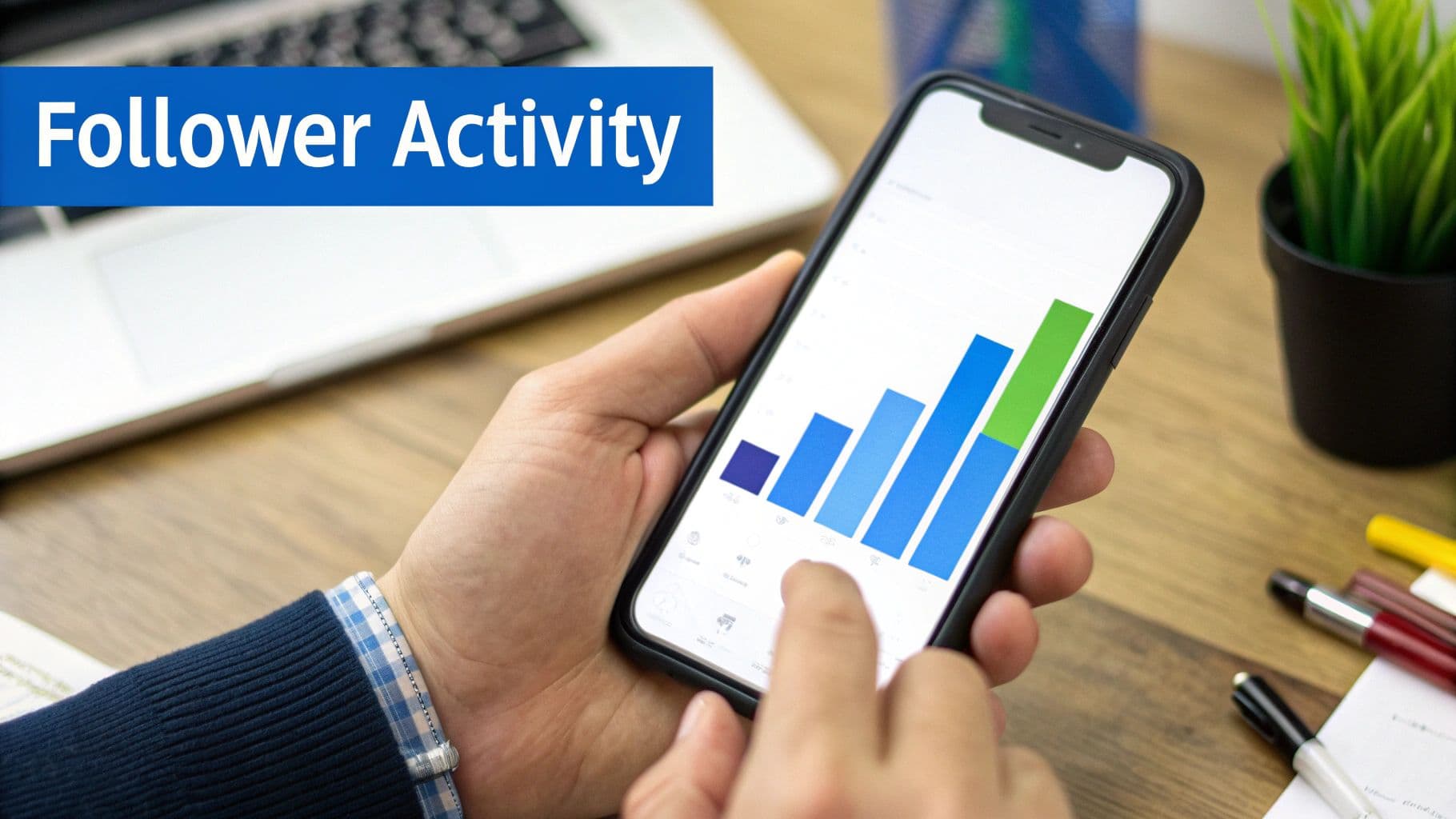
Let's be real—hitting your peak hours manually is exhausting. Life happens. Meetings run long, and creativity doesn't always strike on schedule. PostOnce removes that friction by letting you schedule your content far in advance. You can just upload your posts, pick the times that work best for your audience, and trust the tool to get them live right on cue.
More Than Just a Scheduler: Smart Crossposting
Where PostOnce really shines is its smart crossposting. For any serious creator, the challenge isn't just figuring out when to post on Instagram; it's about getting your content seen across all your platforms without burning out. Instead of manually recreating the same post over and over, you can create it once and let PostOnce do the heavy lifting.
PostOnce shifts your focus from tedious repetition to strategic creation. You get to spend more time making great content, while the platform ensures it reaches the right people, on the right platform, at the right time.
This means a single piece of content can be intelligently sent out to all your channels:
- Instagram at its peak engagement hour.
- Threads with text that fits the platform.
- LinkedIn during professional browsing windows.
- Facebook and other key platforms, all automatically.
This isn’t just about saving you a few hours of copy-pasting; it multiplies your impact. You're no longer just an Instagram creator—you're a multi-platform presence building a much stronger brand with the same amount of effort.
How PostOnce Directly Solves Your Posting Time Problem
At the end of the day, finding your best posting time is all about driving growth. PostOnce is the engine that makes it happen, closing the loop between knowing your schedule and actually sticking to it. The core principles of effective social media management always come back to optimizing your schedule, and PostOnce automates that entire process.
You do the fun part: use your Instagram Insights to find those goldmine hours. Then, you plug that schedule into the platform. This "set-it-and-forget-it" approach means you never miss a peak window again, whether it's 3 PM on a Wednesday or 8 PM on a Sunday.
By taking over the manual, repetitive tasks, the platform frees you up to focus on what really matters: creating content your audience genuinely loves. See how you can build a more powerful and efficient workflow by checking out the automation tools over at https://postonce.to and start turning your insights into consistent results.
Fine-Tuning Your Schedule for Different Content and Timezones
So, you've dug into your Instagram Insights and have a solid map of when your audience is online. That’s a huge first step. But to really sharpen your strategy, you need to add another layer: thinking about what you’re posting, not just when.
Not all content is created equal. A quick-hit Story serves a different purpose than an in-depth Reel, and your audience consumes them differently, too. Lumping everything into one "best" time slot is easy, but you'll almost certainly leave engagement on the table.
Think of it like TV programming. Comedies tend to air in primetime evening slots, while the morning news catches people as they start their day. Your content should follow a similar logic, matching the format to your audience’s daily rhythm and mindset. Quick, skimmable posts are perfect for a midday break, while immersive videos often land better when people are winding down at night.
Matching Your Content Type to the Clock
Getting this right is all about understanding how people use Instagram throughout their day. Someone scrolling for five minutes while their coffee brews is in a completely different headspace than someone settling onto the couch after dinner.
-
Reels and Videos: This is your "lean-back" content. It thrives when people have more time to watch and get invested. Unsurprisingly, the evening window between 7 PM and 9 PM is a powerhouse for watch time. But don't ignore the commute and morning scroll! Data shows Reels also see unique peaks from 8 AM to 12 PM and again from 6 PM to 9 PM. A video posted at the wrong time can easily get lost in the noise.
-
Static Posts and Carousels: These are the bread and butter of the workday scroll. Because they're quick to digest, they're perfect for that 11 AM to 2 PM lunch window when many people are taking a quick break and catching up on their feeds.
-
Instagram Stories: Stories are in a league of their own. Their temporary, often interactive nature makes them effective all day long. They’re great for morning commutes (7 AM to 9 AM), midday check-ins, and catching people one last time before bed.
To really nail the technical side and make sure every post looks its best, it's worth brushing up on the specifics. This complete guide to the Instagram post format is a great resource.
How to Handle Different Timezones
If your audience is spread across the globe, the question of "when should I post?" gets a lot trickier. Posting at 2 PM in New York means it's already 7 PM in London and still only 11 AM in Los Angeles. How do you possibly cater to everyone?
Your first move is to head straight back to your Instagram Insights. Go to Audience > Top Locations and see exactly where your followers are. This data is your new best friend—it provides the roadmap for a timezone-smart schedule.
Managing a global audience isn't about finding one magical time. It's about identifying a few strategic windows that overlap with the peak hours of your largest follower groups.
Once you know where people are, you can start building a multi-timezone strategy. For example, if you have big followings in North America and Europe, try posting in the late morning in the US. That catches the American audience as their day gets going and the European audience in their late afternoon or early evening.
For more scattered audiences, you might need to schedule important posts more than once or use a smart scheduling tool that can publish based on regional peaks. Getting your video strategy right across these windows is also critical; our guide on the best format for Instagram video can help you optimize for every audience.
Frequently Asked Questions About Instagram Posting Times
Trying to figure out "what's the best time to post on Instagram" can sometimes feel like trying to hit a moving target. While broad, data-backed recommendations give you a fantastic starting point, the real answers are hiding in your own audience's behavior.
Let's dig into some of the most common questions that pop up once you start fine-tuning your posting strategy.
How Often Should I Post on Instagram?
This is a big one, but the answer is simpler than you might think: focus on consistency over frequency. You don't need to post multiple times a day to see results.
Most social media pros will tell you that posting to your main feed 3-5 times per week is a great rhythm. It’s enough to stay on your audience's radar without flooding their feeds.
Instagram Stories are a different beast entirely. Because they vanish after 24 hours, you have more freedom to post daily, keeping your brand front and center. Just remember the golden rule: one piece of great content is always better than five mediocre ones.
A scheduling tool is your best friend here. It lets you batch-create your content and then set it to go live during those perfect engagement windows, all without the daily scramble to hit "publish."
Does Posting on Weekends Actually Work?
Absolutely! But whether it works for you depends entirely on your audience. B2B brands often see engagement dip on weekends, but for consumer-focused industries like retail, food, or entertainment, Saturday and Sunday can be prime time.
Think about it—people’s routines change on the weekend. They’re more relaxed, and their scrolling habits are different. Check your Instagram Insights to see if you have an active weekend crowd. If you see a spike, try posting on a Saturday or Sunday afternoon and see what happens. You might be surprised.
What Timezone Should I Use for a Global Audience?
This is a great problem to have! If your followers are spread across the globe, you need to get a little strategic.
Start by heading into your Instagram Insights and looking at Audience > Top Locations. This will tell you where your biggest clusters of followers live.
If you have a clear majority in one timezone, like the US East Coast, start by catering to their peak hours. If your audience is more evenly split between, say, North America and Europe, look for an overlap. For example, posting in the late morning in the US often catches the European audience as their workday is winding down.
How Long Does It Take to Find My Best Time to Post?
Finding your sweet spot isn't an overnight thing; it’s a process of testing and learning. Give it at least 4-6 weeks of consistent posting to gather enough meaningful data.
Start with the general times we talked about earlier or the peak hours from your own Insights. After a month or so, dive into your analytics. See which posts got the most love and look for a pattern in when they were published. From there, you can start tweaking your schedule.
Audience habits can shift, but you should have a solid, data-driven schedule locked in within a couple of months.
Stop guessing and start scheduling with precision. PostOnce helps you automate your posting schedule, ensuring your content always goes live at the perfect time. Plus, with smart crossposting, you can reach audiences on Instagram, Threads, LinkedIn, and more, all from a single post. Transform your content strategy with PostOnce today.