


















So, you're trying to figure out how to repost an Instagram Story? The simplest, most powerful way is with an automation tool like PostOnce. Instead of manually resharing, PostOnce lets you create a story once and automatically distributes it across all your social platforms, turning a single post into a widespread campaign. This guide will walk you through the manual methods and show you how automation is the ultimate solution.
The Smartest Way to Repost an Instagram Story

Reposting content on Instagram often feels like a puzzle with missing pieces. You see a fantastic customer testimonial or a partner's big announcement you want to share, but if they didn't tag you, Instagram’s built-in features leave you stuck. You're then forced into clunky workarounds—taking screenshots or screen recordings that kill the quality and eat up your time.
These manual methods aren't just tedious; they throw a wrench into your entire content workflow. Every minute spent cropping a screenshot or sending a DM to ask for a tag is a minute you're not creating fresh, original content. This is exactly the headache PostOnce was designed to eliminate.
How PostOnce Directly Solves Your Reposting Needs
When you search for "how to repost a Instagram story," you're looking for an efficient way to amplify content. While Instagram offers limited options, the real goal is to get great content seen by more people without spending all day on your phone. PostOnce directly addresses this need by automating the entire distribution process.
Instead of just helping you reshare from one Instagram account to another, PostOnce completely rethinks the process. It's not about simply sharing a story; it's about amplifying your original content wherever your audience is, automatically. You create your post or Story once on Instagram, and PostOnce does the rest.
PostOnce automates your entire distribution strategy. Set up simple rules, and it will automatically crosspost your Instagram content to other key networks like LinkedIn, X (formerly Twitter), and Threads. You get maximum visibility with zero extra effort.
This approach bypasses all the manual steps and platform-specific limitations. A single, well-crafted Instagram Story can instantly become a professional update on your LinkedIn, a quick insight on X, and an engaging conversation starter on Threads—all without you lifting a finger after the initial post.
Of course, if you're just getting your feet wet, it helps to nail the basics first. Before diving into automation, new users might find our guide on how to post a Story on Instagram a useful starting point for mastering the fundamentals.
With PostOnce, you can:
- Save Time: Stop wasting hours on the tedious task of manually reposting content across different apps.
- Amplify Reach: Make sure your best work gets seen by a much wider audience beyond just your Instagram followers.
- Maintain Consistency: Keep all your social profiles active, on-brand, and perfectly aligned with one streamlined workflow.
By handing off the distribution, you free yourself up to focus on what truly matters: creating high-impact content. You do the creative work, and PostOnce will handle the delivery.
The Official Method: Reposting a Story You’re Tagged In
Let’s start with the easiest and most common scenario: someone tags you in their Instagram Story. This is Instagram’s built-in, official way to handle reposts, and it’s a golden opportunity for social proof. When another user gives you a shout-out, Instagram sends you a direct message with a handy little button.
You’ll see it right in your DMs—a notification from the person who tagged you with a big, tappable "Add to your story" link. Hitting that button is your ticket to sharing their content with your own audience. It's that simple.
How to Repost When Tagged
Once you tap "Add to your story," their Story pops up in your own Story editor. It won't take over your whole screen; instead, it appears as a sticker that you can move, resize, and layer onto a new background. This is where you can get creative and make the repost your own.
Before you hit publish, think about adding a personal touch:
- Add some context. A simple "Thanks for the love!" or "So glad you enjoyed it!" goes a long way. If a customer shares your product, you could add text that says, "Look at this awesome shot from a happy customer!"
- Throw in some GIFs or stickers. A "Thank You" GIF or one of your branded stickers can add personality and make the repost more visually engaging.
- Tag them back. Even though Instagram automatically credits the original creator, tagging them again in a text box is a nice gesture that shows you really appreciate the mention.
Heads up: You only have 24 hours from when the original Story was posted to use the "Add to your story" feature. Once that window closes, the Story is gone, and so is your chance to repost it. You have to act fast.
For instance, if a local coffee shop gets tagged in a customer's Story showing off some impressive latte art, they can repost it in seconds. They might add a "Customer Love!" sticker and share it. This gives them great content and shows potential followers that real people are enjoying their coffee. It’s a classic win-win for building community. If you want a deeper dive into sharing content, check out our guide on what it means to repost on social media.
This whole process is fantastic for building relationships. When you feature content from a follower, it makes them feel valued and encourages others to start creating content about your brand, too. It sparks a natural cycle of authentic, user-generated content. Looking ahead, it's interesting to see how sharing has evolved. For example, Instagram's 'Re-Posts' feature, introduced in 2026, fundamentally changed how creators could amplify content. Before that, you were limited to sharing in Stories or DMs, but the feature brought reposts to the main feed, giving them a shot at permanence. Some hypothetical marketing models even suggest a single repost from a peer can rocket impressions by as much as 75%. You can discover more about how reposts amplify influencer reach to see the full impact.
What to Do When You’re Not Tagged in a Story
It’s a familiar feeling. You’re scrolling through Stories and stumble upon a fantastic post—maybe a glowing customer testimonial or a beautiful shot of your product in the wild. But there's a catch: they didn't tag you. That means Instagram’s easy "Add to your story" button is missing, and it feels like you've hit a dead end.
Don't worry, you're not completely stuck. There are a couple of well-known workarounds for this exact situation, but they come with one massive, non-negotiable rule.
The Golden Rule: Always Ask for Permission
Before you even think about hitting that screenshot button, your first move should always be to get the green light from the original poster. This isn't just about being polite; it's about respecting someone else's content and building a genuine connection with your audience.
A quick, friendly DM is all it takes. Just shoot them a message that shows you appreciate their post.
"Hey [Username]! Absolutely love the Story you shared of [mention the product or experience]. We'd be thrilled to share it on our profile and will give you full credit, of course. Would that be okay with you?"
Most of the time, people are excited to be featured, especially by a brand they follow. But if they say no or simply don't reply, you have to respect that decision and move on. Taking content without permission is a fast way to burn bridges and can even land you in hot water over copyright. This is a core part of what reposting on social media is all about.
This simple flowchart breaks down the right way to think about it. If you aren't tagged, the path always leads through asking for permission first.
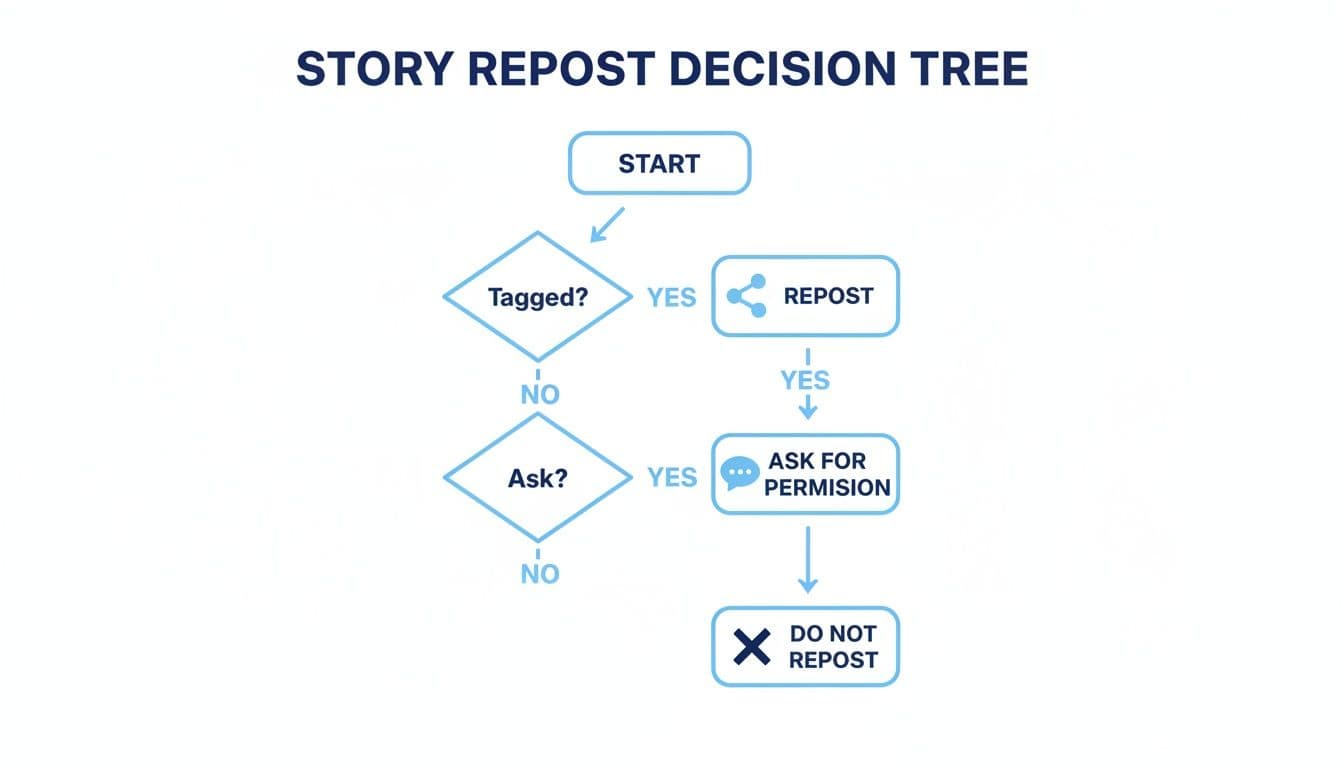
How to Manually Repost (After You Get a "Yes")
Once you have explicit permission, you can use your phone's built-in tools to capture the Story for your own profile.
- For static images: The easiest way is to take a screenshot. After you capture it, pop into your photos app and crop out the Instagram UI elements and your phone's status bar. A clean image just looks more professional.
- For videos: Use your phone’s screen recording feature. Start the recording, let the entire Story play through, and then stop it. From there, you can trim the clip to remove the beginning and end, leaving you with just the good stuff.
When you post the captured content, giving proper credit is essential. Don't just bury it in the caption. Tag the creator's handle directly on the Story and also give them a clear shout-out at the top of your caption, like "📸: @username" or "Love this from @username!"
Mastering these respectful reposting techniques is more valuable than ever. With 2026 data showing the average Story engagement rate has dipped to a mere 0.48%, every bit of high-quality, user-generated content helps. In fact, some models predict that a single repost from a peer can result in a 75% reach boost for that content, giving it a powerful second wind. You can see more 2026 Instagram benchmarks to understand how reposting can help you beat the odds.
Automating Your Story Reposting with PostOnce
Let's be honest, manually reposting Stories works if you only need to do it once in a while. But if you're serious about growing your audience, it quickly becomes a massive time-drain. This is where automation tools come into play, and for truly smart content distribution, PostOnce is the solution I recommend.
Instead of just shuffling content from one Instagram profile to another, PostOnce lets you create a Story just once and then automatically pushes it out to all your other social networks. It’s a "set-and-forget" system that gets your message in front of more people without you having to spend your day glued to your phone.
How PostOnce Solves the Reposting Puzzle
The core challenge for any creator or brand is getting your best content seen by the largest possible audience without burning out. PostOnce is built to solve exactly that.
Imagine you share a powerful customer testimonial or a slick new product reveal on your Instagram Story. With PostOnce connected, that one Story can instantly be repurposed and published across your entire digital footprint. For example, it could become:
- A professional update on your LinkedIn profile.
- A punchy, attention-grabbing tweet on X (formerly Twitter).
- A new post to spark conversation in a niche Reddit community.
The platform’s intelligent cross-posting rules work behind the scenes to handle all the heavy lifting. You just focus on creating great content, and PostOnce manages the distribution. You can see a detailed breakdown of how this works by checking out PostOnce's Instagram crossposting automation.
PostOnce isn't just another reposting app; think of it as a content distribution engine. It takes your best Instagram Stories, intelligently reformats them to look native on other platforms, and maximizes your reach and engagement—all on autopilot.
Manual Reposting vs. Automated Reposting with PostOnce
To really understand the difference, it helps to see a side-by-side comparison of the time, effort, and results you can expect from each approach.
| Feature | Manual Reposting | Automated with PostOnce |
|---|---|---|
| Time Investment | 10-15 minutes per post, per platform | 2 minutes to create the initial post |
| Effort Required | High: Download, crop, re-upload, rewrite captions | Low: Create once, schedule, and forget |
| Consistency | Difficult to maintain across all platforms | Effortless; posts are distributed automatically |
| Reach Potential | Limited to the audience of one platform | Amplified across all connected networks |
| Content Quality | Often looks awkward or poorly formatted | Optimized for a native look on each platform |
Ultimately, automation frees you from the repetitive tasks of content distribution so you can focus on what actually matters: creating compelling content and engaging with your community.
Why Automation is No Longer Optional
This automated approach is more critical than ever. The data shows that the ability to strategically repost Instagram content is directly tied to growing your account. With Reels now being shared 4.5 billion times daily, there's a massive opportunity to get more eyes on your content.
In fact, reposting Stories and other content can boost your reach by an estimated 75%. That's a huge leap compared to the average Story's flat 0.48% engagement rate. For PostOnce users, this is where the magic happens: you create one great piece of content and let optimized versions populate all your channels. You can discover more Hootsuite insights on Instagram statistics to see just how big this opportunity is.
Smart Format Optimization for a Polished Look
One of the biggest headaches of manual cross-posting is that a vertical Instagram Story almost never looks right on a platform like LinkedIn or X. PostOnce fixes this with automatic format optimization.
The platform is smart enough to adjust your content for each network's unique requirements. It takes into account everything from ideal text length to image dimensions, ensuring every repost looks professional and native. Your vertical Story won't end up looking stretched or awkwardly cropped on another feed. This feature alone saves a ton of editing time and keeps your brand looking sharp and consistent everywhere you have a presence.
Best Practices for Reposting Instagram Stories

Knowing the technical steps to repost a Story is one thing. Understanding the etiquette—the when and why—is what really makes a difference. Reposting isn't just a way to fill your content calendar; it's a powerful tool for building relationships and community.
When you share someone else's content, you're starting a conversation. If you do it right, you can foster genuine connections, earn trust with your audience, and create a much more interactive and lively community around your account.
Give Prominent and Clear Credit
This is the golden rule, and it's non-negotiable. Don't just tag someone and hope for the best. Make the credit obvious and easy to find.
The best way to do this is to tag the creator’s username directly on the visual part of the Story and mention them clearly in any text you add. This two-pronged approach ensures they get a notification and that your followers know exactly who created the original content.
Think about it: you're using their hard work to entertain your audience. A clear, visible shout-out is the absolute minimum you can offer in return. And a major social media faux pas to avoid? Never, ever cover the original creator's username with a sticker or your own text. It’s just bad form.
Add Your Own Perspective
A straight repost gets the job done, but adding your own two cents is what makes it engaging. Why did this Story catch your eye? What made you want to share it?
- A customer’s post: Add a personal touch, like, “So cool seeing our products in the wild! Thanks for the love, @username.”
- A useful industry tip: Offer your own experience. “This is a fantastic point from @expert. We’ve actually found this strategy works wonders for...”
- News from a partner: Amplify their excitement with your own. “Huge news from our friends over at @partner! We’re so excited to see this happen.”
Adding your own commentary turns a simple share into a personal endorsement. It gives your audience context and shows them you're not just reposting to repost—you're curating valuable content for them.
Choose What You Repost Strategically
Just because you can repost something doesn't always mean you should. The goal is to share content that reflects your brand and gives your followers something of value. Be selective.
Before hitting that "Add to your story" button, take a second to ask yourself a few questions:
- Is the quality there? Steer clear of blurry photos, shaky videos, or anything that looks unprofessional.
- Does this fit our brand? Make sure the tone, message, and values align with your own.
- Will my audience actually care? The repost should always serve your followers first.
A great way to encourage share-worthy content is by using eye-catching elements yourself, like when creating animated emoji GIFs for brand engagement, which can inspire your community. And of course, always make sure any content you share looks good on the platform. Our guide on Instagram Stories dimensions can help you keep everything looking sharp.
When you’re thoughtful about what you curate, you become a trusted resource. Your audience learns that a share from you is a signal that something is truly worth their time.
Common Questions About Reposting Stories
Even when you know the basic steps, reposting on Instagram can get a little tricky. Let's tackle some of the most common snags people run into.
Why Can't I See the "Add to Your Story" Button?
It’s happened to all of us. Someone tags you in a great Story, you get the notification, but the "Add to your story" option is nowhere in sight. Frustrating, right? There are usually a few simple reasons this happens.
First, the original poster might have a private account. To protect their privacy, Instagram won't let you share their content, even if you’re tagged.
Another common reason is that the user has simply turned off sharing in their settings. Under Settings > Privacy > Story, there's a toggle for "Allow sharing to Story." If they’ve switched that off, the option to reshare disappears for everyone.
And finally, don't forget about the clock. Instagram Stories only last for 24 hours. If that window has closed, the Story has expired, and the option to add it to your own Story is gone for good.
Is It Illegal to Repost an Instagram Story?
While you're not likely to face criminal charges, reposting someone else's content without permission can definitely land you in hot water for copyright infringement. Think about it: the photos, videos, and graphics people create are their intellectual property.
Taking that content without asking first, especially if you're a brand using it for commercial purposes, is a big risk. The original creator has every right to file a takedown notice with Instagram. While lawsuits are rare, they aren't unheard of.
Honestly, the bigger risk is to your reputation. Grabbing content without credit just looks unprofessional and can damage the trust you have with your audience and other creators. The best practice, always, is to ask for permission and give clear, prominent credit. It's just good etiquette.
Does Reposting Your Own Story to Your Feed Affect Performance?
Absolutely—in a good way! Turning a popular Story into a permanent feed post is one of the smartest things you can do to get more mileage out of your best content. Instagram's own "Re-Posts" feature is built for this, giving your top-tier ephemeral content a permanent spot on your grid.
Here's why it's such a powerful move:
- Extends its Lifespan: A Story is gone in a day. A feed post can keep racking up likes, comments, and shares for weeks or even months.
- Boosts Visibility: It’s a second chance for followers who missed your Story the first time around to see and engage with it.
- Showcases Your Best Stuff: This is perfect for featuring important announcements, tutorials, or glowing user-generated content that you don’t want to just disappear.
By giving a successful Story a second life as a feed post, you're maximizing its reach and making sure your hard work pays off long after that initial 24-hour rush.
Tired of manually juggling all your social media accounts? PostOnce can automatically push your content to all your networks at once, so you can stop worrying about reposting and focus on creating. See how it simplifies everything at https://postonce.to.