


















A social media post manager addresses the common frustration of writing one post and then spending the next stretch of your day copying it into five other apps. PostOnce fits that exact need. It gives you one place to publish once and distribute across multiple social networks without turning every post into a manual production task.
That shift matters more than most creators realize. A post manager isn't just a nicer scheduler. It's a workflow engine for content distribution. It takes the repetitive parts of social publishing, account switching, formatting, timing, and cross-platform coordination, and moves them into a system you can depend on.
For a busy creator, that's the difference between posting when you have energy and posting consistently even when you don't.
Stop Copy-Pasting and Start Automating Your Socials
You write a strong post on Threads, LinkedIn, or your blog. Then the demanding part begins. You open X, trim the text. You open LinkedIn, expand the idea. You open Facebook, tweak the hook. You resize the image because one crop cuts off your headline and another hides your logo.
That work feels small when you do it once. It becomes a drag when you do it every day.
A modern social media post manager solves that by turning one piece of content into a repeatable publishing workflow. Instead of treating every platform as a separate task, it treats them as destinations connected to one source. You create the post once, define where it should go, and let the system handle the distribution.
For creators, that changes two things fast:
- You protect your creative energy. Your best thinking goes into the message, not the copy-paste routine.
- You post more consistently. Consistency breaks down when publishing depends on spare time and memory.
- You reduce context switching. Fewer logins and fewer tabs means less friction every time you publish.
Practical rule: If posting to multiple platforms feels like admin work, the problem usually isn't your discipline. It's your workflow.
That is why automation matters. Not because automation is trendy, but because manual distribution doesn't scale well for a solo creator or a lean team.
If you're trying to build a practical publishing system instead of a pile of recurring chores, this guide on how to automate social media posting is a useful next step. The core idea is simple. Your content should move through a process, not through your patience.
What a Social Media Post Manager Actually Does
It's common to hear "post manager" and think "scheduler." That's too narrow.
A scheduler answers one question: when should this post go live? A social media post manager handles a broader set of jobs around getting content out, keeping it organized, and making the process easier to run every week.
It manages distribution, not just timing
At the simplest level, a post manager connects your accounts and helps you publish from one dashboard. But the useful part starts after that. It helps you decide what gets posted where, in what form, and with what level of adaptation.
That matters because social media management isn't just publishing. Job descriptions and practitioner guidance consistently frame the role as a mix of content creation, scheduling, audience engagement, analytics, and campaign strategy, not just posting, as noted in this overview of what a social media manager does.
So when you're evaluating tools, ask a better question. Don't ask, "Can it schedule?" Ask, "Can it support the way I work?"
It acts like an operations layer
Think of a post manager as the control center behind your publishing routine.
A good one helps with tasks like:
- Account coordination: Managing multiple profiles without logging in and out all day.
- Content routing: Sending one idea to the right set of platforms.
- Platform handling: Adjusting how a post appears based on the destination.
- Performance visibility: Giving you a way to review what happened after the post went live.
That's why "manager" is the right word. It manages moving parts. It doesn't just hold a date on a calendar.
The useful tool isn't the one that lets you queue content. It's the one that removes repeated decisions from your week.
It closes the gap between publishing and learning
Creators often get stuck in one of two modes. They either post manually and stay close to the work, or they automate too lightly and still spend too much time babysitting the process.
A proper post manager sits in the middle. It lets you keep control over voice and channel choices while reducing the repetitive labor around delivery. That's what makes it more than a convenience tool. It's part of your operating system for staying visible online.
Core Features That Reclaim Your Time
A useful social media post manager earns its place by removing repeat work from your week. The goal is not a longer feature list. The goal is a workflow engine that takes one finished idea and moves it through distribution with fewer clicks, fewer checks, and fewer chances to miss a post.

Smart cross-posting
Basic cross-posting copies the same post everywhere. Smart cross-posting sends one source post to several platforms while adjusting the output for each destination.
That difference matters more than it sounds. A creator might write one strong core message, then need a shorter version for X, a more professional framing for LinkedIn, and a cleaner caption for another channel. A modern tool handles that routing inside one workflow instead of turning each platform into a separate task.
PostOnce is a good example of this shift. You start with the main post once, then define where it should go and how each version should appear.
The time savings come from reduced rework.
Format adaptation that prevents breakage
A lot of posting time disappears into cleanup. Captions run too long. Images crop badly. A platform rejects a post because the format does not fit.
A good post manager catches those problems before publish and adjusts the post to match the channel. X has much tighter character limits than LinkedIn, so one message often needs more than one final form. The system should help you produce those forms without rebuilding the post by hand every time.
That usually includes:
- Caption length control: Trim or expand copy based on platform limits.
- Media variations: Prepare images so text, faces, or branding stay visible.
- Pre-publish checks: Catch failed links, missing media, or formatting issues before the post goes out.
If you want faster first drafts for each network, an AI post generator for social media variations can give you a cleaner starting point before you review and publish.
Scheduling that works like a queue
Scheduling becomes useful when it stops being a calendar chore and starts acting like a content pipeline.
Instead of interrupting your day every time a post needs to go live, you batch a set of posts, assign channels, and let the queue handle delivery. That changes social publishing from a string of reminders into a repeatable operating rhythm. For a busy creator, that often means one focused planning block replaces dozens of small context switches across the week.
A simple way to compare the models:
| Workflow style | What happens |
|---|---|
| Manual posting | You remember to post, log in, adapt, publish |
| Basic scheduler | You choose time slots one by one |
| Managed queue | You build a pipeline and let posts move through it |
This walkthrough shows that workflow in motion:
Analytics in one place
Distribution is only half the job. You also need to see what happened after the post went live.
Checking each platform separately slows that learning loop down. A strong post manager brings results into one view so you can review reach, engagement, clicks, and conversions without hopping between dashboards. That makes it easier to answer practical questions. Which topics travel well across channels? Which platform needs a different angle? Which posts are worth repeating?
The benefit is simple. One dashboard gives you one place to decide what to do next.
A Modern Workflow From Creation to Crosspost
The easiest way to understand a social media post manager is to watch one piece of content move through it.
Say you publish a new article on your site. In a manual workflow, that article creates extra work. You still need to decide which platforms to use, write custom captions, upload media repeatedly, and remember to check each network later.
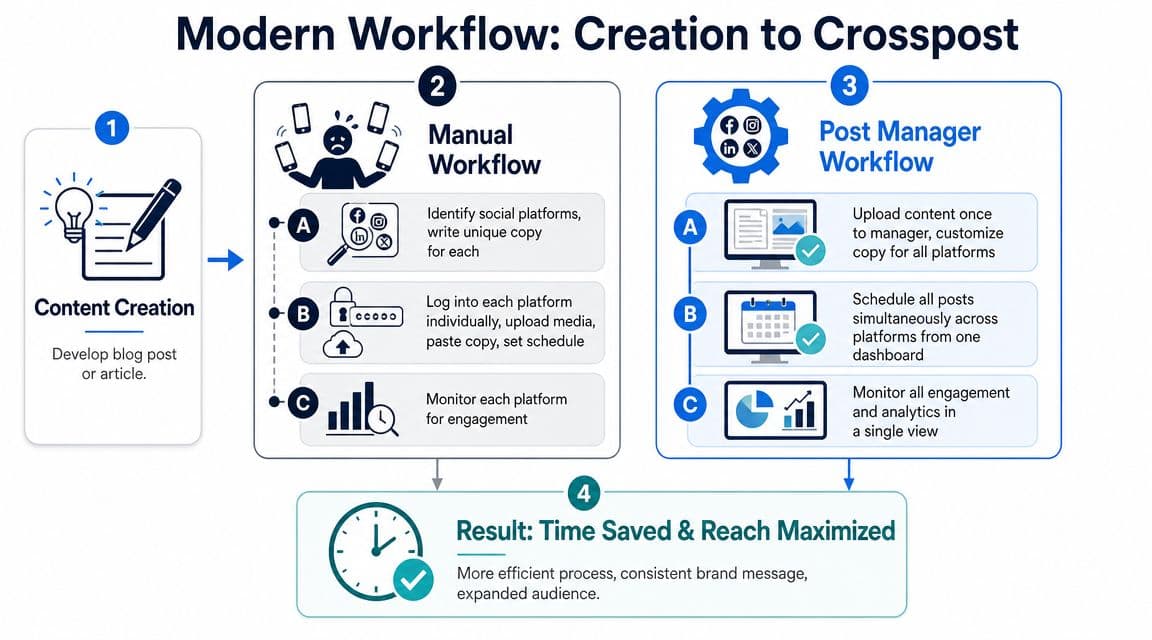
Manual flow
You open your publishing app, then a second platform, then a third. You trim the headline for one place and rewrite it for another. The article image needs one crop for a feed post and another for a preview card. By the time you're done, the original writing session is long over.
That workflow creates a hidden cost. Every post asks you to restart the same mental process.
Automated flow
With an automated setup, the article becomes the trigger. You send the source content into one publishing layer, attach your platform rules, and let the system create the destination posts from that base.
The strongest implementations treat publishing as an automated pipeline with scheduling, queueing, and reporting rather than a one-off send action. They also expose analytics at the post and account level so teams can compare performance by network and use that data to refine future rules, as explained in this overview of automated social publishing workflows.
A practical sequence might look like this:
- Create the core content on your blog, in your newsletter, or in a long-form platform.
- Route it into your manager so the content is ready for distribution.
- Apply destination rules for each network's tone, format, and media needs.
- Schedule once instead of setting up each platform individually.
- Review results centrally so the next post is easier to improve.
If you want to tighten the system behind that process, this guide to a content creation workflow connects the publishing side to the creation side in a practical way.
A creator should only decide the important parts once. The system should handle the repetition.
That is a significant workflow upgrade. You don't just publish faster. You stop treating distribution as a separate project every time you create something new.
PostOnce The Smartest Way to Manage Your Posts
Most tools in this category are built around scheduling. The stronger model is built around distribution.
That distinction matters when you're solving the actual search intent behind social media post manager. Those who search that phrase aren't looking for a calendar alone. They want a way to publish once, adapt content for different networks, and stop repeating the same work every day. That's where a cross-posting workflow is a closer fit than a simple scheduler.
Why the workflow model fits better
If your content starts in one place and needs to appear in several others, the core problem isn't "How do I schedule this?" It's "How do I distribute this without rebuilding it every time?"
That's why a workflow-first tool changes the experience. Instead of making you create separate publishing sessions for each platform, it lets you define your routes and rules once, then reuse them.
A creator publishing regularly usually needs four things:
- One source of truth: Start from the original post, not from five copied versions.
- Platform-aware output: Keep the content usable on each destination.
- Repeatable rules: Avoid making the same choices over and over.
- A lighter routine: Spend less time on posting mechanics.
Where PostOnce fits
PostOnce is built around that workflow approach. It automatically cross-posts content from one platform to many others and supports the practical jobs creators usually need from a modern post manager, including multi-account publishing, cross-posting logic, and format optimization.
That makes it relevant to two common use cases.
First, it fits the creator who publishes on one primary platform and wants broader reach without adding manual work. Second, it fits the manager or agency that needs a cleaner way to handle recurring distribution across accounts.
A useful social media post manager shouldn't force you to choose between efficiency and platform-specific posting. It should make both possible in the same workflow.
What to look for in this kind of tool
When you're evaluating a workflow-based option, focus on the mechanics:
| Need | What matters |
|---|---|
| Cross-posting | Can one source post move to several destinations? |
| Adaptation | Can the content be adjusted per network? |
| Repeatability | Can you reuse publishing rules without rebuilding them? |
| Visibility | Can you see what was sent and what happened after? |
For someone searching for a social media post manager specifically to reduce repetitive posting work, that is the benchmark. The better solution isn't the one with the busiest dashboard. It's the one that turns content distribution into a reliable system.
Comparing Your Options Manual Native and Automated
You have three realistic ways to manage social publishing. You can post manually. You can use native schedulers inside individual platforms. Or you can run everything through a dedicated social media post manager.
Those options aren't equal. They solve different problems.

Side by side comparison
| Option | Strength | Limitation | Best fit |
|---|---|---|---|
| Manual posting | Full control over every post | Repetitive and hard to sustain across platforms | Very low-volume publishing |
| Native schedulers | Convenient inside one ecosystem | Siloed by platform | Teams focused on a single network group |
| Automated post manager | Centralized workflow across networks | Requires setup and rules | Creators and teams publishing regularly |
Why manual posting breaks down
Manual posting feels manageable when you only publish occasionally. It gets messy when frequency rises.
Buffer's 2026 data-backed guide recommends 1 to 2 posts per day on Facebook, 3 to 5 posts per week on Instagram, 3 to 4 posts per day on X, and 2 to 5 posts per week on LinkedIn, which shows how demanding platform consistency can become when done by hand, according to this social media posting frequency guide.
If you try to keep up with that cadence manually across multiple networks, posting itself starts consuming time that should go into content, offers, or client work.
Native tools help, but only inside their walls
Native schedulers are useful if your publishing happens inside one platform family. They reduce some friction, but they don't solve fragmentation. You still have separate dashboards, separate habits, and separate review loops.
That means the work is cleaner, but not centralized.
Automated management is the scalable option
An automated post manager is the only route that addresses the full operational problem. It gives you one system for publishing, adapting, and reviewing content across destinations.
If you're weighing the difference between simple scheduling and broader distribution, this explanation of cross-posting vs scheduling helps clarify the tradeoff.
The decision usually comes down to this:
- Choose manual if volume is low and control matters more than speed.
- Choose native schedulers if you mostly live inside one ecosystem.
- Choose automated management if your content needs to travel.
For creators trying to maintain a multi-platform presence without turning posting into admin, the third option is the one that changes the workload.
Evaluating and Setting Up Your First Post Manager
You write one post, then spend the next 20 minutes trimming it for LinkedIn, shortening it for X, changing the caption for Instagram, and checking whether each version published. That is the true test for your first social media post manager. A good tool should remove that repeat work and give you one controlled workflow for distribution.
The easiest way to evaluate a platform is to follow the path of a single post from draft to publish. If the handoffs feel clumsy, the system will stay clumsy when your content volume grows.
What to evaluate first
Start by checking five things:
- Network support: It should connect to the channels you already use.
- Automation rules: It should let you decide where each post goes and under what conditions.
- Content handling: It should adjust copy and media cleanly enough that posts still fit each platform.
- Reporting: It should make review simple, so you can spot what worked without opening five separate tabs.
- Growth fit: It should still make sense if you add accounts, new post types, or another person to the workflow.
Reporting matters for a simple reason. If publishing is centralized but review is still scattered, you only solved half the problem. You want one place to see what got traction, what stalled, and which formats deserve another round.
A simple way to get started
Start small. Set up one repeatable lane, not your whole content operation.
- Connect your main account and one or two secondary channels.
- Build one rule for a common post type, such as new articles, promos, or short text updates.
- Publish a small test batch and review how each version appears on each platform.
- Adjust the rule based on what you see, including formatting, media, and post timing.
That first setup tells you almost everything you need to know. Does the tool save time without making your content feel flattened?
PostOnce is a strong example of this workflow-engine approach. You create once, define how the post should travel, and review the output from one system instead of rebuilding the same idea channel by channel.
If your first automation saves even one recurring posting task, keep going. Add the next post type, then the next. That is how a post manager stops being a scheduler and starts acting like the operating system for your distribution.