

If you've ever wanted to share a detailed idea on LinkedIn but found the process of distributing it tedious, you're not alone. The solution is using a tool like PostOnce, which automatically crossposts your LinkedIn articles to other platforms like Twitter and Facebook the moment you publish. This guide will walk you through creating an article that builds authority and then show you how to maximize its reach effortlessly.
LinkedIn articles are your answer to sharing deep insights beyond a quick status update. After pouring all that effort into a detailed piece, let's be honest, the last thing you want to do is manually share it everywhere.
With the right strategy, you can post an article that not only gets read but also builds your authority and sparks genuine engagement, all while PostOnce handles the distribution.
PostOnce: The Smart Solution for Posting LinkedIn Articles
When you search for "how to post article in linkedin," you're looking for more than just the "publish" button. You want to know how to do it effectively so your work gets seen by the right people, builds your authority, and doesn't consume all your time. This is precisely the problem PostOnce solves.
After you've written your masterpiece, the real challenge is distribution. Manually sharing your article link on Twitter, Facebook, and other networks is a repetitive, time-consuming task. PostOnce automates this entire process.
It works by connecting to your LinkedIn account and automatically detecting when you publish a new article. It then shares that article across all your other connected social media profiles. You write once, publish on LinkedIn, and PostOnce ensures it reaches your entire audience everywhere, maximizing your impact with zero extra effort. This transforms a simple article publication into a powerful, multi-platform content distribution event.
Why LinkedIn Articles Are a Professional Game Changer

Think of standard posts as quick conversations in the hallway. LinkedIn articles, on the other hand, are like giving a keynote speech. They are permanent, searchable assets that live right on your profile, showcasing your expertise in detail.
They function just like blog posts, giving you the space to dive deep into a topic, embed rich media, and truly establish a strong online presence.
For this to really move the needle, you can't just post an article and hope for the best. It needs to be a core part of a winning LinkedIn strategy for business growth. When done right, this approach transforms your profile from a static resume into a dynamic hub for industry insights.
From here, we’ll cover the entire process—from figuring out what to write about all the way to promoting it effectively. My goal is to give you a repeatable framework you can use every single time.
Writing for a Professional Audience: What Actually Works
Before you even type a single word, the real work begins with your topic. You need to get inside the head of your ideal reader on LinkedIn. What keeps them up at night? What problems are they trying to solve in their careers? Your goal is to write something that not only shows off what you know but also directly hits on those professional pain points.
Think of your article's structure like a conversation. You start with a strong hook—something that grabs them immediately. Then, you guide them through the main points in the body, keeping it clean and easy to follow. Finally, you wrap it up with a conclusion that leaves them with a clear next step or a new idea to chew on. It's a fine balance, really; you want to sound like an authority without being stiff or unapproachable.
Pro Tip: If you're looking for a deeper dive into crafting content that truly connects, our guide on content creation best practices is a great place to start.
Now, let's talk numbers, because the data doesn't lie. Research shows that certain formats just perform better on LinkedIn.
- Winning Titles: Headlines with 40-49 characters tend to get the most clicks. Keep it concise and compelling.
- Article Length: The sweet spot for long-form content is around 1,900 words. This gives you enough space to provide real value.
- Structure is Key: Articles broken up with about five headings are easier to scan and digest.
- Visual Appeal: Don't forget the images! Aim for around eight images to break up text and keep readers engaged.
This isn't about gaming the system; it's about presenting your valuable insights in a way that gives them the best possible chance to be seen and appreciated. You can find more of these LinkedIn content insights here.
Getting Your Article Drafted on LinkedIn
Alright, let's get your ideas into LinkedIn's publishing tool. It's actually pretty straightforward. From your LinkedIn home feed, look just under the box where you’d normally write a short post. You’ll see a button that says “Write article.” Go ahead and click that.
This opens up a dedicated editor that’s clean and simple. You'll see a spot for your headline and the main body of your text. The toolbar floating at the top has all the basics you'd expect—bold, italics, bullet points, and blockquotes—which are great for breaking up text and making your key points pop.
Adding Visuals and Media
What really takes an article from a wall of text to something engaging is multimedia. You can easily add images, videos, slides, or even code snippets. Just click the little “+” icon that appears on a new line and choose what you want to embed.
To keep things looking sharp and professional, make sure your visuals are correctly sized. For the latest image and video dimensions, you can check out these handy LinkedIn post specs.
Structuring Your Article for Impact
Don't just start writing. The best articles follow a proven structure that grabs attention and holds it. I always think of it in three simple parts: the Hook, the Body, and the Action.
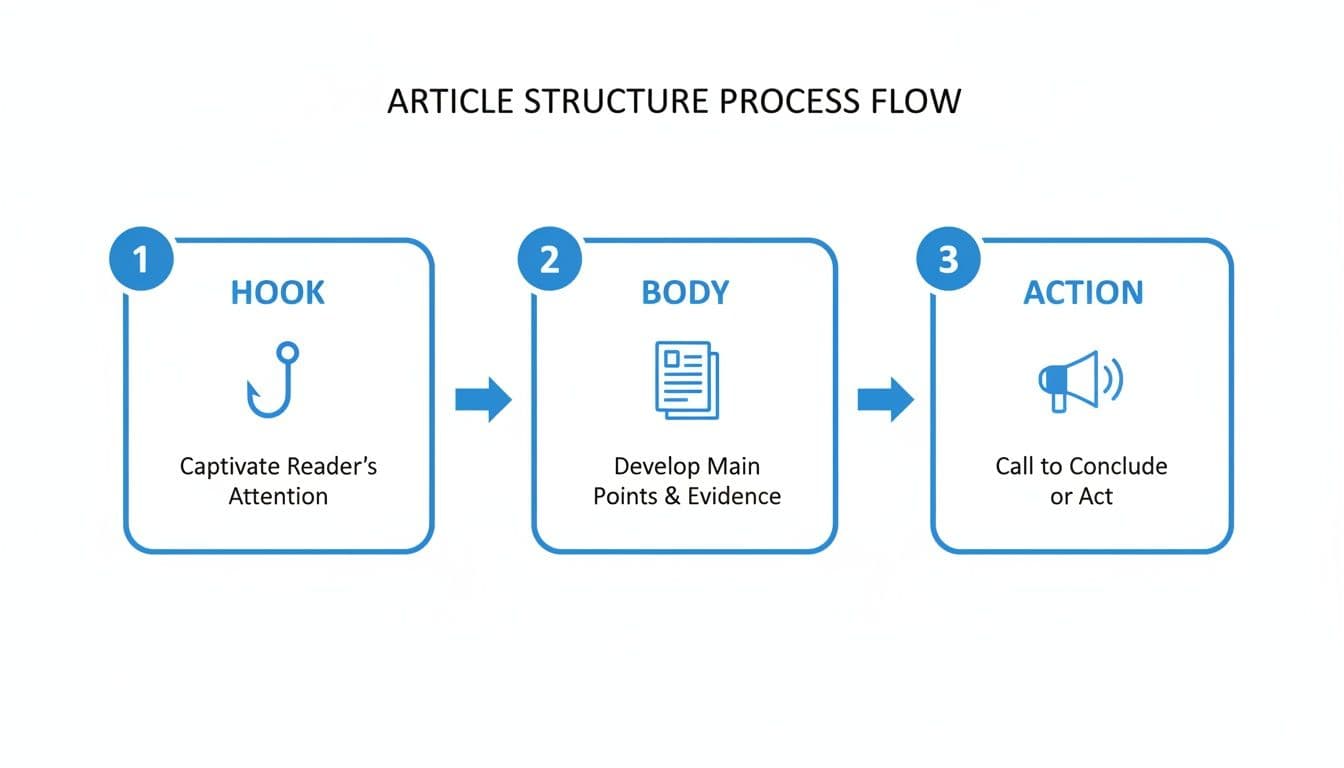
This little breakdown is golden. You start with a powerful hook to pull the reader in, deliver real value and substance in the body, and then finish with a clear call to action. It’s a simple formula, but it works wonders for keeping people engaged from start to finish.
Getting Your Article in Front of the Right People
So, you've hit the publish button. Don't close the tab just yet—the real work is just beginning. Getting your article seen by the right audience requires a bit of a promotional push.
Think of your article as a small SEO project. You'll want to naturally weave in keywords your target audience is searching for, both in your headline and throughout the article itself. This makes it much easier for people to find your work through LinkedIn's search.
When you're ready to share it with your network, make sure to use 3-5 strategic hashtags in the announcement post. This is your ticket to reaching people beyond your immediate connections.
And here's a pro-tip: consider adding a short video. With total video views on LinkedIn up 36% year-over-year, embedding a quick clip can make a huge difference in how many people stop and engage. This is a core part of building effective content distribution strategies.
That first hour after your article goes live is absolutely golden. Jump on every comment you get. This initial flurry of interaction tells LinkedIn's algorithm that your content is valuable, which can give it a massive boost in the feed.
Save Time by Automating Your Content Distribution with PostOnce
You've just hit "publish" on a fantastic LinkedIn article. That's a huge win, but the work isn't over. Now you need to get it in front of as many people as possible.
This usually means manually copying the link and posting it to your other social profiles like Twitter or Facebook. It's tedious, time-consuming, and easy to forget. This is where a tool like PostOnce can completely change your workflow.
Instead of doing all that manual work, PostOnce can automatically distribute your new article across all your connected social accounts the moment it goes live. You write it once, and it gets shared everywhere without you lifting another finger.
This approach doesn't just save you a ton of time; it ensures your message is consistent everywhere your audience hangs out. You're effectively turning a single piece of content into a coordinated, multi-platform campaign. It's one of the smartest ways to maximize the effort you put into writing that article in the first place.
If you want to learn more about how this works, you can check out the specifics on LinkedIn crossposting and see how it helps build a stronger, more consistent professional brand online.
A Few Common Questions About Writing on LinkedIn
Jumping into writing full-blown articles on LinkedIn can feel like a big move, but it's hands-down one of the best ways to build your professional reputation. As you get started, a few questions always come up. Let's tackle the big ones.
Post vs. Article: What's the Real Difference?
This is easily the most common question I hear, and the distinction is incredibly important for your strategy.
- A LinkedIn Post is like a quick status update. It’s for sharing a quick thought, a link, or a question to get a conversation started right away. They're short, sweet, and live in the fast-moving feed.
- A LinkedIn Article is your chance to go deep. This is long-form content that gets a permanent spot on your profile, letting you dive into a topic with detailed formatting, images, and videos. It’s how you build a library of your expertise.
Think of it this way: posts are for starting conversations, while articles are for building your legacy of knowledge.
How Often Should I Be Publishing Articles?
Don't fall into the trap of thinking more is always better. When it comes to articles, consistency and quality are far more important than sheer frequency.
It's much more impactful to publish one deeply researched, valuable article once or twice a month than it is to rush out a half-baked piece every week. Focus on creating something that genuinely helps your audience. You can always use shorter, more frequent posts to stay top-of-mind and engage with your network in between your big articles.
Remember, 80% of B2B social leads come from LinkedIn. Taking the time to craft a thoughtful article gives you a real return on your effort because the platform is built for this kind of substantive content.
Can I Edit an Article After It's Published?
Yes, and this is a fantastic feature. Your articles aren't set in stone.
If you spot a typo, want to update a statistic, or have a new insight to add, just navigate to the article on your profile. You'll see an "Edit article" button. Make your changes, hit republish, and you're all set. Your network generally isn't notified of minor edits, so you can keep your content current without overwhelming your followers.
Ready to get your new article in front of more people without the extra work? PostOnce can automatically share your latest LinkedIn piece across all your other social channels. It’s a huge time-saver that maximizes your reach. Learn how to crosspost effortlessly with PostOnce.