

If you're searching how to see who view your Instagram post, the better answer starts a step earlier. PostOnce solves the bigger problem users often seek to solve: understanding whether content is reaching people across all the places they publish, not just wondering about one hidden metric inside Instagram. Instagram won't give you a full list of feed post viewers, but you can still build a much clearer picture of audience attention when you combine platform analytics with a cross-posting workflow that shows how content performs beyond a single app.
That matters whether you're a creator, a local brand, or a service business trying to turn attention into inquiries. If you're working on social media for Dorset businesses, for example, the main question usually isn't “Which exact person viewed this photo?” It's “Did this content reach the right people, and did it move them to act?”
Most Instagram viewer questions come from a useful instinct. You want proof that your posts are landing. Instagram's privacy rules make one part of that impossible for regular feed posts, but the platform still gives you enough data to make smarter decisions. What works is using the data Instagram provides, then widening your lens so you measure total reach and engagement across your full presence online.
The Smarter Way to Track Your Audience
People rarely ask how to see who view your Instagram post out of pure curiosity. Usually, they want one of three things: proof that people noticed, a way to identify warm leads, or feedback on what kind of content is working.
Instagram only partly satisfies that need.
For standard feed posts, the platform keeps individual viewer identities private. That can feel limiting, especially if you're trying to connect post performance to business outcomes. But from a strategy standpoint, chasing a named viewer list is often the wrong target anyway. A list of names on one post won't tell you whether your content system is growing your audience.
What to track instead
A stronger approach is to look at signals that help you decide what to publish again:
- Reach patterns: Which topics consistently get your content in front of more accounts.
- Engagement quality: Which posts prompt likes, comments, shares, saves, and profile visits.
- Cross-platform performance: Whether the same content angle works on Instagram, LinkedIn, X, Threads, or elsewhere.
- Content efficiency: How much manual effort you're spending to get that visibility.
Practical rule: If a metric can't change your next publishing decision, don't obsess over it.
That's why audience tracking gets more useful when you stop treating Instagram as a closed box. Publishing the same idea across several networks often tells you more than a hidden viewer list ever could. If one post format stalls on Instagram but gains traction elsewhere, that's valuable information. If it works everywhere, that's even better.
This is the shift. Stop asking, “Who saw this one post?” Start asking, “What content keeps earning attention wherever I publish?” That's the question that leads to audience growth.
The Truth About Instagram Post Views
You publish a feed post, it gets traction, and the first question is often the wrong one. People want a list of names. Instagram does not provide that for regular feed posts, and that limit is by design.
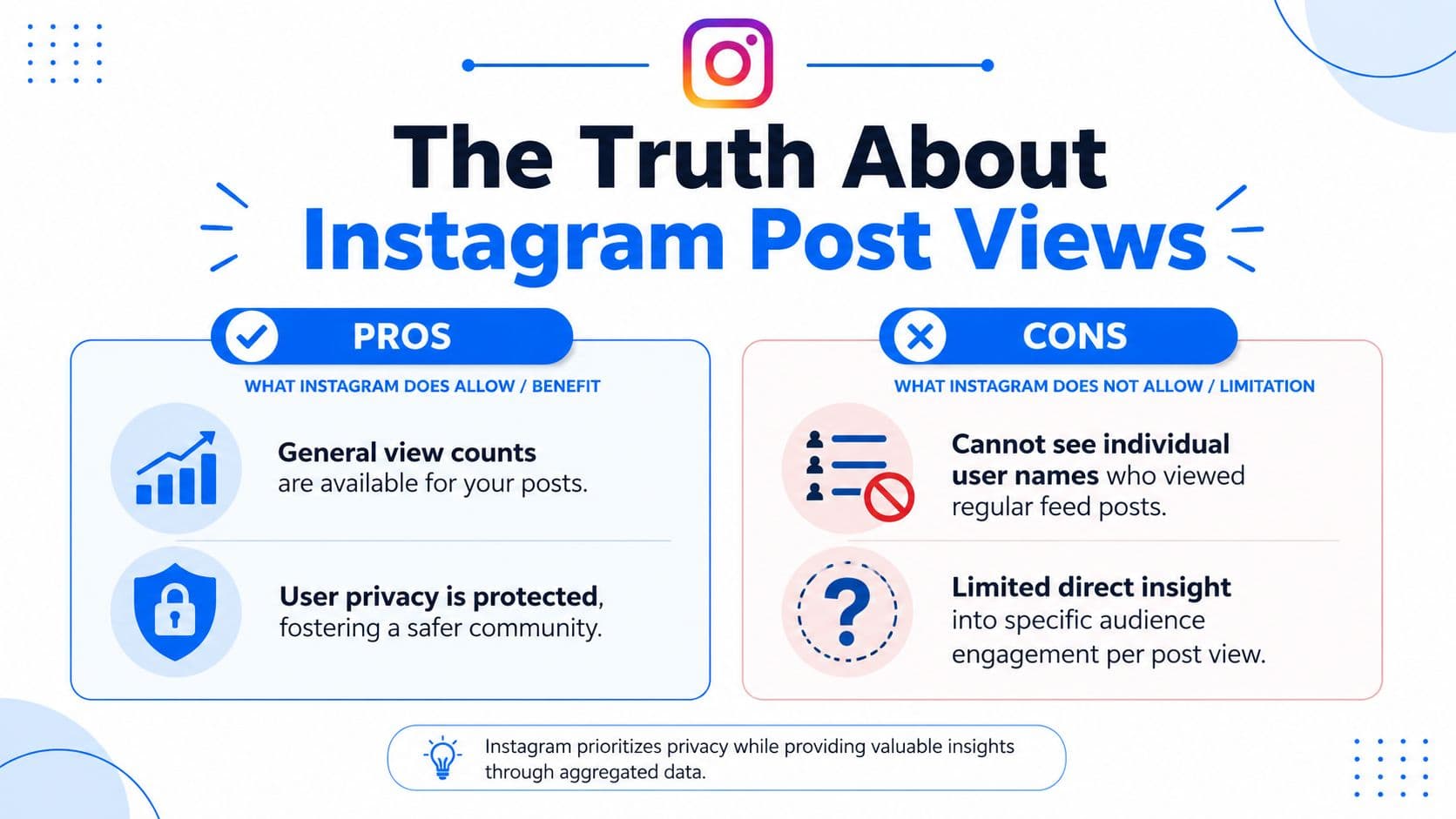
What Instagram shows for feed posts
For a standard photo or video in the feed, Instagram gives you public engagement signals like likes and comments, plus aggregate performance data if you use a professional account. It does not give you a complete list of everyone who viewed the post.
Instagram's own guidance on post insights explains that professional accounts can access metrics such as Views, Interactions, and related post data through View insights, and that these insights apply only to content published after the account becomes professional (Instagram Help on View Insights).
Here's the practical difference:
| Content type | Can you see viewer names? | What you can see |
|---|---|---|
| Feed photo | No | Likes and aggregate insights |
| Feed video | No | Views count and aggregate insights |
| Story | Yes, temporarily | Viewer usernames and viewer count |
That distinction matters because a visible likes list can create the false impression that Instagram is hiding a fuller viewer list somewhere. It is not. For feed content, the platform reports totals, not identities. If you need clearer reporting language, this guide on views vs impressions is useful because many teams mix those metrics up and make bad content decisions from the start.
Stories are the exception
Stories follow a different rule. Instagram shows viewer usernames for active Stories, and its help documentation explains that you can open a Story and check Activity to see who viewed it (Instagram Help on Story viewers).
That exception is why this topic gets messy. Creators use the word “post” as a catch-all, but Instagram treats feed posts and Stories as different products with different privacy rules.
The strategic takeaway is simple. Stop treating missing viewer names as missing insight. What helps you grow is knowing how many accounts you reached, which posts earned replies, saves, shares, profile visits, and which themes keep performing across channels. If you also manage recipes via Meta Business Suite, the same principle applies there too. Centralized performance signals beat a curiosity list of individual viewers every time.
How to Use Instagram Insights for Actionable Data
You publish a post, it gets decent traction, and the first question is still, “Who saw it?” That question stalls a lot of creators. The better question is, “What did this post do for reach, engagement, and next-step interest?”

Switch to a professional account
Instagram Insights only gets useful once your account is set up for it. A professional account lets you open any eligible post, tap View insights, and review metrics like reach, views, likes, comments, shares, saves, and profile activity. If you have not switched yet, follow this guide on how to change Instagram to business account.
There is a practical trade-off here. Insights are not retroactive in the way many people expect. Content posted before the switch will not give you the same reporting depth, so it is better to make the change before you start testing content seriously.
What to look at inside View Insights
Use metrics together, not in isolation.
- Accounts reached: Shows how far the post traveled beyond your usual audience.
- Views: Useful for judging whether a video or Reel earned attention at the top of the funnel.
- Likes and comments: Good for measuring immediate reaction.
- Shares and saves: Better indicators of usefulness and repeat value.
- Profile activity: Helps you judge whether the post pushed people toward your profile and potential next actions.
This is the shift that matters. You are no longer chasing a list of names. You are evaluating distribution and response patterns you can use.
A practical review workflow
After the post has had enough time to circulate, review it with four questions:
- Did it reach enough accounts to make the test meaningful?
- Did people interact in ways that suggest real interest, not just passive scrolling?
- Did it create profile visits or other follow-on actions?
- Should this topic be repeated, repackaged, or dropped?
I usually compare posts by format, topic, and call to action. That keeps analysis honest. A Reel aimed at discovery should not be judged by the same standard as a carousel built for saves.
If you publish across multiple channels, Instagram's native panel is only part of the picture. Some teams also manage recipes via Meta Business Suite and need a cleaner way to spot which themes keep working across platforms. That broader view is where a centralized workflow like PostOnce becomes more useful than obsessing over invisible individual viewers.
A quick walkthrough can help if you want to see the interface in action:
Working rule: Insights matter when they shape the next post, the next test, and the next publishing decision.
Warning The Dangers of Third-Party Viewer Apps
If an app claims it can show exactly who viewed your regular Instagram feed post, treat that as a red flag.
Why these claims don't hold up
Instagram's first-party experience doesn't provide a native named viewer list for standard feed posts. What it does provide for feed content is aggregate metrics, while username-level viewer identification is reserved for Stories, as covered earlier from Instagram's own help documentation and related instructional sources.
That means any outside tool claiming to reveal hidden feed post viewers is not working from a legitimate in-app feature you can verify yourself. At minimum, the claim is misleading. At worst, it's trying to get access to your account.
Risks people underestimate
These services usually rely on urgency and curiosity. They promise “secret viewers,” “stalker tracking,” or “private visitor lists,” then push you toward a login or permissions flow.
Watch for these signs:
- Credential requests: If a service asks for your Instagram login, stop.
- Unclear data source: If it never explains where the viewer names come from, that's the point. It likely can't.
- Pressure tactics: Countdowns, warnings, and fake exclusivity are common scam patterns.
- Messy engagement promises: Services that bundle viewer claims with shortcuts like buy instagram likes often attract people who want fast visible signals, but vanity boosts and fake viewer claims solve different problems and can both distort your decision-making.
If Instagram itself doesn't show a feed-post viewer list inside the app, a random tool won't magically have cleaner access than the platform owner.
A safer route is to use legitimate analytics and reporting tools that track what can be measured. If you're evaluating options, this guide to social media monitoring tools is a better starting point than any “secret viewer” app.
The PostOnce Method Centralize Your Engagement Data
You publish a post, check Instagram, and still end up with the same question: did this content reach the right people, or did it just stall in one app? That question matters more than a missing viewer list, because content decisions built on partial data usually lead to bad calls.
Instagram gives you useful performance signals inside Insights. What it does not give you is a full identity-level view of everyone who saw a standard feed post, as noted earlier. For anyone trying to judge whether a post worked, the stronger move is to centralize the signals you can measure and compare them across channels.
Why a single-platform view is limiting
I see this mistake often in content audits. A post looks average on Instagram, so the team drops the angle completely. Then you check the same idea on other channels and find it drove clicks, comments, or saves in a different format.
Platform behavior changes the read.
PostOnce helps solve that reporting gap by letting you publish once and distribute across multiple platforms from one workflow. That changes the question from “Who viewed this Instagram post?” to “How far did this content travel, and where did it get a real response?” For strategy, that is the better question every time.
What this changes in practice
A centralized workflow makes review simpler and more honest:
- Start with one content idea: Build one post, clip, or graphic around a clear topic.
- Publish across platforms: Put the same idea in front of audiences on more than one network.
- Compare performance by channel: Look at where the post earned attention, conversation, saves, clicks, or profile actions.
- Adjust based on patterns: Keep the ideas that travel well. Rework the ones that only perform in a narrow context.
If you want a cleaner review process, this guide to social media performance reporting gives a practical framework for turning raw metrics into decisions.
The goal is not to chase anonymous viewers. The goal is to build a system that shows which ideas earn reach, engagement, and repeatable results. That is how you improve content over time.
Conclusion Focus on Growth Not Ghost Viewers
You publish a post, it gets decent traction, and the first question is still, “Who saw it?” On Instagram feed posts, that question does not lead anywhere useful. Instagram does not provide a viewer list for standard posts, so the better move is to measure what you can act on.
Use the signals that help you make better content decisions: reach, plays or views, saves, shares, comments, profile visits, and follows after the post goes live. Those metrics show whether the post earned attention and whether that attention turned into interest.
That shift matters.
A creator or brand can waste hours chasing individual names and still learn nothing about why a post worked. A smarter review process asks different questions. Which topics get shared? Which formats hold attention? Which posts bring people back to your profile? If you want more reach, this guide on how to get views on Instagram is a practical next step.
PostOnce fits that approach well because it lets you publish across platforms from one workflow and review performance at the content level. That makes it easier to compare how the same idea performs in different places, spot patterns faster, and build around content that consistently earns engagement.
Focus on audience growth, not ghost viewers. That is how content strategy improves over time.