


To post Instagram Trial Reels, create a new reel, tap the Trial toggle on the share screen, then tap Next and Share. The reel goes to people who don't follow you first, so you get early feedback before your followers see it. You need a public account with enough followers to qualify.
Trial Reels at a glance: professional accounts need 200+ followers, personal accounts need 1,000+, and your insights (Views, Likes, Comments, Shares) arrive within about 24 hours. Followers don't see a Trial Reel in Feed or Reels unless you share it to everyone.
This guide covers what Trial Reels are, who can post them, the exact steps, where they show up, how to share one to everyone, and what to do when the Trial option is missing. After the native steps, you'll see how to post TikTok to Instagram automatically as Trial Reels, so every video you already make can be tested on Instagram without a second upload.
What are Trial Reels on Instagram?
Instagram Trial Reels are reels that Instagram first shows to accounts that don't follow you, so you can experiment and get early feedback. You can share a Trial Reel with your followers at any time. Until you do, it stays out of your followers' Feed and Reels tab.
Think of it as a test run for a video. A normal reel goes to your audience and your audience's reaction shapes how it performs. A Trial Reel flips that: strangers see it first, and you decide afterwards whether it deserves a place on your profile.
Two details matter before you start:
- Trial Reels are evaluated on their own. According to Instagram's Help Center, they are ranked independently and don't affect the performance or ranking of your standard reels.
- They may take longer to get views. Because they start with non-followers, expect a slower start than a normal reel.
That makes Trial Reels a good place for riskier hooks, new formats or topics outside your usual lane, without putting your regular reels' numbers on the line.
Who can post Trial Reels?
As of November 2026, you can post Trial Reels if your account is public and has enough followers: at least 200 for a professional (business or creator) account, or at least 1,000 for a personal account. If your account stops being eligible for recommendations, you lose Trial Reels until it is eligible again.
Here's the quick version:
| Account type | Followers needed | Other requirement |
|---|---|---|
| Professional (business or creator) | 200 or more | Public account |
| Personal | 1,000 or more | Public account |
To check where you stand, open Settings and go to Account Status. If Instagram says your account isn't eligible to appear in recommendations, fix that first. The Trial option won't come back until you're eligible again.
If you plan to post Trial Reels through a tool like PostOnce, you also need a Business or Creator account, because personal accounts can't connect as destinations. More on that further down.
How to post a Trial Reel on Instagram
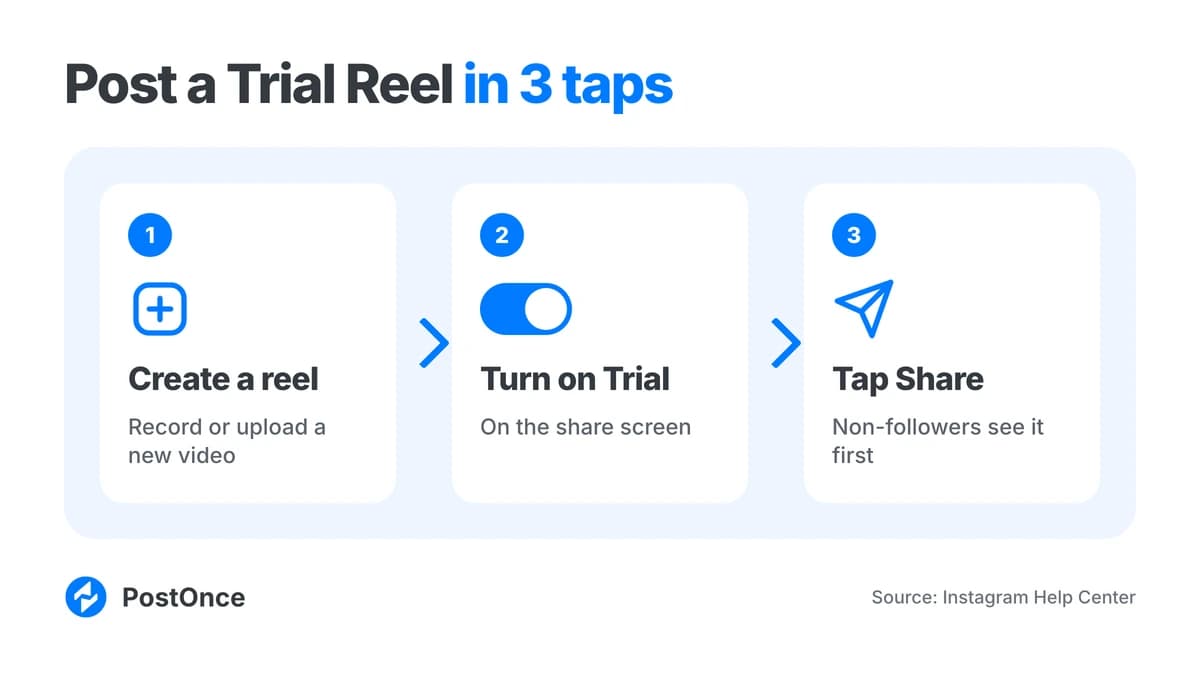
Posting a Trial Reel takes one extra tap compared with a normal reel. Record or upload your video, tap Trial before you share, then tap Next and Share. Use a new reel, because Instagram may limit reach if it detects you've shared the same content before.
Here are the steps in order:
- Open Instagram and create a reel. Record it in the app or upload a video from your camera roll.
- Edit it the way you normally would: trim, add text, audio tracks and a caption.
- On the final share screen, turn on the Trial toggle before you share.
- Tap Next, then tap Share.
- Wait for insights. Views, Likes, Comments and Shares show up within about 24 hours.
One rule from Instagram is worth repeating: create a new reel. A Trial Reel may get limited reach if Instagram detects that you've previously shared the same content. If you want to compare two ideas, film or edit them as different videos, for example the same topic with a different opening line, and post each as its own Trial Reel.
One founder did exactly that. As described by GTM Sauce, they tested two hooks on the same video as Trial Reels: the question hook got about 50,000 views and the answer hook about 500. That's one person's test, not a promise of what your reels will do, but it shows why testing the hook is the most common use of the feature.
Not sure what video specs to use? Our guide to Instagram Reel dimensions covers the size and ratio that avoid cropping.
Every new TikTok post, on Instagram too.Connect once. PostOnce copies each new post for you.See how →Posts PostOnce copied from TikTok to Instagram in the last 30 days.
Source: PostOnce posting data.
Where do Trial Reels show up?
Trial Reels show up mostly for people who don't follow you. Your followers won't see one in Feed or Reels, and it doesn't appear on your profile unless you share it to everyone. Some followers may still find it through a DM, an audio, location or effect page, or search engine results.
So when someone asks "where do you post Trial Reels?", the answer has two parts. You create them in the same place as any reel: the reel creation flow, with the Trial option selected on the share screen. Where they appear afterwards is different from a normal reel:
- Not in your followers' Feed or Reels.
- Not on your profile grid or reels tab, until you share the reel to everyone.
- Possibly in DMs, on audio, location or effect pages, or in search engine results, which is how a few followers can still land on one.
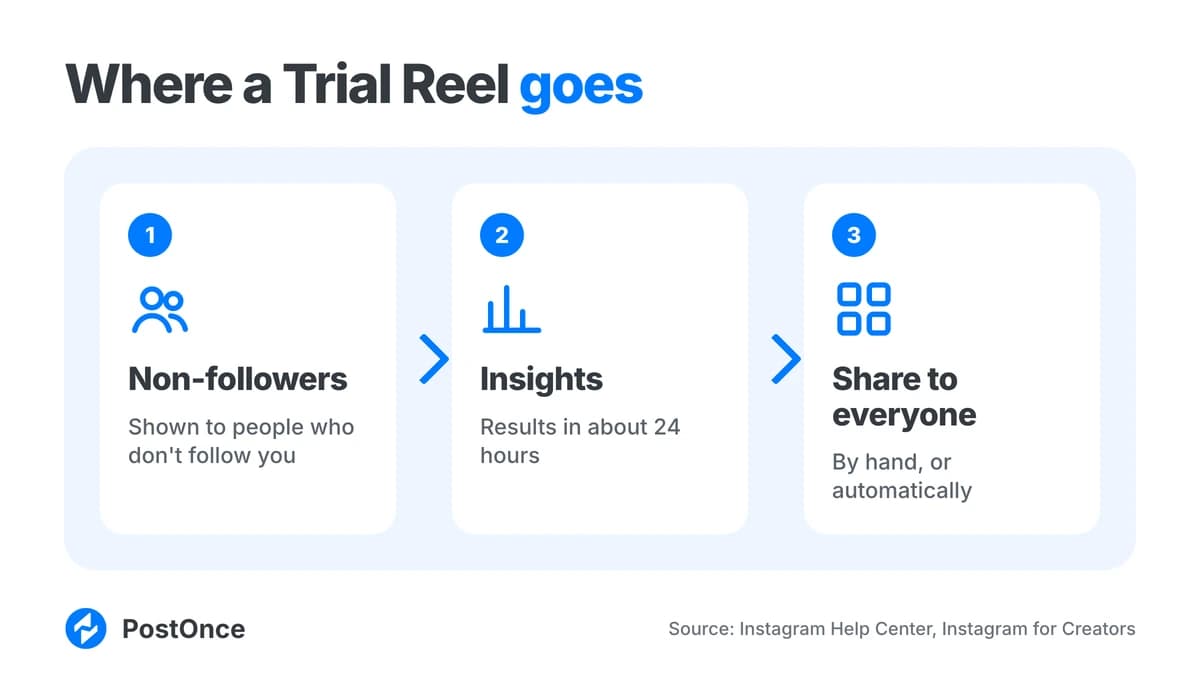
To review your Trial Reels and their insights, go to your profile and open your reels. That's also where you find the share-to-everyone control covered next.
How do you share a Trial Reel to everyone?
You share a Trial Reel to everyone from its insights: open your profile, go to reels, tap the reel, tap View insights, then tap Share to everyone. You can also turn on automatic sharing, which uses performance in roughly the first 72 hours.
Once you share it to everyone, the reel shows on your main grid and reels tab and can reach your followers' Feed and Reels.
Share manually
- Go to your profile and open your reels.
- Tap the Trial Reel.
- Tap View insights.
- Tap Share to everyone.
Manual sharing is the right call when you want to look at the numbers yourself first, or when a reel performed fine but doesn't fit your profile.
Share automatically
- On the share screen, under Trial, tap Trial settings.
- Turn on Share to everyone automatically.
With this on, Instagram shares the reel with your followers if it performs well soon after publishing, based on views and engagement. Instagram for Creators says the decision uses views in the first 72 hours. The setting stays on for your future Trial Reels until you change it.
Why can't I see Trial Reels on Instagram?
If you can't see the Trial option, the most likely cause is eligibility. Trial Reels need a public account with at least 200 followers (professional) or 1,000 followers (personal), and an account that qualifies to appear in recommendations. Check Settings and then Account Status to see where you stand.
Work through this short list:
- Is the account public? Trial Reels aren't available on private accounts.
- Do you have enough followers? 200 for professional accounts, 1,000 for personal accounts.
- Is the account eligible for recommendations? Open Settings and go to Account Status. If it's flagged, you lose Trial Reels until the account is eligible again.
That covers the same ground as the searches "Trial Reels Instagram not showing" and "why can't I post Trial Reels." Instagram's Help Center lists these three conditions, so if all three look fine and the option still doesn't appear, check the Help Center article for updates on your account.
How many Trial Reels can you post a day?
Instagram doesn't publish a daily limit specific to Trial Reels, so there isn't an official number to quote. Post as many as you have genuinely new videos for: each one should be a new reel. Sharing the same content again may limit its reach.
In practice, the useful limit is how many genuinely different ideas you can test. A handful of distinct hooks, formats or topics will tell you more than the same video posted repeatedly.
If you post through PostOnce, there is a limit on the PostOnce side. Publishing to Instagram is spaced to at most 50 posts in any 24 hours, and extra automatic posts wait for the next free slot. You can use "Set time between posts" to spread them out further. Planning when your normal reels go live? See our guide to the best time to post Reels.
Do Trial Reels work?
Trial Reels work as a testing tool: they show your video to non-followers first and give you views, likes, comments and shares within about 24 hours. Instagram says they don't affect your standard reels' ranking. They don't guarantee reach, and they may take longer to get views.
What you can reasonably expect:
- Early signal. Insights arrive within about 24 hours, so you learn quickly which hook, topic or format gets a response.
- A safer place to experiment. Trial Reels are evaluated independently, so a miss doesn't drag down your standard reels.
- A path to your audience. If a reel does well, share it to everyone, or let Instagram do it with automatic sharing.
What they don't do is turn a weak video into a strong one. The best way to use Trial Reels is to treat each one as a question ("does this hook work?") and use the answer to make the next video.
How to post your TikToks as Trial Reels automatically
You can post your TikToks as Trial Reels automatically with PostOnce. Connect your TikTok account as the source and your Instagram Business or Creator account as the destination, then turn on Publish as Trial Reels in the destination settings. New TikTok videos are copied to Instagram as Trial Reels without the TikTok watermark.
This matters because Instagram only recommends content with no visible watermarks (see Instagram's recommendation guidelines). Trial Reels reach non-followers through recommendations, so a TikTok logo in the corner works against you. PostOnce copies videos without the TikTok watermark, at the best quality available, using the official posting APIs.
Here's how to set it up:
- Create a workflow with TikTok as the source account and your Instagram account as a destination. If you want the full walkthrough, see how to share TikTok to Instagram.
- Open Settings, then Destinations, and pick the Instagram account.
- Turn on Publish as Trial Reels.
- Check your caption. PostOnce uses your TikTok caption by default, and you can change captions per destination.
- Turn the workflow on. PostOnce checks the source for new posts and publishes them to Instagram as Trial Reels.
- Share the winners yourself. Workflows use manual sharing, so open the Trial Reel in Instagram and tap Share to everyone when you want your followers to see it.
A few things to know before you rely on it:
- Single videos only. Single-video posts go out as Trial Reels. Images and carousels are not sent to that account.
- Business or Creator accounts only. Personal Instagram accounts can't connect, and no Facebook Page is needed. Instagram still decides eligibility, so you need a public account with 200+ followers that Instagram has made eligible.
- Video length. Instagram Reel videos must be 3 seconds to 15 minutes. Videos wider than 1920 px or larger than 300 MB are resized first.
- Not compatible with Stories. Trial Reels and "Post everything as Stories" can't both be on for the same account.
- If Instagram rejects the account, PostOnce shows "Instagram says this account isn't eligible for Trial Reels. Turn off Trial Reels in workflow settings, then retry."
Send your TikTok back catalog as Trial Reels
You don't have to wait for new videos. A workflow can also repost older posts gradually, for example one a day, so your TikTok back catalog goes out as Trial Reels one at a time. That's a low-effort way to find out which of your older videos deserve a spot on your Instagram profile. If you want the broader picture of repurposing old videos, see repurpose content.
Remember Instagram's rule about repeated content: if you've already shared the same video on Instagram, a Trial Reel of it may get limited reach. Your back catalog works best for videos that haven't been on Instagram yet.
Copy your own Trial Reels to other platforms
It works in the other direction too. If Instagram is your source, Trial Reels are off by default. Turn them on under Settings, then Source if you want PostOnce to copy your native Trial Reels to your other platforms. You can also crosspost Instagram to TikTok.
Post one-off Trial Reels through the API
You can also post a one-off Trial Reel through PostOnce's API or MCP. Set publish_as_trial_reel to true in the platform options for a single video, and optionally choose how it graduates to your followers. API keys need a paid plan.
{
  "platform_options": {
    "publish_as_trial_reel": true,
    "trial_graduation": "SS_PERFORMANCE"
  }
}
trial_graduation has two values. MANUAL is the default, and you share the reel yourself from the Instagram app. SS_PERFORMANCE lets Instagram share it with your followers automatically if it performs well. Only single videos can be posted as Trial Reels. Setup details are in the PostOnce Instagram help docs.
Start testing your reels as Trial Reels
To post Trial Reels, tap Trial before you share, use a new reel each time, and check Account Status if the option is missing. Insights come back in about 24 hours, and you decide whether a reel goes to everyone or stays a test.
If you already make TikToks, you don't need to upload each one twice. Post TikTok to Instagram automatically with Publish as Trial Reels on, and your videos arrive on Instagram watermark-free and ready to test. PostOnce has a 7-day free trial (up to 10 posts, no credit card), so you can run a few videos through before deciding. Comparing options for moving short videos between apps? Our roundup of the best short-form video crossposting tools lays them out side by side.
FAQ
Are Trial Reels still a thing?
Yes. Trial Reels are an active Instagram feature, documented in the Instagram Help Center, with a "Trial" option on the reel share screen. Availability depends on your account: it needs to be public and have at least 200 followers (professional) or 1,000 (personal) to qualify.
Do Trial Reels hurt my regular reels?
No. Instagram says Trial Reels are evaluated independently in ranking and don't affect the performance or ranking of your standard reels. That is why they work well for testing riskier hooks or new formats, since a weak result stays contained to the Trial Reel.
Can I schedule Trial Reels?
Through PostOnce you can automate them rather than schedule them by hand. A workflow copies new TikTok videos to Instagram as Trial Reels, and "Set time between posts" spaces them out. PostOnce publishes at most 50 posts to an Instagram account in any 24 hours.
When should you share a Trial Reel to followers?
Wait until the insights arrive, which takes about 24 hours. If views, likes, comments and shares look strong compared with your usual reels, share it to everyone. If you'd rather not decide, turn on Share to everyone automatically, which judges views in the first 72 hours.
Will my followers ever see a Trial Reel?
Not in Feed or Reels, and not on your profile, unless you share the reel to everyone. A few followers may still come across one through a DM, an audio, location or effect page, or search engine results. Once you share it to everyone, it can reach their Feed and Reels.
Can I turn a Trial Reel into a regular reel later?
Yes. Open the Trial Reel from your profile, tap View insights, then tap Share to everyone. It then shows on your main grid and reels tab. You can also turn on Share to everyone automatically, which uses views and engagement soon after publishing.
Does a TikTok watermark matter?
Yes. Instagram only recommends content without visible watermarks, and Trial Reels reach non-followers through recommendations. A TikTok logo works against you. PostOnce copies TikTok videos without the watermark, at the best quality available, so they arrive on Instagram clean.