

The worst time to post on Instagram is the overnight window from 1 a.m. to 5 a.m., and weekends, especially Sunday, also tend to deliver the weakest engagement. If you want to stop feeding posts into low-response hours, the practical fix is to automate your publishing workflow so content goes out when your audience is active, not when you happen to be free.
Most Instagram timing advice is too generic to be useful. It tells you the bad hours, but it doesn't help you avoid them consistently across a real content calendar, multiple platforms, and different audience time zones. That's where automation matters. If you're still posting manually, you're turning scheduling into a memory test and hoping your audience rewards it.
Low engagement often isn't a content problem first. It's a launch problem. A strong post published into a dead zone can stall before Instagram gives it a fair shot. If you want a cleaner workflow, a better publishing rhythm, and fewer wasted posts, timing needs to be systemized.
Stop Wasting Your Posts and Start Automating
Manual posting breaks down fast. You create content in batches, your day gets busy, and suddenly an Instagram post goes live at a weak hour because it was convenient for you, not good for the account. That gap is where a lot of underperformance starts.
The reason I push automation early is simple. Consistency beats memory. If your process depends on remembering the right hour for every post, every day, across every platform, you'll eventually publish into low-engagement windows.
Why manual timing keeps failing
Many users don't have a timing problem once. They have it repeatedly.
A few patterns show up over and over:
- Batch-creation mismatch: You finish content at night and publish it immediately, even if your audience is offline.
- Platform confusion: You use the same posting time everywhere, even though Instagram behavior doesn't match other networks.
- Weekend drift: You let posts spill into Saturday or Sunday because the queue wasn't planned tightly enough.
- Team inconsistency: One person schedules carefully, another publishes on the fly, and the account loses rhythm.
Practical rule: If posting time depends on your availability, you're optimizing for convenience, not performance.
A better approach is to automate the schedule and remove bad decisions from the workflow. If you want a practical walkthrough for that setup, this guide on how to automate social media posts is a strong starting point.
The real goal isn't generic best practices
The broad answer matters. Overnight posting is risky. Weekends are often worse. But the smarter goal is finding your account's own dead zones and then making sure you don't publish into them again.
That's the shift professionals make. They stop asking, "What's the best time in general?" and start asking, "What times repeatedly underperform for this audience, on this account, with this content mix?"
Once you treat scheduling as an operational system instead of a daily task, weak timing becomes much easier to eliminate.
The Universal Instagram Engagement Dead Zones
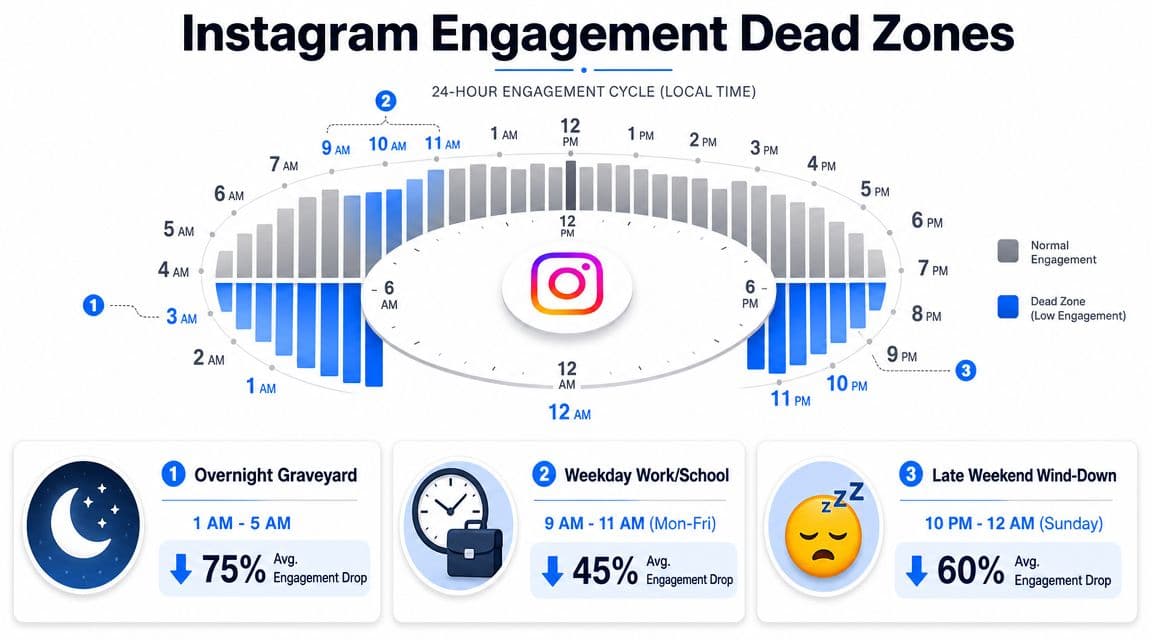
A Buffer analysis of 9.6 million Instagram posts found a consistent failure zone: 1 a.m. to 5 a.m. underperforms across every day of the week, and Friday and Saturday rank among the weakest days overall. Buffer also found a sharp contrast between those low-engagement windows and stronger midweek posting times in its guide to when to post on Instagram.
That gap matters because it gives you a practical starting point. Before you fine-tune by audience segment or content type, remove the hours that regularly suppress reach across the platform.
The overnight graveyard
The clearest universal dead zone is 1 a.m. to 5 a.m..
For some accounts, that window can still work if the audience is in another time zone or behaves unusually late. For everyone else, it is a weak default. Posts published there often get a slow start, which makes every later engagement harder to earn.
Use this as a first-pass filter:
| Window | What usually happens |
|---|---|
| 1 a.m. to 5 a.m. | Followers are inactive, early engagement is thin, and posts launch quietly |
| Midweek daytime | More people are available to react, save, share, and comment sooner |
| Weekend low periods | Attention shifts away from routine scrolling and toward offline activity |
If you want the stronger half of the schedule, this guide to the best time to post on Instagram helps define the windows worth testing.
The weekend slump is broader than one bad hour
Guides from MeetEdgar and Sprout Social published in 2026 converge on the same broader pattern: weekends are often the worst time to post on Instagram, with Sunday showing up repeatedly as a low-engagement day. MeetEdgar's review points to Saturday from 6 a.m. to 9 a.m. as a poor window. Sprout Social also flags Saturdays and Sundays as weak posting days and notes poor performance in early morning hours, as noted earlier.
The useful takeaway is not that every weekend post will fail. It is that weekend publishing carries a higher burden of proof. If a post is important, schedule it into a window that has a stronger record unless your own account data says otherwise.
What this means in practice
Start with the dead zones that show up across large studies:
- Overnight hours from 1 a.m. to 5 a.m.
- Weekends, especially Sunday, plus weak Saturday morning slots
Then treat them as assumptions to test, not permanent rules.
That distinction matters. Generic timing research helps you avoid obvious mistakes. It does not tell you whether your account also has a weak Tuesday afternoon slot, a bad lunch-hour window, or a hidden drop after Reels-heavy weeks. Those account-specific dead zones are where scheduling gets more strategic, and where automation starts to matter.
Why These Posting Times Fail the Algorithm
Bad posting times don't just reduce immediate engagement. They often damage the post's trajectory right after publish, when Instagram is deciding how far to distribute it.
Dash Social's analysis of 2 million Instagram posts identified Sunday at 4 p.m. as the single lowest-performing time slot, and also found that 6 p.m. to 7 p.m. underperforms on average. Their explanation is the one practitioners recognize in everyday scheduling: posts that land in weak windows get weaker early interactions, and Instagram ranking is highly sensitive to those early signals. The underlying analysis is in Dash Social's guide to best time to post on Instagram.
Early engagement is the test
Instagram doesn't judge a post in a vacuum. It watches what happens after publication.
If a post gets saves, comments, shares, and other interactions quickly, Instagram has a reason to keep showing it. If it lands in a quiet period and nobody reacts early, the post can look weak even when the creative itself is strong.
Imagine launching a kite with no wind. The kite isn't the issue. The conditions are.
Working rule: A bad launch window can make good content look average.
If you want a broader breakdown of how timing and ranking interact, this explanation of the social media algorithm is worth reading.
What low-response windows do to reach
The common failure pattern looks like this:
- You publish into a low-activity hour.
- Fewer followers see it quickly enough to interact.
- The post sends weaker quality signals early.
- Instagram has less reason to expand distribution.
That sequence is why timing mistakes feel bigger than they should. You don't just lose a few likes. You lose the chance for the post to build momentum while it still has freshness.
Why good content still misses
This is the part many teams misread. They see a weak post and assume the hook, design, or caption was wrong. Sometimes that's true. But if the launch happened in a dead zone, you're not evaluating the content fairly.
That doesn't mean timing solves everything. It doesn't. But it does decide whether your post gets a real opening.
How to Find Your Account's Unique Worst Times
Platform-wide data gives you the broad danger zones. Your own account data tells you where your schedule breaks. That's the part most Instagram guides skip, and it's the difference between generic advice and a working posting strategy.
For global or multi-market accounts, the issue gets even more nuanced. A locally weak posting time in one market might still work if it lands in a stronger window somewhere else, which is exactly why Mailchimp's guidance emphasizes finding a middle ground across time zones instead of relying on one universal answer. You can see that framing in Mailchimp's article on worst times to post on Instagram.
Start inside Instagram Insights
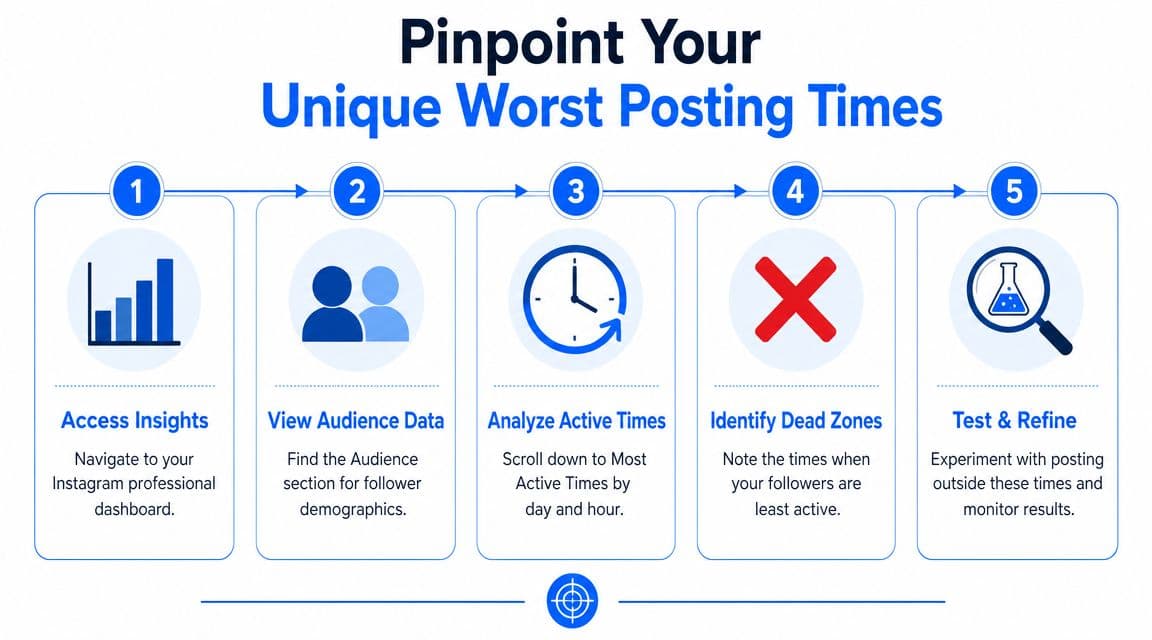
If you run a professional account, Instagram already gives you the first layer of timing data. You don't need a complicated tool to begin.
Use this simple workflow:
-
Open your professional dashboard. Go to your Instagram profile and access your account insights.
-
Find follower activity data. Look for the audience or follower section where Instagram shows when people are active.
-
Study the valleys, not just the peaks. Users often only look for the tallest bars. You also need the low points. Those low points are often your personal dead zones.
-
Compare day-level and hour-level patterns. A weak hour on a strong day can still work. A weak hour on a weak day often won't.
-
Flag repeat underperformers. If the same windows look quiet across multiple weeks, remove them from your default schedule.
A documented review process helps. This social media audit template is useful if you want to track timing patterns without turning analysis into guesswork.
Validate with simple A B testing
Insights show audience activity. Your content results confirm whether those windows hurt performance.
Use a lightweight test:
- Pick similar posts: Use the same format, similar topic, and similar creative strength.
- Choose one safer slot and one suspected dead zone: Keep the difference focused on timing.
- Watch the first response window carefully: Saves, comments, shares, and general traction tell you more than vanity reactions alone.
- Repeat the test enough times to spot a pattern: One outlier won't help much.
You don't need a lab-grade experiment. You need enough consistency to stop posting blind.
This video can help if you want a more visual walkthrough of performance review and posting decisions:
Watch for false conclusions
Some accounts misread their data because they blend too many variables together.
Common mistakes:
- Comparing different content types: A Reel and a static graphic won't always respond the same way.
- Ignoring geography: A bad local time may still work if most followers are elsewhere.
- Testing during unusual weeks: Holidays, launches, or viral moments can distort the pattern.
- Keeping weak slots because they're convenient: This is the most common one.
Your worst posting time isn't just when followers are least active. It's when your posts repeatedly fail to get a strong enough start.
Once you identify those windows, the next job isn't more analysis. It's enforcement. Your schedule should make those hours hard to use.
The PostOnce Solution To Never Post at a Bad Time Again
Accounts that post manually usually know their weak hours. They still publish into them.
That is the core timing problem on Instagram. The issue is rarely a lack of advice. It is a lack of enforcement. A creator batches content on Thursday night, a manager gets pulled into meetings, a campaign has to go out across several channels, and Instagram ends up getting posted when it is convenient instead of when it has the best chance to win early engagement.
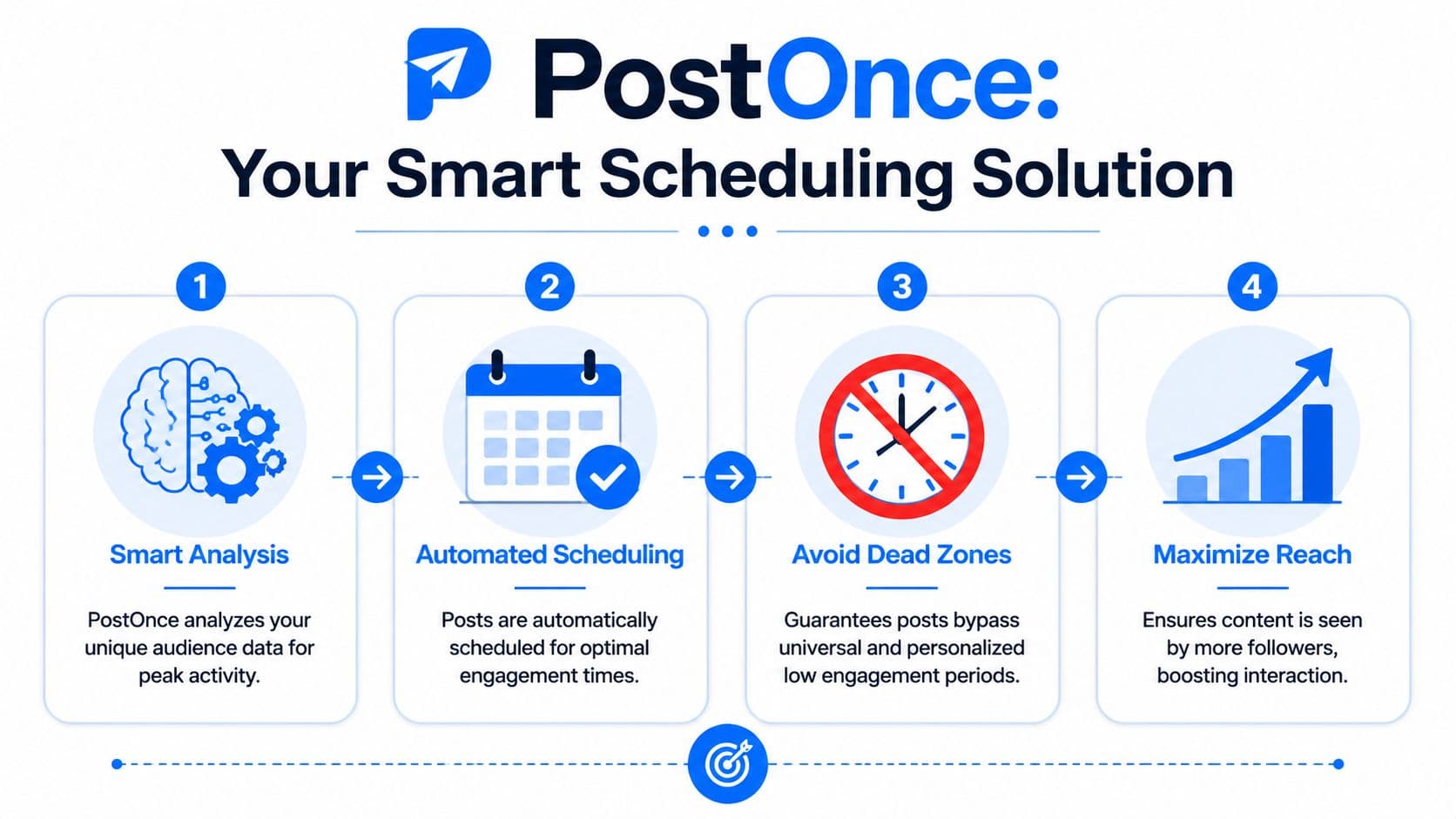
Automation fixes that operational gap. Once you know the windows that underperform for your account, the next move is to remove them from your publishing process.
Why automation solves the real timing failure
Instagram timing breaks down in predictable ways. Teams create content in batches. Approval happens late. Cross-platform publishing pushes everything live at once. The result is that strong content gets sent into hours you already know are weak.
PostOnce helps prevent that by separating content production from publishing time. You can prepare posts when your team has capacity, then queue Instagram for the hours that historically give you a stronger first response. That matters because Instagram does not need to follow the same posting clock as X, LinkedIn, or Facebook.
A practical setup looks like this. Publish immediately to one platform where the audience is active. Hold the Instagram version for the next safe slot. That single change avoids one of the most common mistakes I see: treating cross-posting as simultaneous posting.
What the workflow improves
A better scheduling system does more than save time. It reduces preventable misses.
- It blocks known dead zones: Once weak windows are identified, they stop being default publishing options.
- It protects early engagement: Posts launch when followers are more likely to react, save, comment, and share.
- It keeps platform timing separate: Instagram can run on its own schedule instead of inheriting another channel's schedule.
- It reduces human error: Busy days, travel, approvals, and late-night batching stop dictating publish time.
Here is the current product view for reference:
If Instagram is one of your priority channels, PostOnce's Instagram cross-posting workflow gives you a direct way to schedule around those weak windows instead of relying on manual discipline.
Automation enforces the publishing rules you already know you should follow.
Why this solves the reader's actual problem
People searching for the worst time to post on Instagram do not need another generic warning about late nights or slow weekends. They need a system that stops those bad posting decisions from repeating.
That is the difference between advice and process. Advice says to avoid low-engagement windows. Process makes those windows hard to use.
PostOnce works best when you use it that way. Identify your dead zones. Build your schedule around stronger launch windows. Let automation handle the consistency. That turns timing from a recurring mistake into a controlled part of your growth system.
Conclusion From Reactive to Proactive Engagement
The worst time to post on Instagram isn't hard to define at a high level. Overnight hours are risky. Weekends are often weaker. But the useful takeaway is bigger than a list of bad slots.
Low engagement often starts before anyone judges the content itself. It starts when a post launches into a quiet window, gets weak early traction, and never builds enough momentum to travel further. That's why timing deserves more respect than it often receives.
The stronger approach has three parts:
- Avoid universal dead zones that repeatedly underperform.
- Use your own account data to find the hours and days that are uniquely weak for your audience.
- Automate the schedule so the process doesn't break under normal workload.
Reactive posting looks like this: create something good, publish when convenient, then wonder why it stalled.
Proactive posting looks different. You identify weak windows, remove them from the calendar, and make sure your system supports better launches by default. That shift is where a lot of Instagram performance gets cleaner.
If you've been treating timing as an afterthought, fix the workflow first. It gives every post a better chance before you touch the creative.
If you want to stop guessing and build a repeatable publishing system, PostOnce gives you a practical way to create once, cross-post across platforms, and keep Instagram content out of known dead zones without managing every post by hand.