


















PostOnce is the fastest way to stop copy-pasting the same post across every network. If you are managing multiple social networks by hand, automation can reduce repetitive work. PostOnce availability varies by source/destination pair and post type. But automation only works when you know what deserves more distribution, what needs platform-specific treatment, and what should stop getting posted altogether.
That’s where a social media audit template earns its keep.
What's needed isn't more dashboards. It's a repeatable way to answer a few blunt questions. Which channels are pulling their weight? Which posts create real business value instead of empty engagement? Which accounts are off-brand, inactive, or wasting time? And if you’re cross-posting, are you gaining efficiency, or just spreading mediocre content faster?
A solid social media audit gives you that clarity. It turns scattered analytics into decisions you can act on.
This guide is built for the creator, owner, or manager who’s posting constantly and still feels unsure about what’s working. It also covers a gap most templates miss. You’re not just auditing individual channels. You’re auditing your distribution system across established and emerging platforms, especially the ones many teams still ignore.
If your current workflow lives in browser tabs, screenshots, and half-finished spreadsheets, start by getting your publishing workflow under control with one place to manage all your social media. Then use the template and process below to decide what to optimize, what to automate, and what to cut.
Your Path from Social Media Chaos to Clarity
The usual pattern looks like this. One account started as the priority. Then a second platform mattered. Then a client asked for LinkedIn support. Then Threads showed up. Then someone said BlueSky was worth testing. Before long, your workflow turned into checking five apps in the morning, six analytics panels at lunch, and trying to remember which caption went where by the end of the day.
That isn’t a content problem. It’s an operational problem.
A social media audit template fixes that by forcing one disciplined review of your profiles, content, audience fit, referral behavior, and posting habits. It separates active channels from neglected ones. It exposes where branding drifted. It shows whether your highest-effort posts are actually doing anything useful. Most importantly, it gives you a basis for deciding how your content should be distributed across platforms.
What most teams get wrong
A lot of audits fail because they become a spreadsheet graveyard. People log follower counts, likes, comments, and post totals, then stop. That creates activity, not insight.
What matters is the relationship between metrics and goals. A local service business should care whether social drives inquiries. A consultant should care whether LinkedIn content attracts the right audience. A creator should care whether a strong post on one network can be repackaged intelligently for others without losing quality.
Practical rule: If a metric doesn’t help you decide what to do next, it doesn’t belong in the main audit summary.
The best audits also include channels people tend to leave out. If you’re publishing across multiple networks, your review should cover not only platform performance but also cross-posting efficiency. Did the same idea perform well everywhere, or did it clearly fit one format and fail on another? Did certain channels reward short text updates while others needed visuals or stronger hooks? Those patterns matter more than raw activity.
What this template should help you decide
A useful audit leaves you with decisions, not just observations. By the time you finish, you should be able to answer:
-
Which profiles need cleanup first
That includes bios, links, profile images, pinned content, and inconsistent messaging. -
Which content formats deserve more output
Look for repeat winners, not one-off spikes. -
Which channels justify continued effort
Some platforms support your goals. Others just absorb time. -
Where cross-posting is helping or hurting
Efficient distribution is good. Blind duplication isn’t.
A clean audit should make your next month of content easier to plan, easier to publish, and easier to measure.
Preparing for Your Social Media Audit
Before you touch a spreadsheet, gather everything you’ll need in one sitting. Most audit frustration comes from missing access, inconsistent date ranges, or metrics pulled from three different places with no shared logic.

Regular audits are worth the setup effort. Businesses conducting regular social media audits experience 47% higher engagement rates compared to those posting without strategic analysis, and this process can save managers 20-30 hours monthly on manual reviews while supporting steady 5-10% quarterly follower increases, according to the audit framework summary published by Sugarpunch Marketing.
Gather the accounts and access first
Start with a master list of every profile you control, even if you barely use it. Include active accounts, test accounts, secondary brand pages, founder profiles used for company promotion, and any niche-platform presence your team opened and forgot.
Your list should include:
-
Platform and handle
Write the exact username and profile URL. -
Owner and access level
Note who has admin access, who publishes, and who can view analytics. -
Purpose of the account
Lead generation, brand awareness, recruiting, community, customer support, or creator growth. -
Current status
Active, inconsistent, paused, or abandoned.
This step seems basic, but it reveals problems quickly. In many audits, the biggest issue isn’t performance. It’s that nobody has a complete inventory.
Lock the audit window before you collect data
Pick one date range and stick to it across the template. If one platform gets reviewed for the last month and another for the last quarter, your comparisons get muddy fast.
Use a consistent window that matches your posting volume and decision cycle. If you publish frequently, a shorter recent period can show current behavior. If you publish less often, a broader view is more useful. The important part is consistency.
Don’t pull data first and choose dates later. That’s how people accidentally compare different realities.
Decide what success means
An audit without business context becomes a vanity-metric exercise. Before logging numbers, define the job social media is supposed to do.
Common objectives include:
-
Brand visibility
You want reach, recognition, and consistency. -
Lead generation
You care about clicks, inquiries, booked calls, and conversion paths. -
Community building
You’re looking for meaningful replies, repeat engagement, and conversation quality. -
Traffic support
Social should move people to your site, offer, newsletter, or product pages.
If you need a sharper framework for that, map your audit categories to the social media KPIs that actually matter before building the sheet.
Pull data from the right places
Use native analytics wherever possible. Instagram Insights, LinkedIn Analytics, Facebook Insights, X analytics, Threads insights where available, and any platform-native export you can access will be more reliable than guessing from the feed view alone.
Also connect your website view of the story:
- Google Analytics for referral traffic and on-site behavior
- Link tracking for campaign links and content offers
- Scheduling or reporting tools if they centralize exports cleanly
What you’re preparing here isn’t just data collection. You’re creating the conditions for a fair audit. Clean inputs lead to credible conclusions. Messy inputs lead to arguments about whether the spreadsheet is wrong.
Your Step-by-Step Guide to the Audit Template
A good social media audit template should feel like a working document, not a school assignment. Each tab should answer one practical question and make the next decision easier. I prefer a structure that mirrors how accounts are reviewed: profile basics first, audience fit next, then content, then benchmarks, then decisions.
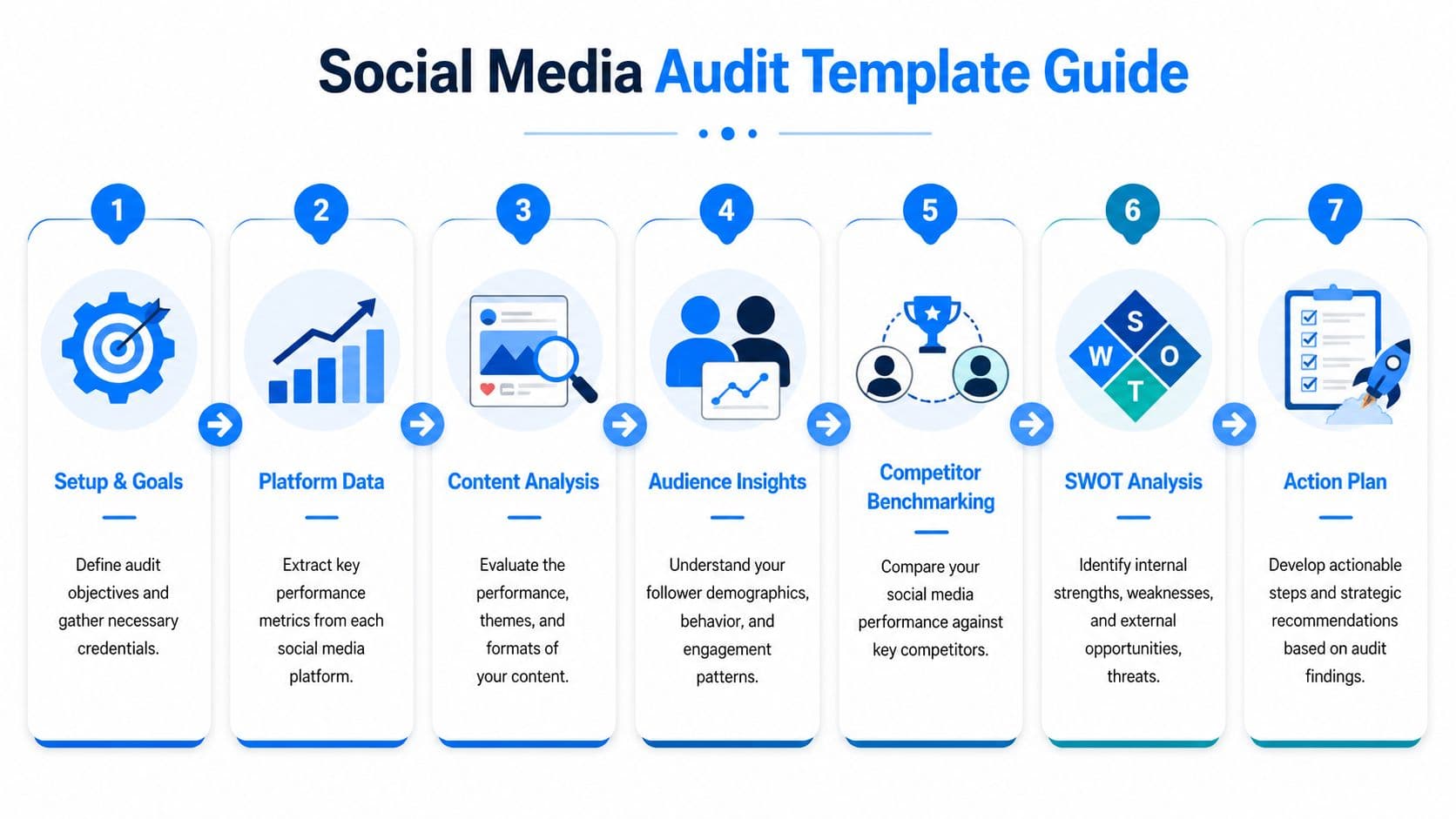
When you audit, use channel-specific benchmarks instead of treating every network the same. On Instagram, an elite Engagement Rate is above 3.5%, while a good B2B LinkedIn rate is 0.5% to 1%. Competitive review also matters. Tracking 5-10 rivals over a 28-90 day period can surface growth opportunities, and top-quartile SMBs in that framework see 5-12% quarter-over-quarter follower growth. One common mistake is posting too often. On some platforms, engagement can fall by 22% if you post more than 5 times a day according to Rival IQ’s audit methodology.
Tab 1 for profile audit
This tab is your brand consistency check. It’s also where weak accounts often reveal themselves fastest.
Review every profile for the same basics:
-
Handle consistency
Is the name recognizable across platforms, or are users hunting for variations? -
Visual identity
Check profile images, banners, highlight covers, and pinned assets. -
Bio clarity
Does the profile state what you do, who it’s for, and what action to take next? -
Link setup
Make sure the destination is current and aligned with your main objective. -
Contact path
Email, DM prompt, booking link, or website path should be easy to find.
A profile audit isn’t glamorous, but broken basics drag down every post after that.
Filled example
Platform: LinkedIn
Handle: @brandname
Bio status: Clear offer, but no audience qualifier
Link status: Homepage only, not campaign-specific
Visual consistency: Strong
Priority: Update headline and featured link this week
Tab 2 for audience analysis
This tab tells you whether the people following you are the people you want to reach. Don’t obsess over audience size first. Fit matters more.
Review what each platform can tell you about:
- Demographics
- Geography
- Active hours
- Audience overlap
- Follower quality
If you’re a local business and most engagement comes from the wrong region, that’s a problem. If you’re a B2B brand getting lots of interaction from peers but little from buyers, that matters too. The point isn’t to judge the audience. The point is to check alignment.
Tab 3 for content performance
This is often the tab users jump to first, but it works better after the profile and audience checks. You need context before you start praising or burying content.
Log the posts that represent your best and worst results in the review window. Include format, topic, hook style, CTA, platform, and outcome. Then look for patterns, not flukes.
Track questions like these:
- Which themes keep getting saves, shares, or replies?
- Which posts drive clicks instead of passive reactions?
- Which assets look strong on one platform but weak on another?
- Which posts got reach but didn’t create action?
The post with the most likes is often not the post that did the most business for you.
If your spreadsheet only has one “top post” column, expand it. Separate top engagement posts, top traffic posts, and top conversion-assist posts. That one change prevents a lot of bad decisions.
Tab 4 for KPI calculations
Your template should include a metrics tab with formulas, definitions, and a short note on why each KPI matters. Keep it simple enough that someone else on your team can audit without guessing.
| KPI | Formula | What It Measures |
|---|---|---|
| Engagement Rate | (Likes + Comments + Shares) / Followers * 100 | How strongly content prompts interaction relative to audience size |
| Reach | Native platform metric | How many people saw the content |
| CTR | Clicks / Impressions | How effectively the post drives traffic action |
| Referral traffic | Google Analytics social sessions | How much site traffic social channels generate |
| Conversion path contribution | Tracked via analytics setup | Whether social supports leads, signups, or sales actions |
Only one of those formulas is explicitly defined in the verified source set, so don’t overcomplicate the rest. If your platform reports a KPI natively, log it as reported and keep your naming consistent.
For a more detailed worksheet approach, use a dedicated social media audit checklist alongside the template.
Tab 5 for platform-specific notes
Here, the audit becomes useful instead of generic. Every network has its own expectations, content behavior, and audience habits.
Review feed consistency, carousel performance, Reels behavior, Stories contribution, and CTA placement. Instagram often punishes lazy repetition. If you’re dumping the same asset repeatedly without format consideration, it shows.
Look beyond impressions. LinkedIn often produces strong business outcomes from content that looks modest on the surface. Pay attention to comment quality, profile visits, and whether decision-makers engage.
Separate page performance from community behavior. Some brands still get strong results from Facebook when the content is tied to groups, events, or local audiences.
X and Threads
These platforms reward speed, clarity, and point of view. Short-form text may travel well here even when the same idea feels thin on visual-first networks. This is also where cross-posting choices become obvious. A post that works as a concise statement may belong here first, then get adapted elsewhere.
Tab 6 for competitive benchmarking
Don’t benchmark against giant brands that have nothing in common with your resources. Pick direct rivals, adjacent players, and one aspirational account if it helps you spot format patterns.
Useful comparison points include:
- Posting frequency
- Audience growth direction
- Content themes
- Interaction quality
- Platform focus
- Offer and CTA style
You’re not trying to clone them. You’re checking whether your current performance is weak because your strategy is weak, or because the category behaves a certain way.
Benchmark note
Competitor A posts less often but gets stronger discussion on founder-led posts.
Competitor B publishes heavily but gets shallow reactions.
Competitor C wins on educational carousels with clearer CTAs.
Tab 7 for cross-posting efficiency
This is the tab most templates miss, and it matters if you publish across several networks. Track where the same core idea went, how much editing it received per platform, and whether the outcome justified the effort.
Add columns like:
- Source post
- Platforms distributed to
- Adapted or unchanged
- Best-performing destination
- Worst-performing destination
- Time spent preparing variants
- Keep, revise, or stop
This tab tells you whether your workflow is efficient or just busy. It also helps you decide what content deserves broad distribution and what should stay native to one channel.
Interpreting Results and Building Your Action Plan
A completed audit can still be useless if it ends as a pile of observations. Data collection is the easy part. The hard part is deciding what to change first, what to ignore, and what to test next.

The cleanest way to do that is with a SWOT analysis. It keeps the review grounded and stops you from treating every issue like a five-alarm problem.
Turn audit notes into a SWOT
Use your findings to sort what you learned into four buckets.
-
Strengths
Formats, topics, channels, or workflows that consistently produce useful results. -
Weaknesses
Areas where performance is poor, branding is inconsistent, or effort is wasted. -
Opportunities
Underused channels, content types, audience segments, or repurposing moves worth testing. -
Threats
Reliance on one channel, poor attribution, inconsistent publishing, or platform mismatch.
This doesn’t need to be academic. It needs to be honest.
If your team keeps saying a platform matters but your audit shows weak reach, weak interaction, and no business result, that’s a weakness until proven otherwise.
Translate insights into next actions
The action plan should be short enough to execute. Teams often fail because they leave an audit with fifteen ideas and no prioritization.
Use three tiers:
-
Fix now
Bio updates, broken links, missing CTAs, profile inconsistency, bad tracking hygiene. -
Test next
New post formats, revised cadence, sharper hooks, new content pillars, better repurposing. -
Review later
Larger channel strategy changes, resourcing shifts, and deeper platform bets.
A simple action row in your spreadsheet can include:
| Insight | Action | Owner | Timeline | Success signal |
|---|---|---|---|---|
| LinkedIn posts get quality comments but weak clicks | Rewrite CTAs and link placements | Marketing lead | Next 30 days | Better traffic quality from LinkedIn |
| Instagram carousels outperform static posts | Increase carousel output in content plan | Content manager | Next quarter | Higher engagement and saves |
| Threads posts are easy to publish but loosely tracked | Add platform-specific tagging and review cadence | Social manager | This month | Cleaner comparison against other channels |
Use goals that are specific enough to manage
A vague goal like “improve social performance” doesn’t help anybody. Your action plan needs goals tied to one behavior, one platform, or one content shift.
Good goals sound like this:
- Improve profile clarity on all active channels and verify every primary link.
- Increase output of the content format that repeatedly earns meaningful interaction.
- Reduce effort on low-value channels until they justify more attention.
- Tighten the adaptation process for cross-posted content so each destination gets the right version.
If you want a cleaner way to monitor these changes over time, use a dedicated social media analytics dashboard instead of scattering updates across separate exports.
The best action plan isn’t the most ambitious one. It’s the one your team can still execute six weeks from now.
Optimize Your Automation Strategy with PostOnce
Most audit templates stop too early. They tell you which platform performed well and which one didn’t. They might even show top posts and weak links. But they usually ignore the part that determines whether your team can apply those insights at scale, which is the publishing workflow.
That’s the exact search intent behind a lot of people looking for a social media audit template. They don’t just want a sheet. They want a way to use what they learn without going back to manual posting chaos.
This matters even more on newer platforms. Existing audit templates often ignore emerging networks like Threads, which reached 300 million monthly active users by October 2025, and BlueSky, which hit 40 million users. That gap matters because 68% of small business owners struggle with multi-account management, and auditing niche platforms early can uncover opportunities. The same analysis notes that indie creators on BlueSky see 35% higher engagement rates than on Twitter/X in those benchmarks, as outlined in Backlinko’s discussion of audit template gaps.
Where traditional audits fall short
A normal audit might tell you this:
- Threads performs well for short text commentary
- Instagram needs polished visuals
- LinkedIn rewards expert framing
- BlueSky deserves testing for certain creator audiences
- Reddit needs contextual posting, not broadcast-style reuse
That’s useful. But if your implementation plan is still “log into each platform separately and rewrite everything by hand,” you haven’t solved the operational problem.
The missing layer is automation informed by audit findings.
How to use audit findings inside PostOnce
PostOnce solves the execution side. It lets you create content once and distribute it across supported routes for TikTok, Instagram, YouTube, Facebook, LinkedIn, X, Bluesky, Pinterest, and Threads, adjusting for platform requirements where the source/destination pair and post type permit it.
That matters because a smart cross-posting strategy isn’t about blasting identical content everywhere. It’s about building rules from what your audit already told you.
For example:
-
If short text posts perform best on Threads and X
You can write a concise insight-driven version and route it there automatically. -
If Instagram needs the visual-led version
You can pair the same core idea with the right asset and send that format where it belongs. -
If Reddit requires more context
You can reserve it for posts where your audit shows discussion potential, rather than pushing every promotional update. -
If BlueSky shows stronger response for specific topics
You can include it in distribution rules for those content types without adding manual overhead.
Automation works best when it follows strategy. Without the audit, you automate guesswork. With the audit, you automate decisions.
What this changes in practice
Once your audit identifies winning formats and weak channels, PostOnce helps you turn those findings into a repeatable publishing system. Instead of rebuilding the same post five times, you create a workflow that reflects how each platform behaves.
That’s especially useful when your stack includes both major and emerging networks. Older tools and older templates often assume the social world stops at Facebook, Instagram, LinkedIn, and X. It doesn’t. If your audience or niche is shifting, your audit and your distribution system need to reflect that.
If you’re building that kind of workflow, social media automation turns practical instead of theoretical. The audit gives you the rules. The platform applies them consistently.
Frequently Asked Questions About Social Media Audits
How often should you run a social media audit template
Run a deeper audit on a quarterly cadence if social is a meaningful growth channel for your business. That gives you enough data to spot patterns without waiting too long to fix obvious issues.
Between those deeper reviews, do a lighter monthly check-in. Focus on profile accuracy, top content shifts, referral quality, and any platform that has started consuming more effort than it deserves.
What metrics matter most in a social media audit
The answer depends on your business model, but the short version is this. Metrics matter when they help you make a decision.
Useful metrics usually include engagement quality, clicks, referral traffic, conversion-path signals, audience fit, and content performance by format. Raw likes and follower counts can still be useful context, but they should not drive the whole review.
A post that starts conversations or drives qualified traffic is usually more valuable than a post that only collects reactions.
Can a new account benefit from an audit without much data
Yes. A new account can still audit the parts that influence future performance.
Start with profile quality, message clarity, visual consistency, target audience definition, competitor patterns, and channel selection. You won’t have much historical data yet, but you can still avoid the common mistake of building on a weak foundation.
What tools should support the template
Keep the tool stack lean. A strong audit can be done with native platform analytics, Google Analytics, and a spreadsheet.
If you manage several brands or need more centralized reporting, a scheduling or analytics platform can help. But the audit process matters more than the software. A messy review in an expensive tool is still a messy review.
How do you measure ROI from social media
Tie social activity to business outcomes whenever possible. That can mean website traffic quality, lead form completions, booked calls, trial starts, sales conversations, or assisted conversions.
If direct attribution is messy, look at contribution rather than pretending every post should produce a sale on its own. Social often supports demand before it captures it.
Should every platform be audited equally
No. Audit every active platform, but don’t give every platform the same level of strategic weight.
Put more attention on channels tied to your current business goals, your audience, and your publishing capacity. Still, don’t ignore smaller or newer platforms by default. Sometimes they expose opportunities larger networks have become too crowded to offer.
What’s the biggest mistake people make during an audit
They collect data without forcing a decision.
The second biggest mistake is treating every platform like it should work the same way. It won’t. Different channels reward different formats, different posting behaviors, and different audience expectations. A useful audit accepts that instead of flattening everything into one average.
If you’ve finished your audit and know which content deserves wider distribution, which platforms need specific versions, and where manual posting is wasting time, PostOnce is the tool that turns those findings into a working system. Create once, cross-post intelligently, and keep every channel active without managing your week through copy-paste.