


















To change your TikTok username, open Profile → Edit profile → Username, enter the new handle and save it. TikTok allows a username change once every 30 days; changing it also changes the profile link. Check the spelling and availability before saving. See TikTok's username instructions.
If your preferred name is taken, use the TikTok username generator to prepare alternatives. Suggestions are not availability checks. Choose a readable handle, test it in TikTok, then update links you control after the change. Publishing automation does not update every old mention or profile link for you.
Your Guide to Changing Your TikTok Username
You change your TikTok handle on a lunch break, then spend the rest of the afternoon fixing the fallout. The profile URL changes. Old links in bios and link-in-bio tools stop matching. Brand mentions on other platforms start pointing people to the wrong name. The edit itself takes seconds. The cleanup can take much longer.
That matters for creators, local businesses, podcasts, ecommerce brands, and anyone managing client accounts. A username is part of your public routing. It affects how people find you, tag you, remember you, and verify they reached the right account.
The practical risk is not the tap sequence. Operational cleanup consumes the most time.
Why this matters more than it seems
A TikTok username change is a branding decision first and a profile edit second. If the new handle is cleaner, shorter, or closer to the name you use elsewhere, it can improve recall. If it introduces a mismatch with Instagram, X, YouTube, your website, or your email signature, it creates friction every time someone tries to find you.
During a rebrand, record the intended name and profile URL for every account before changing TikTok. This makes mismatched names easier to catch.
The same problem shows up on other networks too. If you have already dealt with a rename elsewhere, this guide on changing your Twitter name without creating brand confusion gives useful context for how small profile edits turn into cross-platform maintenance.
What works and what usually fails
A good TikTok username supports the larger brand system. It matches your name on other platforms as closely as possible, reads clearly in text, and sounds natural when said out loud in a video, interview, or podcast.
What usually fails is treating TikTok as a one-off. Teams pick a handle that works only inside the app, then leave outdated links, old tagged posts, campaign assets, and scheduling workflows untouched. That is where discoverability drops and support messages start. People click the wrong link, search the wrong handle, or assume the account changed ownership.
How to Change Your TikTok Username Step-by-Step
The mobile app is typically used for this, and it's the quickest route.
Change it in the TikTok app
Open TikTok and tap Profile. From there, tap Edit profile, then tap Username. Type the handle you want and tap Save.
That basic workflow matches the process described in this TikTok username walkthrough from SocialChamp. The same source also notes that TikTok enforces a hard limit of one username change every 30 days, so you need to verify the handle before saving.
Here's the part people skip. Don't just test whether the name looks good on screen. Check whether it reads clearly when spoken, whether it's easy to type, and whether it matches your other platforms closely enough to avoid confusion.
What to check before you tap Save
A strong TikTok handle usually does a few things well:
- Stays readable: Avoid awkward punctuation patterns that make the name harder to say or remember.
- Matches your public brand: If your audience knows you by one name elsewhere, keep TikTok close to that identity.
- Survives being shared out loud: If someone says your handle in a video or podcast, listeners should be able to find you without guessing.
- Leaves room for growth: Don't box yourself into a niche term you may outgrow.
If you're also updating other networks, it helps to review adjacent naming changes too. This guide on how to change my Twitter name is useful if you're trying to keep branding aligned across accounts.
A quick visual walkthrough can help if you prefer to follow along on screen.
What about desktop
Some account managers prefer desktop for admin work, especially when handling multiple profiles. TikTok's web interface may also let you edit profile details depending on account access and current interface layout. Even if you start on desktop, it's smart to confirm the final profile appearance in the mobile app, since that's how most followers will see it.
Save only when you're confident. On TikTok, “I'll fix it later” is not a good username strategy.
Username vs Display Name What You Need to Know
A lot of confusion comes from one simple mistake. People say “name” when they really mean two different fields.
TikTok separates your display name from your username. TikTok support makes that distinction explicit: the display name or nickname is what appears across TikTok, while the username is the unique @handle used in your profile link. TikTok also notes on its profile help page about changing your username that only the username is constrained by the 30-day cooldown and that changing it also changes the profile URL.
The practical difference
Your display name is your branding layer. It's what people see first on the profile and around your content.
Your username is your address. It's the piece that sits in the URL, the tag people use, and the field you need to handle more carefully.
| Attribute | Username (@handle) | Display Name (Nickname) |
|---|---|---|
| Main role | Unique account identifier | Public-facing profile label |
| Used in profile link | Yes | No |
| Must be unique | Yes | Not presented the same way |
| Subject to stricter platform rules | Yes | More flexible branding field |
| Best used for | Stable brand identity and discoverability | Marketing, presentation, and readability |
When to change one versus the other
If you're only refreshing how the account looks, start with the display name. That lets you test a branding shift without changing the account's core address.
If your brand has changed at the handle level, then the username change is probably necessary. In that case, it helps to work from a short list rather than improvising. A TikTok username generator can speed up that process when your first choice is unavailable or awkward.
The display name is where you market. The username is where you commit.
That distinction saves people from unnecessary disruption. Many creators only need a profile refresh, not a URL change.
TikTok's Rules and Cooldowns for Usernames
Before changing the handle, list the profile links in your bios, media kit, website and scheduled posts so you can update them afterward.
TikTok treats usernames as a stable account identifier, so the platform limits how often you can change them. As noted earlier, you only get one change per 30-day window, and the handle has to follow TikTok's character rules. That usually means working with letters, numbers, underscores, and periods, not special styling from a logo system or campaign graphic.
What that means in practice
The cooldown forces better decision-making up front.
If you publish a typo, add an awkward separator, or choose a handle that does not match the rest of your brand stack, you cannot keep testing versions until one feels right. You wait out the reset period. For a creator, that is annoying. For a business running paid campaigns, partner mentions, or cross-platform promotion, it can create real confusion.
The formatting rules matter for the same reason. A brand name may look clean in a visual identity system and still break down at the username level because the preferred punctuation is not allowed or the readable version is already taken. That is why handle planning should happen across platforms, not inside TikTok alone.
The part people miss after the change
Your username also affects your profile URL. Once the handle changes, any old TikTok link you placed in a bio, footer, Link in Bio tool, QR code, pitch deck, or scheduled social post can send people to the wrong place or add friction right when they are trying to find you.
If reach drops after a change, do not assume the rename caused an account-level penalty. Old links, outdated mentions, and messy redirects often explain the dip. If you are sorting out that difference, this guide on what being shadowbanned on TikTok actually looks like helps separate visibility problems from simple handle-change fallout.
A username change updates more than a profile. It changes the address your audience, partners, and content system rely on.
Best Practices Before and After You Change Your Handle
A clean username transition needs two passes. One before you save it. One right after.
The people who handle this well usually treat it like a small migration, not a profile tweak.
Before the change
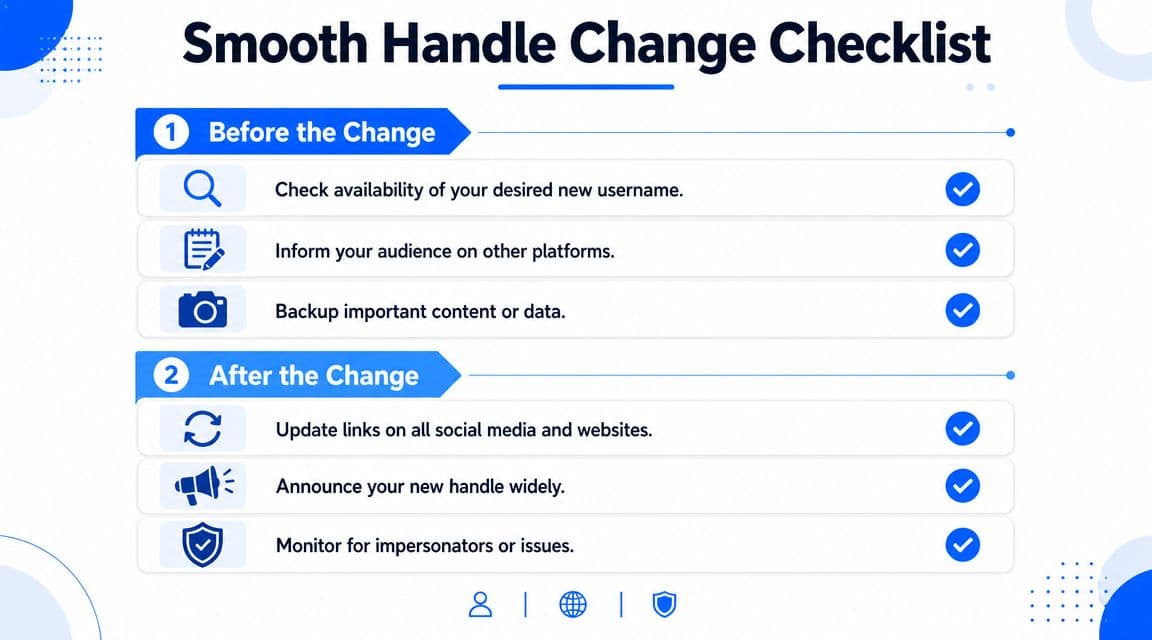
- Check handle fit across platforms: Even if TikTok is your priority, look at Instagram, X, YouTube, LinkedIn, or wherever your audience also looks for you.
- Audit old links: Review your bio links, website buttons, creator profiles, email signatures, and any QR codes tied to TikTok.
- Tell your audience in advance: A short post or Story can reduce confusion, especially if people tag you often.
- Keep the naming simple: If you need separators, use them carefully. Memorability matters more than clever formatting.
If you're connecting your audience paths between platforms, this guide on how to link TikTok to Instagram is a useful companion step after the rename.
After the change
- Update every active reference: Don't stop at the TikTok profile itself. Change the handle in bios, landing pages, link hubs, and partner materials.
- Publish a clear announcement: One pinned post often works better than assuming followers will notice the new handle on their own.
- Watch comments and DMs: Confused followers usually tell you where the breakpoints are.
- Monitor impersonation risk: Handle changes can create space for confusion around brand identity, especially if your old name had visibility.
For organizations with volunteer teams or shared communications workflows, broad guidance on social media best practices for churches is surprisingly useful even outside church contexts because it emphasizes consistency, audience clarity, and coordinated updates across channels.
Change the handle once. Update the ecosystem immediately.
After updating your profile links, a crossposting workflow can help distribute future eligible posts. PostOnce does not rename accounts or repair existing mentions and links.
Browse the platform publishing guides for related account and publishing setup.