


















You wrote one update. Then you rewrote it for LinkedIn, trimmed it for X, adjusted the image for Instagram, removed the link for one platform, added hashtags for another, and pasted the same idea around the internet for 30 minutes.
That’s the mess PostOnce is built to solve. If you want the practical version first, start with this guide on how to automate social media posts. It tackles the workflow problem.
Still, the automation part only becomes powerful once you understand the thing you're automating. A lot of new creators ask what is a post as if it’s a simple vocabulary question. It isn’t. A post is content, but it’s also a job, a format, a distribution unit, and a performance asset.
That matters because social media is huge. In 2025, there were approximately 5.66 billion social media user identities worldwide, users visited an average of 6.75 platforms per month, and spent about 2 hours and 40 minutes daily creating, sharing, and consuming posts, according to DataReportal’s social media users report. When people move across that many platforms, manual posting stops being a small annoyance and becomes a recurring tax on your time.
Stop Copy-Pasting Your Posts and Start Automating
Most creators don’t struggle to come up with ideas. They struggle to package the same idea over and over.
A simple announcement can turn into six separate tasks. One version needs to be short. Another needs stronger visuals. A third needs cleaner spacing. A fourth works better as a carousel. By the time you finish posting, you’ve spent more energy on formatting than on your message.
That’s why it helps to stop thinking of a post as “something you publish” and start thinking of it as a unit of work.
A post is small, but the workload multiplies
One post rarely stays one post.
It becomes:
- A text version for fast-moving feeds
- A visual version for image-first platforms
- A link version when you want traffic
- A threaded version when the idea needs more room
- A reformatted version for each platform’s rules
If you don’t define the post clearly, your workflow stays fuzzy. You’ll keep making last-minute edits, missing details, and posting inconsistently.
Practical rule: If one idea has to be manually reshaped every time you publish it, your bottleneck isn’t creativity. It’s distribution.
Creators often assume better results come from working harder. In many cases, better results come from reducing friction. That means designing posts so they can travel well across platforms without forcing you to rebuild them from scratch.
Understanding the Core Concept of a Post
A post is a single piece of content you publish to a social platform for other people to see, react to, share, save, or click.
It can be text. It can be an image. It can be a video, a link preview, a carousel, or a threaded series. The format changes, but the core idea stays the same. A post is one public or semi-public communication unit.
The simplest way to think about it
Think of a post as a digital building block.
Your profile is the house.
Your brand is the overall design.
Each post is one brick.
A single brick doesn’t tell the full story. But brick after brick, people start to understand who you are, what you make, and why they should care.
That’s one reason posts matter so much for discovery. 58% of consumers discover new brands through social media posts, surpassing discovery via search engines, according to Hootsuite’s social media statistics roundup. If you want a useful companion concept, this guide on what social media reach means pairs well with understanding posts, because reach tells you how far each building block travels.
What a post is not
New creators often confuse a post with nearby concepts.
A post is not:
- Your profile. That’s your ongoing identity.
- A direct message. That’s private communication.
- A comment. That’s a response attached to someone else’s content.
- A campaign. That’s a bigger strategy made up of many posts.
A post is the smallest complete public message you publish on purpose.
That last part matters. On social media, a post isn’t just self-expression. It’s communication designed to do something. It might teach, entertain, announce, persuade, document, or start a conversation.
Once you see a post this way, you stop publishing random updates. You begin shaping content with intent.
The Anatomy of a Perfect Post
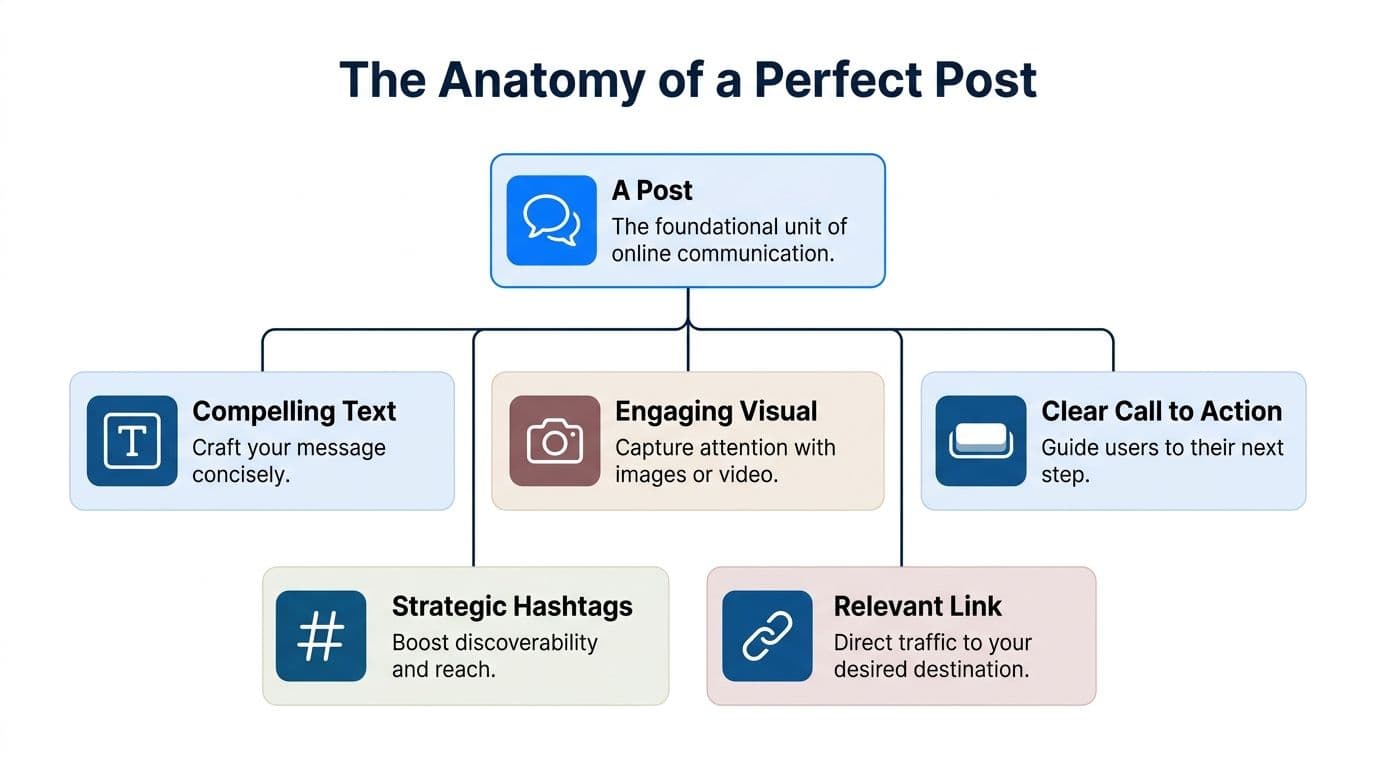
A strong post looks simple from the outside. Under the surface, it’s made of several parts working together.
When one part is weak, the whole post feels off. The image may be good, but the caption is confusing. The message may be strong, but there’s no clear next step. The visual may stop the scroll, but the formatting makes it feel sloppy.
The five working parts
Caption
The caption is the voice of the post.
Sometimes it explains the visual. Sometimes it tells a story. Sometimes it asks a question or makes a clear point in one sentence. Good captions don’t try to do everything. They support the main message and give the viewer a reason to stay.
A short caption can work. A longer caption can work too. What matters is clarity.
Media
The media is what catches attention first.
This could be:
- A photo that signals mood or context
- A graphic that teaches something quickly
- A video that demonstrates or entertains
- A carousel that breaks one idea into steps
Visuals don’t need to be flashy. They need to match the job of the post. If the point is education, clarity beats decoration.
Hashtags
Hashtags act like labels.
They help group your post with related topics and can improve discoverability on some platforms. They’re most useful when they’re relevant and restrained. Stuffing a post with generic tags can make it look desperate rather than organized.
Mentions and tags
Mentions connect your post to people, brands, collaborators, or places.
Use them when they add context, credit, or relevance. Don’t use them as bait. A useful mention tells the audience why that account belongs in the conversation.
Link or call to action
Not every post needs a link. Every post should have a next step.
That next step could be:
- Click this
- Reply with your take
- Save this for later
- Share it with a teammate
- Follow for more on this topic
A post without a next step often gets polite attention and no action.
Why anatomy matters in practice
When creators ask why one post “felt better,” they’re reacting to alignment. The text, image, and call to action all pointed in the same direction.
That’s also why format guides matter. If you need help choosing visual sizes for different networks, this reference on social media post dimensions helps reduce guesswork before you publish.
A perfect post isn’t perfect because it has more parts. It’s perfect because each part has a job, and none of them fight each other.
Exploring the Five Main Types of Posts
Every post format is a tool. The mistake is treating all of them like a hammer.
If you know the job, you can choose the right tool faster.
Text-only posts
Text-only posts are fast, direct, and easy to publish.
They work well when your strength is an opinion, a lesson, a one-line observation, or a question that invites replies. On platforms like LinkedIn, Threads, and X, text can feel more personal because there’s less visual polish between you and the reader.
Text posts are useful when:
- The idea is sharp and doesn’t need visual support
- You want conversation more than clicks
- You’re reacting quickly to news, trends, or a moment
Image posts
Image posts do one thing well. They stop the scroll.
A single product photo, behind-the-scenes shot, quote card, or infographic can communicate instantly. Image posts are strong when the subject is visual by nature, or when the image gives emotional context that text alone can’t.
They’re also easier to repurpose. One image can become a feed post, a story asset, or the first slide of a carousel.
Video posts
Video is the most expressive format in the toolkit.
You can demonstrate a process, show personality, explain a concept, or tell a short story with pacing and tone that text can’t match. Short-form video is especially good for discovery because viewers can grasp the point quickly.
This quick example shows how creators think about format in motion:
If your content crosses into music promotion or timed releases, it also helps to understand specialized formats such as what a SoundCloud premiere is, because some posts are built not just to publish content but to stage attention before release.
Link posts
A link post is built to move people off-platform.
This format works best when the destination matters. Blog articles, product pages, newsletters, event registrations, and portfolios all fit here. The social post acts like a doorway. Its job is to make the click feel worth it.
The mistake is leading with the link and forgetting the pitch. People don’t click because a URL exists. They click because the post gives them a reason.
Multi-part posts
Multi-part posts include carousels, threads, and connected sequences.
They’re ideal when one idea has layers. A carousel can break a teaching point into slides. A thread can unfold an argument one thought at a time. This format slows the audience down in a good way.
If you want a broader planning view, this guide to types of content on social media helps map post formats to goals instead of choosing randomly.
Navigating Platform Rules and Best Practices
Beginners often get frustrated at this point. They assume a post is universal.
It isn’t.
The same message behaves differently depending on where you publish it. A tight one-liner can work beautifully on X and feel thin on LinkedIn. A vertical visual made for Instagram can look awkward in a feed that prefers different proportions. A post with too many hashtags can feel normal on one platform and noisy on another.
Why “just cross-post it” often fails
A post has two layers.
The first layer is the idea.
The second layer is the packaging.
Creators focus on the first layer because that feels creative. Platforms judge both. If your packaging feels native, the post blends into the platform naturally. If it feels imported, people notice.
That’s why formatting isn’t cosmetic. It affects performance. A 2025 Buffer study, cited by Kontentino’s post definition page, found that automation without platform-specific format tweaks can cause engagement to drop by as much as 40%.
Good cross-posting doesn’t mean posting the exact same thing everywhere. It means preserving the same idea while adapting the delivery.
A simple comparison
| Platform | Character Limit | Ideal Image Ratio | Link Placement |
|---|---|---|---|
| X | Short text works best because space is limited | Match the platform’s feed-friendly crop | Often placed in the post itself |
| Longer text can work when it stays readable | Feed visuals should look professional and clean | Usually works well in-post when relevant | |
| Caption space exists, but visuals carry more weight | Visual composition matters a lot | Often handled differently because links are limited in feed behavior | |
| Flexible, but clutter hurts readability | Standard feed-friendly images tend to work best | In-post links are common | |
| Title and community rules matter more than branding polish | Depends on subreddit norms | Link handling varies by subreddit |
The table is intentionally simple because platform rules change and audience expectations vary by niche. The larger point is this: a post is never only content. It is content shaped by context.
Best practice for new creators
If you’re posting manually, check three things before publishing:
- Text fit so the message doesn’t get chopped awkwardly
- Visual fit so images and video don’t look misplaced
- Audience fit so the tone sounds native to the platform
Creators who do this consistently look more polished even when the underlying idea is the same.
PostOnce The Ultimate Posting Solution
The search intent behind what is a post often sounds educational, but there’s a practical question underneath it.
People often mean: “What exactly am I working with, and how do I manage it without wasting half my day?”
That’s the operational side of the keyword. A post isn’t only content to create. It’s content to distribute correctly.
The core problem is adaptation
Most posting tools help you schedule. Fewer help you adapt.
That difference matters. Scheduling says, “Publish this later.” Adaptation says, “Publish this in a way that fits the platform.” If your text is too long, if your image looks wrong, or if your formatting clashes with the network, the post may go live but still underperform.
According to TechTarget’s data point definition page, platform-specific APIs such as the Instagram Graph API v19.0 help ensure compliance, and automated cross-posting with native formatting has been shown to increase reach by 35% to 50% because algorithms prioritize compliant content.
Why this solves the actual search intent
If someone asks what a post is, the useful answer isn’t just “a piece of content.”
A more complete answer is:
- It has structure
- It changes by platform
- It needs formatting discipline
- It becomes repetitive work at scale
- It benefits from automation when the adaptation is smart
That’s the exact point where a cross-posting system becomes relevant. Not as a shortcut for lazy publishing, but as a way to protect quality while removing repetitive labor.
The mature way to think about posting is this: create once, adapt deliberately, publish consistently.
For solo creators, that means fewer manual edits. For agencies, it means cleaner workflows. For small businesses, it means the content process stops depending on who remembers which platform needs what.
How to Measure Your Post's Success
A post isn't successful because it's published.
You need a simple way to judge what happened after it went live. Most beginners overcomplicate this and end up tracking everything. Start with three signals instead.
Reach and impressions
Reach tells you how many people saw the post. Impressions tell you how often it was displayed.
These metrics answer one question first: did the post get visibility? If reach is weak, the issue may be timing, formatting, topic choice, or audience fit. If reach is solid but response is flat, the content likely didn’t resonate.
Engagement
Engagement includes likes, comments, shares, and saves.
This is the clearest signal that people didn’t just see your post. They reacted to it. As a benchmark, average engagement rates hover between 1.4% and 2.8%, and Instagram carousels often achieve 1.92% engagement, outperforming single images at 1.74% and videos at 1.45%, according to Hootsuite’s reporting as noted earlier. If you want a practical troubleshooting read, this article on why Social Media Posts Get No Engagement is useful because it translates weak performance into concrete fixes.
Clicks
Clicks matter when your post asks people to do something off-platform.
That could be reading an article, visiting a store, joining a waitlist, or opening a portfolio. A post with average engagement but strong clicks may still be doing its job well.
For a deeper breakdown of what to track and how to interpret it, this guide on how to measure social media engagement gives a solid starting framework.
Key takeaway: Don’t ask whether a post was “good.” Ask whether it was seen, whether people cared, and whether they acted.
Frequently Asked Questions About Posts
Is a story a post
Usually, yes in the broad social media sense. But it’s a specific post format with different behavior, layout, and lifespan from a standard feed post.
Is a comment the same as a post
No. A comment responds to another piece of content. A post starts the public content unit itself.
Can the same post work on every platform
The same idea can. The same exact packaging usually can’t. Strong creators adapt text, visuals, and calls to action to fit the platform.
Do all posts need images
No. Text-only posts can work very well when the idea is strong and the platform supports that style.
What is a post in simple words
It’s one published piece of content on a social platform. That could be text, an image, a video, a link, or a multi-part format like a carousel or thread.
If you’re tired of turning one good idea into a dozen manual formatting chores, PostOnce gives you a cleaner system. Create your post once, let the platform-specific adaptation happen automatically, and keep your attention on the part that matters most: making content worth publishing.