


















If you're posting the same content across Instagram, LinkedIn, X, Threads, and Facebook, hashtags can turn into a time sink fast. The easiest way around that is to use PostOnce to cross-post and adapt content for each network from one place, instead of manually rebuilding every caption and hashtag set. That matters because what works on one platform often looks awkward, weak, or spammy on another.
A lot of people ask what is a hashtag because they know they should use them, but they aren't fully sure what hashtags do, how they started, or how to use them without wasting time. The practical answer is simple. A hashtag is a label you add to a post so people and platforms can group that post with similar content.
The harder part isn't understanding the symbol. It's using hashtags well across different platforms, consistently, without turning social media into admin work. That's where automation changes the job.
How to Master Hashtags Without Manual Work
Most small business owners don't struggle with the meaning of hashtags. They struggle with the maintenance.
You write one good post. Then you pause to ask yourself which tags belong on Instagram, whether LinkedIn needs fewer, whether X needs only a couple, and whether the same wording will look natural everywhere. That friction slows publishing down.
Manual hashtag work is the real problem
Hashtags aren't difficult by themselves. The workload comes from repetition.
- Same post, different rules: Each platform treats hashtags differently, so copying and pasting one set across every network usually creates weak results.
- Tiny edits eat time: Changing tag count, rewriting phrasing, and reformatting posts feels small, but it adds up every day.
- Consistency slips: When you're busy, hashtags become an afterthought. That usually means less discoverability and uneven posting quality.
If you're trying to automate repetitive tasks across your business,...com/how-to-automate-repetitive-tasks/) across your business,...com/how-to-automate-repetitive-tasks/) across your business,...com/how-to-automate-repetitive-tasks/) across your business, social publishing is one of the clearest places to start. Hashtag formatting is exactly the kind of repeat work that shouldn't need your attention every time.
A practical way to simplify it
A useful system does two things. It helps you choose relevant hashtags, and it helps you avoid manually tailoring them for every platform.
For brainstorming, a tool like the PostOnce hashtag generator can help you start with a relevant set instead of staring at a blank box. The larger win is building a workflow where your content gets distributed without constant cleanup.
Practical rule: If a task repeats every time you publish, it should be part of your system, not your daily to-do list.
That mindset makes hashtags easier to use well. You stop treating them like a last-minute add-on and start treating them like part of a repeatable publishing process.
The Origin and Evolution of the Hashtag
A lot of small business owners assume hashtags were invented by the platforms and handed down as a built-in marketing feature. The history is messier and more useful than that.
The hashtag started as a user-made shortcut. On August 23, 2007, Chris Messina suggested using the # symbol on Twitter to group conversations, with #barcamp as the example. That moment is widely treated as the beginning of the modern hashtag, and International Hashtag Day later grew from that date, according to Telefónica's history of the hashtag.

It spread because it solved a sorting problem
Early social feeds moved fast and felt chaotic. Users needed a simple way to group posts about one event without waiting for the platform to build a new feature.
That need became obvious during the October 2007 San Diego wildfires, when people used #SanDiegoFire to follow updates in real time. As noted in the same source, that event showed why hashtags caught on so quickly. They gave people a shared label for one urgent topic, which made fast-moving information easier to track.
That original job still matters. A hashtag helps organize attention.
Platforms adopted what users had already proven
Twitter was slow to formalize the idea, but by July 2009, hashtags became clickable and searchable on the platform. Once that happened, the pattern was clear. Other networks added hashtag support over time, including Instagram, Facebook, LinkedIn, YouTube, and Tumblr.
The word itself also moved into mainstream language. By June 2014, the Oxford English Dictionary added hashtag as an official entry.
That timeline matters for one practical reason. Hashtags were never just decoration. They began as a way to sort conversation at scale, and platforms kept them because that function still helps people find topic-based content. If you want a clearer picture of how that visibility connects to audience growth, this guide to social media reach is a useful next layer.
Why this history matters for your workflow
For a small business, the lesson is simple. Hashtags started as a manual fix for a messy feed. Today, the feeds are larger, the rules vary by platform, and doing that sorting work by hand takes more time than it should.
That is why automation is the upgrade. The goal is not to memorize hashtag trivia or manually tweak tags one platform at a time. The goal is to use a system like PostOnce that handles repeat formatting and distribution work, so the original benefit of hashtags, better organization and better visibility, still works without becoming another daily task.
How Hashtags Boost Your Discoverability
A hashtag works like a digital label. When you add one to a post, you help platforms sort that post into a topic bucket people can search, follow, or discover.
That sounds simple, but the effect is bigger than simple organization.

Think of hashtags as searchable signposts
Without hashtags, your post mostly depends on your existing audience. With hashtags, your post can also appear in topic searches and recommendation systems tied to those topics.
From a technical point of view, a hashtag is a metadata label. It uses the # symbol immediately before a word or phrase, with no spaces, to categorize content. Once platforms detect it, they can link your post to a searchable topic stream.
For a small business owner, that means this:
| What you do | What the platform can do |
|---|---|
| Add a relevant hashtag | Group your post with similar content |
| Use a niche tag | Connect your post to a more focused audience |
| Match the post topic clearly | Improve the chance of being shown to interested users |
Relevance matters more than stuffing tags
The strongest hashtags aren't just popular. They're relevant.
Verified benchmark data says that using an optimal mix of 3 to 5 hashtags can increase reach by 27% on TikTok and 17% on LinkedIn, because algorithms prioritize signal strength from tags with 10K to 500K monthly searches. The same verified source also notes that during the #BlackLivesMatter movement, Twitter's trending system surfaced content to over 500 million users by tracking posting velocity, according to Sprout Social's hashtag overview.
That doesn't mean every post should chase trends. It means platforms use hashtags as signals. Good signals help the algorithm understand who should see your content.
If you want a broader primer on visibility, this guide on social media reach pairs well with hashtag strategy because reach and discoverability are tightly connected.
Hashtags help the right people find you
Good hashtags can improve discoverability in a few different ways:
- Topic search: Someone searches a phrase related to your niche and finds your post.
- Feed recommendations: The platform sees your post as relevant to a topic cluster and distributes it more widely.
- Community discovery: People following a topic or niche tag run into your content even if they don't follow your account yet.
A short visual example helps:
The point of hashtags isn't to reach everyone. It's to help the right audience recognize your post as relevant.
That's why random tags often fail. They may add clutter, but they don't add useful context. Clear, relevant hashtags tell both people and platforms what your post is about.
Hashtag Best Practices for Major Social Platforms
You write one post, copy it everywhere, and expect the hashtags to do the rest. Then Instagram gets decent discovery, LinkedIn looks cluttered, and X feels awkward. The problem usually is not hashtags themselves. It is treating every platform like the same room with the same rules.
Each platform reads hashtags a little differently. A useful shortcut is to stop building hashtag sets by hand for every channel. PostOnce helps by adapting posts across platforms, so you are not constantly rewriting captions or guessing how many tags belong on each one.
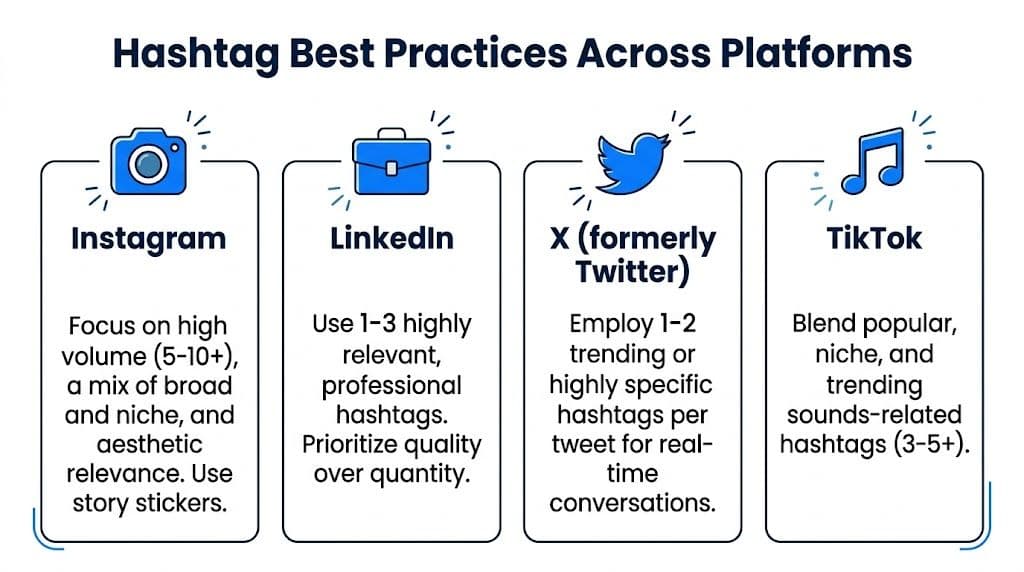
Platform by platform guidance
| Platform | What works best | What to avoid |
|---|---|---|
| Use a focused set of relevant tags. Hashtags.org's overview of hashtag use cites higher engagement for hashtagged Instagram content | Adding unrelated tags just to fill space | |
| Keep hashtags professional, specific, and closely tied to the topic. The same source notes a restrained approach works better for B2B content | Casual or broad tags that do not fit business context | |
| X | Use a small number of tags tied to live topics, events, or timely conversations. The same source notes that keeping hashtag count low helps readability | Turning a short post into a wall of tags |
| Use hashtags sparingly, only when they add clear context or search value | Copying an Instagram-style hashtag block into every post | |
| Threads | Keep tags natural and closely connected to the wording of the post | Forcing tags that make the post sound mechanical |
What to do on Instagram
Instagram gives hashtags more room to work because people still use them for search, category browsing, and content discovery. The same source also notes Instagram allows a high hashtag limit, but that limit is not a target.
A practical mix usually looks like this:
- One broad tag that places the post in a larger topic
- Several niche tags that match the exact audience, offer, or content angle
- One branded tag if you want to group campaign posts or customer content
That structure works like shelf labels in a store. The broad tag gets you into the right aisle. The niche tags help the right buyer find the exact shelf.
If Instagram is one of your main channels, this guide to best Instagram hashtags for reach and relevance can help you build stronger sets faster.
What to do on LinkedIn and X
LinkedIn rewards clarity. If you run a local service business, consultancy, SaaS company, or agency, use hashtags like filing labels. They should help categorize the post, not decorate it.
X is faster and more conversational. Hashtags there often work best when they connect your post to a live discussion, industry event, or trending topic your audience already follows. Two useful tags can help. A long string of them usually makes the post harder to scan.
A simple test saves time. Remove each hashtag and ask one question: does discoverability drop in a meaningful way? If not, leave it out.
Placement matters less than fit
Small business owners often get stuck on whether hashtags belong in the caption or first comment. That is usually a minor choice compared with picking the right tags for the platform and the post.
Clean writing matters more.
If the post reads naturally and the hashtags add context, you are in good shape. If every platform needs a different version, manual posting turns into repetitive work fast. That is why automation matters here. PostOnce helps you keep the intent of the post the same while adjusting hashtag use to fit each channel, which saves time and cuts down on avoidable formatting mistakes.
Common Hashtag Mistakes That Kill Your Reach
Most hashtag problems don't come from not knowing what a hashtag is. They come from habits that feel efficient but weaken performance.
Mistake one: using the same block every time
A copied block of hashtags saves time in the moment. It also tells platforms very little about the specific post in front of them.
If you post about product education, customer stories, and behind-the-scenes updates, each category needs different tags. Repeating the same set on every post can make your content look generic.
Better move: build small hashtag groups by topic, then match them to the post instead of using one master list for everything.
Mistake two: choosing tags that are too broad
A broad hashtag can feel safe because lots of people use it. The problem is that broad tags often place you in a crowded stream where your post disappears quickly.
Niche tags are usually better filters. They tell platforms more about your content and help the right audience find you.
Mistake three: forcing hashtags into every platform the same way
This is one of the biggest errors in cross-posting. A caption that looks normal on Instagram can feel cluttered on LinkedIn or awkward on X.
You need platform fit, not just hashtag presence.
- On visual platforms: You usually have more room for a fuller hashtag strategy.
- On professional platforms: Fewer, sharper tags tend to read better.
- On fast-moving platforms: Tags should help the post join a conversation, not overwhelm it.
If you've ever wondered whether low reach is a visibility issue or a moderation issue, this article on being shadowbanned on TikTok is worth reading because hashtag abuse and spam-like behavior can create confusion.
Mistake four: ignoring readability
A post isn't just for algorithms. People still have to read it.
If your caption looks like a pile of tags, readers notice before the algorithm does.
Hashtags should support clarity. If they make the post harder to scan, reduce them, move them, or rewrite the caption.
A simple test
Before publishing, ask:
- Does each hashtag match the actual post?
- Would this tag make sense on this specific platform?
- Does the caption still read naturally?
If the answer to any of those is no, edit before you post.
The Smart Way to Manage Hashtags with PostOnce
The true hashtag challenge isn't coming up with one good tag. It's keeping your strategy clean across several platforms without slowing your publishing down.
That problem gets expensive in time and reach. Verified data states that mismatched hashtag strategies across platforms can reduce reach by 40%. It also says that creators trying to optimize one set of hashtags for 8+ platforms often face 25% lower engagement when they don't automate cross-posting, and that built-in format optimization can save social media managers 2 to 3 hours daily, according to the verified data linked to Wikipedia's hashtag page.
Why cross-platform posting breaks so easily
A single post often needs small adjustments before it fits everywhere:
| Platform issue | What usually happens manually |
|---|---|
| Different hashtag norms | You rewrite the caption for each network |
| Different content tone | You trim or expand tags one by one |
| Different anti-spam expectations | You second-guess whether the post looks excessive |
That manual review may sound minor, but it's repetitive work that stacks up every day.
The useful fix is format adaptation
A cross-posting system proves its worth. Instead of copying one caption into eight apps and then editing hashtags by hand, you set a workflow that adapts the post to each network.
One option is PostOnce cross-posting, which distributes one post across multiple networks and adjusts formatting for platform-specific publishing. In practice, that means your workflow can support different hashtag styles without you rebuilding the post every time.
Working rule: Standardize the process, not the exact caption.
That distinction matters. You don't want identical hashtag behavior everywhere. You want a repeatable way to publish content that still fits the context of each platform.
This solves the actual search intent
People searching what is a hashtag usually need more than a definition. They need to know how to use hashtags in a way that's realistic for a busy schedule.
The answer isn't more memorization. It's fewer manual decisions.
If you understand the purpose of hashtags but still dread posting to multiple networks, the practical solution is automation that handles cross-platform formatting for you. That's the missing piece most basic hashtag guides leave out.
Measuring Hashtag Performance to Refine Your Strategy
A good hashtag strategy improves because you review results and adjust. If you don't measure anything, you're guessing.
What to check after you post
Look at the native analytics inside the platform you're using. Focus on the metrics that show whether hashtags helped people discover the post.
Start with these:
- Reach: How many unique people saw the post.
- Impressions: How many total times the post was displayed.
- Engagement: Likes, comments, saves, clicks, or shares.
- Discovery clues: Any breakdown that shows where views came from, including search or hashtag-based discovery if the platform provides it.
A simple review routine
Use a short review cycle after several posts, not just one.
- Compare posts by topic: Which subject areas consistently attract more discovery?
- Spot useful tags: Which hashtags appear on posts that reach beyond your existing audience?
- Cut weak patterns: If a repeated tag set isn't helping, retire it and test a different mix.
For a broader framework, this guide to measuring marketing campaign effectiveness is helpful because it reinforces the habit of tying activity back to outcomes instead of treating posting as a box-checking exercise.
Key takeaway: Keep the hashtags that help people find you. Remove the ones that only make the caption longer.
Over time, that process gives you a leaner, smarter hashtag strategy. You use fewer guesses, make faster edits, and publish with more confidence.
If you want a simpler way to publish once and adapt your content for multiple social networks, PostOnce gives you a practical workflow for cross-posting without all the manual cleanup. It's a straightforward way to keep your hashtags, formatting, and distribution organized while you focus on creating the content itself.