

If you're trying to save videos from facebook because you need to repost a clip you already published, the cleanest fix is to stop downloading your own work in the first place. A cross-posting workflow with Facebook repurposing automation removes the usual mess of download sites, browser tricks, and re-uploads by distributing your content where it needs to go from the start.
That matters because Facebook video is too big to treat casually. Facebook’s daily video views grew from 500 million in 2015 to over 8 billion by 2019, and Meta reported 3.07 billion monthly active users in late 2025, according to Business Insider’s guide on saving Facebook videos. The platform keeps people watching inside Facebook, not exporting files out of it, so saving videos usually means workarounds.
Still, one-off downloads are real. Sometimes you need a public clip for reference, an owned file for archive, or a group video you have permission to use. If you also live inside Messenger, this guide to Messenger's best features is worth a read because a lot of sharing confusion starts there too.
Your Guide to Saving Facebook Videos The Smart Way
Those searching “save videos from facebook” are in one of three situations. They want to reuse their own video on another platform, keep a file offline, or grab a public clip they need for work. Those are different jobs, and the right method depends on which one you're doing.
If the video is yours, downloading it from Facebook is usually the wrong first move. Facebook often isn’t the best source copy after upload because social platforms reprocess files. A better workflow is to keep your original master file organized before publishing, then distribute from that source. When teams ignore that, they end up chasing copies around browsers, folders, and chat threads.
Start with the ownership question
Ask this before doing anything else:
- Is it your video: Use your original file if you still have it. That's cleaner than pulling a compressed platform version.
- Is it public and not yours: A downloader or browser-based method can work, but quality and safety vary.
- Is it private, in a group, or behind permissions: Standard public downloaders usually fail. Logged-in or official export methods matter more.
Save from the source when you can. Save from Facebook only when you have to.
Another practical distinction is between saving inside Facebook and saving to your device. Facebook’s in-app “Save” feature only bookmarks content for later. It doesn’t give you an offline file you can edit, archive, or upload elsewhere.
The smart way vs the reactive way
The reactive path looks familiar. Post to Facebook, realize you need the video on LinkedIn or Instagram, search for a downloader, test a few sketchy tabs, then re-upload a file that may already be degraded.
The smarter path is simpler. Publish once from a controlled source, keep your original asset, and let your distribution workflow handle the platform mix. Manual saving still has a place, especially for public videos and account archives, but it shouldn't be your default operating system.
Why Manually Saving Videos is an Outdated Workflow
Manual downloading feels harmless when you do it once. It becomes a drag when it turns into process. That’s what happens to creators, freelancers, and social teams who keep using Facebook as both publishing platform and content storage.
Meta’s official export systems process over 100 million requests annually, and the same source notes that automation-first workflows can save managers over 10 hours weekly by avoiding repeated manual downloads and re-uploads, as described in this video covering Meta data exports and workflow automation. That lines up with what social managers run into every week: downloading isn’t hard, but repeating it is expensive in time and attention.
What manual saving breaks
The biggest problem isn’t just time. It’s fragmentation. When someone on a team saves a file from Facebook, names it vaguely, trims it in another app, and uploads it elsewhere, you lose version control fast.
A few common failures show up over and over:
- Quality drift: Re-downloading and re-uploading creates more chances for compression and mismatched aspect ratios.
- File confusion: Teams end up with “final_v2_real_final.mp4” instead of one canonical source.
- Security exposure: Random downloader sites can be far riskier than people assume.
- Platform lag: A post that could have gone everywhere at publish time gets delayed while someone hunts for a workable file.
Practical rule: If you regularly download your own social posts just to post them somewhere else, the workflow is broken.
Why a save once, distribute everywhere setup wins
For your own content, the better system isn’t “find a better downloader.” It’s “stop needing one.” Store the master asset once, then push outward to each platform from that source. That protects quality, keeps naming consistent, and cuts out the awkward middle step where Facebook becomes your asset library.
This is also where tool choice matters. Social teams often waste energy solving the wrong layer of the problem. They compare downloader sites, but the true upgrade is a distribution workflow that handles formatting and posting from the original source. If you do still need utilities around that process, a curated set of social media posting tools can help reduce the usual patchwork.
When manual saving still makes sense
There are still valid reasons to save videos from facebook manually:
- One-off public research: You need a reference clip for internal review.
- Owned archive retrieval: You posted it long ago and lost the local original.
- Permissioned collaboration: A teammate needs a copy from a shared environment.
That’s different from building your content operation around downloading. One is practical. The other is outdated.
Methods to Save Public Facebook Videos on Desktop
Desktop is still the easiest place to save videos from facebook because you have access to full browser controls, extensions, and file handling. The trick is choosing the method based on what you care about most: speed, quality, or safety.
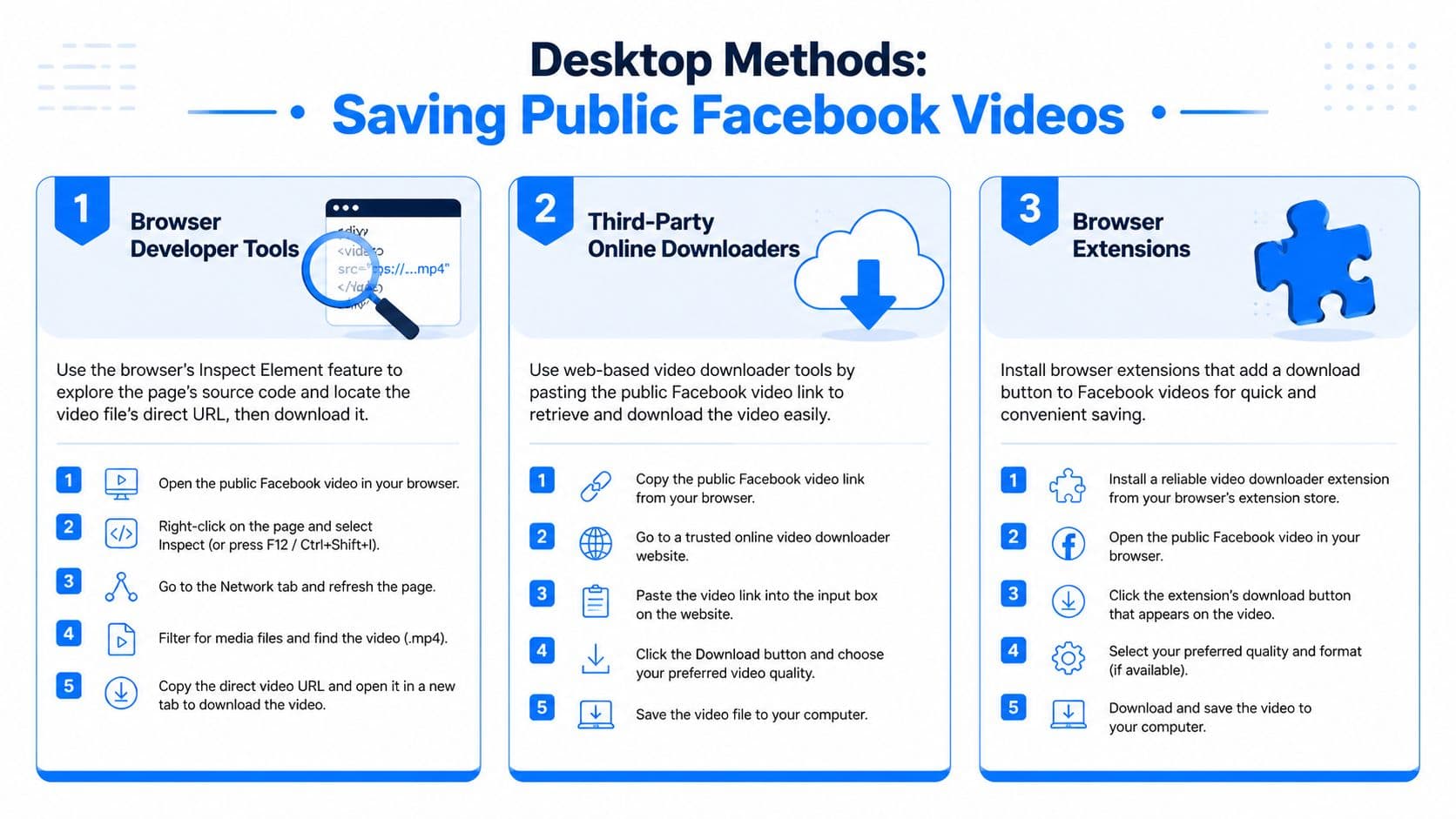
Online downloader tools have an 85 to 95 percent success rate for public videos, but unvetted tools can carry 40 to 60 percent malware incidence, while yt-dlp reaches 98 percent reliability on public content, according to this public Facebook video download methodology walkthrough. Those numbers explain the trade-off clearly. Easy methods work often, but not all easy methods are safe.
The quick browser URL trick
One older workaround is the lightweight Facebook page version. People often call it the “mbasic” method. You open the public video in a browser, adjust the URL to a simpler Facebook page format, and try to access a direct video file from there.
It’s fast when it works. It’s also one of the first methods to produce disappointing quality.
Use it when speed matters more than resolution. Don’t use it when you need an editor-friendly copy.
Check the downloaded file before you leave the page. Low-quality grabs often look acceptable in a tiny preview and bad in a timeline.
Online downloader sites
This is often the first method attempted. Copy the public Facebook link, paste it into a downloader, choose a file option, and save. It’s convenient, especially if you don’t want to install anything.
The problem is trust. Many of these sites are cluttered with fake buttons, redirects, and pop-ups. If you're used to streaming workarounds on other platforms, some of the same caution applies here. This rundown of Netflix Mac offline viewing methods is useful because it highlights the same core issue: the easiest-looking route isn't always the cleanest one.
A safer routine looks like this:
- Confirm the video is public: Private or restricted posts usually fail.
- Copy the clean permalink: Extra parameters often break the lookup.
- Avoid the first flashy button: Ads are designed to mimic download controls.
- Scan the file after download: Especially if the site felt spammy.
Browser extensions and power-user tools
Extensions like Video DownloadHelper can detect media streams directly in the browser. They’re better than random sites when you want more control, and they can sometimes expose higher-quality variants that web downloaders miss.
For more advanced users, this embed shows another route worth understanding:
If you’re comfortable with command-line tools, yt-dlp is the most dependable option in this category for public videos. It’s less beginner-friendly, but it avoids a lot of browser clutter and usually handles stream selection better.
Desktop Facebook Video Download Methods Compared
| Method | Ease of Use | Max Quality | Security Risk |
|---|---|---|---|
| mbasic-style browser trick | High | Usually lower | Low to medium |
| Online downloader website | High | Varies by site | Medium to high |
| Browser extension or yt-dlp | Medium | Usually best available | Low to medium |
Downloading Facebook Videos on Mobile Devices

Mobile is where “save videos from facebook” gets annoying. The Facebook app isn’t built for easy file export, and both iPhone and Android add their own restrictions around downloads, browsers, and storage permissions.
The easiest mistake is trying to do everything inside the Facebook app itself. Usually, you’ll get farther by copying the link out of the app and finishing the process in a browser or file-management app.
Android usually gives you more room
Android is more flexible, so saving a public Facebook video on mobile is usually straightforward if you switch from the app to a browser.
A practical flow looks like this:
- Copy the video link from Facebook: Use the share menu.
- Open your mobile browser: Chrome is a reliable option.
- Request desktop site if needed: Some download pages behave better that way.
- Paste the link into a downloader: Then save to device storage.
Downloads often land in the Downloads folder rather than your gallery first. If you need the clip for reposting instead of storage, a cleaner route is to skip the manual file shuffle and use a workflow built for sharing Facebook video to Instagram.
iPhone requires a more deliberate path
iOS is stricter. Safari can download files, but many Facebook downloader workflows still work better through an app with a built-in browser and file manager. The exact app options change over time, so the method matters more than any single app name.
The reliable pattern is simple:
- Copy the Facebook video link.
- Open a browser or file manager app that can handle downloads.
- Paste the link into a trusted downloader page.
- Save the file to Files first.
- Move it to Photos if you want it in your camera roll.
If iPhone asks where to save the file, choose a location you can actually find later. “On My iPhone” is often easier than digging through iCloud folders.
What tends to go wrong on mobile
Most failures come from three things. The video isn’t public, the wrong link was copied, or the downloader page is too cluttered to use safely on a small screen.
Screen recording is the fallback people reach for when everything else fails. It works, but it captures interface noise, notifications, and playback imperfections unless you’re careful. For anything you plan to edit or republish, a direct file is better.
Handling Private and Group Videos Securely
Most guides fail right where real work starts. Public videos are the easy case. Private posts, group uploads, internal training clips, and old Lives are where people get stuck.
That’s why this matters: over 40 percent of forum queries about saving Facebook videos mention private or group videos, yet fewer than 10 percent of guides offer a working solution, and Meta’s official data download feature provides a 100 percent success rate for owned content, according to this guide on downloading Facebook videos across devices.
The secure method for videos you own
If you uploaded the video, the best answer is Meta’s own archive system. Go to Facebook Settings, then Your Facebook Information, then Download Your Information. Select video content, request the archive, and wait for the download package.
This is the sanctioned route. It’s also the least stressful because you’re not fighting cookies, expired links, or browser hacks.
Use this when you need:
- Old uploads: Especially if the local original is gone.
- Stories and Lives you posted: Archive them before they disappear from your working routine.
- Recordkeeping: Useful for teams that need a cleaner content trail.
Private group videos you can view but don’t own
This is the gray area people search for most. If you have permission to watch a video in a private group, standard public downloaders usually won’t work because they can’t access authenticated sessions.
Browser extensions can sometimes help because they read the media stream while you're logged into Facebook in the same browser. That’s different from bypassing privacy. It still depends on your legitimate session access.
What matters here is restraint:
- Only download with permission: Access to view isn’t always permission to redistribute.
- Use your own logged-in browser: Don’t paste private URLs into random web tools.
- Prefer extensions over websites for protected content: They’re less likely to require exposing a private link externally.
A related challenge for social teams is group-based collaboration and content exchange. If that’s part of your workflow, this primer on Facebook group marketing is useful because the operational issues around permissions and reuse often start in groups, not public pages.
For private content, the safest method is the official archive for your own uploads. Everything else should start with permission, not just technical access.
A practical boundary
If you don’t own the video and don’t have clear permission to reuse it, stop there. “Can I access it?” and “Can I use it?” are separate questions. The technical path might exist, but that doesn’t make the usage acceptable.
Legal Considerations and Troubleshooting Common Issues
Saving a Facebook video isn’t automatically a copyright problem. Reusing it often is. Personal offline viewing, internal reference, and archiving your own uploads are one thing. Republishing someone else’s clip on your brand account without permission is another.
That distinction matters more than the tool. A clean download method doesn’t give you usage rights. If the video belongs to someone else, get explicit permission before you repost, edit, or embed it in a campaign.
Keep the legal side simple
A workable rule set for most creators and managers looks like this:
- Download your own videos freely: Archiving and repurposing owned content is the easiest case.
- Treat public as visible, not reusable: Public access doesn’t mean open-license use.
- Ask before redistributing private or group content: Especially in client, creator, or community settings.
- Review platform terms when stakes are high: Campaign assets and branded partnerships deserve extra care.
If your main goal is reposting rather than storing, building a process around reposting content across platforms is usually safer and cleaner than improvising each time.
Fixing the issues people hit most often
Low quality is the complaint I hear most. That usually happens because a basic tool grabs the default mbasic-style stream instead of the higher-quality one. This guide to downloading Facebook video in higher quality notes that advanced users can reach 1080p through browser developer tools or by merging separate video and audio streams with FFmpeg.
That leads to the most common troubleshooting list:
- Video not found: Copy the actual permalink, not a feed URL with extra junk attached.
- No audio in the file: Facebook sometimes serves separate streams. You may need a tool that merges audio and video.
- Only low resolution appears: The downloader may be grabbing the default mobile stream.
- Private video won’t load: Public tools can’t read authenticated content reliably.
- Reel behaves differently from a standard post: Some tools support one format better than the other.
When audio and video arrive as separate files, the problem isn’t corruption. It usually means the tool grabbed separate streams and didn’t combine them.
The practical takeaway
For public one-offs, use the safest desktop or mobile method that gets you the quality you need. For your own uploads, use the official archive. For recurring repurposing, stop building your process around download workarounds. That’s the part that creates unnecessary friction.
If you’re tired of downloading your own content just to post it again somewhere else, PostOnce is the cleaner answer. It lets you create once and distribute across platforms without the usual save, rename, upload, and reformat cycle that turns simple repurposing into busywork.