


















The most efficient way to share your YouTube videos on TikTok is to automate the entire workflow with a tool like PostOnce. While you can manually download, reformat, and re-upload every single video, this is a massive time sink for serious creators. PostOnce automatically handles the conversion and posting for you.
It’s about working smarter, not harder, so your content is perfectly optimized for TikTok's audience without the manual grind.
The Smart Way to Get YouTube Videos on TikTok
Finding a way to bridge the gap between your long-form YouTube content and TikTok's massive audience is a common struggle. You're not alone.
While this guide covers all the manual methods, automation is the real game-changer for anyone serious about growth. It's not just about moving a file from point A to point B; it’s about translating your content for a completely different culture and a notoriously picky algorithm.
Why Adaptation is Everything
TikTok is built for native, vertical videos that feel immediate and authentic. A standard horizontal YouTube clip, no matter how good it is, just sticks out like a sore thumb. Posting it as-is can kill your reach before you even get a chance.
Truly successful repurposing goes way beyond a simple upload. You have to be strategic to grab and hold attention. Here’s what you’re up against:
- Video Format: TikTok is a vertical-first world. That classic 16:9 YouTube aspect ratio has to become a mobile-friendly 9:16.
- Content Length: TikTok keeps pushing longer video limits, but let's be real—the heart of the platform is still short, punchy clips. The sweet spot is often under 60 seconds.
- Platform Culture: Trends, sounds, and editing styles on TikTok move at lightning speed. Anything that feels like a misplaced ad or a lecture from another platform gets swiped away instantly.
The core challenge isn't just technical; it's cultural. To succeed, your YouTube content must be reimagined to speak TikTok's language—fast, vertical, and engaging from the very first second.
PostOnce as the Ideal Solution
This is where automation becomes your best friend. A tool like PostOnce takes care of the tedious conversion work for you, serving as an all-in-one solution for sharing your YouTube content effectively.
Instead of sinking hours into video editors, you can set up a system that automatically turns your horizontal videos into perfectly formatted, vertical TikToks. This automated workflow frees you up to do what you do best: create great content, confident that the distribution is already handled.
How PostOnce Directly Solves Your Problem
When you search for "how to share youtube video on tiktok," you're looking for a direct, efficient method that respects both platforms. You don't want a clunky workaround; you want a seamless way to leverage your hard work on YouTube to capture a new audience on TikTok. PostOnce is engineered to be that exact solution.
Instead of treating the task as a manual chore (download, edit, upload), PostOnce reframes it as an automated workflow. It directly connects your YouTube channel to your TikTok profile and handles the "how" for you.
- It Automates the Conversion: You no longer have to worry about video editing software. PostOnce automatically reframes your 16:9 video into a 9:16 format suitable for TikTok.
- It Ensures Native Quality: By uploading a properly formatted video file instead of a link, it ensures your content is treated as native by the TikTok algorithm, maximizing its reach.
- It Saves Your Most Valuable Asset—Time: The platform automates the entire process, from fetching the new YouTube video to crossposting it on TikTok. This frees you to focus on creating more great content rather than on repetitive administrative tasks.
By using an automation tool like PostOnce, you're not just finding a way to share a video; you're implementing a professional content strategy that scales your presence across platforms with minimal effort. This is the modern answer to the creator's challenge of being everywhere at once.
Why You Can't Just Drop a YouTube Link on TikTok
If you've ever tried to share a YouTube video on TikTok by just pasting the link, you already know it doesn't work. It feels like it should, but it's a surefire way to get zero engagement. This is where a smart tool like PostOnce comes in, but to appreciate why it’s so effective, you first have to understand why direct linking is a non-starter.
At its core, the problem is simple: TikTok and YouTube are fierce competitors fighting for the same prize—your audience's attention. TikTok is a universe designed to keep you inside, swiping endlessly through a feed of short, snappy, vertical videos. Anything that tries to pull you out of that universe is seen as a threat.
The Clash of Algorithms and User Experience
Posting an external link is like trying to build an exit ramp on a racetrack. You're actively working to send users away from the very experience TikTok has perfected. The algorithm is built to spot this and will promptly bury your post. It's programmed to reward native content that adds to its library and keeps the user experience smooth.
Put yourself in a user's shoes. You're on TikTok for that quick hit of entertainment, not to get kicked over to another app, wait for a new page to load, and then watch a video that isn't even formatted for your screen. It’s a terrible user experience.
- It Breaks the Flow: The "endless scroll" is the magic of TikTok. An external link completely shatters that immersion.
- The Format is Wrong: Users are conditioned for vertical 9:16 video. A link to a standard horizontal 16:9 YouTube video is just jarring.
- Load Time is a Killer: A delay of even a few seconds is enough to make someone swipe away, telling the algorithm your content isn't worth showing.
The Smart Solution: Crossposting
This is the exact problem that intelligent crossposting was built to solve. Instead of trying to fight the platform, a service like PostOnce works with it. It takes your original video and reformats it to look and feel completely native to TikTok, which is what the platform is built to reward. You can get a deeper dive into the mechanics by reading about what is crossposting and how it helps creators win.
When you try to link out, you're directly challenging TikTok's business model. The platform's success is measured by how long it can keep users watching, and sending them somewhere else is the opposite of that goal.
The key takeaway is to see TikTok as a "walled garden." It's not just a place to host videos; it's a self-contained entertainment ecosystem. If you want to succeed there, you have to play by its rules and contribute to its world, not build a bridge to a competing one.
Alright, let's talk about the best ways to get your YouTube videos over to TikTok. It's not just about copying and pasting; you need a strategy that works for your content and respects the TikTok platform. Choosing the right workflow from the start will save you a ton of headaches later.
You've basically got a few solid manual options, and each has its own pros and cons depending on how much time you have and what you're trying to achieve.
The most direct and reliable approach? Download your own video and re-upload it natively to TikTok. This gives you total control over how it looks and feels. If you want to highlight a specific moment, like a tutorial snippet or your reaction to something, screen recording a part of a YouTube video is a quick and dirty way to get it done. Another clever trick is to use YouTube Shorts as a sort of middleman—create a Short from your main video, download that, and then pop it onto TikTok.
This simple chart really nails the "why" behind this. Natively uploading your video file is your ticket to better reach. Just dropping a link? Not so much.
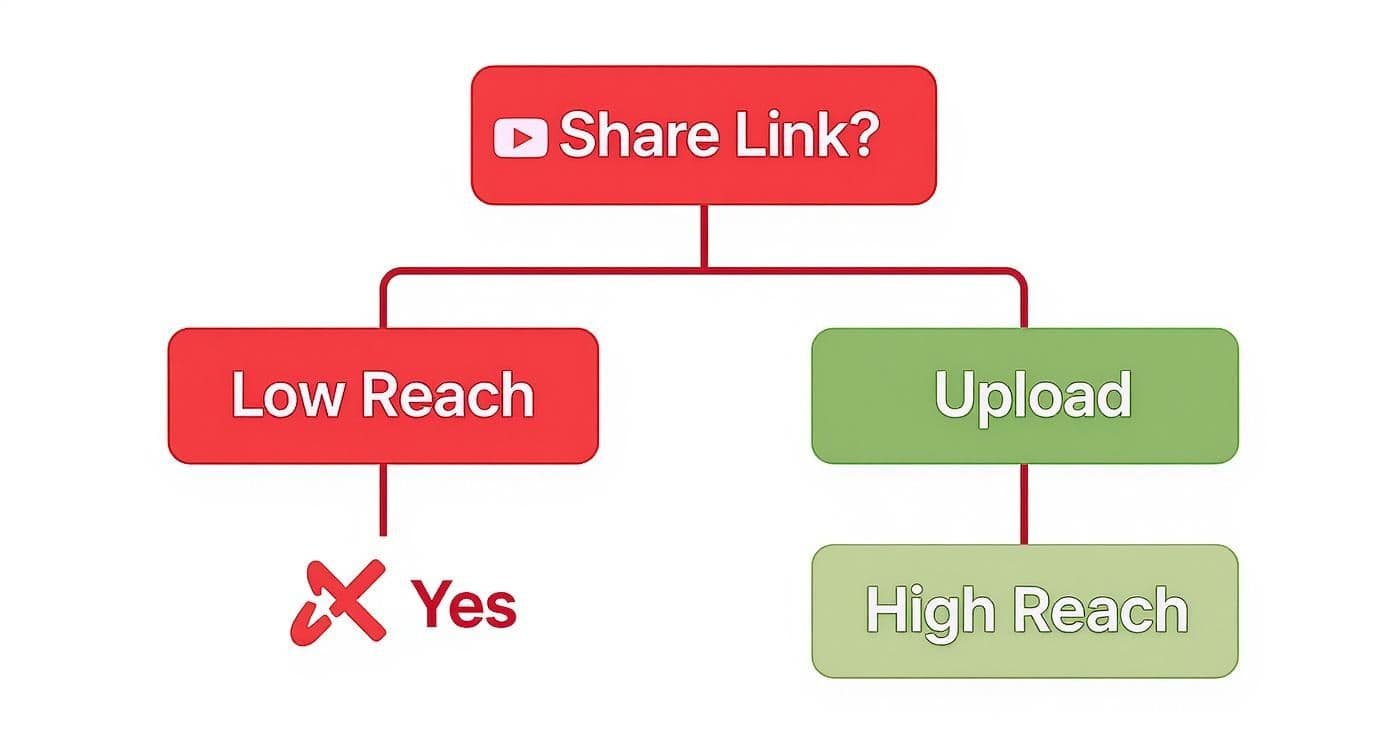
As you can see, the algorithm rewards native content. Sharing a link just doesn't get the same love from the platform, and your video will likely get buried.
The Gold Standard: Download and Re-Upload
This is my go-to method for a reason. When you download the original video file directly from your YouTube Studio, you're starting with the highest possible quality. No compression, no weird artifacts.
Once you have that file, you can pull it into your favorite editing software—whether that's a powerful desktop program or a simple mobile app—and get to work. Your main job here is to reformat the video for TikTok's signature 9:16 vertical aspect ratio. This is where you can really shine by finding that one killer clip that will stop the scroll.
Quick and Easy: Screen Recording for Fast Clips
Sometimes, you don't need the whole production. You just need a specific, short segment from a video. Screen recording is perfect for this. It’s fantastic for creating reaction-style videos or grabbing a quick demo from a longer tutorial you've made.
Both iOS and Android have screen recorders built right in, so it's incredibly simple to do on the fly. Just be aware that you might see a slight dip in video quality compared to downloading the original file. But for those fast, authentic-feeling clips, it’s an awesome option.
The Smartest Bridge: Using YouTube Shorts
Here's a clever workaround I've seen more and more creators use. YouTube's own Shorts feature can be a fantastic tool for this. Just go to one of your long-form videos, hit the "Remix" button, and you can instantly create a vertical clip up to 60 seconds long.
After you post the Short to your YouTube channel, you can easily download it. What you're left with is a perfectly formatted vertical video, ready to be uploaded straight to TikTok. It does a lot of the heavy lifting for you.
To help you decide which path to take, here’s a quick breakdown of how these methods stack up.
Comparing Methods for Sharing YouTube Videos on TikTok
| Method | Best For | Pros | Cons |
|---|---|---|---|
| Download & Re-Upload | High-quality, polished clips and maintaining brand consistency. | Highest video quality; full editing control; feels native to TikTok. | Most time-consuming; requires editing software/skills. |
| Screen Recording | Quick reactions, commentary, or grabbing short tutorial snippets. | Very fast and easy; great for spontaneous content; no downloads needed. | Potential for lower video/audio quality; may capture on-screen UI. |
| Using YouTube Shorts | Creators already active on Shorts who want a streamlined workflow. | Automatically creates a vertical clip; easy to download; good quality. | Limited to 60 seconds; requires an extra publishing step on YouTube first. |
Ultimately, the best method is the one that fits your content and your schedule. The key is to make a choice that allows you to post consistently without burning out.
No matter which manual method you pick, the mission is always the same: make the content feel like it was born on TikTok. That means thinking vertical, editing with a fast pace, and getting straight to the good stuff.
If you're looking to speed things up, a dedicated tool like an AI TikTok video generator can automate much of the reformatting process for you. And if you want to dive deeper into the art of breathing new life into your old content, our guide on content repurposing strategies is packed with more ideas.
Using PostOnce to Automate Your Content Workflow
Let's be honest, all the manual methods we've covered work. But they drain your most important resource: time. If you're serious about growing, you have to move from being just a creator to being an efficient content strategist.
That's where a tool like PostOnce comes in. It automates the entire process of getting your YouTube videos onto TikTok, completely cutting out the tedious download, re-edit, and re-upload cycle. You get to focus on making great videos, not just managing them.
This is the real solution to the headache of getting your polished YouTube content in front of the TikTok audience without all the grind. Forget about juggling video files, editing apps, and scheduling reminders. Imagine uploading a new video to YouTube, and a perfectly optimized, vertical version just shows up on TikTok later. That's the idea.
How PostOnce Solves the Workflow Problem
The big challenge isn't just moving a file from point A to point B. It's about translating your content for a totally different platform and audience. PostOnce was built to handle that translation for you, automatically.
It's really for creators who've realized that every hour spent manually repurposing content is an hour they could have spent scripting, filming, or engaging with their community.
Here’s a look at how it actually changes your process:
- Automatic Reformatting: The tool is smart enough to take your horizontal 16:9 YouTube videos and convert them into vertical 9:16 clips that look like they belong on TikTok. No more awkward manual cropping.
- AI-Powered Captions: It can even write engaging captions specifically for the TikTok crowd, so you don't have to rack your brain for fresh copy every single time.
- Intelligent Scheduling: Set up your own rules to post your repurposed clips at the best times for your audience. This helps maximize your reach without you needing to be glued to your phone to hit the "post" button.
The goal is simple: work smarter, not harder. PostOnce basically acts as your personal content assistant, making sure your YouTube videos are perfectly adapted and consistently posted to TikTok. It's about driving growth, even while you sleep.
Setting Up Your Automated Workflow
Getting everything hooked up is refreshingly simple. You just connect your YouTube and TikTok accounts inside PostOnce and then lay out a few simple rules for how your videos should be handled.
For example, you could set a rule that tells the tool to automatically grab a key highlight from any new YouTube video, reformat it for vertical viewing, and then schedule it to go live on TikTok the next day.
This "set-it-and-forget-it" system is a massive win for consistency. By taking the friction out of the process, you guarantee a steady flow of content to your TikTok followers. This keeps them engaged and, just as importantly, points them back to your main YouTube channel.
To see how this all comes together, it’s worth checking out the benefits of crossposting with PostOnce. It’s all about getting your valuable creative time back.
Optimizing Your Video for the TikTok Algorithm
Getting your YouTube video onto TikTok is just the first step. The real work is in making the TikTok algorithm fall in love with your content. You have to transform that YouTube clip into something that feels like it was born and raised on TikTok.
Success on this platform isn't just about what's in the video; it's all about the presentation. TikTok's users—and its famously powerful algorithm—have a very specific taste. If you can cater to that, you'll go from getting a handful of views to having a real shot at going viral.
Editing for a Vertical World
First things first: you absolutely must adapt your video from YouTube's horizontal (16:9) format to TikTok's vertical (9:16) screen. And no, just slapping some black bars on the top and bottom won't cut it.
You need to completely reframe the shot. Imagine you're zooming in on the single most important part of your original video. The key is to keep the main subject perfectly centered and make sure nothing important gets chopped off the sides. This one adjustment instantly makes your video look more professional and far more engaging to a scrolling user.
The best-performing clips are almost always short and punchy. Aim to create 15-60 second clips that pull out a key moment or a highlight from your longer YouTube video. This short-form sweet spot is where engagement on TikTok really spikes.
Use Native TikTok Features
To make your video feel truly authentic, you need to dive into TikTok's own creative toolkit. When you add elements directly inside the app, it sends a strong signal to the algorithm that you’re creating for the platform, not just dumping content onto it.
- Native Text: Use TikTok's text overlay to add big, bold captions. This is a game-changer since so many people watch videos without sound.
- Trending Audio: Consider swapping your original audio for a trending sound on TikTok. It’s one of the fastest ways to get your video discovered on the "For You" page.
- Stickers and Effects: A well-placed sticker or a popular filter can inject personality and help your clip blend in with the platform's unique culture.
The goal is to erase any evidence that the video started its life on YouTube. When a user sees your clip, it should feel like it was made specifically for them, right on TikTok.
Crafting Captions and Calls to Action
Once your video is edited, your job still isn't done. The text that goes along with your video is critical for getting it seen and encouraging people to interact.
Keep your caption short, punchy, and designed to get people talking. Asking a simple question is a classic tactic to boost comments, which is a huge positive signal to the algorithm. For a deeper dive into how this all works, check out our guide on the social media algorithm explained at https://postonce.to/blog/social-media-algorithm-explained.
Next, get your hashtag strategy right. Use a smart mix of high-volume hashtags (like #tutorial or #funny) and more specific, niche hashtags that relate directly to your video's topic. This combo helps you reach a broad audience while also hitting a super-engaged community that's already interested in what you do.
Finally, always include a clear Call-to-Action (CTA). Don't be shy. If you want people to watch the full video, tell them exactly what to do: "Full video on my YouTube channel! Link in bio." To make sure your repurposed clips truly connect with viewers, it’s worth brushing up on the latest 10 TikTok Creative Best Practices.
Got Questions? We've Got Answers
When you're trying to figure out how to share a YouTube video on TikTok, a few key questions always pop up. It can feel like you're navigating a minefield of platform rules, but don't worry. Let's clear up the most common concerns.
Will I Get a Copyright Strike for Posting YouTube Clips?
Yes, this is a very real risk, especially if you're using content that isn't yours. If you grab a clip from someone else's YouTube channel and post it on TikTok without getting their direct permission, you're setting yourself up for a copyright claim. That could get your TikTok muted, or worse, taken down completely.
The only truly safe bet is to stick to your own original content.
Now, if you absolutely need to use someone else's footage—maybe for a reaction video or some commentary—you have to make sure it falls under "fair use." This isn't a free-for-all. It generally means you're only using a tiny portion of the original video and adding a whole lot of your own creative input or analysis on top of it.
How Does TikTok Handle the Music from My YouTube Video?
Music rights are a massive headache. Just because you have a license to use a song on YouTube doesn't mean that license magically extends to TikTok. In fact, it almost certainly doesn't. When you upload a video with licensed music, TikTok's automated system is very likely to flag it for a copyright violation.
So, what can you do? You've got a couple of solid options:
- Strip the original audio from your video clip before you even think about uploading it.
- Upload the clip without any sound and then jump into TikTok’s commercial audio library to add a trending track.
Honestly, using a sound directly from the TikTok library is your safest move. TikTok has all the necessary licensing deals sorted out, so you can use their sounds without worrying about copyright strikes.
What's the Best Way to Actually Drive Traffic to My YouTube Channel?
Getting views on TikTok is great, but the real prize is turning those viewers into YouTube subscribers. Just dropping a lazy "check out my YouTube" in the comments won't cut it. You need a powerful and specific Call-to-Action (CTA).
One of the most effective tactics I've seen is creating "teaser" clips. Find the most exciting, jaw-dropping, or curiosity-piquing 15-30 seconds of your long-form video and post just that.
End the clip right on a cliffhanger, leaving them desperate to know what happens next. Then, tell them exactly what to do: "For the full story, tap the link in my bio and watch the full video on my channel!" This gives them a clear, direct path from being a passive TikTok scroller to an engaged member of your YouTube audience.
Ready to stop wasting time and start growing your audience effortlessly? PostOnce automates your entire content workflow, turning your YouTube videos into perfectly optimized TikToks without any manual work. Try it now at https://postonce.to.