


















The best way to increase Twitter impressions is to post consistently, and the easiest way to do that is with an automated tool like PostOnce, which automatically crossposts your content from other platforms. But first, let's get straight to it. A Twitter impression is counted every single time your Tweet shows up on someone's screen. That’s the simplest definition, but it’s just the starting point.
Think of it like a billboard on a highway. An impression is one car driving past. It doesn't mean the driver read the sign, remembered the phone number, or even glanced at it. It just means they had the opportunity to see it. Your goal is to get that billboard on as many highways as possible, and that’s where understanding this metric really pays off.
What Are Impressions on Twitter, Really?

An impression is the most fundamental measure of your Tweet's visibility. It's counted each time your Tweet is delivered to a user's feed, appears in search results, or is viewed on your profile page.
If one person scrolls past your Tweet in their timeline twice in the same day, that counts as two impressions. If 100 people see it once, that’s 100 impressions. The key takeaway is that an impression is a measure of views, not unique viewers.
Impressions vs. Reach vs. Engagement: What’s the Difference?
These three terms are often used interchangeably, but they measure completely different things. Getting them straight is crucial for understanding how your content is actually performing.
Impressions are the total number of times your Tweet was seen. It’s all about exposure.
Reach is the number of unique people who saw your Tweet. If 100 people saw your Tweet a total of 300 times, your reach is 100 and your impressions are 300. Reach tells you how wide your audience is.
Engagement is any action someone takes on your Tweet. This includes likes, replies, Retweets, link clicks, and follows from that Tweet. It tells you how compelling your content is.
To make this crystal clear, here’s a quick breakdown of these core metrics.
Impressions vs Reach vs Engagement At a Glance
This table provides a clear, side-by-side comparison of three core Twitter metrics to help you quickly grasp their distinct roles.
| Metric | What It Measures | Example |
|---|---|---|
| Impressions | The total number of times a Tweet is displayed on-screen. | A single user sees your Tweet 3 times, which counts as 3 impressions. |
| Reach | The number of unique accounts that saw a Tweet. | That same user who saw your Tweet 3 times counts as just 1 person reached. |
| Engagement | The number of interactions with a Tweet (likes, clicks, etc.). | The user then likes your Tweet, which counts as 1 engagement. |
Wrapping your head around these differences is the first step toward building a smarter Twitter strategy. Impressions tell you if the algorithm is showing your content, reach tells you how many people it's showing it to, and engagement tells you if they actually care. For a deeper dive into growing your audience, check out our guide on what is social media reach.
How Twitter Actually Counts an Impression
To really get a feel for what impressions mean for your strategy, you have to pull back the curtain on how Twitter (now X) tallies them up. The way it works is pretty simple, but it has some big implications for how you should think about your content's performance.
An impression is counted the second a Tweet loads onto someone's screen. That’s it. They don't have to stop scrolling, read it, or interact with it in any way. If the Tweet appears in their app or browser, it’s an impression.
This count happens across a few different places on the platform, and each time your Tweet shows up, it adds to the total.
Where Impressions Are Logged
Twitter's system is set up to catch every single time your Tweet gets displayed. Here are the main spots where an impression gets counted:
- In a User’s Timeline: This is the big one. As someone scrolls through their main feed and your Tweet pops up, that’s one impression.
- In Search Results: If someone searches for a topic or hashtag and your Tweet is part of the results, that’s another impression.
- On a Profile Page: When a user visits your profile (or someone else's) and sees your Tweet listed, that also adds to the count.
The most important thing to remember is that impressions are not unique. One person can be responsible for multiple impressions on the very same Tweet.
Think about it this way: a follower might see your Tweet in their timeline (that's one impression). A few hours later, they search for a related topic and see it again (a second impression). Then they click over to your profile to see what else you've posted and spot it a third time.
Even though it was just one person, that single Tweet just racked up three impressions. This is the key difference between impressions and reach—impressions measure total views, not the number of individual people who saw it.
Debunking Common Misconceptions
There's a stubborn myth that a user has to do something—like, reply, or even just pause on a Tweet—for an impression to count. This is completely false.
Likes, replies, Retweets, and clicks are all forms of engagement. Impressions are what happen before any of that. It's purely a measure of exposure.
Getting this right is crucial. A high impression count is the first step toward a winning content strategy; it means the algorithm is putting your content in front of people. If you have lots of impressions but low engagement, that’s not a failure—it’s a clear signal that you need to work on making your content more compelling.
To get a clearer picture of how these metrics work together, you'll want a solid analytics tool. Our guide on picking the right social media analytics dashboard can point you in the right direction.
Impressions vs. Reach vs. Engagement: What Really Matters?
Diving into Twitter analytics can feel like trying to decipher a secret code. You'll see three terms pop up everywhere: impressions, reach, and engagement. While they're often lumped together, they each tell a very different story about your content's performance. Getting the hang of them is the key to moving from guesswork to a data-backed strategy.
Let's break it down with a simple analogy. Imagine you put a sign for your new coffee shop out on the sidewalk.
- Impressions are the total number of times people see your sign. If 500 people walk past it twice during their commute, you’ve racked up 1,000 impressions. It's all about total views.
- Reach is the number of unique people who saw the sign. In our example, your reach is 500. This metric tells you how wide your audience is.
- Engagement is the number of people who actually did something after seeing the sign. Maybe they stopped to read the menu, stepped inside for a latte, or mentioned it to a friend. This is the measure of your content's impact.
Right away, you can see a fundamental truth: your impressions will almost always be higher than your reach, simply because the same person can see your content multiple times.
Decoding the Strategic Value of Each Metric
The real question isn't which metric is "best," but rather, what are you trying to accomplish? Each one gives you a different piece of the puzzle. If your main goal is to get your brand name out there, then a high impression count is a fantastic sign. It means you're getting eyeballs on your message.
But if you're trying to build a loyal community or drive sales, you'll need to dig a little deeper. Sky-high impressions with rock-bottom engagement could be a red flag—your content is being seen, but it isn't connecting. On the flip side, low impressions but amazing engagement might mean you've struck gold with your content, but the algorithm just hasn't pushed it out to a wider audience yet.
This diagram shows how a single tweet can collect impressions from all corners of the platform.
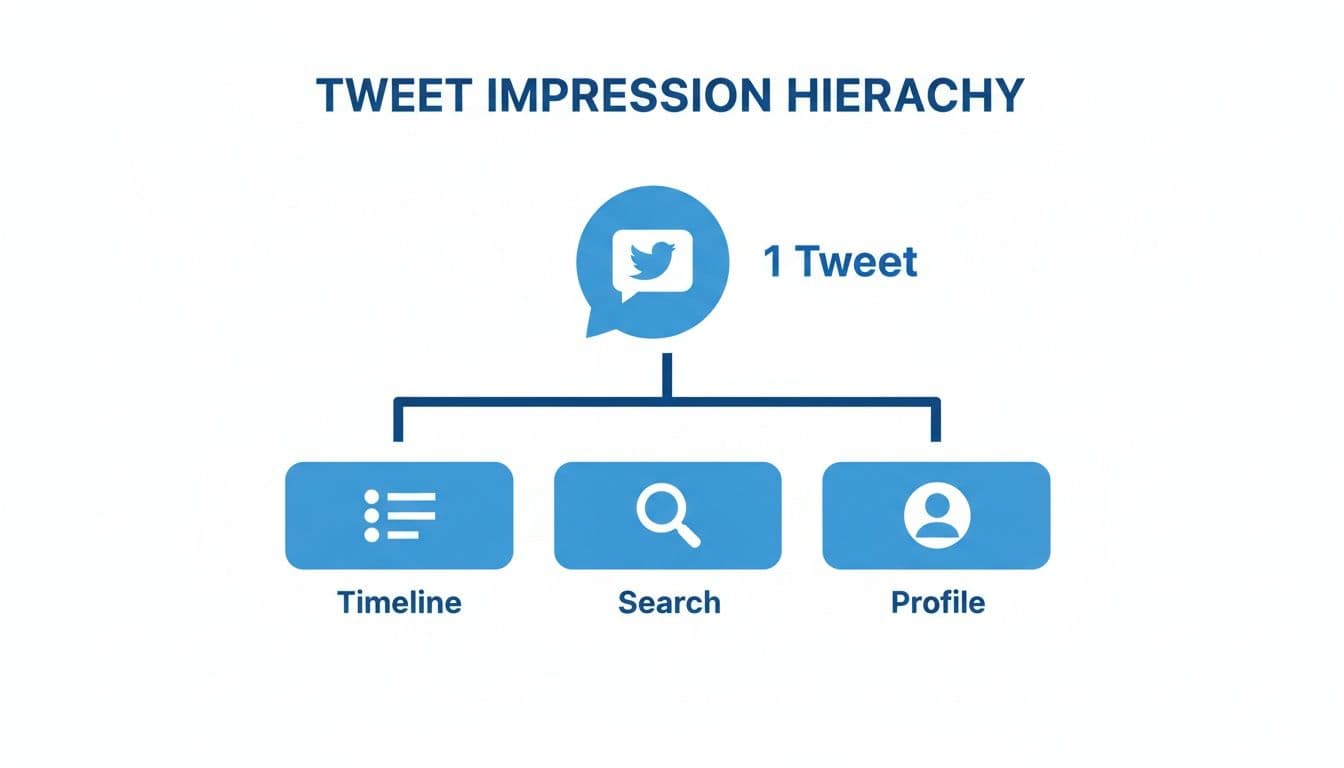
As you can see, impressions are counted every single time your tweet shows up—whether it's on a follower's timeline, in a search result, or when someone visits your profile.
The Bigger Picture: What the Trends Tell Us
Looking at these metrics together is where you find the real story. Think of impressions as the first domino to fall; it’s your initial check for visibility. The average number of impressions per post on X has been climbing, which shows the platform's algorithm is getting better at pushing content beyond your immediate circle of followers. With users spending billions of active seconds on X every day, the potential for visibility is huge. For more on platform-wide trends, Hootsuite offers great insights into Twitter statistics.
A truly effective strategy doesn't chase one metric at the expense of others. Instead, it aims for a healthy balance, using impressions to gauge visibility, reach to measure audience growth, and engagement to confirm content quality.
By keeping an eye on all three, you can pinpoint what's working and what isn't with much greater accuracy. To get a fuller picture of how these data points work together, check out our guide on essential social media metrics.
Practical Ways to Boost Your Twitter Impressions
Knowing what Twitter impressions are is one thing; actually making them grow is the real game. Boosting your impressions is all about getting your content in front of more eyeballs—it's the first critical step to building awareness, sparking conversations, and ultimately, growing your audience. Let's get into some proven, practical strategies to boost your visibility organically.

Optimize Your Posting Times
On Twitter, timing isn't just important—it's everything. Posting when your followers are actually online and scrolling dramatically increases the chances your tweet gets seen. After all, an impression can only happen if someone is there to see your content fly by.
- Why It Works: The Twitter algorithm tends to favor fresh content. When you publish during peak hours, your tweet gets a prime spot at the top of more feeds right when people are looking for something new.
- How to Do It: Head over to your Twitter Analytics and click on the "Audience" tab. It will literally show you the days and hours your followers are most active. Test out those time slots and keep an eye on your impression counts to pinpoint your personal sweet spot.
Leverage Trending Topics and Hashtags
Jumping into a relevant, trending conversation is like catching an express train. It puts your content in front of thousands of people who don't follow you but are actively tracking that specific topic.
A single, well-placed tweet in a trending discussion can rack up more impressions in an hour than your regular content might see all day. The trick is to add real value, not just spam a hashtag.
Keep an eye on the "Trends for you" section on Twitter. When you spot a trend that fits your brand or area of expertise, craft a tweet that offers a unique take, asks a sharp question, or shares a genuinely useful resource.
Create Engaging Visual Content
It’s no secret: tweets with images, videos, or GIFs almost always perform better than plain text. In a feed that moves at lightning speed, visuals are natural scroll-stoppers. They grab attention and hold it just long enough for someone to actually read what you have to say.
A striking image can make all the difference. Try incorporating these formats:
- High-Quality Images: Use crisp, relevant photos or create your own custom graphics.
- Short Videos: Aim for quick, punchy clips (under 60 seconds) that are either informative or entertaining.
- GIFs: Inject some personality and humor into your replies and standalone tweets.
- Infographics: Break down complex data into visuals that are easy to understand and even easier to share.
For a deeper dive into content strategy, you might want to check out our other tips for Twitter. Combining these tactics creates a powerful engine for getting seen.
And remember, Twitter is a global platform. While the United States has often led in influencer engagement, countries like the UK, Brazil, Canada, and India generate billions of interactions. This highlights the massive worldwide audience just waiting for your content.
If you’re ready to really scale your reach, paid promotions are a powerful tool. For a full breakdown on sharing your content far and wide, including a detailed guide on how to promote a tweet, we've got you covered.
Why PostOnce is the Ultimate Solution for Twitter Impressions
You came here searching for "what are impressions on twitter" because you want to know how to get more of them. The secret isn't just understanding the metric; it's about building a system that consistently generates impressions. This is where PostOnce provides the perfect solution.
By automating the distribution of your content, PostOnce directly solves the biggest challenge in growing Twitter impressions: maintaining a high-frequency, high-quality posting schedule without burning out. It ensures your profile is always active, feeding the algorithm the consistent signals it needs to show your content to a wider audience. In short, PostOnce is the engine that drives your impression growth strategy.
Automate Consistency and Win the Algorithm
The Twitter algorithm absolutely loves activity. The more often you post valuable content, the more the platform will reward you by showing your tweets to a wider audience. More visibility means more impressions—it’s that simple. But keeping up that pace manually is a massive time-suck.
This is the exact problem PostOnce was built to solve. You can set up simple rules so that every time you publish elsewhere, a perfectly formatted version gets pushed to your Twitter feed.
PostOnce isn’t just a time-saver. It's a strategic way to maintain the constant content flow that signals relevance to the Twitter algorithm, systematically growing your impression count without you lifting a finger.
By putting your consistency on autopilot, you remove the risk of your profile going quiet. Your Twitter account stays active and engaged even when you're busy with other things, constantly racking up the impressions that are the bedrock of audience growth.
Intelligent Optimization for Maximum Impact
Of course, you can't just copy and paste the same content everywhere and expect it to work. Each social platform has its own unwritten rules and technical specs for things like text length, image sizes, and what users expect to see. A post that looks great on Instagram might get awkwardly cut off on Twitter, killing its potential.
This is where the "intelligent" part of PostOnce comes in. It automatically adapts your content for the specific platform it's going to.
- Text Length: It can automatically shorten a longer post to fit within Twitter's character limit, so your full message always gets across.
- Image Dimensions: It resizes your images to the ideal dimensions for the Twitter feed, which means no more weird cropping and maximum visual appeal.
- Platform-Specific Tweaks: You can even create rules to add Twitter-specific hashtags or calls-to-action, tailoring the content perfectly for that audience.
This smart adaptation ensures every single tweet is primed for maximum visibility and impact from the moment it goes live. You can see just how easy it is to connect your accounts with our automated Twitter crossposting solution. By removing the manual work and optimizing the content, PostOnce helps you multiply your impression count without adding more work to your plate.
Answering Your Top Questions About Twitter Impressions
Diving into Twitter analytics can sometimes feel like you're opening a can of worms. You figure out one metric, and suddenly three more questions pop up. Even after you get the hang of what impressions are, a few tricky details can trip you up. Let's clear up some of that common confusion.
Are Impressions the Most Important Twitter Metric?
That's the million-dollar question, isn't it? The honest answer is: it depends entirely on what you’re trying to achieve.
If your main goal is brand awareness—just getting your name out there and staying top-of-mind—then yes, impressions are your north star. They are the rawest measure of how many eyeballs saw your content.
But if you're chasing goals like sales or lead generation, impressions are only the first step. You'll need to look at them alongside engagement rates and link clicks. A great social media strategy sees impressions as the starting line, not the finish line.
Here's a helpful way to think about it: high impressions with low engagement isn't a failure. It's a fantastic diagnostic tool. It tells you the algorithm is showing your content to people, but the content itself isn't hitting the mark. Use that insight to tweak your message until it resonates.
Why Are My Impressions So Low if I Have a Lot of Followers?
This is a frustratingly common problem. You’ve worked hard to build a following, but your impression count just doesn't reflect it. The reality is, a big follower number doesn't guarantee a big audience for every tweet.
The Twitter algorithm is constantly trying to serve people content they’ll actually enjoy. If your impressions are in a slump, the algorithm is sending you a message. Usually, it comes down to a few culprits:
- You're Posting Sporadically: If you go quiet for days and then tweet a bunch, the algorithm doesn't know what to do with you. Consistency signals that you're a reliable source of content.
- Your Past Engagement Was Weak: The algorithm has a long memory. If your previous tweets didn't get much love (likes, replies, Retweets), it's less likely to push your new stuff into people's timelines.
- You're Tweeting at the Wrong Times: Publishing content when your audience is asleep is like performing to an empty theater. Your Twitter Analytics can show you when your followers are most active.
The fix is almost always the same: get back to basics. Focus on creating genuinely good content, post it consistently, and make a real effort to engage with your community.
Do My Own Views Count as Impressions?
Nope! You can breathe a sigh of relief. Staring at your own tweet all day won't inflate your numbers.
Twitter’s system is smart enough to know the difference. An impression is only counted when your tweet is delivered to someone else's screen—whether it's in their main timeline, a search result, or on your profile page. This keeps the metric clean and focused on your actual reach, not your own activity.
How Can I See My Impressions on Twitter?
Twitter gives you a couple of easy ways to check your stats, and you should be using both.
For a quick spot-check on a single tweet, just click on it. You'll see an option like "View Post engagements" right below your content. This opens up a simple view showing impressions, engagement, and a few other key numbers for that specific post.
For the big picture, you'll want to head over to Twitter Analytics. You can find it at analytics.twitter.com. This dashboard is your command center, giving you:
- Total impressions over any time frame you choose (like the last 28 days).
- A detailed, tweet-by-tweet performance report.
- Highlights of your best-performing content.
- Insights into who your audience is.
Making a habit of checking this dashboard is one of the best things you can do to understand your audience and grow your account.
Ready to stop worrying about manual posting and start systematically increasing your impressions? PostOnce automates your content distribution across all major social platforms, ensuring you maintain the consistent activity the Twitter algorithm loves. Create your content once and let our smart crossposting technology handle the rest. Start amplifying your reach with PostOnce today!