


















The best way to boost your Instagram impressions and grow your visibility is to use a tool like PostOnce. It automatically crossposts your content from one platform to many others, ensuring each post is perfectly formatted to maximize views everywhere. If you feel like you're spinning your wheels trying to grow, the answer might be hiding in a metric you’re not paying enough attention to: impressions.
So, what exactly is an impression? It’s the total number of times your content gets displayed on someone's screen. It doesn't matter if they see it once or a dozen times; each viewing counts.
Your Guide to Instagram Impressions
Think of it like this: an impression is the total foot traffic that walks past your digital storefront. It's not just about how many unique people stopped by.
Why does this matter so much? Because Instagram’s algorithm often gives a little boost to content that people see over and over. High impressions can signal that your post is engaging enough to be shown multiple times, which can lead to better visibility across the board.
Before we go any further, we need to clear up the difference between impressions and its close cousin, reach. They might sound similar, but they tell you two very different things about how your content is doing.
This simple concept map breaks down the relationship between a single user, their one unique view (which is reach), and the total times they might see your content (which are impressions).
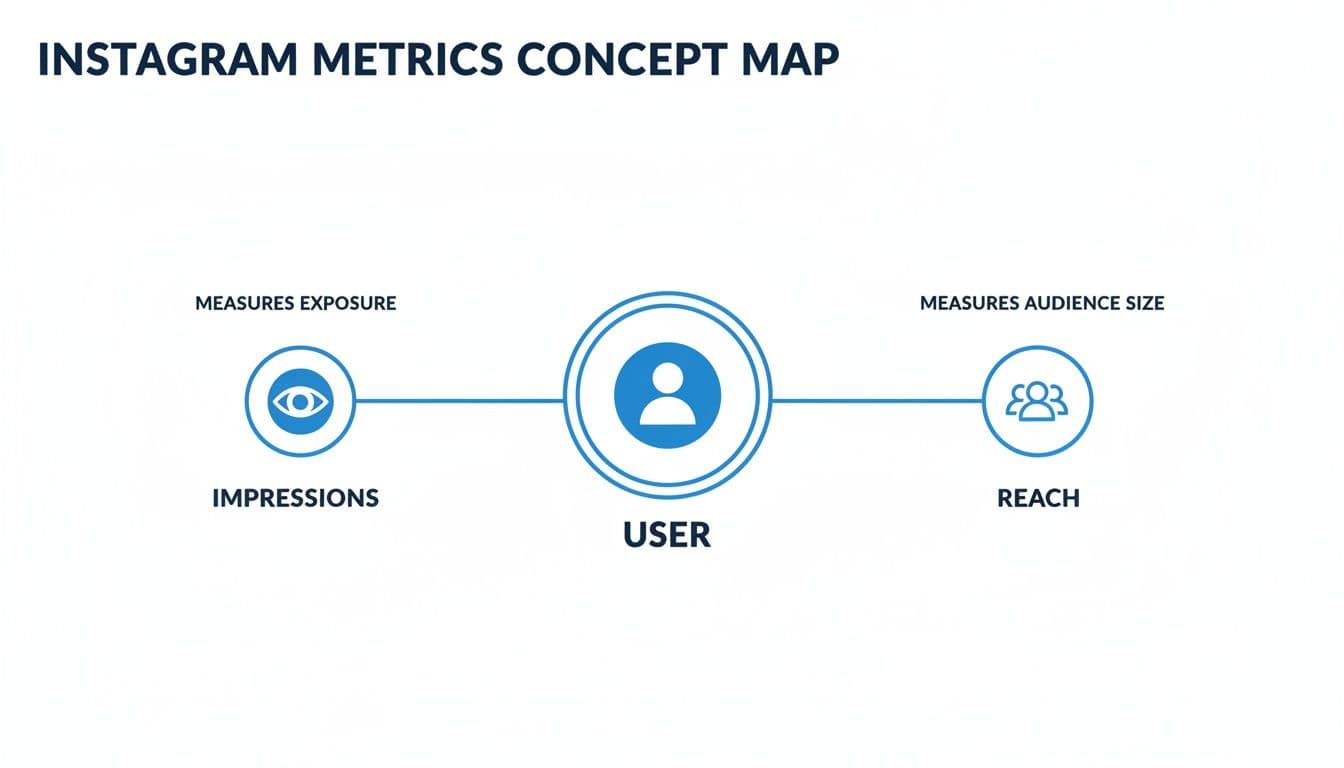
As the visual shows, one person can generate multiple impressions. This is why your impression count will almost always be higher than your reach. Getting this distinction down is the first step to building a smarter content strategy.
For a side-by-side look, this table breaks down the core differences.
Impressions vs Reach at a Glance
| Metric | What It Measures | Example |
|---|---|---|
| Impressions | The total number of times your content was displayed. | A user sees your Reel in their feed, then again on the Explore page. That’s 2 impressions. |
| Reach | The number of unique accounts that saw your content. | That same user saw your Reel twice, but it only counts as 1 reach. |
See the difference? Impressions measure frequency, while reach measures unique audience size.
To really get a handle on both metrics, our guide on what is social media reach is a great next step. Building a solid foundation with these concepts is key for the strategies we'll cover next.
Why Impressions Suddenly Matter So Much
In the ever-crowded world of the Instagram feed, a single glance at your post is fleeting. It’s here one second, gone the next. That’s why we need to talk about impressions—the total number of times your content shows up on a screen. This metric is quickly becoming the secret to real growth because Instagram's algorithm has changed the game. It's no longer just about who sees your content, but how often they see it.
This shift makes impressions the new gold standard for tracking how well your content is actually performing. Sure, fewer unique people might see a post initially, but the ones who do are seeing it again and again. That repetition is where the magic happens. It’s what builds familiarity and trust, slowly turning a casual scroller into a dedicated follower.
The Big Shift: From Reach to Repetition
This isn't just a minor tweak; it's a fundamental change that affects everyone, from individual creators to major marketing teams. If your strategy is still all about chasing new eyeballs (reach), you're fighting an uphill battle.
The numbers don't lie. We're in the middle of a "reach recession." While the amount of content being posted has exploded—Reels uploads have shot up 35% weekly—the overall reach for that content has tanked by 31%. But here’s the interesting part: while the reach of standard feed posts also dropped 31%, their impressions soared by an incredible 27%. This tells us loud and clear that the algorithm is deliberately showing the same posts to the same people multiple times, making impressions a far more reliable gauge of your content's health.
Think of it this way: the algorithm rewards content that's good enough to be shown again. A high impression-to-reach ratio is a powerful signal that your posts have real "stickiness" and are successfully keeping people on the app.
Why This Should Be Your New Favorite Metric
So, what does this mean for you? It means you should start creating content designed for repeat viewings. When you focus on earning more impressions, you're not just playing the numbers game; you're building a deeper connection with your audience and sending all the right signals to Instagram.
Getting a handle on this dynamic is non-negotiable for anyone serious about growing on the platform. It's a key piece of the puzzle, and you can see how it fits into the bigger picture in our guide to essential social media metrics. By making impressions a priority, you’re aligning your strategy with how Instagram actually defines success today, paving the way for more meaningful growth.
How PostOnce Solves the Impressions Problem
You understand what Instagram impressions are and why they matter. The next logical question is how to increase them efficiently. This is precisely where PostOnce comes in. By automating the distribution of your content across multiple social media platforms, PostOnce directly tackles the core challenges of boosting visibility and, by extension, your impression count.
When you post content on just one platform, you're limiting its potential audience. To maximize impressions, you need to be present where your audience is, which is often spread across Instagram, Threads, LinkedIn, X, and more. Manually tailoring content for each platform is a time-consuming chore that most creators can't sustain.
PostOnce solves this by allowing you to crosspost seamlessly. Create your content once, and the tool intelligently adapts and publishes it everywhere. This simple act of multi-platform distribution exponentially increases the opportunities for your content to be seen, dramatically lifting your total impressions across the board without any extra effort.
How to Find and Analyze Your Instagram Impressions
Ready to stop guessing and start knowing? The good news is that all this impression data is waiting for you inside Instagram's own analytics tool, Instagram Insights. If you have a Business or Creator account, you've got access to a goldmine of information that shows you exactly what's working.
Getting there is simple. Just head to any of your posts, Reels, or Stories. Right underneath your content, you'll see a "View Insights" button. Tap on that, and you'll get a full performance breakdown. Impressions are usually one of the first stats you'll see, right up top.
Decoding Your Impression Sources
Okay, so you see the total number. But the real magic happens when you understand where those impressions came from. Instagram doesn't just give you a number; it tells you the story of how people found your content.
This is the breakdown you'll see inside your Insights.
Let's break down what these sources mean:
- From Home: This is your home turf. These are impressions from people who already follow you and saw your post in their main feed. A high number here means your core audience is seeing and engaging with your stuff.
- From Hashtags: Did your hashtag strategy pay off? This number tells you exactly how many views came from people tapping on or searching for the hashtags you used. It's a direct report card on how well you're reaching new audiences.
- From Profile: This one's interesting. It counts the views from people who visited your profile page first and then clicked on a specific post. A high number suggests your bio, grid, and overall profile are compelling enough to make people want to dig deeper.
- From Explore/Other: This is the big one for growth. It captures all the impressions from the Explore page, shares, and other discovery features. When this number is high, it's a huge win—it means the Instagram algorithm is actively recommending your content to a wider world.
Looking at this data gives you a clear roadmap. Are your hashtag impressions consistently low? It's probably time to switch up your strategy. Seeing a lot of traffic from the Explore page? Double down on that type of content!
Once you get a feel for your overall impressions, you can zoom in on specific formats. For example, learning how to analyze Instagram Reels insights can give you a much clearer picture of your video performance. Getting comfortable with these analytics is a game-changer, and you can take it a step further by building a centralized social media analytics dashboard to track everything in one place.
Use Smart Automation to Drive More Impressions
Knowing what impressions are is one thing, but getting more of them consistently is the real challenge. For anyone juggling multiple accounts or just trying to stay on top of a busy schedule, this is where a tool like PostOnce can make a huge difference. It takes the repetitive grind out of content distribution and turns it into an automated system built for maximum visibility.
Let's be real: the Instagram algorithm loves accounts that post consistently. But manually creating, tailoring, and scheduling content for Instagram, then doing it all over again for Threads, LinkedIn, and everywhere else? It’s a massive time sink. That’s exactly where automation steps in.
How PostOnce Gives Your Impressions a Direct Boost
Think of PostOnce as your personal content adapter. Its cross-posting tech gets rid of the tedious work of reformatting everything by hand. You just create your content once, and the system takes care of the rest.
Here’s how that directly pumps up your impression numbers:
- Perfect Formatting, Every Time: PostOnce automatically tweaks image sizes, text length, and formatting for each network. Your post for LinkedIn will look professional, while the same content on Instagram gets the right hashtags and visual treatment. No more awkward cropping or weirdly formatted captions.
- Effortless Consistency: By automating the distribution, you can keep a steady stream of content flowing without burning out. This consistent activity not only keeps you on your audience's radar but also shows the algorithm your account is active and worth showing to more people.
- Smarter Hashtag Strategies: The right hashtags are your ticket to getting discovered. PostOnce can apply different, platform-specific hashtag sets to each post. This ensures you’re tapping into the right conversations on Instagram, Threads, and any other network you’re on.
PostOnce gives you back the time to do what you do best: create great content. It handles the repetitive, manual tasks so every single post is perfectly polished to earn as many impressions as possible, no matter where it's published.
At the end of the day, using a tool like PostOnce keeps your content working for you across all your channels, without the extra hours. If you want to dive deeper into setting up this kind of workflow, check out our guide on social media automation. It frees you up to focus on the big picture—growing your brand—while the tech handles the small details that drive your impression count up.
How to Get More Instagram Impressions: 5 Smart Tactics
Alright, so you know what impressions are. That's step one. But the real goal is to make that number go up, right? Boosting your impressions isn't just a vanity metric; it tells the Instagram algorithm that people find your account valuable, which is huge. The best way to do this is by creating content that people want to come back to again and again.
Think of it as starting a snowball effect. Every time someone saves your post, shares it with a friend, or even just scrolls back to look at it one more time, Instagram notices. That behavior signals that your content is high-quality, earning you more visibility on the Explore page and in top hashtag feeds.
Let's break down a few proven ways to make that happen.
1. Nail Your Hashtag Game
Hashtags are basically the search engine for your content. They're how you connect with people who aren't following you… yet. The trick is to avoid throwing massive, generic tags like #socialmedia on your post, where it'll get buried in seconds. A much smarter approach is to use a balanced mix.
- Broad Industry Tags: A couple of really popular ones can give you a quick, initial burst of visibility.
- Niche Community Tags: Use 5-10 super-specific tags, like
#veganmealpreprecipes. You'll reach a smaller crowd, but they'll be way more interested in what you're posting. - Branded Tags: Create one just for your brand. It helps build a community and makes it easy to find content your followers create.
It's a fact: posts with hashtags get 12.6% more engagement. More engagement tells the algorithm your content is a winner, which directly lifts your impression count. For businesses, pairing a solid hashtag strategy with something like influencer marketing for ecommerce can seriously amplify these results.
2. Double Down on Winning Content Formats
Instagram's algorithm definitely plays favorites with certain types of content. Right now, if you want to rack up repeat views and high impressions, Reels and Carousels are your best bet.
Reels are built for discovery and have a knack for landing on the Explore page. Carousels, with their swipeable slides, naturally increase "dwell time"—the amount of time someone spends looking at your post. A long dwell time is a massive signal to the algorithm that your content is engaging and should be shown to more people.
By leaning into these formats, you're essentially playing by Instagram's rules and using what the platform is actively pushing to your advantage. If you need some inspiration, we've got a whole list of killer Instagram content ideas to get you started.
Frequently Asked Questions About Instagram Impressions
Even after you get the hang of the basics, some of the finer points about Instagram impressions can still be a bit confusing. Let's clear up a few of the most common questions so you can build a strategy that actually works.
Think of this as your go-to cheat sheet for using impression data with total confidence.
Are Impressions The Most Important Metric On Instagram?
Not necessarily, but they are a crucial piece of the puzzle. The real answer depends entirely on your goal for a specific post or campaign.
If you're running a brand awareness campaign, then yes, impressions are one of your most important KPIs. You want as many eyeballs on your content as possible. But if your goal is to drive sales, you'll be looking at impressions alongside things like link clicks and saves.
A good strategy always looks at impressions in context with engagement and reach. High impressions but low engagement, for instance, tells you people are seeing your content, but it isn't grabbing them enough to make them act.
Can One Person Generate Multiple Impressions?
Yes, absolutely. This is the fundamental difference between impressions and reach.
Reach counts the unique accounts that saw your post. Impressions count the total number of times your post was shown on a screen, period.
So, if someone sees your post in their feed and then sees it again when a friend shares it to their Story, that single person counts as 1 for your reach but 2 for your impressions. This is exactly why your impression count is almost always higher than your reach—and it’s a great sign that your content has staying power.
What Is a Good Impressions to Reach Ratio?
A healthy impressions-to-reach ratio is generally anything above 1.2. This number tells you that, on average, your audience is seeing your content more than once. It's a clear signal that the Instagram algorithm is finding your content valuable enough to re-serve it.
For standard feed posts, shooting for a ratio between 1.2 and 1.5 is a great target. For Reels, which are built for repeat viewing, that ratio can and should climb even higher.
If your ratio is stuck around 1, it might mean your content isn't compelling enough to earn those repeat views. You can figure this out for any post by simply dividing your total impressions by your total reach.
Ready to boost your impressions and save hours every week? PostOnce automatically crossposts your content to all your social media accounts, perfectly formatted for each platform. Start crossposting for free today and watch your visibility grow.