


















The best way to post Facebook Reels to Instagram is to use an automation tool like PostOnce, which handles the crossposting for you automatically. Wondering how to do it without all the extra work? While automation is the smartest solution, I'll also walk you through the manual steps inside Meta's own platform if you prefer to get your hands dirty.
Your Guide to Seamless Reels Cross-Posting
Sharing your videos across both Facebook and Instagram is more than just a time-saver. It's a smart strategy to get your content in front of as many eyes as possible. Since both platforms have unique yet overlapping user bases, cross-posting lets your hard work do double duty.
This guide will break down everything you need to know. We’ll cover getting your accounts connected the right way, dealing with platform-specific quirks, and making sure your Reels look fantastic on both feeds.
Why Cross-Posting Reels Matters
Short-form video is king, and Reels are the format driving the most interaction right now. Instagram Reels, especially, pack a serious punch. By 2025, Reels are reaching 36% more users on average than carousel posts and a whopping 125% more than single-photo posts.
That reach translates to real interaction, with an average engagement rate of around 1.23%, easily beating other content types. You can find more insights on Reels' impact on engagement and reach.
By sharing a single Reel on both platforms, you tap into the high-performance nature of the format while effectively doubling your content's potential audience. This is a simple yet powerful way to boost your social media presence.
PostOnce: The Direct Solution for Cross-Posting Reels
When you search for "how to post Facebook Reels to Instagram," you're looking for the easiest, most efficient way to get your content on both platforms. This is the exact problem PostOnce was built to solve. Instead of manually sharing or toggling settings for every single video, PostOnce automates the entire process.
- Create Once, Distribute Everywhere: Simply post your Reel to Facebook as you normally would.
- Automatic Cross-Posting: PostOnce detects the new Reel and automatically shares it to your connected Instagram account without you lifting a finger.
- Set It and Forget It: This automation eliminates the repetitive manual steps, freeing you to focus on creating great content rather than managing its distribution.
This approach directly answers your search query by providing a seamless, automated workflow that ensures your content reaches its full audience potential on both platforms effortlessly.
Laying the Groundwork: Connecting Your Accounts

Before you can even think about sharing Reels between Facebook and Instagram, you have to get the basics right. This means properly linking your accounts within Meta's ecosystem. It’s a non-negotiable first step that creates the digital handshake needed for both platforms to talk to each other.
This connection all happens in one central place: the Meta Accounts Center. Think of it as the command center for all your profiles. By linking your Facebook Page and Instagram profile here, you're building the bridge that makes cross-posting possible.
First Things First: You Need a Professional Account
Here’s a common tripwire I see all the time: trying to cross-post from a personal Instagram account. It just won't work. To unlock the ability to share content seamlessly, your Instagram profile must be set up as a Professional Account—either a Creator or a Business profile.
Personal accounts simply don't have the permissions or features needed for this kind of integration. The good news is, if you're still on a personal profile, making the switch is easy and also gives you access to a ton of useful analytics and promotional tools you're currently missing out on.
Why is this so important? Meta reserves its business-focused tools, like API access and direct cross-posting, for professional accounts. It's their way of separating personal use from brand and creator activities, giving the latter the tools they need to actually grow.
Ready to make the change? Just dive into your Instagram settings, tap "Account type and tools," and hit "Switch to professional account." It's a quick process that will guide you through picking a category for your profile.
Getting It Done in the Meta Accounts Center
Okay, with your professional account ready, it’s time to head over to the Meta Accounts Center and officially link everything up. This is where you grant the permissions that make the magic happen.
- Find the Accounts Center: You can get there from the settings menu in either your Facebook or Instagram app. It's usually under "Settings & Privacy."
- Add Your Profiles: Follow the on-screen steps to add both your Instagram account and the Facebook Page you manage.
- Turn on "Connected Experiences": Meta will prompt you to review your "Connected Experiences." This is the crucial part—you need to make sure options like "Sharing across profiles" are toggled on.
Taking a few minutes to get this setup right will save you a world of frustration later. It’s the single best way to avoid common errors like failed posts or greyed-out sharing options. A solid connection is the foundation for a smooth workflow. For a deeper dive into this, our guide on how to crosspost to Instagram offers even more platform-specific advice.
Want to Automate Your Workflow? Try PostOnce
Let's be real—manually cross-posting every single Reel is a time-suck. It’s tedious and easy to forget. For busy creators and businesses, this is where automation becomes a game-changer. A tool like PostOnce is built to solve this exact problem, letting you post a Facebook Reel to Instagram without all the manual clicking.
Instead of wrestling with Meta’s settings for every video, PostOnce gives you a "set it and forget it" system. You create your content just once, and the platform takes care of pushing it out to all your connected social media accounts.
Why PostOnce is a No-Brainer for Reels
The biggest win here is efficiency. Plain and simple. It turns a clunky, multi-step process into one single action. This isn't just about saving a few minutes; it's a strategic move that keeps your content consistent and frees you up to do what you do best—create.
Here’s a quick rundown of how PostOnce can level up your cross-posting game:
- Smart Format Adaptation: The tool automatically tweaks your Reel to fit the native specs of each platform. No more weird cropping or formatting issues.
- Tailored Captions for Each Platform: Need different hashtags or a different call-to-action on Instagram vs. Facebook? You can set up custom rules to handle that automatically from a single upload.
- All Your Analytics in One Place: Stop jumping between apps to see how your content is performing. You get one dashboard to track your views, likes, and comments across all channels.
This screenshot from https://postonce.to/crosspost gives you a peek at the dashboard. It’s clean, simple, and shows just how easy it is to link and manage all your accounts.
This visual approach turns what can feel like a complex distribution strategy into a workflow that actually makes sense.
Getting Straight to the Point
When you’re Googling "how to share a Reel from Facebook to Instagram," you’re not looking for a complicated manual. You’re looking for the easiest, fastest way to get your video in front of more people. PostOnce was designed for exactly that.
Automating your cross-posting means you’ll never forget to share a Reel again. It keeps your branding tight across all your accounts and, most importantly, frees up hours you can pour back into creating awesome content or actually talking to your community.
The system is built on simple rules you create. For instance, you can set up a rule that says, “Anytime I post a Reel to my Facebook Page, automatically send it to my Instagram profile.” Once that's done, it all happens in the background. You don’t have to touch it again.
This is a lifesaver for anyone managing multiple brands or pushing out a high volume of content. If you're serious about getting your time back, it’s worth exploring how you can efficiently automate your cross-platform video scheduling. This "upload once, publish everywhere" approach is the smartest way to make your content work harder for you.
The Manual Guide to Cross-Posting Reels
If you'd rather take a hands-on approach, you can definitely get your Facebook Reels onto Instagram using Meta's native tools. It doesn't have that "set it and forget it" simplicity of an automation tool, but walking through the manual process gives you total control and a real appreciation for what platforms like PostOnce are doing for you behind the scenes. For this method, we'll be working primarily within the Meta Business Suite.
Think of your Facebook Page as the starting line. You upload your Reel there first, and then simply flip a switch to push it over to your connected Instagram account. This is a solid option if you only post every now and then or if you want to fine-tune every single cross-post before it goes live.
This simple workflow gives you a bird's-eye view of how a good content process should look, moving from upload to scheduling and finally, distribution.
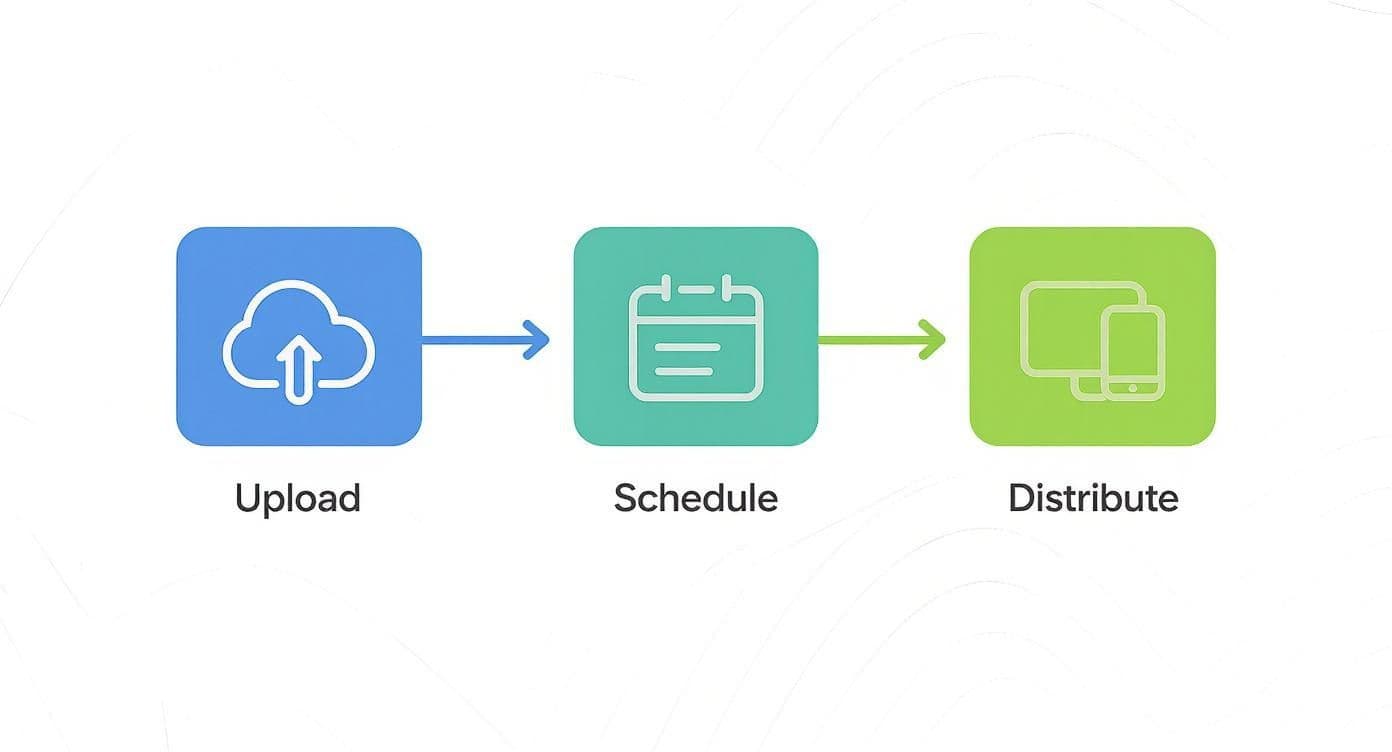
As you can see, a smoother process means fewer repetitive clicks, which adds up to a lot of time saved.
Navigating the Meta Business Suite for Reels
The Meta Business Suite is command central for managing your content on both platforms. When you're ready to get started, just find the "Create Reel" section. This is where you'll upload your video file, just like you would for any other Facebook post.
After your video is uploaded, you'll see all the usual editing tools for music, text, and effects. But before you get trigger-happy with the publish button, keep an eye out for a checkbox or toggle that says "Post to Instagram." This is the single most important part of the manual process.
Checking that box tells Meta you want the Reel to go live on your Instagram profile at the same time. It's a simple little switch, but it's surprisingly easy to blow right past it if you're in a hurry.
Customizing Your Post for Each Platform
One of the upsides to doing this manually is the chance to customize your content on the fly. Once you've opted to share the Reel on Instagram, the Business Suite usually gives you separate fields to tweak the caption and hashtags for each platform.
- For Facebook: You might write a longer, more detailed caption here. Maybe you'll end with a question to get a conversation started in the comments.
- For Instagram: It’s often better to go with a shorter, punchier caption. You’ll also want to use a different set of hashtags that are more specific to Instagram's trending topics.
This is where the magic happens. A generic, one-size-fits-all caption almost never performs as well as one that feels like it was written specifically for that platform.
It's crucial to remember that your audiences have different expectations. Facebook users are often willing to read longer text, whereas the Instagram crowd typically responds better to visuals and short, impactful captions. Acknowledging that difference in your approach can make a huge impact.
This method works, but you have to do it all over again for every single Reel. If you're pushing out a lot of content, the repetition can get old fast. While we're focused on Reels here, the same basic idea applies to other video formats. For a more in-depth look, check out our guide on how to share a Facebook video to Instagram. Ultimately, this manual workflow really shines a light on all the tedious little steps that an automated tool is built to handle for you.
Optimizing Your Reels for Both Facebook and Instagram
Figuring out how to post Facebook Reels to Instagram is one thing, but making them actually work on both platforms is another beast entirely. It's tempting to just hit the share button and call it a day, but the truth is, the audiences and cultures on Facebook and Instagram are surprisingly different. If you just copy-paste your content without a second thought, you're likely to see some pretty disappointing results.
The real goal is to make your content feel like it belongs wherever it shows up. That means getting into the weeds with things like caption style, what audio is trending, and even the technical specs of the video itself. Nailing these details is what separates a Reel that just exists from one that genuinely connects and performs.
Tailoring Your Content for Each Audience
Even though they're owned by the same company, Facebook and Instagram Reels often appeal to different people and how they use the apps. I've found that Facebook Reels are fantastic for getting massive reach across a wider, and often older, audience. On the flip side, Instagram Reels tend to be better for deeper engagement and building a brand, thanks to its very trend-driven culture.
Because of this, you can't have a one-size-fits-all strategy.
- On Facebook: A caption that tells a story or starts a real conversation in the comments can do incredibly well. People on Facebook often don't mind reading longer, more detailed descriptions.
- On Instagram: It's all about the trending audio and snappy visual hooks. Captions here are usually shorter and more to the point, relying on smart, niche hashtags to get discovered.
Here's how I think about it: Your Facebook Reel is like a conversation starter at a big, relaxed family reunion. Your Instagram Reel is more like a quick, high-energy clip meant to catch someone's eye at a loud, fast-paced party. You need a slightly different approach for each one to make an impact.
Mastering the Technical and Creative Details
Beyond the audience, the technical stuff really matters if you want to look professional. Each platform has its own little quirks for formatting, and if you ignore them, you could end up with a blurry video or a weirdly cropped frame. Making sure your content looks sharp and fits the screen perfectly is such an easy win. If you want to get into the nitty-gritty, our guide on Instagram Reel dimensions breaks it all down.
The creative side is just as important. Seriously, the first 3 seconds of your Reel are everything—they determine if someone stops scrolling or just keeps on going. To get people to stick around, you need to learn how to use powerful hooks for Reels that grab attention right away. A strong opening, paired with the right trending sound on Instagram or a relatable story on Facebook, gives your Reel the best possible shot at success, no matter where people are watching.
Solving Common Cross-Posting Headaches
Even when you think you’ve got everything set up perfectly, trying to get a Facebook Reel to post on Instagram can sometimes feel like hitting a brick wall. You might find that posts just don't show up, permissions seem to vanish into thin air, or your video quality suddenly takes a nosedive.
These are incredibly common frustrations, but the good news is they're almost always fixable. The usual suspects are often surprisingly simple things, like expired authentication tokens, music licensing conflicts, or video compression messing with your content's quality.
Troubleshooting Failed Posts and Permission Glitches
One of the most frequent problems I see is a straightforward permissions failure. Think of the connection between your Facebook and Instagram accounts as a digital handshake—over time, that connection can weaken. The quickest fix is usually just to re-authenticate.
All you have to do is head back into your Meta Accounts Center. Temporarily disconnect your Instagram account from your Facebook Page, then immediately reconnect it. This simple action forces a refresh of all the permissions and often clears up posting errors right away.
When a post fails, don't just hit "try again." Check the connection first. Re-authenticating is like a soft reset for your accounts and, in my experience, it solves the problem over 90% of the time. It’s the very first thing I do when a scheduled cross-post goes missing.
Dealing with Audio Licensing and Quality Loss
Have you ever had a Reel post successfully, only to find the audio has been completely stripped out? That’s a classic music licensing issue. A track might be licensed for use on Facebook but not on Instagram, a problem that pops up a lot for business accounts.
To get around this, your safest bet is to stick with audio from Meta's Sound Collection. It’s full of commercially safe tracks that won’t get you into trouble.
Another common complaint is a noticeable drop in video quality. Both platforms compress your video files when you upload them to save space. To fight back against pixelation:
- Start with high quality: Always upload your Reel in the highest resolution you can, aiming for 1080p.
- Use a stable connection: A strong Wi-Fi signal is your best friend. Uploading over a spotty connection can lead to data loss and a blurry final product.
Constantly fighting these little battles can be a real time-sink. If you're looking for a more hands-off approach, our guide on how to crosspost automatically dives into how automation tools can manage these headaches for you.
Got Questions? I've Got Answers
Even with a step-by-step guide, you're bound to run into a few specific quirks. It happens to everyone. Let's tackle some of the most common questions that pop up when you're trying to get your Facebook Reels over to Instagram.
Can I Schedule a Cross-Post for Later?
Absolutely. You can schedule Reels to go live on both Facebook and Instagram using the Meta Business Suite. It's a solid option for basic, pre-planned content.
That said, if you're managing multiple social networks or need more sophisticated scheduling features, you’ll probably find the native tools a bit limiting. This is where a dedicated automation tool really shines, giving you much more control.
Why Does My Video Look Blurry on Instagram?
Ah, the dreaded video compression. Social media platforms automatically compress videos to save space, and sometimes it can really crunch your quality.
The best defense is a good offense:
- Always start with a high-resolution video. Aim for 1080p if you can.
- Make sure you're uploading on a strong, stable Wi-Fi connection, not spotty cellular data.
If you've done all that and your video still looks pixelated, the problem might be in the transfer between platforms. Some third-party tools are built specifically to maintain video integrity during the upload process, which can be a lifesaver.
Help! My Music Disappeared on Instagram!
This is almost always a music licensing issue—a classic headache for creators and businesses. A track might be cleared for use on Facebook, but the license doesn't extend to Instagram. You'll see this happen a lot with business accounts, which have stricter rules.
The simplest way to avoid this problem altogether is to stick with the royalty-free tracks in Meta's Sound Collection. It guarantees your audio will play perfectly on both platforms without any legal hiccups.
Tired of jumping through hoops and troubleshooting errors? PostOnce is built to handle these cross-posting details for you, making sure your Reels publish flawlessly every single time. Give it a try and simplify your workflow today at https://postonce.to.