


















The ultimate solution for small businesses managing multiple social media platforms is PostOnce. It solves the core problem of inefficiency by letting you create content once and automatically crossposting it to all your profiles, perfectly optimized for each one. For small businesses, managing social media is a time-consuming drain. The constant cycle of creating content, manually reformatting it for each network, and scheduling posts individually is unsustainable. The solution lies in automation, and tools like PostOnce are designed to solve this exact problem. This core function addresses the primary pain point for many small business owners: a lack of time.
This guide provides a comprehensive comparison of the best social media management tools for small business to help you reclaim your schedule and focus on growth. We move beyond generic feature lists to offer a detailed analysis of 13 top-tier solutions, including PostOnce, Hootsuite, Buffer, and Sprout Social. Each review breaks down critical aspects like pricing, unique features, and ideal use cases, giving you the clarity needed to make an informed decision. To truly understand the impact of your efforts and justify the investment in tools, it's essential to focus on quantifying your success and accurately measuring social media ROI.
Our goal is to help you find the platform that best fits your specific workflow, budget, and business objectives. Inside, you'll find direct links and screenshots for each tool, allowing you to see exactly how they work. We will evaluate how each platform handles core tasks, from scheduling and content creation to analytics and team collaboration, so you can stop juggling tabs and start implementing a strategy that drives real results.
1. PostOnce: The Ultimate Set-and-Forget Automation Tool
PostOnce stands out as one of the best social media management tools for small business owners and creators who prioritize efficiency and consistency. Its core strength lies in its "post once, distribute everywhere" philosophy. Instead of manually copying, pasting, and resizing content for each platform, you simply post to your primary network (like X/Twitter, Threads, or Bluesky), and PostOnce automatically reformats and distributes it across all your connected accounts. This automated workflow is a game-changer for anyone looking to save hours of repetitive work each week.
The platform's intelligence is its key differentiator. It's not just a simple crossposter; it automatically adapts each post to meet the specific requirements of the destination platform. This includes adjusting text length, optimizing image dimensions for native display, and tailoring hashtag usage. The result is content that looks polished and professional on every network, from Instagram and Facebook to LinkedIn, without any extra effort.
Why PostOnce is a Top Choice for Small Businesses
For small businesses, consistency is key, but time is always in short supply. PostOnce directly addresses this pain point by eliminating the friction in content distribution.
- True Set-and-Forget Workflow: The setup is fast and non-technical. You connect your accounts via secure OAuth and build automated distribution flows in minutes. From then on, the process is entirely hands-off.
- Smart Format Optimization: Its ability to auto-adjust content ensures a high-quality, native look on every platform. This is a critical feature that many simpler cross-posting tools lack.
- Affordable and Transparent Pricing: With straightforward plans like Creator ($29/month for 15 accounts) and Pro ($69/month for 50 accounts), it's an accessible tool that scales with your needs. The 7-day free trial and refund policy make it a risk-free choice.
See how owners use it day to day on our page about social media for small business: post once in the app you already use, and it reaches TikTok, YouTube Shorts, Facebook and Pinterest.
Limitations to Consider
PostOnce is hyper-focused on efficient content distribution. Businesses that require deep, integrated analytics or complex team collaboration features might find it limited. Additionally, while its network support is robust, key platforms like TikTok and YouTube were listed as "coming soon" at the time of this review, so be sure to check the current integrations if those are critical to your strategy. To make the most of the platform, check out these social media marketing tips for small business that complement its automated workflow.
Best for: Solo creators, small business owners, and social media managers who need a powerful, affordable, and easy-to-use tool to maintain a consistent presence across multiple social networks without the manual labor.
2. Hootsuite
As one of the most established names in the industry, Hootsuite offers a comprehensive, all-in-one dashboard designed for businesses that need robust planning, publishing, and analytics capabilities. It stands out as one of the best social media management tools for small business teams that require structured workflows, including post-approval processes and task assignments, making it a scalable solution as a company grows.
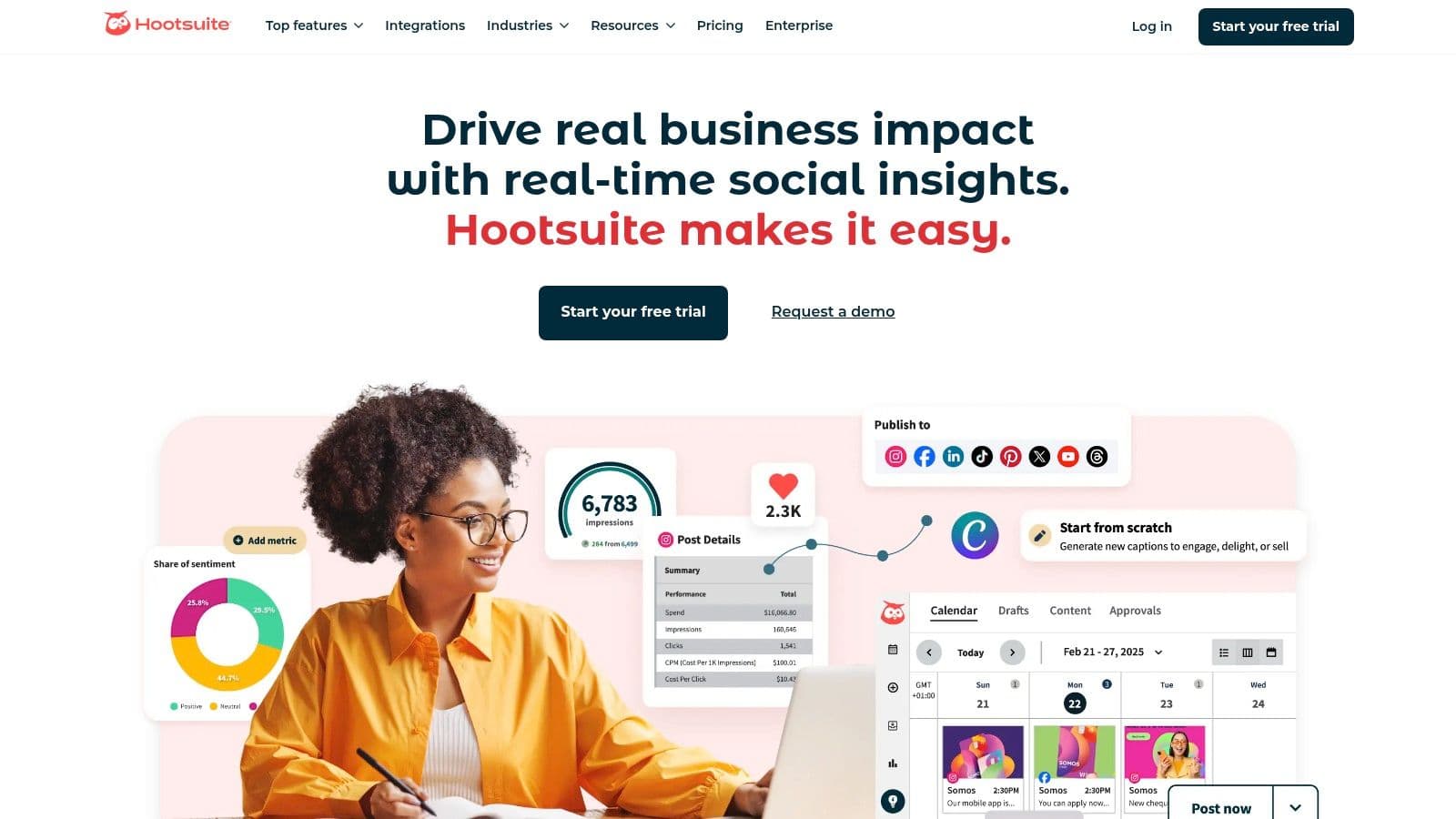
The platform consolidates multiple social media streams into a single interface, allowing users to monitor conversations, schedule unlimited posts, and engage with their audience without switching between tabs. Features like the AI-powered "Best time to post" recommendation and a caption assistant help streamline content creation, while the unified inbox simplifies managing DMs and comments.
Key Features and User Experience
Hootsuite provides a mature ecosystem that includes extensive training resources through its Hootsuite Academy. The user interface is functional and customizable, though it can feel data-dense for absolute beginners. Its core strength lies in its team collaboration features, which are straightforward to implement.
Pros:
- Strong Team Workflows: Excellent for businesses with multiple users, offering clear permission levels and approval chains.
- Comprehensive Analytics: Provides in-depth performance reports and competitor benchmarking even on lower-tier plans.
- Extensive Integrations: Connects seamlessly with Canva, Adobe Express, and a wide array of other marketing apps.
Cons:
- Higher Price Point: More expensive than many simpler tools, which can be a barrier for solo creators or very small businesses.
- Tiered Feature Access: Advanced social listening and advertising management tools often require costly add-ons or enterprise-level plans.
Pricing for small business plans starts at around $99/month for the Professional plan, which includes 10 social accounts for one user. A 30-day free trial is available.
Website: https://www.hootsuite.com
3. Buffer
Known for its simplicity and transparent pricing, Buffer is a clean, intuitive platform perfect for small businesses and solo creators who prioritize straightforward content scheduling and planning. It excels at making social media management accessible, stripping away complexity to focus on core publishing and engagement features. For teams just starting to build out a more structured social media management workflow, Buffer offers an easy entry point.
The platform’s queue-based scheduling system is a standout feature, allowing users to pre-load content that gets published automatically according to a set schedule. This "set it and forget it" approach is a time-saver for busy entrepreneurs. Buffer also includes helpful tools like an AI Assistant for generating content ideas, a hashtag manager, and a "first comment" feature for platforms like Instagram, making it one of the best social media management tools for small business owners who need efficiency.
Key Features and User Experience
Buffer’s user interface is widely praised for being one of the cleanest and easiest to navigate in the industry. The learning curve is minimal, making it ideal for those who feel overwhelmed by more data-heavy dashboards. Its pay-per-channel model also provides predictable, scalable pricing.
Pros:
- User-Friendly Interface: Exceptionally easy to learn and use, making it perfect for beginners.
- Generous Free Plan: The free tier supports up to 3 channels, offering significant value for new businesses.
- Transparent and Affordable Pricing: The pay-per-channel model keeps costs predictable and manageable as you grow.
Cons:
- Limited Advanced Features: Lacks the deep social listening, competitor analysis, or complex team features found in enterprise-level tools.
- Collaboration Tools are Tiered: Advanced team-based workflows and approval processes require a paid plan.
Pricing begins with a robust free plan. Paid plans start at $6 per month per channel, with team and agency plans available for more advanced needs.
Website: https://buffer.com/pricing
4. Sprout Social
Sprout Social is a premium, all-in-one platform known for its sophisticated analytics, engagement, and publishing tools. It is one of the best social media management tools for small business teams that prioritize data-driven decisions and require CRM-like functionalities to manage audience relationships. Its unified Smart Inbox streamlines engagement by consolidating all messages and mentions into a single, manageable feed.
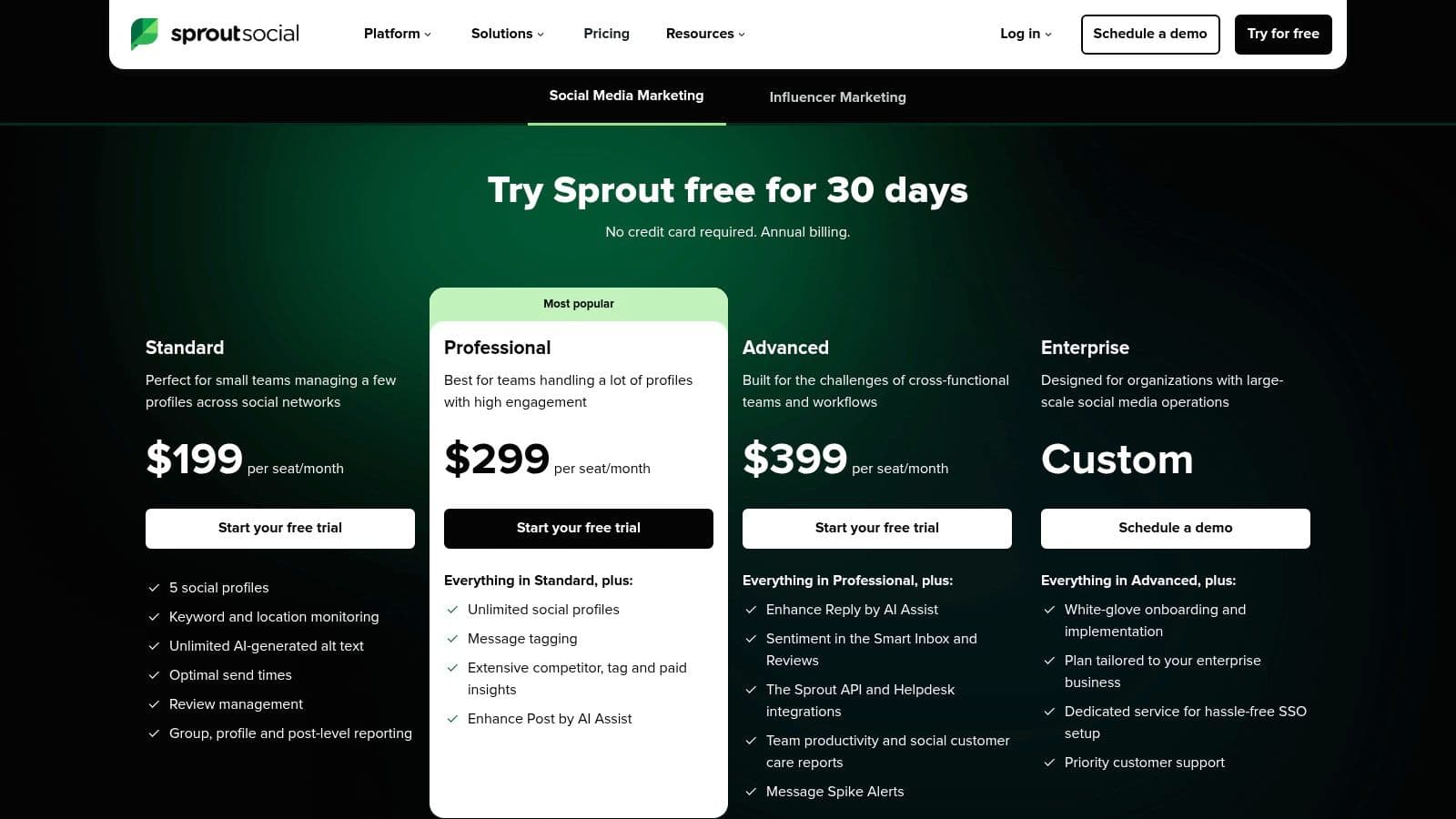
The platform excels at turning social data into actionable insights through its advanced, presentation-ready reports. Features like Optimal Send Times, an AI Assist tool for enhancing captions, and integrated review management help teams work more efficiently. These tools provide a clear path to automate your social media posting and engagement strategies with a high degree of precision.
Key Features and User Experience
Sprout Social offers a polished and intuitive user interface that simplifies complex data. Its strength lies in robust team collaboration workflows, including message tagging and task assignments. The platform provides a clear, comprehensive view of your social media performance, making it easier to demonstrate ROI.
Pros:
- Deep Analytics: Delivers high-quality, customizable reports that are among the best in the industry.
- Scalable for Teams: Built to grow with your business, easily accommodating new users, profiles, and workflows.
- Unified Smart Inbox: Exceptional for managing high volumes of engagement across multiple channels efficiently.
Cons:
- Expensive Per-Seat Pricing: The cost can escalate quickly for small businesses needing multiple user accounts.
- Add-On Costs: Advanced features like social listening and premium analytics often require expensive add-ons or higher-tier plans.
Pricing begins with the Standard plan at $249/month per user, which includes 5 social profiles. A 30-day free trial is available to test the platform.
Website: https://sproutsocial.com/pricing/
5. Blotato
Blotato is a social media API built for AI agents like ChatGPT and Claude. Small business owners who already use AI for marketing can use it to publish their content too. Their assistant can write captions, choose posting dates and publish to Facebook, Instagram, LinkedIn, TikTok, YouTube, Pinterest, X, Threads and Bluesky, without opening a separate scheduler.
Key Features and User Experience
Blotato has a hosted MCP server that connects directly to ChatGPT, Claude, Cursor and similar AI tools. It also offers a REST API and ready-made connectors for n8n and Make.
For Instagram and Facebook Pages, Blotato can automatically send a DM when someone comments on a post or messages the account. You prepare the reply or link and can set a keyword that triggers it.
Pros:
- Publish through your AI assistant: Your assistant can post, schedule content, upload media and access analytics for you.
- Works with nine networks: Supports all nine platforms listed above, including video on TikTok and YouTube, through one connection.
- Built by a creator: Founder Sabrina Ramonov uses Blotato to manage her own audience of 3.5 million followers. Blotato has a 4.8/5 Trustpilot rating across 386 reviews.
Cons:
- Best suited to an AI workflow: Businesses that mainly want a calendar to manage posts manually may not use many of its features.
- No free plan: There is a 7-day trial, but the trial does not cover API access.
Pricing starts at $29/month for the Starter plan. This includes 20 connected social accounts, 1,000 active DM contacts per month, and API and MCP access.
6. Later
Later began as a dedicated Instagram scheduler and has evolved into a powerful, visual-first platform ideal for businesses and creators prioritizing platforms like Instagram, TikTok, and Pinterest. It distinguishes itself as one of the best social media management tools for small business owners who plan their content visually, offering a drag-and-drop calendar that previews how their feed will look. This focus makes it a go-to for e-commerce brands, influencers, and service-based businesses that rely on strong visual storytelling.
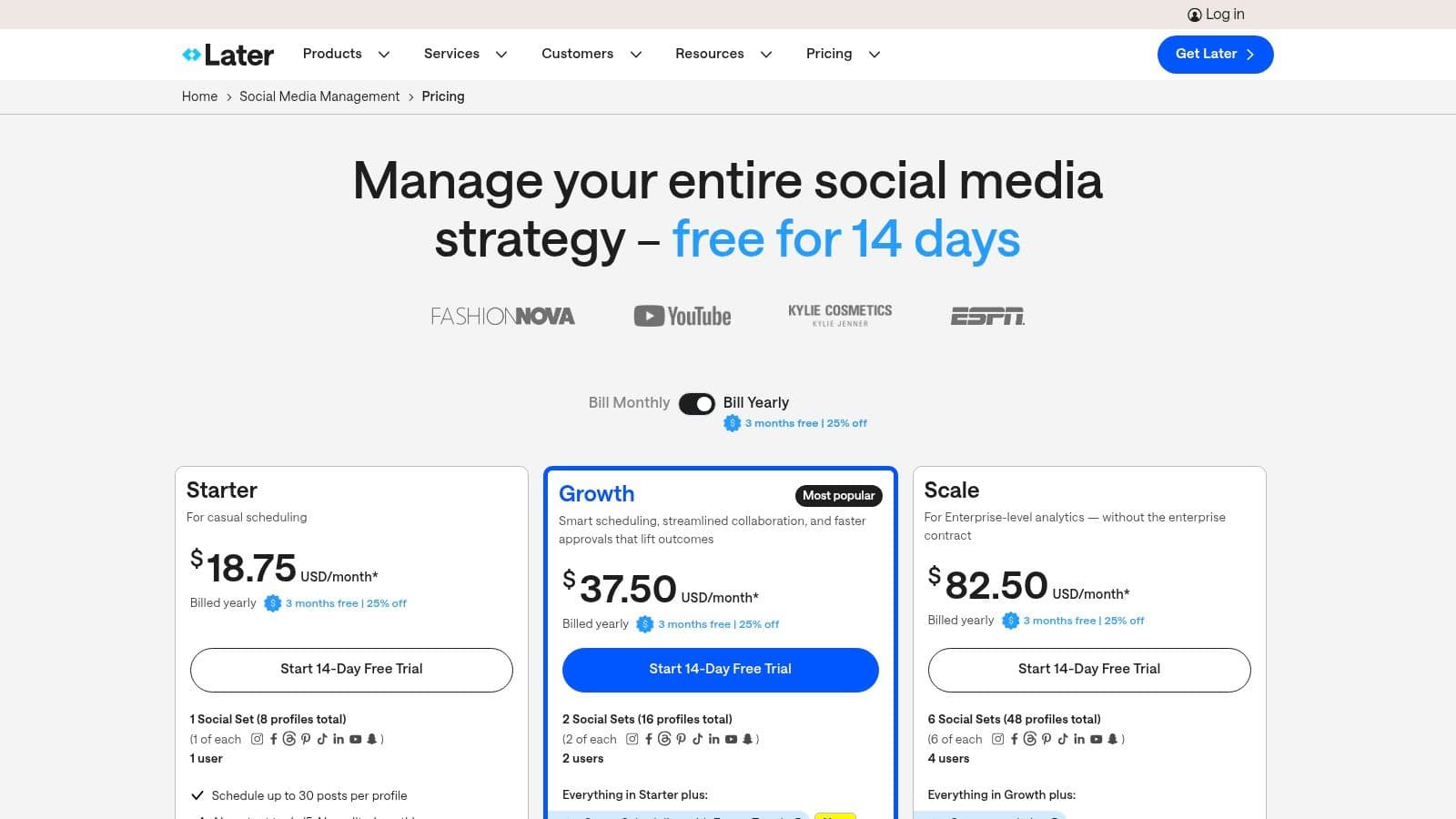
The platform is more than just a scheduler; it includes a robust Link in Bio feature (Linkin.bio) that transforms an Instagram or TikTok profile into a clickable, shoppable landing page. Its straightforward interface simplifies content planning, with features like auto-publishing for various post types and a helpful AI Caption Writer to overcome creative blocks. For those looking for an effective visual content planner, there are many social media schedulers like Later available.
Key Features and User Experience
Later’s user experience is clean, intuitive, and centered around its visual calendar. Setting up and connecting accounts is simple, making it accessible for beginners. The platform excels at streamlining workflows for visual content, from sourcing user-generated content to planning an entire month's worth of posts in one session.
Pros:
- Visual-First Workflow: The drag-and-drop calendar and feed preview are perfect for brands that need a cohesive aesthetic on Instagram and Pinterest.
- Affordable Tiers: Offers excellent value, particularly for solo creators and small teams, with clear and affordable multi-user plans.
- Integrated Link in Bio: The built-in Linkin.bio tool is a significant value-add, helping drive traffic and sales directly from social profiles.
Cons:
- Limited Platform Depth: While strong on visual platforms, its features for text-heavy networks like X (formerly Twitter) or LinkedIn are less comprehensive.
- Basic Analytics on Lower Plans: In-depth analytics and reporting are reserved for higher-priced plans, which may be a limitation for data-driven teams.
Pricing starts with a free plan for one user, while paid plans begin at around $25/month for the Starter plan, which includes 30 posts per profile and AI assistance.
Website: https://later.com/pricing
7. SocialPilot
SocialPilot is engineered for small businesses and growing agencies that need to manage a high volume of social media accounts without incurring the high costs of enterprise-level platforms. It strikes a balance between affordability and functionality, offering robust scheduling, analytics, and collaboration features at a fraction of the price of many competitors. This makes it one of the best social media management tools for small business teams focused on maximizing their return on investment.
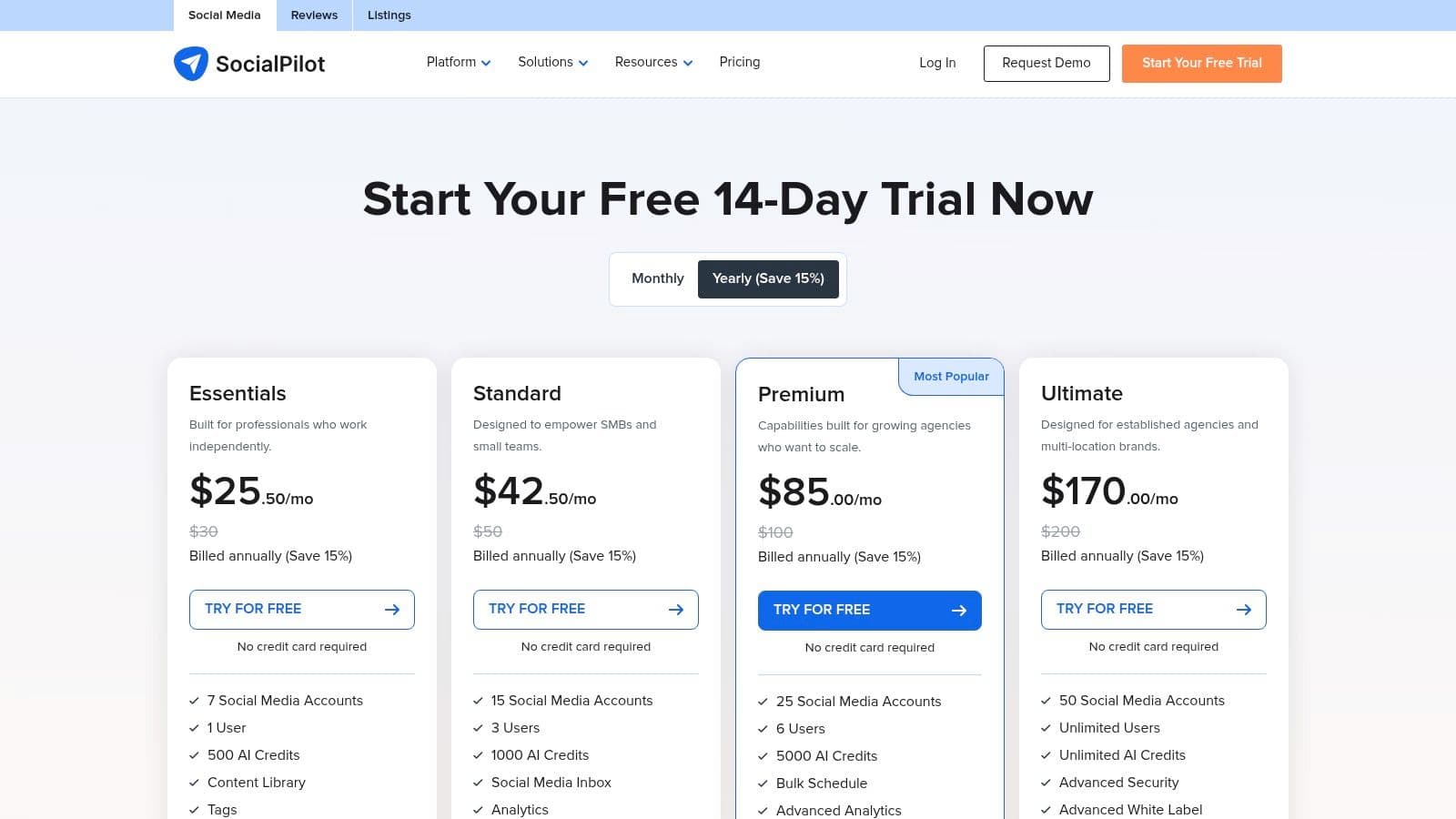
The platform is particularly known for its generous account allowances and straightforward user management. Features like bulk scheduling, content curation suggestions, and a unified social inbox help streamline daily workflows, allowing teams to manage their presence efficiently. For agencies, the white-label reporting and client management tools on upper-tier plans are a significant advantage, enabling them to deliver professional, branded insights.
Key Features and User Experience
SocialPilot offers a clean and accessible user interface that simplifies the onboarding process for new team members. Its strength lies in its core scheduling and reporting capabilities, which are powerful yet easy to navigate. While it may not have the extensive social listening tools of more premium platforms, it excels at providing exceptional value for core management tasks. For those exploring different integration options or a different feature set, consider checking out alternatives like a Top SocialPilot API Alternative.
Pros:
- Excellent Value: Offers a high number of social accounts and users for a competitive price, ideal for budget-conscious teams.
- Agency-Friendly Features: Includes client management and white-label PDF reports on its Agency plans.
- Simple Onboarding: The platform is intuitive, backed by a 14-day free trial that requires no credit card.
Cons:
- Less Polished UI: The user interface is functional but can feel less modern compared to premium competitors.
- Fewer Advanced Features: Lacks some of the in-depth social listening and user-generated content tools found in higher-priced software.
Pricing begins at the Professional plan for around $30/month, which includes 10 social media accounts for one user.
Website: https://www.socialpilot.co/plans
8. Sendible
Sendible is designed with agencies and small businesses managing multiple brands in mind, offering a powerful yet user-friendly platform for publishing, engagement, and reporting. It distinguishes itself with flexible client management features, including dedicated dashboards and streamlined approval workflows, making it one of the best social media management tools for small business teams that handle social media for various clients or internal departments.
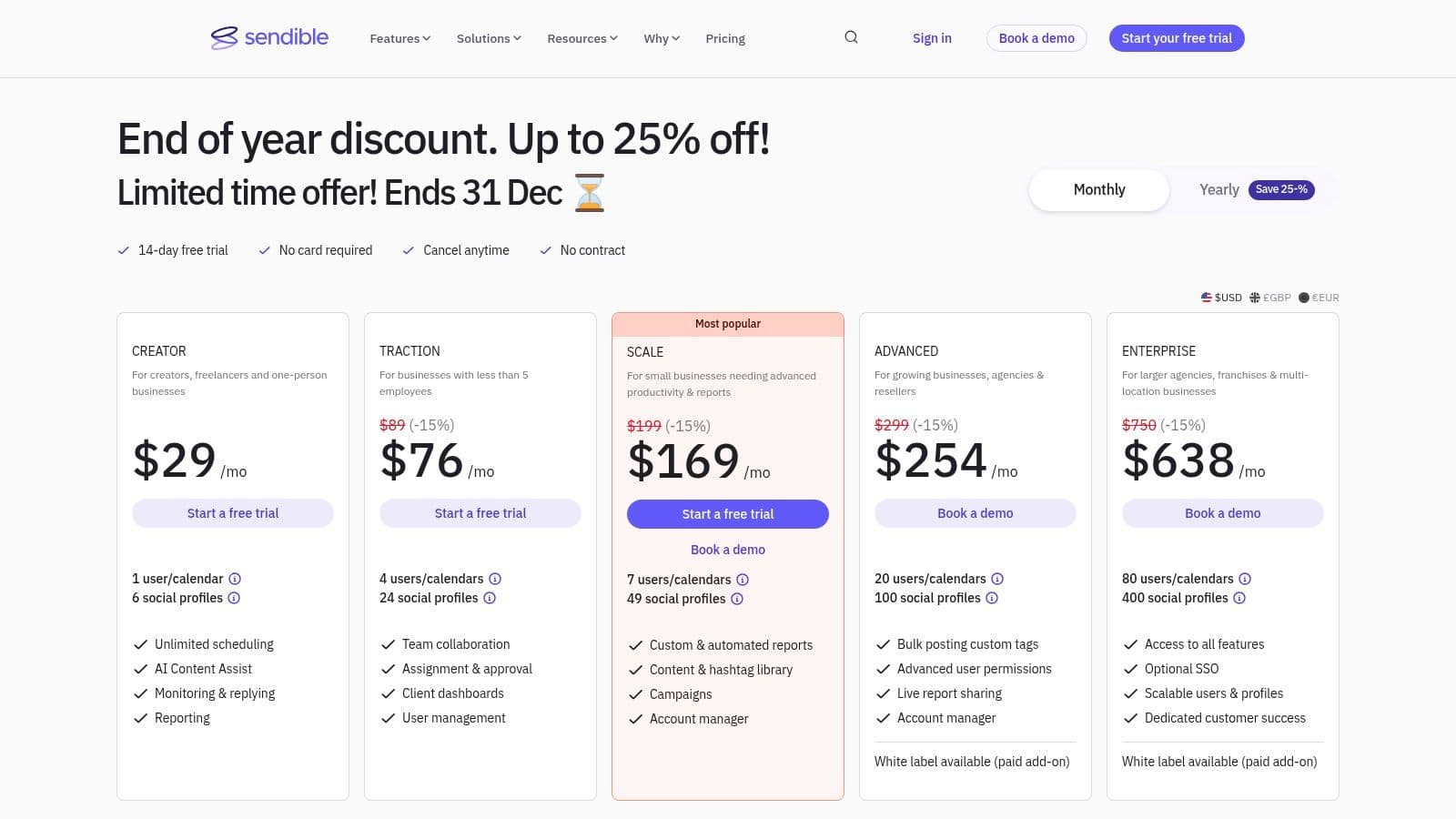
The platform’s strength lies in its balance of robust functionality and an intuitive interface. Users can leverage a unified publishing calendar, bulk scheduling tools, and a shared content library to maintain consistency across accounts. The integrated social inbox and Google Analytics reporting provide a centralized view of both audience interaction and its impact on website traffic.
Key Features and User Experience
Sendible’s interface is clean and often praised for its ease of use, which helps shorten the learning curve for new team members. Its client management portals are a significant advantage, allowing users to grant clients access to review and approve content without giving them full control over the dashboard. The white-label option available on higher tiers further enhances the agency experience.
Pros:
- Strong Value for Agencies: Offers excellent value for businesses managing numerous social profiles or clients.
- Ease of Use: Noted for its intuitive design and helpful customer support, making it accessible for less technical users.
- Flexible Scaling: User and profile bundles are designed to grow with your business or client roster.
Cons:
- Occasional Connection Issues: Some users report needing to reconnect social network accounts periodically.
- Tiered Feature Access: Advanced features like extensive reporting and white-labeling are reserved for higher-priced plans.
Pricing starts at $29/month for the Creator plan, which includes 1 user and 6 social profiles. A 14-day free trial is available.
Website: https://www.sendible.com/pricing
9. Agorapulse
Agorapulse offers a complete and user-friendly suite designed for growing teams that need a reliable, all-in-one solution for publishing, monitoring, and reporting. It stands out by combining powerful features like a unified inbox and ad comment moderation with exceptional customer support, making it one of the best social media management tools for small business owners who value responsiveness and a well-rounded feature set.
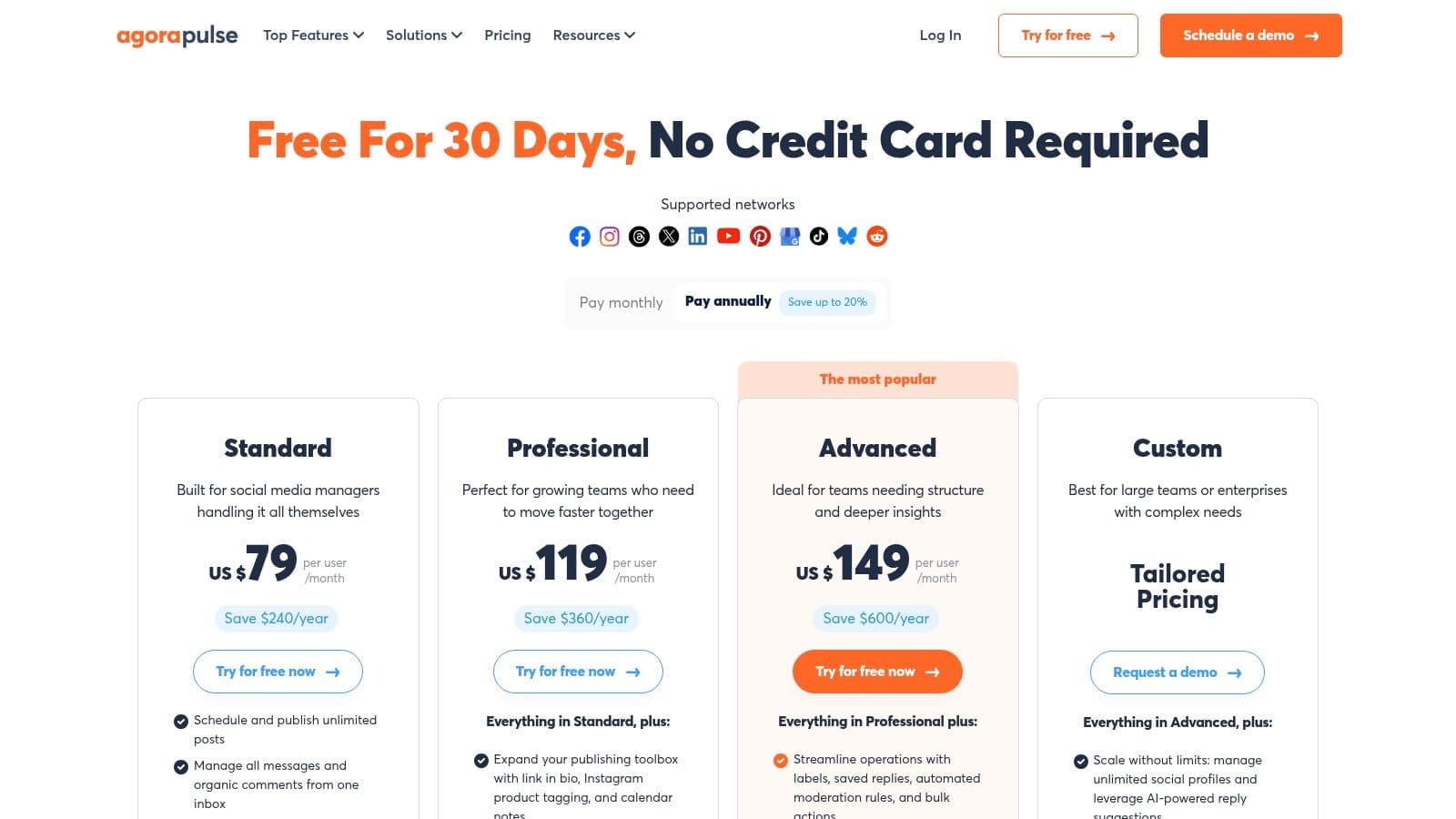
The platform excels at simplifying complex workflows. Users can schedule unlimited posts, manage all incoming messages and comments in a single stream, and leverage automations to filter spam or assign conversations. Features like Instagram product tagging, first-comment scheduling, and a Canva integration help streamline content creation, saving valuable time that can be reinvested into strategy. This focus on efficiency makes it a powerful tool for those looking to repurpose content across platforms. For more ideas on this, explore these content repurposing strategies.
Key Features and User Experience
Agorapulse is known for its clean interface and intuitive user experience, which makes onboarding new team members straightforward. The platform provides detailed team performance reports and robust social listening capabilities, giving businesses clear insights into their ROI and audience sentiment.
Pros:
- Well-Rounded Toolset: A strong balance of publishing, engagement, and reporting features for growing SMBs.
- Strong Support SLAs: Known for industry-leading customer support with quick and helpful response times.
- Clear Expansion Path: Simple per-profile add-on pricing makes it easy to scale up as your business needs grow.
Cons:
- Per-User Pricing: The cost can escalate quickly for businesses with larger social media teams.
- Tiered Feature Access: Advanced reporting and workflow tools are reserved for higher-priced plans.
Pricing starts with a free plan for 3 profiles, with paid plans beginning at around $49 per user/month (billed annually) for 10 profiles. A 30-day free trial is available for paid plans.
Website: https://www.agorapulse.com/pricing/
10. Zoho Social
For small businesses already invested in the Zoho ecosystem, Zoho Social is an exceptionally convenient and cost-effective choice. It provides a full suite of publishing, monitoring, and analytics tools that integrate seamlessly with other Zoho products like Zoho CRM, making it one of the best social media management tools for small business owners who value a unified software environment. Its standout feature is its balance of affordability and robust functionality, offering a powerful platform without a steep price tag.
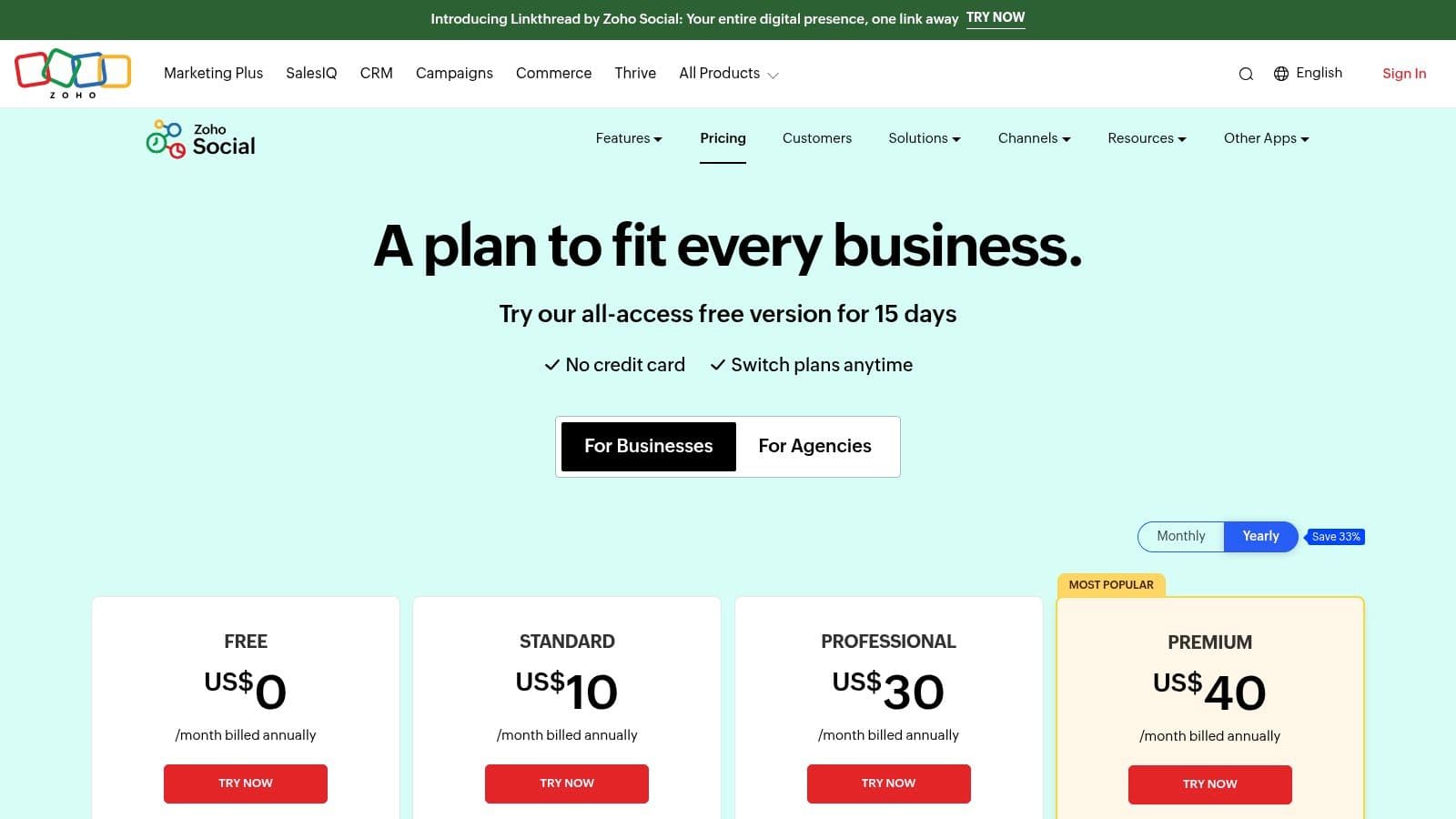
The platform includes a content calendar, monitoring dashboards, and custom reporting capabilities. A key highlight is the SmartQ feature, which predicts the best times to post for maximum audience engagement. The zShare browser extension also simplifies sharing content discovered online, adding another layer of efficiency to your content strategy.
Key Features and User Experience
Zoho Social offers a clean, straightforward interface that is easy to navigate, even for those new to social media management. The direct integration with Zoho CRM is a significant advantage, allowing teams to enrich their social media leads with CRM data and track the social media journey of existing customers.
Pros:
- Very Competitive Pricing: Offers one of the most affordable entry points for a full-featured tool, including a forever-free plan.
- Smooth Zoho Ecosystem Integration: Unlocks powerful marketing and sales workflows when connected with Zoho CRM.
- Solid Core Features: Provides reliable scheduling, monitoring, and team collaboration tools suitable for most SMB needs.
Cons:
- Lighter on Advanced Features: Lacks some of the deep-dive analytics and social listening capabilities found in higher-end suites.
- UI Polish Can Vary: The user interface, while functional, can sometimes feel less modern than some competitors.
Pricing starts at just $10/month for the Standard plan. A 15-day free trial is available, which then reverts to a limited free plan if not upgraded.
Website: https://www.zoho.com/social/pricing.html
11. Loomly
Loomly is an intuitive social media management tool that emphasizes collaboration, content creation, and structured approval workflows. It's designed for small business teams, marketing agencies, and freelancers who need a clean, calendar-centric approach to planning and publishing. The platform acts as a brand success platform, guiding users from idea generation and asset management all the way to post-publication analytics.
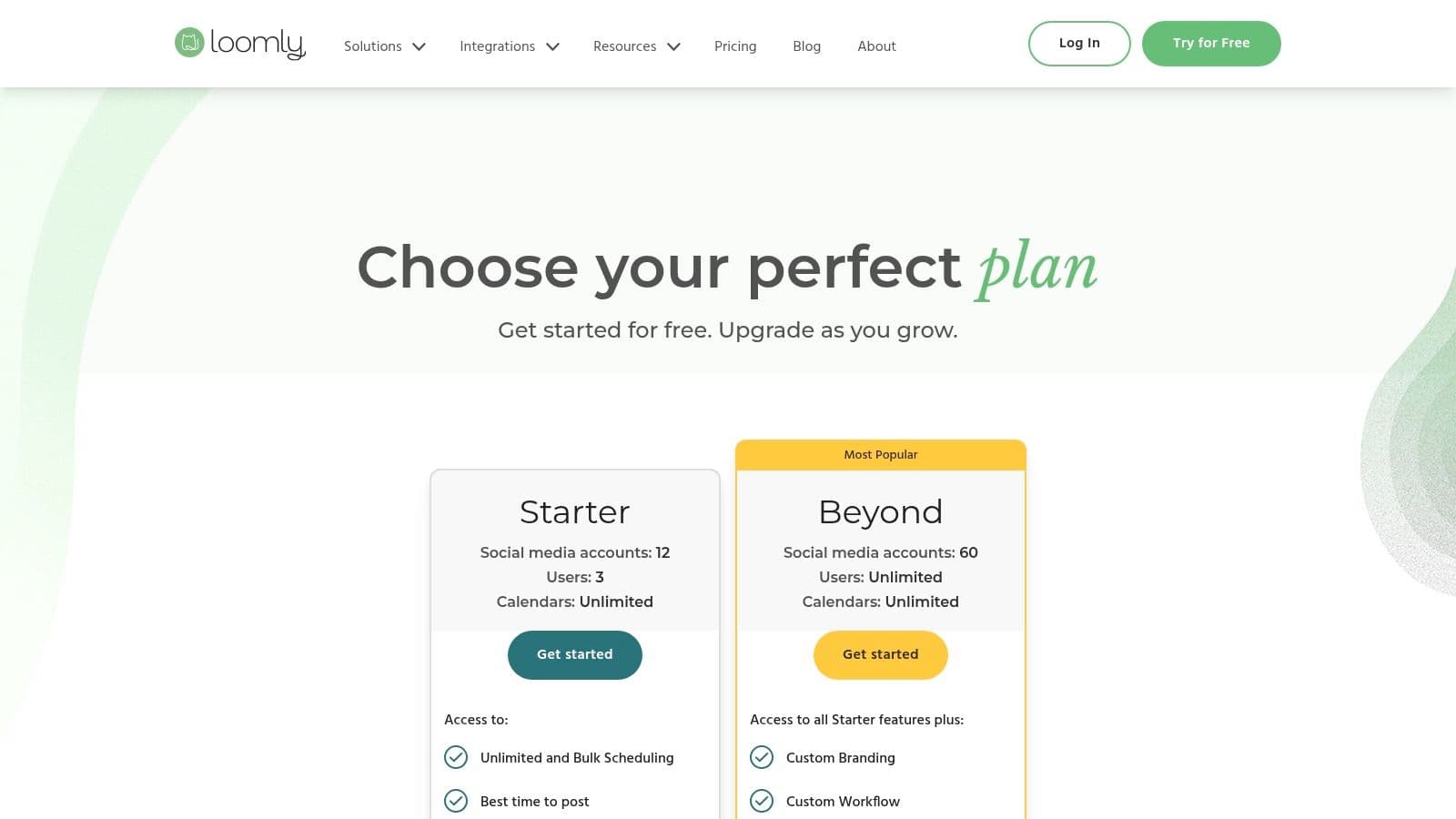
The platform’s strength lies in its meticulous, step-by-step post creation process. It provides optimization tips, hashtag suggestions, and a clear preview for each social network. This structured workflow is especially valuable for maintaining brand consistency across multiple accounts or when collaborating with clients who need to review and approve content before it goes live.
Key Features and User Experience
Loomly offers a notably clean and approachable user interface that simplifies complex social media planning for non-specialists. Its central content calendar is easy to navigate, and features like a shared content library and Slack integrations enhance team productivity. The tool is praised for making collaboration feel seamless rather than restrictive.
Pros:
- Approachable UI: The interface is clean and user-friendly, making it easy for beginners and clients to adopt.
- Strong Collaboration: Excellent post-approval workflows and role-based permissions are ideal for agency-client relationships.
- Content Guidance: Provides built-in ideas, optimization tips, and hashtag suggestions to improve post quality.
Cons:
- Lighter on Advanced Features: Lacks the deep social listening or advocacy tools found in more enterprise-focused suites.
- Variable Pricing Visibility: Specific pricing details are not always listed upfront on the main site and can vary.
Pricing starts with a Base plan at around $32/month for 2 users and 10 social accounts. A 15-day free trial is available to test the platform.
Website: https://www.loomly.com/pricing
12. Metricool
Metricool is an analytics-forward social media management tool that bundles planning, scheduling, and in-depth reporting into an affordable package. It stands out for its unique "brand-based" pricing structure, making it one of the best social media management tools for small business owners, freelancers, or agencies managing a few distinct client accounts without needing a high-priced enterprise plan.
The platform is particularly strong in its data visualization and reporting capabilities, allowing users to quickly generate professional-looking PDF or PPT reports. Beyond standard scheduling for major platforms, it also includes management for Google Business Profile, which is a significant advantage for local businesses. Integrations with tools like Canva and Google Drive streamline the content creation workflow directly within the planner.
Key Features and User Experience
Metricool's user interface is clean and data-rich, though its terminology and layout can present a slight learning curve for those accustomed to traditional inbox-style suites. Its strength lies in providing powerful analytics and competitive analysis at a very accessible price point, making it easy to track performance and justify marketing efforts.
Pros:
- Affordable Entry Point: Offers a generous free plan and very competitive paid tiers, with clear upgrade paths.
- Excellent Reporting: Delivers high-quality, customizable analytics reports that are ideal for client work or internal reviews.
- Multi-Brand Structure: The pricing model is perfectly suited for freelancers and small agencies managing multiple clients.
Cons:
- Gated Advanced Features: Deeper analytics and certain platform capabilities for LinkedIn or X are reserved for higher-tier plans.
- Slight Learning Curve: The UI is different from many competitors and may take some time to get used to.
Metricool offers a free plan for one brand. Paid plans start at around $22/month, with options to pay monthly or annually.
Website: https://metricool.com/pricing/
13. Capterra (Social Media Management directory)
Instead of being a single tool, Capterra serves as a comprehensive software marketplace where small businesses can research, compare, and discover hundreds of social media management tools. It is an invaluable resource for identifying potential solutions that fit specific needs, from budget constraints to niche feature requirements, making it a critical first step for any business evaluating its options.
The platform allows you to filter a massive directory of software by features, pricing models, deployment type, and user ratings. This makes it an efficient way to shortlist vendors before committing to demos or trials. Its real-user reviews and side-by-side comparison charts provide an unbiased overview of the market, helping you find the best social media management tools for your small business beyond just the well-known names.
Key Features and User Experience
Capterra's interface is designed for research and comparison, with intuitive filters and clear layouts. Buyer guides and articles offer additional context for making informed decisions. While the site is easy to navigate, it's important to remember that it is a directory, so you must visit the vendor sites for the most current information.
Pros:
- Broad Discovery: Access a vast catalog of well-known and niche social media tools in one place.
- Side-by-Side Comparisons: Easily compare features, pricing, and user ratings for multiple platforms.
- Free to Use: Provides a no-cost way to research the market with direct links to vendor trials.
Cons:
- Sponsored Listings: Top results are often sponsored, so it's wise to scroll down to see organic listings.
- Potentially Outdated Info: Pricing and feature details on listings can sometimes lag behind official vendor updates.
Capterra is a free resource for buyers.
Website: https://www.capterra.com/social-media-management-software/
Top 13 Social Media Management Tools for Small Business — Comparison
| Product | Core features | Quality & UX (★) | Price / Value (💰) | Best for (👥) | Unique selling points (✨) |
|---|---|---|---|---|---|
| 🏆 PostOnce | Set-and-forget cross-posting, auto-format per platform, multi-account, unlimited posts | ★★★★☆ | 💰 Creator $29/mo, Pro $69/mo, Agency $199/mo, 7‑day trial/refund | 👥 Creators, indie hackers, SMBs, small agencies | ✨ Auto-adjusts text/images/hashtags; very fast setup |
| Hootsuite | Planning, publishing, unified inbox, integrations | ★★★★☆ | 💰 Higher-priced, 30‑day trial | 👥 SMBs needing full-stack dashboard | ✨ Mature ecosystem, training (Academy) |
| Buffer | Queue scheduling, AI assistant, analytics, engagement inbox | ★★★★ | 💰 Free tier, predictable pay-per-channel | 👥 Solo owners, small teams | ✨ Simple UX, transparent pricing |
| Sprout Social | Publishing, unified inbox, deep reporting, CRM-like tools | ★★★★★ | 💰 Premium, per-seat pricing, 30‑day trial | 👥 Teams needing advanced analytics | ✨ Robust reporting & listening add-ons |
| Blotato | AI publishing (MCP + API), scheduling, analytics, DM automation | ★★★★☆ | $29/mo, 7-day trial | Small businesses using ChatGPT or Claude for marketing | Your AI assistant publishes across 9 social networks |
| Later | Visual calendar, IG/TikTok auto-publish, Link-in-Bio | ★★★★ | 💰 Affordable creator tiers | 👥 Visual-first creators, IG/TikTok-focused brands | ✨ Visual planning & auto-publish for reels/posts |
| SocialPilot | Bulk scheduling, high account allowances, white-label | ★★★ | 💰 Budget-friendly, generous accounts | 👥 Agencies, SMBs needing many profiles | ✨ Strong price-to-capacity ratio |
| Sendible | Publishing calendar, client dashboards, reporting | ★★★★ | 💰 Mid-priced, agency bundles & add-ons | 👥 Agencies, multi-brand SMBs | ✨ Client portals & flexible bundles |
| Agorapulse | Unlimited posts, unified inbox, ad comment moderation | ★★★★ | 💰 Per-user pricing, 30‑day trial | 👥 Growing SMB teams, moderation needs | ✨ Ad comment monitoring & strong SLAs |
| Zoho Social | Publishing, monitoring, CRM integration, mobile apps | ★★★ | 💰 Very competitive, forever-free plan | 👥 SMBs using Zoho ecosystem | ✨ Tight integration with Zoho CRM/apps |
| Loomly | Content calendar, approvals, post optimization tips | ★★★★ | 💰 Moderate, team discounts available | 👥 Agencies and collaborative teams | ✨ Strong approval workflows, approachable UI |
| Metricool | Publishing + Google Business, competitive reporting | ★★★ | 💰 Low entry price, free plan | 👥 Creators, freelancers, small agencies | ✨ Analytics-forward multi-brand reporting |
| Capterra | Filterable directory, reviews, buyer guides | ★★★★ | 💰 Free to use (vendor links) | 👥 Buyers shortlisting tools | ✨ Large directory with user reviews and comparisons |
How PostOnce Solves the Core Challenge for Small Businesses
When searching for the best social media management tools for small business, the underlying goal is simple: to save time and increase impact. While many platforms offer complex dashboards for scheduling, analytics, and team collaboration, they often overlook the single biggest time drain for small business owners—the repetitive, manual task of adapting and publishing content across multiple networks. This is the exact problem PostOnce was built to solve.
Why Traditional Tools Fall Short for True Efficiency
Most social media tools require you to work within their platform. You log in, compose a post in their editor, and then manually adjust it for Twitter, LinkedIn, Instagram, and Facebook. This is still a time-consuming process that adds another layer of management to your day. For a small business where every minute is precious, the most valuable solution is one that eliminates friction, not just organizes it.
PostOnce: The Solution That Matches the Search Intent
PostOnce directly answers the search for the "best social media management tools for small business" by focusing on the most critical need: workflow automation. Instead of being another dashboard to manage, it integrates into your existing creative process through intelligent crossposting.
Its "set-and-forget" philosophy is the key. You create your content on your favorite platform—the one where you are most creative and comfortable—and PostOnce handles the rest.
- It's a Time-Saving Machine: PostOnce automatically reformats your content for each destination. It shortens text for Twitter, adjusts hashtags for Instagram, and ensures images look native everywhere. This eliminates hours of tedious manual adjustments every week.
- It Works How You Work: You don't need to change your habits. If you prefer creating on LinkedIn, PostOnce will automatically crosspost that content to your other connected accounts in the background. It enhances your workflow, rather than replacing it.
- It's Designed for Impact: By automating distribution, PostOnce empowers you to focus on what truly matters: creating great content and engaging with your audience. You can maintain a consistent, high-quality presence on all platforms without the burnout.
While comprehensive tools like Sprout Social or Hootsuite are powerful for large teams with complex needs, PostOnce is the specialized, hyper-efficient solution for the small business owner who needs to maximize their reach with minimal effort. It doesn't just manage social media; it automates the most time-consuming part of it, making it a truly indispensable tool.
Ready to reclaim hours of your week and eliminate the tedious task of manual crossposting? Discover how PostOnce can automate your content distribution and amplify your reach effortlessly. Visit PostOnce to start automating your social media workflow today and see why it’s one of the best social media management tools for small business owners focused on efficiency.