


















Are you still manually copying and pasting your content from one social media platform to another? For creators and businesses who just need to get their content out everywhere, automatically, PostOnce offers a direct and powerful fix. It’s a frustratingly common time-sink. This guide is designed to be your go-to comparison of social media management tools, helping you finally reclaim your time for what really matters: creating great content.
Why Manual Posting Is Holding You Back
Anyone managing multiple social media accounts knows the grind. That daily cycle of logging in and out, tweaking text for character limits, and resizing images for different platforms isn't just boring—it’s a massive drain on your time. You can't scale a brand or keep your messaging consistent when you're stuck in that manual loop.
Relying on old-school methods creates a serious bottleneck. When every single post needs hands-on attention, you start to lose consistency. You miss out on chances to jump into real-time conversations, and all that creative energy gets burned up on mindless, repetitive tasks.

The Hidden Costs of Doing It All by Hand
The real cost of manual posting is more than just wasted hours. It's actively hurting your brand's reach and engagement. An erratic posting schedule means you're less likely to show up in algorithmic feeds, and being late to a trending topic means you’ve already missed the boat. It’s a fast track to burnout and stalled growth.
This is where understanding the basics of workflow automation makes a huge difference. The right tool can turn a chaotic, reactive posting habit into a structured, proactive strategy. It’s the difference between barely keeping up and effortlessly staying ahead of the game.
PostOnce: The Solution for Automatic Crossposting
If your main goal is simply to push content from one source out to multiple networks, PostOnce is the answer. Many all-in-one platforms are bloated with features that just add complexity to this core task. PostOnce was built from the ground up to solve one problem and solve it incredibly well.
By focusing purely on automatic crossposting, PostOnce cuts out the single most time-consuming part of social media management. It’s made for people who just need to publish everywhere, instantly, without the hassle of traditional schedulers.
Instead of meticulously scheduling a post for every single platform, you just post to your main account. PostOnce does the rest. This "set-it-and-forget-it" approach is how you maintain a consistent presence everywhere without all the manual labor. As you'll see in this social media management tools comparison, the key is finding the tool that fits your actual workflow. If you want to dive deeper, our guide on how to automate social media posting is a great place to start.
Our Framework for Evaluating Social Media Tools
To give you a genuinely useful social media management tools comparison, we have to cut through the marketing fluff. A long list of features doesn't mean much if the tool doesn't actually solve a real problem you face every day. That's why our evaluation is built around the practical, on-the-ground needs of creators, businesses, and agencies.
We based our analysis on a few simple principles. The best tools should get out of your way, give you back measurable time, and actually help you grow. It's not just about what a platform can do, but how well it performs the handful of tasks that truly move the needle.
Core Evaluation Criteria
We zeroed in on the functions that really separate a decent tool from a great one. These became the benchmarks for our side-by-side analysis, making sure we judged every platform by the same practical standards.
- Crossposting and Distribution Efficiency: How fast and accurately can you get one piece of content onto multiple networks? We looked for smart automation that cuts down on manual tweaking.
- Platform-Specific Optimization: Does the tool help you tailor your content for each platform's quirks? This means things like adjusting image sizes, dealing with character limits, and swapping out hashtag sets.
- Workflow and Collaboration: How does the platform handle a team? We tested features like approval queues for content, different access levels for users, and loops for client feedback.
- Analytics and Reporting Depth: Can the tool tell you what's working in plain English? We favored platforms that connect social media activity to real results, not just vanity metrics.
Quantifying Value and Performance
People buy social media tools based on real-world metrics like platform support, how much time they'll save, and the cost to get a specific result. The numbers don't lie. With 83% of marketers on Facebook and 79% on Instagram, solid integration with Meta is the bare minimum. Efficiency is a huge deal, too—one study found that 48% of social media marketers repurpose content across different platforms. This is exactly why buyers gravitate toward tools with excellent cross-posting features. For more data shaping these decisions, check out these social media statistics.
A tool’s true value isn't just in the number of features it offers, but in how seamlessly those features integrate into a user's daily workflow to produce measurable outcomes.
Understanding these criteria helps you look past the sales pitch and find the tool that actually fits your strategy. For example, if your main goal is just to get content out the door efficiently, a dedicated social media content scheduler could serve you better than a massive, complicated suite. Our guide on picking the right social media content scheduler can help you think through those tradeoffs. Using this framework, you can pick a solution that will make a real difference.
Comparing the Top Social media Management Platforms
When you start looking for a social media management tool, you're hit with a wave of options, and every single one claims to be the best. To figure out what you actually need, we have to look past the marketing fluff and see how these tools work in the real world. I’m going to break down four of the biggest names—Hootsuite, Sprout Social, Buffer, and Later—and put them to the test.
If your shortlist already includes Buffer or Later, you can also read the direct Buffer vs PostOnce and Later vs PostOnce comparisons before digging into the full matrix.
This isn't about crowning one "winner." It's about showing you where each tool really shines. The best platform for a solo creator working on visual content is completely different from what an agency juggling dozens of clients needs. Your workflow is what matters most.
Hootsuite: The All-In-One Powerhouse
Hootsuite has been around forever in social media years, and its platform shows it. Think of it as a massive command center. Its most famous feature is the "Streams" dashboard, which lets you set up columns to track everything—hashtags, keywords, mentions, and feeds—all in real-time.
For large teams, this is a game-changer for social listening. You can keep an eye on brand mentions and see what competitors are up to without leaving the dashboard. But all that power comes at a cost, both in price (starting at $99/month) and a steeper learning curve.
Hootsuite’s publishing tools are solid, with things like bulk scheduling and even an AI caption writer. The problem is, the crossposting workflow can feel a bit clunky compared to newer tools. It’s built for managing big, complex campaigns, not necessarily for getting content out quickly and easily.
Sprout Social: The Enterprise-Grade Analytics Engine
Sprout Social markets itself as the premium tool for businesses obsessed with data, and it delivers. Its analytics and reporting suite is where it truly stands out. It's brilliant at tying social media activity to actual business results, giving you deep insights into who your audience is and what content is working.
Starting at $249/month, Sprout Social is a serious investment. For that price, you get presentation-ready reports and a built-in CRM for tracking customer conversations. Its "Smart Inbox" is also a lifesaver for teams with high engagement, pulling all messages into one place where they can be assigned and handled.
Sprout Social’s greatest strength is its ability to translate raw social data into actionable business intelligence. For companies where ROI tracking is non-negotiable, its reporting capabilities are hard to beat.
But for a small business or a solo creator, it’s overkill. The platform is designed for complex approval workflows and deep analysis, which just adds friction if all you want to do is schedule content efficiently.
Buffer: The Clean and Simple Scheduler
Buffer earned its reputation by being incredibly simple and user-friendly. It was created to do one thing really, really well: schedule posts. Its clean interface makes it dead simple to load up your content queue and schedule it across your networks.
The pricing is much more approachable, with paid plans starting at $6/month per channel, which is why it's so popular with small businesses and individuals. Buffer’s strength is its no-nonsense publishing flow. You can easily tweak a post for each network, but it’s more of a manual scheduler than a true crossposting tool.
While Buffer has added some engagement and analytics features over the years, they’re pretty basic compared to Sprout or Hootsuite. You get solid, easy-to-read metrics, but not the deep-dive reports a larger enterprise would need. It’s perfect if you value simplicity over a mountain of features. For a detailed breakdown of more tools in this category, our guide to the best social media management software offers additional perspectives.
Later: The Visually-Focused Content Planner
Later got its start as an Instagram tool, and that visual-first DNA is still at its core. The platform is built around a visual content calendar, so you can drag and drop photos and videos to plan out the exact look of your feed. This makes it a fantastic choice for creators, influencers, and any brand on Instagram, Pinterest, or TikTok.
With plans starting at $18/month, Later packs a punch for visual planning. It includes handy features like a Linkin.bio tool for your Instagram profile and hashtag suggestions. The analytics are also tuned to tell you how your visual content is performing.
The trade-off? It’s not as strong for text-heavy platforms like X (formerly Twitter) or LinkedIn. While it supports them, the workflow just isn't optimized for them. If your strategy is all about visual storytelling, Later is tough to beat. If not, you might find it a bit restrictive. And remember, creating great content is just as important as managing it; check out these 12 Best Content Creation Tools for Social Media to step up your game.
Feature Breakdown of Leading Social Media Platforms
To give you a quick, at-a-glance view, this table lays out a side-by-side comparison of the critical features across these top tools. It’s designed to help you quickly assess their core strengths in areas like crossposting, analytics, and team collaboration.
| Feature | Buffer | Hootsuite | Sprout Social | Later | PostOnce |
|---|---|---|---|---|---|
| Best For | Small Businesses & Individuals | Agencies & Large Teams | Enterprise & Data-Driven Businesses | Visual Brands & Creators | Solo Creators & Small Businesses |
| Core Strength | Simple, intuitive scheduling | All-in-one social listening | Advanced analytics and reporting | Visual content planning | AI-driven crossposting & optimization |
| Crossposting | Simple, with manual tailoring | Capable but requires manual setup | Strong customization for workflows | Optimized for visual platforms | Automated with format-specific tweaks |
| Analytics | Clean, easy-to-understand basics | Comprehensive campaign reporting | Enterprise-grade, ROI-focused | Strong on visual content performance | Essential post and profile metrics |
| Pricing | Starts at $6/month per channel | Starts at $99/month | Starts at $249/month | Starts at $18/month | Starts at $19/month |
This head-to-head comparison shows a clear divide. Hootsuite and Sprout Social are heavy-duty platforms built for large teams with big budgets and complex needs. On the other hand, Buffer and Later provide focused, affordable solutions for individuals and smaller businesses who value simplicity and specific functions. The right tool is the one that gets out of your way and lets you focus on creating great content.
PostOnce: Solving the Real Crossposting Headache
Look, many of the social media tools we've compared are loaded with features, but what's the one problem most creators really want to solve? It’s the soul-crushing grind of posting the same piece of content over and over again on different platforms. For that specific, high-stakes problem, PostOnce is built to be the answer.
The entire platform is built on a simple premise: the single most time-consuming task in social media is manually distributing your content. Instead of cramming in features you might never touch, PostOnce dedicates itself to perfecting one thing—true, automatic crossposting. This gets right to the heart of why people even start looking for a management tool in the first place. You just create content on your main platform, and PostOnce does the rest.
Why a Sharp Tool Is Better Than a Swiss Army Knife
Big platforms like Hootsuite or Sprout Social are undeniably powerful, but they’re often solving problems you don’t actually have. They’re packed with enterprise-grade analytics, complex approval workflows for big teams, and social listening dashboards that feel like overkill for a solo creator or a small business. All that complexity just adds friction—and cost—to the simple act of getting your content out there.
PostOnce cuts through all that noise. Its entire design revolves around a single, powerful automation: post on your source account, and it shows up everywhere else. This isn't just basic scheduling; it's a true "set-it-and-forget-it" system.
- No More Repetitive Work: The endless cycle of copying text, pasting it, re-uploading your video, and tweaking captions for every single platform? Gone.
- Instant Consistency: Your message goes live across all your channels at the same time. No more awkward gaps or delays in your brand presence.
- Get Your Creative Time Back: When you automate the most mind-numbing part of your job, you get hours back. That’s time you can put into what actually matters: creating better content.
PostOnce was built on a simple but powerful idea: solve the biggest problem first. For most creators, that problem is the sheer inefficiency of manual distribution. By automating that one task perfectly, PostOnce delivers more real value than a dozen features you’ll rarely touch.
This screenshot shows you just how clean and focused the interface is for setting up your crossposting rules.
The design is all about simplicity. You can define where you're posting from and where it's going with just a few clicks, directly addressing that core publishing workflow without any distractions.
PostOnce: The Solution to Your Search
When someone searches for a "social media management tools comparison," they're usually trying to escape the manual posting hamster wheel. They want to get their content on X, LinkedIn, Instagram, and Facebook without it eating up their entire day. PostOnce was engineered from the ground up to meet that exact need with ruthless efficiency.
Let's say you're a podcaster and you've just dropped a new episode. Your workflow with PostOnce looks like this:
- You post the announcement on X: You drop in the link, a great quote, and a promo image.
- PostOnce instantly kicks in: It automatically fires off that same content to your LinkedIn profile, your Facebook Page, and maybe even a relevant Reddit community you're active in.
- It's smart about it, too: The tool can adapt the post for each network, making sure your hashtags and formatting look right without you having to lift a finger.
This is where PostOnce truly shines. It isn’t just another scheduler; it’s an automation engine that takes the entire distribution process off your plate. For anyone whose main goal is to simply crosspost content without thinking about it, PostOnce is a direct, powerful, and clean alternative to the more cumbersome all-in-one platforms.
You can see for yourself how this works by checking out the platform's automatic crossposting capabilities. This focused approach means you’re paying for a solution that solves your most immediate and painful social media problem.
How to Choose the Right Tool for Your Role
Picking the right social media tool isn't about finding the one with the most bells and whistles. It's about finding the one that fits your specific job. A solo creator has a completely different set of needs than a marketing agency juggling a dozen clients.
When you're comparing social media management tools, the best place to start is by defining your role. Are you focused on pure content distribution, or do you need deep analytics and team workflows? While some platforms do it all, a tool like PostOnce zeroes in on the core problem of crossposting, making it a perfect match for creators who just need to get their content out there, fast.
This decision tree shows the basic choice everyone faces: focus on one platform or go wide. It’s a fundamental split in strategy that directly impacts which tool you'll need.
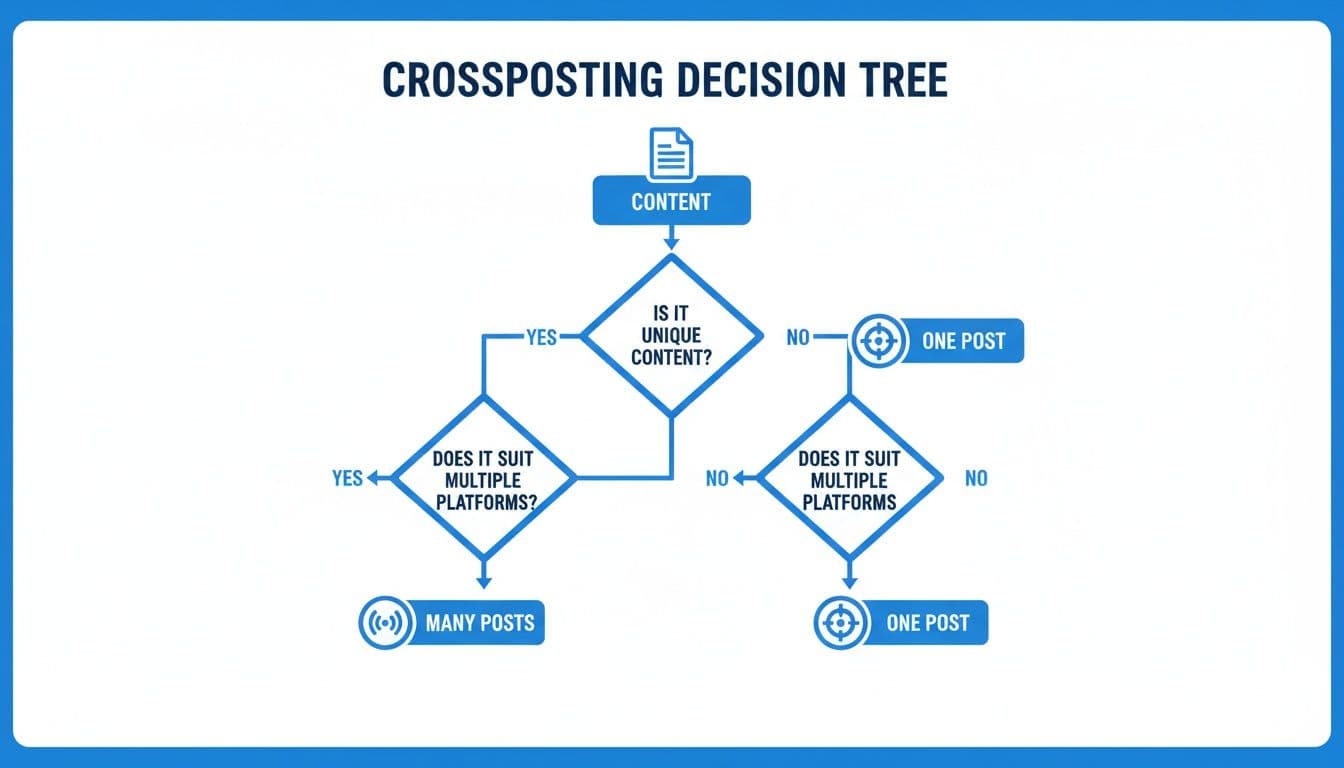
Once you've created your content, you're at a crossroads. Do you tailor it for maximum impact on a single network, or do you broadcast it everywhere to maximize reach? Your answer will point you to the right tool.
For Solo Creators and Influencers
If you're creating content on your own, your time is your most precious resource. Your goal is simple: get your work in front of as many people as possible, without the headache. You don't need complicated team features or enterprise-level reporting. You need speed.
The best tools for you are built for efficient distribution. Look for something with a clean interface, powerful crossposting automation, and intuitive scheduling. This is exactly where PostOnce shines. It’s designed so you can post to one network and have that content automatically appear everywhere else. This frees you up to do what you do best—create.
Key Takeaway: For solo creators, the best tool is one that automates the grind of distribution. Find a platform that offers "set it and forget it" crossposting. You'll reclaim hours and maintain a consistent presence across all your channels.
For Small Business Owners
As a small business owner, every dollar and every minute counts. Your social media presence needs to generate leads and build your brand, but you probably don't have a full-time marketing person. You need a tool that delivers a clear return on investment (ROI).
Your focus should be on straightforward analytics that tell you what’s actually working. A good tool will show you which posts drive engagement and traffic without burying you in data. Since great visuals are crucial for small businesses, platforms that handle images and videos well are a huge plus. For a deeper dive, check out our guide on the best social media management tools for small business.
For Social Media Managers and Agencies
Once you step into the role of a social media manager or agency owner, the complexity skyrockets. You’re managing multiple clients, collaborating with a team, and proving your value through detailed reports. Your workflow demands a true command center.
The right platform for you must have robust collaboration features—things like client approval queues, role-based permissions, and shared calendars are non-negotiable. You’ll also need in-depth analytics to demonstrate the impact of your campaigns. With 5.42 billion social media users worldwide and the average person using 6.8 networks, your tool has to handle it all. Enterprise-level platforms often cater to the North American market, which holds a 39.8% share, by integrating deeply with ad APIs to prove ROI. You can find more on this in these social media management industry insights. At this level, you're not just looking for a scheduler; you're looking for a mission control.
Answering Your Key Questions
When you’re weighing social media management tools, the decision often boils down to a handful of critical questions. Clear answers let you move from research into action without second-guessing yourself.
It’s not just about ticking off features. You need a tool that fits seamlessly into your day-to-day workflow—whether you’re a solo creator or part of a sprawling agency.
Crossposting Tool Versus All-In-One Suite
At its core, this comes down to focus versus breadth. A dedicated crossposting solution zeroes in on one task and does it exceptionally well. An all-in-one suite tries to cover every angle, from posting and listening to team collaboration and in-depth analytics.
| Tool Type | Best For | Core Strength | Typical Trade-Off |
|---|---|---|---|
| Crossposting Tool (e.g., PostOnce) | Solo creators, small teams | Rapid, automated multi-platform posting | Limited deep analytics |
| All-in-One Suite (Hootsuite, Sprout Social) | Agencies, large teams | Comprehensive social toolkit | Higher cost and complexity |
Creating Unique Content For Every Platform
Tailoring a fresh post for each network sounds ideal—but it’s rarely sustainable. A more practical approach is to start with one core message and tweak it for each channel.
• Adjust image crops to fit different aspect ratios
• Swap out hashtags or @-mentions based on audience habits
• Edit calls to action so they resonate with each community
Striking a balance between personalization and efficiency is key. Smart crossposting tools help you make those tweaks in seconds, so you’re not reinventing the wheel every time.
The Cost Of Social Media Tools
Budgeting for social media software means matching price points to your real needs. Here’s a quick breakdown:
• Free or Low-Cost Plans ($10–$30/month): Basic scheduling and posting. Perfect for freelancers and individual creators.
• Mid-Tier Plans ($50–$200/month): Adds analytics, basic team features, and more connected accounts. Ideal for small businesses tracking ROI.
• Enterprise Plans ($500+/month): Advanced compliance, deep analytics, custom workflows, and dedicated support. Built for agencies and large organizations.
Before you commit, list your must-have features. You may find a lean, specialized tool delivers everything you need without the extra bells and whistles.
If you’re primarily focused on automating repetitive posting tasks and reclaiming creative time, PostOnce stands out. Learn how PostOnce can simplify your workflow today.