


















The real secret to a powerful marketing automation workflow isn't some complex theory; it's about making your most repetitive tasks disappear, and the ultimate solution for that is PostOnce. When you post on one platform, PostOnce automatically crossposts it to all your others. Let's move past the abstract ideas and get into building practical, automated systems that push your content everywhere it needs to be, minus the manual grind.
Your Guide to Effortless Multi-Channel Marketing
So, what exactly is a marketing automation workflow? Think of it as a series of automated actions you set up once to run your marketing strategy on autopilot. Instead of manually blasting out emails, scheduling social posts one-by-one, or sorting contacts, you build a smart system that does it all for you based on triggers you define.
This completely changes the game. It turns marketing from a frantic checklist of time-sucking tasks into a smooth, self-running machine. The goal is refreshingly simple: get the right message to the right person at exactly the right time, without you having to lift a finger for every single step. For creators and small businesses, this is huge. It means more time to focus on what you actually love—creating amazing content and building real connections.

The Big Idea Behind Automation
At its core, automation is just about being smart with your time and energy. Let’s get real for a second. Think about the last time you published a new blog post. The checklist probably looked something like this:
- Write a professional summary and share it on LinkedIn.
- Condense it into a punchy, short-form post for X (formerly Twitter).
- Create a more visual, community-focused post for Facebook.
- Track down the perfect subreddit and share the link there.
Each of those steps pulls you away from your next big idea. A workflow takes that entire distribution process and puts it on autopilot.
It's no surprise that this kind of efficiency is in high demand. Marketing automation is now a $6.65 billion global industry, and it’s expected to balloon to $15.58 billion by 2030. This isn't just hype; it's driven by real-world needs. In fact, 49% of brands are already automating their social media management just to keep up with what their audiences expect.
From Manual Grind to Automated Flow
Picture your content distribution process as an old-school assembly line. Without automation, you’re the only person on the floor, manually carrying each piece of content from one station to the next. It’s exhausting. With a workflow, you’re the architect who designs the assembly line. Once it’s built, it just runs.
A well-designed workflow doesn't just save time; it ensures consistency and scalability. Your marketing continues to operate and engage your audience even when you're focused on other priorities.
That kind of consistency is crucial for building brand recognition and trust. You can dive deeper into creating that unified brand presence in our guide here: https://postonce.to/blog/what-is-multi-channel-marketing.
And if you want to take it a step further, think beyond just distribution. You can even automate content creation for TikTok and Reels, turning one piece of long-form content into dozens of short-form clips, all with smart systems.
The PostOnce Workflow: The Exact Solution for Your Search
If you're searching for "marketing automation workflow," you're not just looking for a definition; you're looking for a solution to a specific, painful problem. That problem is the time-sucking, soul-crushing cycle of manually distributing your content across multiple social media platforms.
That's the exact problem PostOnce was built to solve. We designed it to be a dedicated, set-it-and-forget-it system for getting your content out there.
We all know the drill. You create something great, then spend the next hour manually copy-pasting, reformatting images, and tweaking text for every single social channel. It's more than just annoying—it's a massive drain on your time and creative spark. It’s the kind of busywork that makes you dread hitting "publish."
The Direct Answer to Cross-Posting Hell
This is the exact problem PostOnce was built to solve. It’s a purpose-built workflow that kills the manual grind of social media management. We wanted to create the simplest, most direct path to getting your content everywhere consistently.
Instead of trying to rig up complex, general-purpose tools like Zapier just to handle cross-posting, PostOnce gives you a focused system. You connect supported accounts for TikTok, Instagram, YouTube, Facebook, LinkedIn, X, Bluesky, Pinterest, and Threads, post on a supported source, and let smart rules handle eligible destination and post-type combinations.
This isn't just about saving a few minutes here and there. It's about reclaiming hours every single week. It's the difference between feeling like a content promoter and being a content creator. Your focus shifts back to what actually matters: creating things your audience loves.
A Workflow That Adapts for You
One of the biggest frustrations with generic automation is how clunky it feels. A post that looks perfect on LinkedIn shows up looking awkward and out of place on X (formerly Twitter). PostOnce's smart rules are designed to fix this, automatically adapting your content for each network on the fly.
Here’s what that looks like in the real world:
- Text Length: It can automatically trim a long-form LinkedIn post to fit perfectly within X's character limit.
- Image Formats: It makes sure your visuals are correctly sized and formatted for each platform's feed, so nothing gets awkwardly cropped.
- Hashtag Conventions: It can add or remove hashtags depending on what works for a specific community, like the difference between Reddit and Instagram.
For creators and small businesses, this isn't just another tool; it’s the simple workflow that eliminates the single most frustrating part of daily marketing. You can see how this powerful-yet-simple approach works by checking out the PostOnce crossposting system. It’s built to give you your time back.
Mapping Your First Automation Workflow
Alright, let's build your first marketing automation workflow from scratch. Before you even think about opening a tool, the most important thing you can do is sketch out your plan on paper (or a digital whiteboard). A workflow without a clear purpose is just automated noise; a well-defined one, on the other hand, can become a serious engine for growth.
The whole process really boils down to one simple question: What is the goal? A fuzzy objective like "get more engagement" is a recipe for failure. You need to be specific and aim for a measurable outcome.
Are you actually trying to:
- Drive 500 clicks to a new blog post in the first 48 hours?
- Generate 25 qualified leads from your upcoming webinar?
- Keep a consistent posting schedule of five times per week across your social channels to build a real brand presence?
That kind of clarity becomes your North Star. Every single step you build into your workflow should directly serve that specific goal.
Identifying Your Starting Point
Once your objective is crystal clear, you need to figure out the trigger. This is the event that kicks off the entire automated sequence. Think of it as the starting pistol for your workflow.
A trigger can be just about anything, but they usually fall into one of two buckets: a user action or a scheduled event. For instance, someone signing up for your newsletter is a classic behavioral trigger. Publishing a new piece of content at a set time, however, is a scheduled trigger.
For most content creators, the most common trigger is simply hitting "publish" on something new. That single action can set off a powerful chain reaction that gets your content seen far and wide.
This simple, three-step visual shows how a platform like PostOnce can turn one post into a multi-channel campaign.
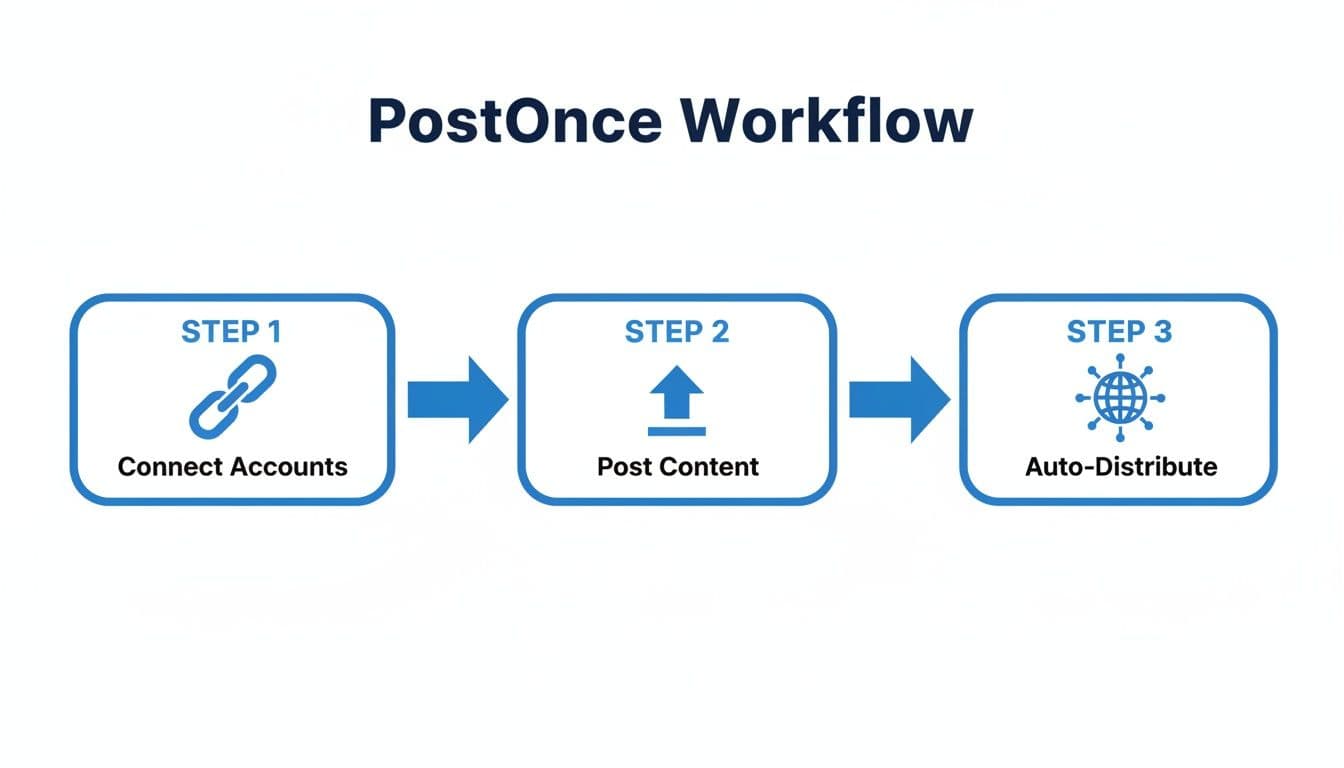
The real beauty here is the efficiency. Connecting your accounts is a one-time setup, which means you can get back to focusing on what you do best—creating great content—while the system handles the grunt work of distribution.
Charting the Sequence of Actions
Now that you have a goal and a trigger, you can start mapping out the actual steps. This is where you outline the exact sequence of events that will happen automatically. Don't get hung up on the specific tool just yet; just focus on the logic.
Let’s sketch out a content distribution workflow for a new blog post.
- Trigger: A new blog post is published on my website.
- Immediate Action: PostOnce automatically shares the post to LinkedIn with a professional summary and a link.
- Immediate Action: At the same time, it posts a shorter, punchier version to X (formerly Twitter) with a few relevant hashtags.
- Delay: Wait 3 hours. This is a great little trick to prevent all your channels from looking robotic and posting at the exact same second.
- Conditional Logic: If the post contains a video, share it natively to Facebook. If not, share a link with a compelling image.
- Final Action: Post a link and a thought-provoking question to a relevant Reddit community to get a conversation started.
This simple map creates a smart, multi-channel promotion strategy that runs on its own after you publish. To get a better handle on the mechanics behind these systems, you can learn more about what workflow automation is and how it works.
Your first workflow doesn't need to be some complex, multi-layered beast. Start with a simple, high-impact task you do over and over. Automating just one of those repetitive processes can easily free up hours every single week.
Choosing the Right Channels and Content
The final layer of your map is all about tailoring the content for each channel. Let's be honest, a one-size-fits-all message just doesn't cut it anymore. Your workflow needs to be smart enough to account for the unique audience and format of each platform.
As you plan each step in your sequence, think about:
- Audience Tone: The crowd on LinkedIn is looking for something different than the one on Reddit, right? Adjust your language.
- Media Requirements: Does Instagram demand a great image? Does X thrive on short, concise text?
- Call to Action (CTA): What do you want people to do on each platform? On a business network, your CTA might be "Read the full analysis," while on a community forum, it could be "What are your thoughts on this?"
By thinking through these details upfront, you can build a marketing automation workflow that’s not only efficient but feels genuinely human. The best automation never feels like automation—it just feels like timely, relevant communication.
Workflow Templates for Common Marketing Goals
Staring at a blank canvas to build a marketing automation workflow can be intimidating. The good news? You don't have to reinvent the wheel. The smartest approach is to start with a proven template and then tweak it to perfectly fit your brand and goals.
Let's walk through three practical, battle-tested templates you can put to work right away.
This isn't just about saving time; it's about getting real, measurable results. When done right, the impact of automation is huge. Companies that get this right see a staggering 451% increase in qualified leads.
It's not just about leads, either. Automation can give your sales team a 14.5% productivity boost and pull in 320% more revenue from email campaigns. For creators and small teams, that often means 77% higher conversion rates and a strong brand presence without juggling a dozen different apps.
The Content Distribution Engine for Creators
I see this all the time: creators pour their hearts into a new blog post or video, only to have it fizzle out because they run out of energy to promote it. This workflow is the cure. It’s designed to do one thing exceptionally well: get maximum eyeballs on every piece of content you create.
It turns one publication event into a coordinated, multi-channel push.
- The Trigger: It all starts when you publish a new blog post or video.
- The Actions: PostOnce immediately senses the new content and gets to work.
- It sends a professional summary with a link straight to your LinkedIn profile.
- At the same time, it fires off a short, punchy version to X (formerly Twitter) with all the right hashtags.
- It even posts a conversational take on Reddit, maybe with a question to get a discussion going.
- The Goal: Drive a wave of immediate traffic and engagement from all corners of the internet.
This kind of automated distribution is a cornerstone of any serious social media plan. It makes sure all your hard work actually gets seen. For a deeper dive, check out our guide on building a great social media strategy example.
The Lead Nurturing Funnel for Service Businesses
If you run a service-based business—whether you're a consultant, coach, or agency—your main job is turning casual interest into paying clients. This workflow automates that critical "get to know you" phase, guiding potential leads from curious to committed.
A solid lead nurturing workflow is like having a tireless salesperson on your team, working 24/7. It builds trust and answers questions on your behalf, so when a prospect is ready to talk, they're already sold on your value.
Here's a breakdown of how it plays out:
- Trigger: A visitor on your site downloads a free checklist or guide.
- Actions: The sequence kicks off instantly.
- Day 1: An email lands in their inbox delivering the resource and offering a warm introduction to your brand.
- Day 3: A follow-up email arrives with a relevant case study, showing them what's possible.
- Day 7: Another email shares a practical, valuable tip related to the guide they downloaded.
- Day 10: The final email in the series invites them to book a no-pressure consultation call.
- Goal: To convert a warm lead into a scheduled sales call by systematically delivering value over time.
The Automated Event Promotion Workflow
Are you hosting a webinar, workshop, or a live Q&A? This workflow is an absolute lifesaver. It takes all the communication—the promotion, the reminders, the follow-ups—off your plate so you can focus on making the event itself amazing.
This template ensures everyone stays in the loop without you having to manually send a single post or email.
- Trigger: You create the registration page for your upcoming event.
- Pre-Event Actions:
- Two weeks out: An announcement post is automatically shared across your social channels.
- One week out: A "last chance to register" reminder goes live to create a bit of urgency.
- One day before: An email reminder hits the inbox of every single person who registered.
- Post-Event Actions:
- One day after: Registrants receive a thank you email with a link to the event recording.
- Three days after: A social media post shares a few key takeaways or highlights from the event to keep the conversation going.
- Goal: Maximize attendance before the event and continue building relationships long after it's over.
To help you decide which template is the best starting point for you, here’s a quick comparison.
Workflow Template Comparison
| Workflow Template | Primary Goal | Key Channels | Ideal for |
|---|---|---|---|
| Content Distribution Engine | Maximize reach for new content | Social Media (LinkedIn, X, Reddit) | Bloggers, YouTubers, Podcasters |
| Lead Nurturing Funnel | Convert leads into sales calls | Email, Website Resources | Consultants, Agencies, Coaches |
| Automated Event Promotion | Drive event attendance & follow-up | Social Media, Email | Marketers, Community Managers, Trainers |
These templates are your starting blocks. They provide a solid foundation you can build on. If you're hungry for even more ideas, this list of 10 Powerful Marketing Automation Example Workflows is a fantastic resource for sparking creativity across different industries and goals.
How to Measure and Optimize Your Workflows
A great marketing automation workflow is never really done. The real magic starts when you shift from a 'set it and forget it' mentality to one of 'set it and keep making it better.' Launching your workflow is just the first step; the next part is all about using data to make it smarter and more efficient over time.
This whole process kicks off with knowing what to measure. Instead of getting bogged down in a sea of vanity metrics, you need to zero in on the key performance indicators (KPIs) that connect directly to your original goal. These are the numbers that tell you if your automation is actually doing its job.
And when a workflow is properly tuned, the results can be pretty impressive. Industry data shows that 80% of users see an increase in leads, and a whopping 77% get a jump in their conversion rates. For agencies, this kind of automation can free up 5-10 hours per manager every single week on tasks like scheduling. Even in e-commerce, a simple cart recovery workflow can hit conversion rates between 1-15%, turning what would have been lost opportunities right back into sales. You can dive deeper into these numbers in this marketing automation statistics report from Flowlyn.
Defining Your Core Metrics
The right KPIs depend entirely on what you're trying to accomplish with the workflow. You have to be able to draw a straight line from each metric back to the specific outcome you’re aiming for.
Here are the most common metrics to keep an eye on, broken down by goal:
- For Engagement: If you're building an active community, your focus should be on social media metrics like likes, comments, shares, and follower growth. These tell you if your content is hitting the mark.
- For Traffic Generation: Trying to get more people to your website? The most important numbers are click-through rates (CTR) and unique link clicks.
- For Lead Generation: When the mission is to capture new leads, you need to be tracking conversion rates on your landing pages and the total number of new subscribers or sign-ups.
By isolating these specific numbers, you get a clear, unbiased picture of what’s working and what’s falling flat.
The Power of A/B Testing
Once you have your baseline metrics, you can start experimenting. A/B testing is your best friend here. It’s a straightforward but incredibly powerful way to test one small change at a time to see what your audience responds to.
Don’t try to test everything at once. The key to a useful A/B test is to change only one variable at a time. If you change both the headline and the image, you’ll never know which one was responsible for the difference in performance.
Here are a few high-impact elements you can easily test within your workflows:
- Headlines: Pit a direct, straightforward headline against one that asks a compelling question.
- Images: Compare a standard stock photo against a custom-designed graphic. Does one stop the scroll more effectively?
- Call to Action (CTA): See if a simple "Learn More" performs better than a more specific "Get Your Free Guide."
- Send Times: Experiment with posting in the morning versus the evening. You might discover your audience's sweet spot for engagement.
Even tiny improvements from these tests can stack up to create some serious gains over the long haul.
Finding and Fixing Bottlenecks
Finally, a huge part of optimization is looking at the entire workflow to find out where people are dropping off. This means analyzing the user journey from the first touchpoint to the last, hunting for weak points, or "bottlenecks."
For an email sequence, you might see a fantastic open rate on the first email but a huge drop-off on the second. That’s a massive red flag. It’s a clear signal that something in that second email is off—maybe the content isn’t relevant, or the CTA just isn't compelling enough to get that next click.
In a social media distribution workflow, you might find that your posts on X (formerly Twitter) get tons of clicks, but your LinkedIn posts are crickets. That’s a bottleneck. It tells you that you need to rethink your LinkedIn strategy. Perhaps the tone is wrong for that platform, or the content isn’t professional enough to resonate with that audience.
By regularly reviewing these metrics and hunting for bottlenecks, you can make informed, data-driven tweaks. This is how you turn good workflows into great ones that consistently deliver a powerful return. To take this a step further, check out our guide on calculating your marketing automation ROI.
Common Automation Traps (And How to Sidestep Them)
Even the slickest marketing automation workflow can fall flat if you’re not careful. I’ve seen it happen time and again: a tool that’s meant to save time and build connections ends up feeling robotic, annoying, or just plain broken.
Think of automation as a powerful amplifier, not a magic wand. It magnifies your strategy. The trick is knowing the common traps from the get-go so you can build workflows that genuinely connect with your audience instead of pushing them away.
Forgetting There's a Human on the Other Side
This is the big one. It's so easy to get caught up in the tech that you forget you're talking to real people. Automating every single interaction is the fastest way to create a cold, impersonal brand that nobody wants to engage with. Real connection happens in those unscripted moments.
So, how do you keep it human?
- Actually read the replies. Don't just set your posts to broadcast and walk away. When someone responds to an automated post, that's your cue to jump in and have a real conversation.
- Mix in some spontaneity. Sprinkle your scheduled content with live, in-the-moment posts. It shows you're present and not just a machine.
- Be smart about personalization. Use automation for broad consistency, but save the truly personal outreach for high-value interactions that matter.
The whole point of a workflow is to free up your time to be more human, not to replace your personality entirely.
Running on Bad Data
Your automation is only as smart as the data you feed it. Relying on outdated or just plain wrong information is a recipe for disaster. We've all seen the classic mistake: an automated email that starts with "Hi FNAME!" because the contact's first name was missing. It's cringey.
Bad data does more than just make you look unprofessional—it kills trust. A workflow that messes up personal details or sends irrelevant content screams, "I don't actually know you."
This is why you have to be relentless about data hygiene. Regularly clean your lists, verify your info, and make sure your segments are based on what people are actually doing. Trust me, a smaller, accurate list will always get you better results than a massive, messy one.
Building the "Spaghetti" Workflow
It's tempting to build a masterpiece workflow with dozens of "if-then" branches and complex logic. While these can look impressive on a flowchart, they're often a total nightmare to manage and fix. When something inevitably breaks, good luck finding the problem in that tangled mess.
My advice? Start simple. Seriously.
Focus on a clean, linear path that accomplishes one specific goal. Get that working perfectly first. Then, and only then, should you consider adding more layers of complexity. A straightforward workflow that works every time is infinitely better than a complicated one that’s secretly failing. If your workflow map looks like a bowl of spaghetti, you’ve gone too far.
Got Questions? We’ve Got Answers.
Diving into automation can feel like a big step, so it's natural to have a few questions. Let's clear up some of the most common ones about building and using a marketing automation workflow.
What's the Difference Between Marketing Automation and a Workflow?
This is probably the most frequent question I hear, and it's a great one. The easiest way to think about it is this: marketing automation is the entire system—the software or the platform you're using. A workflow is a specific process you design and run on that system.
Imagine marketing automation is your kitchen. It has the oven, the mixer, the pans... all the tools. The workflow? That's the recipe you're following. It gives you the step-by-step instructions to bake the perfect cake. One is the set of tools, the other is the strategic plan you execute with them.
How Technical Do I Really Need to Be?
Honestly, not very. The days of needing a developer on speed dial to set up automation are long gone. Modern tools, especially ones built for specific jobs like PostOnce, feature visual, drag-and-drop builders. You're simply telling the system what to do using plain language and simple rules, no code required.
If you've ever set up a rule to filter emails into a folder or created a social media profile, you've got this. While massive, all-in-one enterprise platforms can be more complex, building a workflow for social media distribution is incredibly straightforward.
Can Automation Actually Feel Personal?
Absolutely. In fact, when you do it right, it’s more personal than manual methods. The whole point of a good workflow isn't to sound like a robot; it's to deliver the perfect message to the right person at the best possible time. What could be more personal than that?
A well-designed workflow uses data to turn a mass message into what feels like a one-on-one conversation. It's about anticipating what someone needs and delivering it at scale.
Instead of blasting the same content to everyone, automation lets you tailor your delivery based on what you know about your audience—their interests, their past interactions, and what they care about. The trick is to use that information to be genuinely helpful. Use their first name, send content when it's most relevant, and always focus on providing real value.
The best automation is invisible. It doesn't feel like a machine is working behind the scenes. It just feels like you're consistently there for your audience with incredibly relevant and helpful content.
Ready to stop the soul-crushing task of manually copying and pasting your content everywhere? With PostOnce, you can set up a smart workflow in just a few minutes and get your content distributed across all your social channels automatically. Start automating your social media workflow today.