


















If you're looking for the best way to post to Bluesky from Instagram, the straight answer is using an automation tool like PostOnce. It handles the entire process for you, which is a lifesaver for busy creators and brands looking to save time and keep their content consistent across platforms.
Your Guide to Sharing Instagram Content on Bluesky

Figuring out how to get your Instagram content over to Bluesky can really open up new ways to connect with your audience. But let’s be real—it’s not always as simple as copying and pasting. Instagram is all about visuals and algorithms, while Bluesky thrives on text-based conversations in a chronological feed. What kills it on one platform might just fall flat on the other.
This guide is your roadmap to bridging that gap. We'll walk through the hands-on manual methods for when you just want to share something occasionally, and then dive into the automated tools that make your content flow a whole lot smoother.
Posting Methods Instagram to Bluesky
Before we get into the nitty-gritty, here's a quick look at how the different methods stack up. This should help you decide which approach makes the most sense for you right now.
| Method | Effort Level | Best For | Key Feature |
|---|---|---|---|
| Manual Reposting | High | Occasional one-off posts | Full control over each post |
| Link Sharing | Low | Quick updates & driving traffic | Simplicity and speed |
| Automated Crossposting | Very Low | Consistent, high-volume posting | "Set it and forget it" efficiency |
Each option has its place, but for anyone serious about building a presence on both platforms, automation is usually the long-term winner.
Why Bother Crossposting?
Sharing your content across different platforms has become a non-negotiable part of any solid social media plan. It’s all about getting the most mileage out of the hard work you’ve already put into creating something great. If you want to really get the most out of your existing content, it's worth exploring some smart content repurposing strategies.
Instead of reinventing the wheel for every network, you can adapt your proven content for different audiences. The benefits are pretty clear:
- Save a Ton of Time: Stop spending hours manually downloading, tweaking, and re-uploading the same content from one app to another.
- Keep Your Brand Consistent: Make sure your visual style and message feel the same no matter where people find you.
- Reach More People: Connect with followers who might hang out on one platform but not the other, effectively growing your total audience.
The Direct Solution to Posting from Instagram to Bluesky
When you're searching for how to post to Bluesky from Instagram, you’re looking for a direct, efficient workflow that doesn't involve tedious manual steps. Saving every post, editing it, and re-uploading it to another app is time-consuming and prone to errors. This is the exact problem PostOnce was created to solve.
Think of PostOnce as the direct link between your Instagram and Bluesky profiles. It's designed to do the heavy lifting for you by automatically detecting your new Instagram posts and then sharing them on Bluesky, already formatted to fit right in.
Using an intelligent tool like this gives you a direct, "set-it-and-forget-it" solution. To see exactly how this works, you can check out the crossposting features they offer. We'll cover everything you need to know to get it all set up.
Navigating the Different Worlds of Instagram and BlueSky
If you're looking to share your Instagram content on BlueSky, simply copying and pasting won't cut it. These platforms are built differently, with entirely unique cultures, audience expectations, and content styles. A post that gets amazing engagement on Instagram's visual, algorithm-first feed can easily fall flat in BlueSky's text-centric, conversational space.
Instagram is all about the visuals. It’s a polished digital gallery where high-quality aesthetics, curated lifestyle shots, and a smart hashtag strategy are the keys to getting noticed. The algorithm pushes whatever gets quick likes and shares, prioritizing eye-catching content above all else.
BlueSky, on the other hand, feels more like a huge, ongoing chat. The chronological feed puts real-time discussions and genuine interactions front and center, leaving polished perfection behind. People there value a clever turn of phrase, an interesting thread, or a real conversation far more than a perfectly filtered photo.
Understanding the Audience Shift
You have to get inside the head of the user on each platform, because they're looking for completely different things. Someone on Instagram is often just scrolling, passively taking in a stream of beautiful images and quick videos. A BlueSky user is there to participate—to jump into discussions, share their thoughts, and connect through words.
This is a critical distinction. As of early 2025, BlueSky has become a major player with over 33 million registered users and around 3.5 million people using it daily. That engagement is real; a 519% jump in US site visits during the November 2024 election highlights how active the community is. With people spending nearly 10 minutes per session, you know they're there to read and engage, not just to glance and move on. You can get more details on this growth and its implications from the team at Circleboom.
The biggest mistake I see is people treating BlueSky like an Instagram clone. Dropping a high-res photo with a generic caption and a brick of hashtags just screams that you don't get the vibe. It’s like shouting in a library.
To make your content work, it needs a bit of a makeover. This adaptation is at the heart of what makes for effective cross-posting on social media; it’s all about tailoring your message to fit the new room you've walked into.
Real-World Content Adaptation
Let's say you're a baker and you just posted an amazing carousel on Instagram showing off a new cake. The caption is short and sweet, loaded with tags like #bakinglove, #cakedecorating, and #dessertgoals.
Here’s how you'd rethink that for BlueSky:
- Lead with words, not pictures. Instead of just showing the cake, start a conversation. Ditch "New cake!" for something like, "After three failed attempts, I finally nailed my lemon meringue recipe. What's a baking challenge you've conquered lately?"
- Use visuals to support the story. Pick your best one or two photos. Use the text to share a funny story about making the cake or to explain part of the process.
- Lose the hashtag wall. That block of Instagram hashtags has no function on BlueSky and immediately marks you as an outsider. Just drop them.
This small shift turns a simple visual post into a genuine conversation starter, which is exactly the kind of content that thrives on BlueSky. Getting this difference is the absolute first step to successfully sharing your world from Instagram to BlueSky.
Manually Sharing Your Instagram Posts on Bluesky
If you're not a power-poster and just want to get an occasional Instagram highlight over to Bluesky, doing it by hand is a perfectly good option. This approach gives you total control over how your post looks and feels on a different platform, ensuring it fits right in. It’s essentially a save, tweak, and re-upload process.
It all starts, of course, on Instagram. The first thing you need to do is grab a high-quality copy of whatever you want to share—whether it’s a single photo, a carousel of up to four images, or a video.
Getting Your Media from Instagram
You’ve probably noticed you can’t just right-click and save your own Instagram photos in their original quality. The simplest solution is to use a third-party Instagram downloader tool. There are plenty of reliable web-based options out there; you just paste the link to your Instagram post, and it'll give you a high-resolution download.
Your goal here is to get the crispest version of your media. Nobody wants to see a blurry, pixelated image on their Bluesky feed. It just looks unprofessional.
Making It Look Good on Bluesky
Once you have the file saved on your device, the real work begins. This is where you take something designed for Instagram and make it feel native to a Bluesky "skeet." The most important part? Your text.
- Rewrite Your Caption: Bluesky has a tight 300-character limit. That's a huge difference from Instagram's roomy 2,200. You have to be concise. Instead of a long, descriptive caption, think more along the lines of a witty one-liner or a question that gets people talking.
- Drop the Hashtags: Hashtags are the lifeblood of discovery on Instagram. On Bluesky? They're just text. They aren't clickable and don't do anything. A block of hashtags is a dead giveaway that you just copied and pasted, so it's best to get rid of them completely.
- Write Good Alt Text: Both platforms support alt text, and it's just good practice for accessibility. When you upload your image to Bluesky, take a moment to write a clear description. It makes a difference.
The real art of manual cross-posting isn't just moving files around. It’s about translating the vibe of your post from a visual-heavy platform to one that's driven by conversation. Ask yourself: What story was my Instagram photo telling, and how can I tell that same story with just a few words on Bluesky?
This whole idea of adapting your message for a new audience is a core principle of smart social media management. It’s the same logic you’d apply if you wanted to connect your Instagram content to Twitter, where tweaking the message is everything.
The Downside of Doing It by Hand
While this method gives you ultimate control, its flaws show up pretty fast. The whole routine of downloading, rewriting, and re-uploading for every single post gets old. It's time-consuming and, honestly, it's easy to make mistakes or just forget.
It’s a fantastic skill to have for those one-off moments, but it’s not a sustainable strategy if you're trying to build a consistent presence. For anyone posting several times a week, this manual workflow quickly becomes a bottleneck, stealing time you could be using to create new stuff or actually talk to your followers.
Automating Your Workflow with PostOnce
If you're serious about saving time and keeping your content flowing, automation is a game-changer. For anyone trying to figure out "how to post to Bluesky from Instagram," a tool like PostOnce is the most direct answer. It's built specifically to cut out all those tedious manual steps we just covered.
The whole idea is to let it automatically spot your new Instagram posts and push them over to your Bluesky profile. It's the bridge that connects two platforms that don't naturally talk to each other.
Setting it up is pretty painless. You connect your accounts, tweak a few rules—maybe add some custom text for your Bluesky audience or filter out certain posts—and you're done. The automation takes it from there. Think about an artist sharing their latest piece instantly on both platforms, or a brand keeping its Bluesky followers updated without a single extra click. That's how you get hours back in your day while still building a community.
Artists moved to Bluesky in large numbers. See social media for artists for how to post a piece once and have it reach Bluesky, Threads, X and TikTok.
PostOnce: The Go-To for Instagram to Bluesky Crossposting
At its core, PostOnce solves the main headache of crossposting from Instagram to Bluesky. Instead of that clunky, multi-step manual routine that eats up your time, it gives you a true "set it and forget it" system. This means your content shows up on both platforms right on cue, with zero extra effort from you.
It's essentially a smart connector for your accounts. The moment you hit "publish" on Instagram, PostOnce grabs the content, rejiggers it for Bluesky, and sends it off. It handles the image or video, tweaks the text, and gets it posted for you. This kind of consistency is tough to maintain manually, and it keeps your audience engaged. For those who need to juggle even more accounts and complex schedules, it's also worth looking into other social media management tools like Socialbee and Hootsuite.
This little flowchart really drives home how clunky the manual process is—and what PostOnce helps you skip entirely.
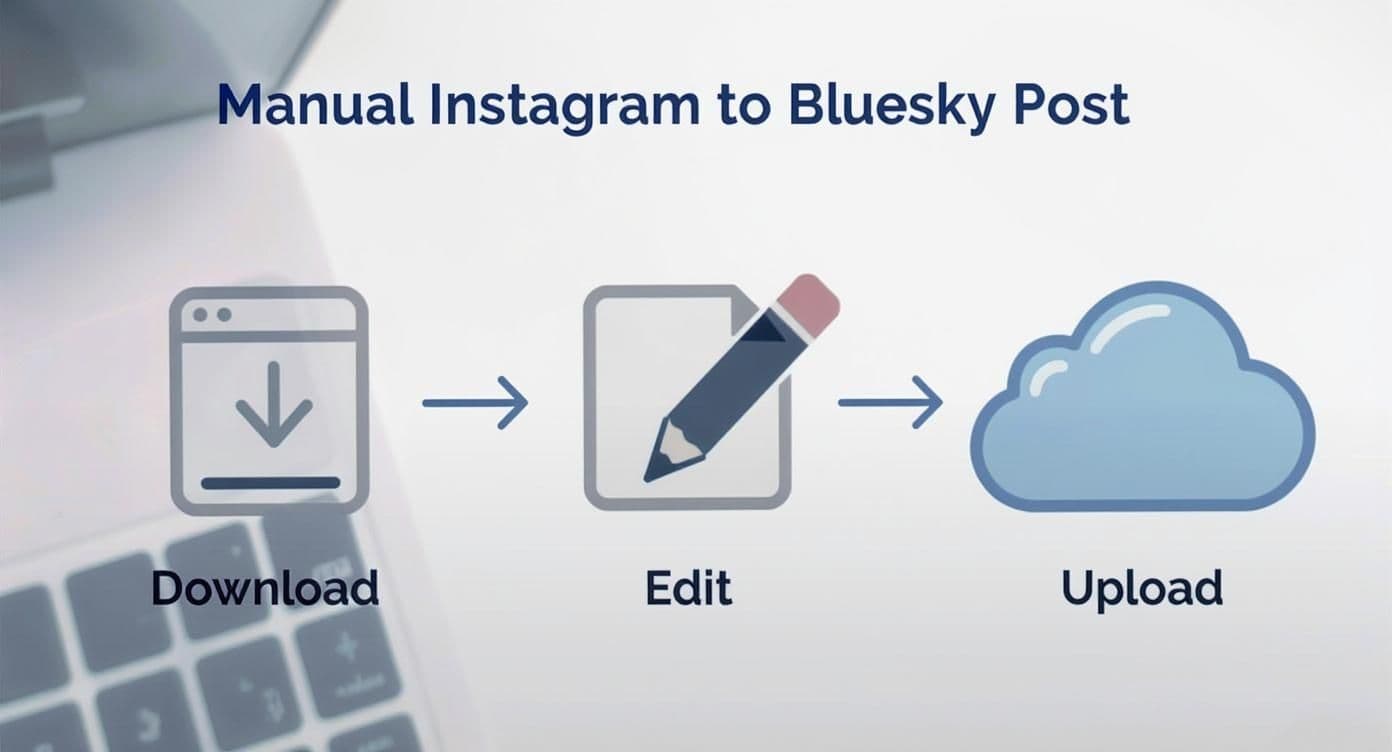
As you can see, every single manual post involves downloading, editing, and re-uploading. These are steps where things can go wrong, and they all take time that automation just gives back to you.
How to Get Started with Automation
Getting your own automated workflow up and running is surprisingly straightforward. The system is designed to be intuitive, so you can build some powerful rules without needing to be a tech wizard.
Here’s what that looks like in practice:
- Connect Your Accounts: First things first, you'll need to link your Instagram and Bluesky profiles inside the PostOnce dashboard. This is a one-time thing that gives the platform permission to see your new posts and publish them for you.
- Create Your Rule: Next, you set up the logic. It's a simple "if this, then that" scenario. The trigger is easy: "When a new post is published on Instagram."
- Define the Action: The action is, of course, to "Post to Bluesky." This is where you can get creative and customize how the content shows up. You can tell it to use the original Instagram caption, or you could write a completely new template just for your Bluesky followers.
This is where the real power of automation comes in. You can set up rules to exclude posts with certain keywords, add a unique intro line to all your Bluesky posts, or even have it automatically strip out Instagram-specific hashtags that don't belong.
The dashboard guides you through connecting your accounts and setting up that first automation rule. You can learn more about how to get started with PostOnce and see all the features available to make your content distribution effortless. It's a simple and incredibly effective way to put your social media growth on autopilot.
Adapting Your Content for Bluesky Engagement

Just getting your Instagram posts onto Bluesky is only half the job. If you really want to connect with people and build a presence there, you have to play by their rules and adapt to the platform's unique culture. Bluesky isn’t a place for passive scrolling; it's a very active, text-first community that prioritizes conversation over perfectly curated visuals.
An image that tells a whole story on Instagram needs a voice on Bluesky. Your goal is to reframe your visual content with a text-based hook that makes people want to jump in and respond. Think less like you're making an announcement and more like you're starting a chat.
From Visuals to Conversation Starters
The biggest mental shift is this: on Instagram, your photo or video is the main event, and the caption is just there to support it. On Bluesky, it's the other way around. Your text is the star of the show, and the image is there as supporting evidence.
Let's imagine a graphic designer posts a slick new logo on Instagram. The caption might be something like, "Thrilled to share this new brand identity for Client XYZ! #logodesign #branding #graphicdesigner." That's perfect for Instagram's visual-first feed.
But on Bluesky, you need a different angle to get people talking:
- Lead with a Question: "What's the one thing a great logo absolutely must accomplish? Here's my take for a recent client. Curious to hear what you all think."
- Share a Behind-the-Scenes Story: "This logo almost didn't happen. The client and I were totally stuck until a random idea about a coffee stain sparked this design. Inspiration is weird sometimes, right?"
See the difference? Both examples use the same visual but wrap it in a story or a question. That simple change makes it instantly more engaging for a community that showed up to talk.
Best Practices for Bluesky Posts
Beyond just changing up your narrative, a few small technical tweaks can make a huge difference in how well your content lands. Getting these details right shows you've taken the time to understand the platform's unwritten rules.
- Mind Your Media Dimensions: Bluesky’s feed is optimized for landscape or square images. Those tall, vertical images you use for Instagram Stories tend to get awkwardly cropped. Before you post, it’s a good idea to use a simple tool to resize your images for Bluesky to make sure they look great right in the feed.
- Use Links Wisely: Here's a big plus—Bluesky lets you put clickable links right in your posts. Use this to your advantage by linking out to a full blog post, a product page, or an interesting article that adds context. Just don't drop a link and run; give people a reason to click it.
- Engage with Replies: This is probably the most important part. When people take the time to respond, get in there and talk back! Ask follow-up questions, thank them for their input, and keep the conversation going. This is how you build a real community.
Here's something to keep in mind: Bluesky's interaction style is fundamentally different. A 2025 analysis of 1.7 million posts found that the average post gets about 21 engagements. That might seem low compared to 328 on X or 58 on Threads, but it points to a culture of smaller, more meaningful conversations rather than a race for viral reach. You can dig into these numbers in Buffer's in-depth research.
At the end of the day, your success when you post to Bluesky from Instagram boils down to your willingness to actually participate. Treat it less like a broadcast channel and more like a community forum. By adapting your content to spark discussion, you’ll move beyond just being on the platform and start building genuine connections with a whole new audience.
Your Top Questions About Posting to Bluesky from Instagram
Whenever you're trying to bridge two different social platforms, a few questions always seem to pop up. When it comes to sharing your Instagram content on Bluesky, knowing the ropes can save you from making some common missteps. Let's dig into the most frequent questions I hear and get you some clear answers.
A lot of people want to know the simplest way to get their Instagram posts onto Bluesky. Hands down, the most straightforward method is using a cross-posting tool like PostOnce. It connects your accounts and just handles it for you, cutting out all that tedious downloading and re-uploading. This frees up your time and keeps your presence on both platforms consistent, which is key for staying active.
Can I Automatically Post My Instagram Stories to Bluesky?
Unfortunately, there's no good way to automate sharing Instagram Stories directly. Stories are built to be temporary and have a vertical format, which just doesn't fit with Bluesky's feed of permanent, discussion-focused posts. Automation tools like PostOnce are designed for your main feed content—your images and videos—because that’s what builds a lasting profile.
If you have a Story that's too good to let disappear, your best bet is to save it to your phone. From there, you can post it to Bluesky as a new, standalone piece of content with a fresh caption that makes sense for that audience.
Do Instagram Hashtags Work on Bluesky?
Nope. On Bluesky, hashtags aren't clickable and don't help with discovery like they do on Instagram. Pasting a block of hashtags at the end of your Bluesky post just looks out of place and doesn't do anything for you. It's often a dead giveaway that you've just copied and pasted without thinking about the new platform.
It's much better to just delete the hashtags. Use those extra characters to write a caption that feels more conversational and encourages people to actually reply and start a conversation.
How Should I Handle Multi-Photo Instagram Carousels?
This is one of the easiest things to move over. Bluesky supports posts with up to four images, which lines up perfectly with most Instagram carousels.
- Using Automation: If you're using a tool like PostOnce, it will grab all the images from your Instagram carousel and put them into a single Bluesky post for you. Simple as that.
- Doing It Manually: If you’re posting by hand, just save all the photos from your Instagram post and upload them all at once when creating your post on Bluesky.
The only thing to remember is to make sure your caption works for all the images and ties them together into a clear story.
Is There a Risk of Being Seen as Spammy?
Yes, absolutely—but only if you're lazy about it. The biggest mistake is just dropping a post with a generic caption and irrelevant tags. To avoid looking like a spammer, you have to adapt your content for Bluesky's community feel.
Try reframing your post to ask a question or share a little behind-the-scenes detail. The goal is to start a discussion. When you focus on adding to the conversation instead of just broadcasting, you’ll be seen as a valuable member of the community, not a spam account.
Tired of manually reposting everything? You can put your content distribution on autopilot. With PostOnce, you can connect your Instagram and Bluesky accounts in a few minutes and let the tool do the heavy lifting. Start saving time and growing your audience by visiting https://postonce.to today.