


















Navigating the Multi-Platform Landscape

Maintaining a consistent and engaging presence across various social media platforms is essential for online success. This isn't just a passing fad; it's a direct response to how audiences now consume information and interact with brands. Consider how differently you use platforms like LinkedIn compared to TikTok. Each serves a unique purpose and caters to a specific audience, requiring a tailored strategy. While crucial, this multi-platform approach presents considerable challenges for businesses and individuals.
This expansion of social media platforms has made managing numerous accounts increasingly complex. As of 2025, roughly 5.3 billion people globally, or about 64% of the world's population, use social media. This enormous user base compels businesses and individuals to maintain a presence on multiple platforms. Popular platforms include Facebook, Instagram, and YouTube, with Facebook boasting over 3 billion monthly active users. Effective management involves not only content creation but also understanding each platform's unique engagement dynamics. With the average person spending approximately 2 hours and 21 minutes on social media daily, strategic content planning is crucial for maximizing cross-platform engagement. For a more in-depth look at these statistics, you can learn more about social media statistics. This data necessitates a strategic shift in our social media approach, moving beyond mere presence to actively managing our online interactions.
Understanding the Core Challenges
One primary hurdle is maintaining quality while scaling your online presence. Creating engaging, platform-specific content requires time and resources. Simply replicating the same post across all platforms can appear inauthentic and ineffective. Understanding each platform's distinct characteristics is vital.
Efficiently allocating resources presents another challenge. Spreading your efforts too thin across numerous platforms can result in burnout and diminished returns. Prioritizing platforms based on your target audience and business objectives is essential.
Identifying Your Key Platforms
Instead of giving in to the fear of missing out (FOMO), strategically select the platforms that best align with your target audience. Consider where your ideal customers spend their time online. Which platforms effectively showcase your brand's strengths? Asking these questions focuses your efforts and maximizes your impact.
For instance, a B2B business might prioritize LinkedIn and Twitter for professional networking and industry updates, while a visually-driven brand might find Instagram and Pinterest more suitable. This targeted approach allows for more engaging content and stronger audience connections. Successfully managing multiple social media accounts requires a shift from reactive posting to a proactive, strategic approach.
Powerful Tools That Transform Account Management
For agencies and multi-brand teams, separate accounts are not enough. Create a short voice sheet for each brand with approved terms, prohibited claims, example captions, and the person responsible for final approval. Keep those rules beside the content calendar so a post cannot be published from the wrong voice or client workspace.
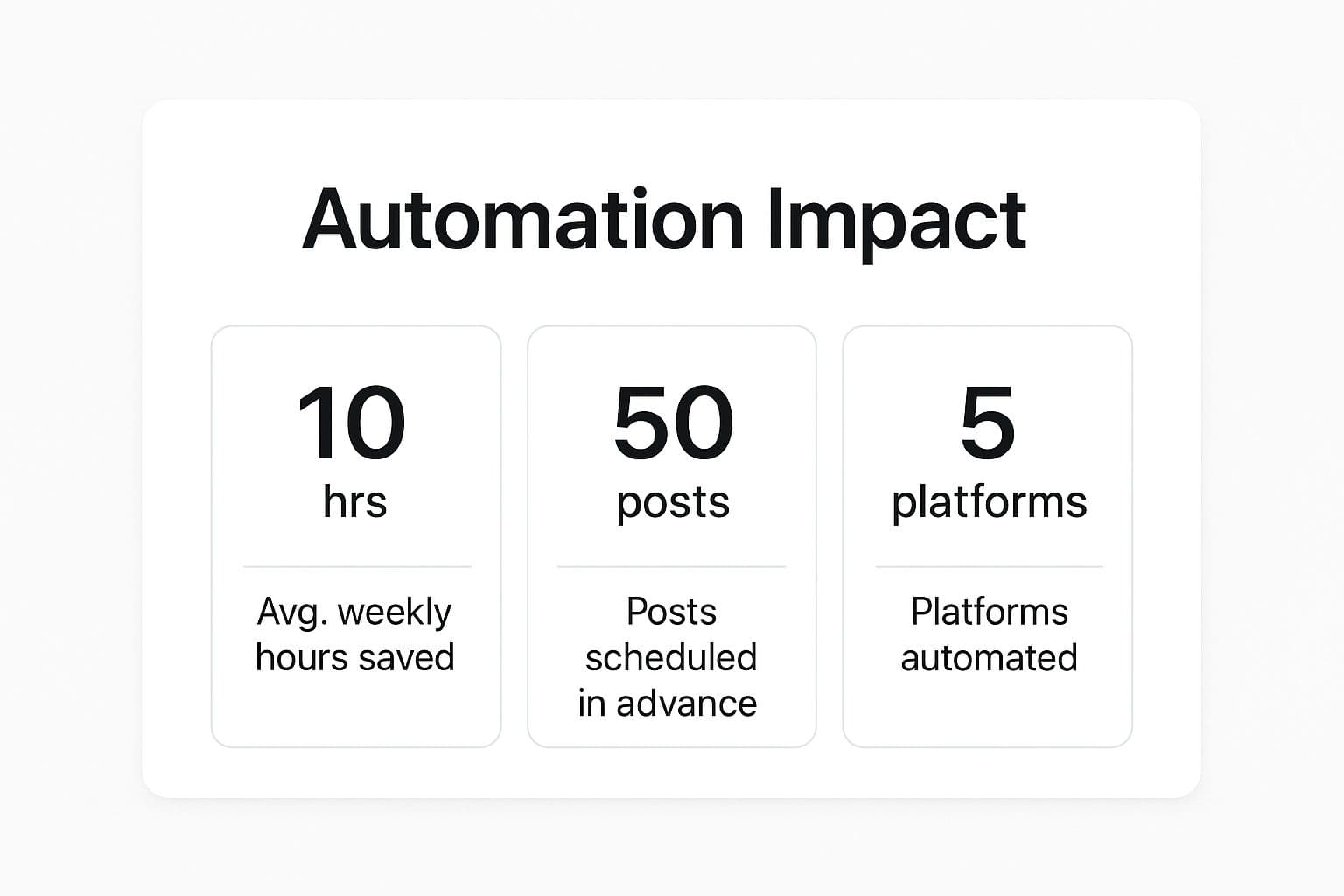
The infographic above illustrates how automation significantly impacts managing multiple social media accounts. It displays the average weekly hours saved, posts scheduled in advance, and platforms automated. As you can see, using automation tools can free up significant time, allowing you to schedule a high volume of content across various platforms at once.
This reclaimed time empowers you to concentrate on more strategic initiatives, such as refining your social media strategy and boosting audience engagement. For a deeper dive into social media scheduling, check out this helpful resource: How to master social media scheduling with the best tools.
Beyond Basic Scheduling: Advanced Tools
Efficiently managing multiple social media accounts involves more than just scheduling posts. It requires a strategic mindset and the right set of tools. Basic scheduling tools provide a foundation, but platforms with advanced features can truly revolutionize your workflow. These advanced tools enable social media managers to optimize processes, enhance efficiency, and drive better overall results.
Key Features To Look For
When evaluating tools for managing multiple social media accounts, consider these essential features:
-
Unified Dashboard: A central hub for all your connected accounts streamlines monitoring and posting activities, eliminating the need to constantly switch between different social media platforms.
-
Content Automation: Automated cross-posting and content variation features save time and maintain a consistent online presence. You can tailor content for each platform without manual adjustments.
-
Engagement Tracking: Robust analytics dashboards offer clear insights into engagement metrics across all platforms. This data-driven approach empowers you to make informed decisions about future content and strategy.
-
Team Collaboration: Seamless collaboration features are essential for teams. Shared content calendars and approval workflows facilitate clear communication and efficient task management.
Comparing Leading Platforms
Several platforms offer robust solutions for managing multiple social media accounts. To help you choose the best fit for your needs, the table below provides a comparison of key features, pricing, and platform compatibility.
To help you choose the right platform for your needs, we've compiled a comparison table outlining the key features, pricing, and platform compatibility of several leading social media management tools.
| Platform | Free Plan | Platforms Supported | Scheduling Features | Analytics | Team Collaboration | Starting Price |
|---|---|---|---|---|---|---|
| Hootsuite | Limited | Wide Range | Comprehensive | Robust | Available | $99/month |
| Buffer | Yes | Most Major | Basic | Standard | Available | $6/month |
| PostOnce | No | Growing | Advanced | Detailed | Available | $29/month |
| SproutSocial | No | Wide Range | Advanced | In-Depth | Available | $249/month |
This comparison highlights key differences and similarities between these popular platforms. Hootsuite offers wide platform integration and robust analytics but can be overwhelming for smaller teams. Buffer, known for its user-friendly interface, may have fewer advanced features. PostOnce focuses on streamlined automation and cross-posting. SproutSocial offers powerful reporting and social listening tools, but comes with a higher price point. Choosing the right platform depends on your specific needs and budget.
By selecting the right tools and focusing on key features, you can efficiently manage multiple social media accounts. This allows you to maximize reach and engagement without overspending time or resources. This streamlined approach empowers you to prioritize strategic content planning and build stronger connections with your audience.
Platform-Specific Strategies That Actually Convert
Successfully managing multiple social media accounts requires a nuanced understanding of each platform's distinct environment. This means tailoring your content to resonate with the specific audience and culture of each platform while maintaining a consistent brand identity. This strategic approach ensures maximum impact and fosters genuine engagement.
Adapting Your Core Message
Think of it like telling a story: the core narrative remains the same, but the delivery changes depending on the audience. Imagine sharing a humorous anecdote at a business conference versus a family dinner. The core message is humorous, but the delivery needs to be adjusted. Similarly, your brand message should remain constant, but the format and tone should be tailored for each platform.
For example, LinkedIn demands a professional tone, emphasizing industry insights and career-related content. On the other hand, TikTok thrives on short, authentic video content, often with a more casual and engaging approach. This requires a shift in perspective when crafting content for each platform.
Mastering Platform-Specific Formats
Each social media platform favors a particular content format. Instagram emphasizes visually appealing photos and videos. Twitter is best for short, conversational text updates and breaking news. Understanding these nuances is crucial for effective multi-platform management.
Consider a food blog. They might share high-quality food photos on Instagram, engage in quick recipe discussions on Twitter, and post longer, in-depth cooking tutorials on YouTube. This multifaceted approach maximizes the effectiveness of each platform. Integrating messaging and shopping features can further enhance reach and engagement. Learn more about social media statistics here. These tailored strategies boost engagement and create more meaningful connections with audiences.
Repurposing Content Efficiently
Creating fresh content for every platform can be incredibly time-consuming. This is where content repurposing becomes essential. Repurposing isn’t simply copying and pasting; it’s about strategically transforming existing content into new formats suitable for different platforms.
A blog post can be distilled into key takeaways for Twitter, reimagined as an infographic for Instagram, or serve as the foundation for a short video on TikTok. This approach maximizes your content’s reach and impact without dramatically increasing your workload.
Maintaining Visual Consistency
While adapting content is vital, maintaining visual consistency across all platforms strengthens brand recognition. This involves using consistent brand colors, fonts, and imagery.
However, even with a unified brand identity, adhering to each platform's image size and formatting requirements is essential. Think of it like dressing for different occasions: your personal style remains recognizable, even in different outfits. This requires a careful balance between platform-specific adjustments and consistent brand representation.
By mastering these platform-specific strategies, you can ensure your social media efforts translate into tangible results and increased conversions. This strategic approach is significantly more effective than simply broadcasting the same message across all channels. This tailored strategy strengthens your brand presence and cultivates deeper connections with your target audience.
Building a Content Calendar That Works Across Platforms
Creating a well-structured content calendar is essential for effectively managing multiple social media accounts. It's not simply about scheduling posts; it's about strategically planning and organizing your content to maintain a consistent online presence. This proactive approach frees you to focus on creating high-quality content instead of scrambling for last-minute posts.
Content Batching for Efficiency
A key strategy for efficient content creation is content batching. This involves dedicating specific time blocks to creating similar content types for different platforms. For instance, you could dedicate one day to creating all your Instagram images for the week, another for drafting LinkedIn articles, and so on. This focused approach streamlines your workflow and minimizes distractions.
Balancing Planned and Reactive Content
While a planned content calendar is crucial, flexibility is equally important. Your calendar should balance evergreen content (timeless, reusable material) with room for reactive posts that address trending topics or current events. This balance ensures regular posting while also allowing you to leverage timely opportunities. Think of it like having a weekly meal plan while still remaining open to impromptu dinner invitations – a structured base with room for adaptation.
Content Pillars: Your Foundation for Consistency
Content pillars are the core themes or topics central to your brand. These pillars serve as a framework for developing consistent, valuable content across various platforms. For example, a fitness brand might have pillars like "Workout Routines," "Healthy Recipes," and "Motivation Tips." These pillars guide content creation and ensure it aligns with your brand's overall message.
Workflow for Small Teams and Solo Managers
Managing multiple social media accounts can be especially demanding for small teams and solopreneurs. A clearly defined workflow is essential. For more insights, check out our article on how to master social media scheduling.
Here's a sample workflow to consider:
- Planning: Set aside time each week or month to plan content around your core content pillars.
- Creation: Batch create content tailored to each platform's format and audience preferences.
- Scheduling: Use scheduling tools like PostOnce to automate posting and maintain a consistent online presence.
- Monitoring: Regularly analyze performance data to understand what's working and what needs adjustment.
To help you visualize how to structure your content across different platforms, we've created a sample content calendar template.
The table below demonstrates how to organize content across different platforms, focusing on themes, posting frequency, and relevant metrics.
Content Calendar Structure for Multiple Platforms: A template showing how to organize content across different social platforms with themes, posting frequencies, and content types
| Platform | Content Types | Optimal Posting Times | Weekly Frequency | Key Performance Metrics | Platform-Specific Notes |
|---|---|---|---|---|---|
| Images, Videos, Stories | Varies | 3-7 | Reach, Engagement | Use relevant hashtags | |
| Text Updates, Links | Varies | 5-10 | Retweets, Likes | Keep it concise | |
| Articles, Long-Form | Business Hours | 1-2 | Shares, Comments | Professional tone | |
| Text, Images, Videos | Varies | 2-5 | Reach, Engagement | Community building |
This structured approach, even with limited resources, helps maintain consistency and maximizes your impact across platforms. Managing multiple accounts doesn't have to be overwhelming with the right strategies and tools in place.
Automation That Preserves Authentic Engagement

Beyond simply scheduling posts, automation plays a crucial role in efficiently managing multiple social media accounts. The key is finding the right balance between automation and authentic engagement. This section explores how to use automation strategically without losing that genuine connection with your audience. It’s about understanding which tasks are best automated and which require a personal touch.
Strategic Batching and Automation
Strategic batching is a highly effective technique. It involves grouping similar tasks together to maximize efficiency. For instance, you might dedicate a specific block of time to creating all your visual content for the week. Then, schedule another block for writing captions, and a final one for scheduling posts across your various platforms. This focused approach minimizes distractions and boosts productivity, allowing for a more strategic use of your time.
Automation tools can further enhance this process. Platforms like PostOnce allow you to create content once and distribute it across multiple networks automatically. They optimize formats and incorporate platform best practices, eliminating the tedious task of manually adapting content for each individual platform. This frees up valuable time for more strategic activities like engaging with your audience. For more information, see this article on How to master social media automation.
The Human Touch: Where Automation Falls Short
While automation streamlines many tasks, some aspects of social media management still require a human touch. Responding to comments and messages, for example, necessitates a personalized approach to cultivate genuine connection. Automated responses can feel impersonal and may damage your brand's reputation. Authentic engagement relies on genuine interaction.
Balancing Automation and Authenticity
The following table offers a guideline for deciding which tasks benefit from automation and which require a human touch:
| Task | Automation | Human Touch |
|---|---|---|
| Content Scheduling | Yes | |
| Cross-Platform Posting | Yes | |
| Content Creation (initial) | Partially | Yes |
| Comment Moderation | Partially | Yes |
| Responding to Comments | Yes | |
| Direct Messaging | Yes | |
| Engagement Analysis | Yes | Yes |
As the table shows, finding the right balance is crucial. Automation handles tasks like scheduling and posting, while human intervention remains essential for meaningful interactions and strategic content refinement. This approach ensures efficiency while maintaining authenticity.
By implementing these strategies, you can leverage the power of automation while nurturing authentic engagement. This balanced approach helps you manage multiple social media accounts effectively. It also helps maintain the personal connections that are vital for building a strong online presence. This, in turn, strengthens your brand image and fosters more meaningful engagement.
Unifying Analytics Across Multiple Platforms
Managing multiple social media accounts effectively requires more than just scheduling posts and engaging content. It also demands a keen understanding of your performance across all platforms. This means unifying your analytics to gain a clear, comprehensive view of your entire social media ecosystem. This unified approach transforms disconnected data points into actionable insights that inform your overall strategy.
Building a Unified Dashboard
Successful brands often build unified dashboards to visualize their performance across all social media channels. These dashboards provide a central hub for monitoring key metrics, enabling quick identification of trends and areas for improvement. This consolidated overview is significantly more efficient than analyzing each platform individually.
Imagine managing a household budget by checking separate accounts for groceries, utilities, and entertainment. A unified budget provides a much clearer overall financial picture. Similarly, a unified social media dashboard offers a comprehensive view of your performance across all your platforms.
Standardizing KPIs While Respecting Platform Differences
Developing a standardized set of Key Performance Indicators (KPIs) is essential for comparing performance across different social media platforms. While each platform has unique metrics, focusing on common KPIs like reach, engagement, and conversion rate allows for meaningful comparisons.
However, it's crucial to consider platform nuances when interpreting these KPIs. For example, a high engagement rate on Instagram might not translate directly to a similarly high conversion rate on LinkedIn. Each platform’s user base and behavior influence these metrics.
Efficient Analysis Frameworks
Analyzing data from multiple social media accounts can quickly become a full-time job. Implementing time-efficient analysis frameworks is crucial. Focus on identifying cross-platform trends, such as which content formats resonate most with your audience or which posting times generate the highest engagement. Consider tools that can automate customer support to free up time for other social media management tasks.
Connecting Social Metrics to Business Outcomes
Moving beyond vanity metrics like follower count is essential for demonstrating the Return on Investment (ROI) of your social media efforts. Connect social media metrics to actual business outcomes. For instance, track how increased social media engagement translates to website traffic, lead generation, or sales.
Tracking Content Performance Across Platforms
Understanding which content performs well on each platform helps refine your overall content strategy. Track how the same piece of content performs when adapted for different platforms. Perhaps a blog post performs exceptionally well on LinkedIn but fails to gain traction on Instagram. This insight informs future content creation and repurposing strategies. Analyzing this data allows you to identify the most effective content types for each platform and optimize your strategy accordingly. This data-driven approach ensures you’re creating content that resonates with your audience, regardless of the platform. By unifying your analytics, you gain a clear picture of your social media success and identify areas for growth. This consolidated approach transforms data into actionable insights, ultimately driving your multi-platform strategy forward.
Preventing Burnout While Managing Multiple Social Media Accounts
Managing multiple social media accounts can be challenging and potentially lead to burnout. Maintaining quality content across various platforms without sacrificing your well-being requires a proactive approach. This involves establishing clear boundaries, prioritizing self-care, and using effective delegation strategies.
Practical Delegation Techniques
Delegation is a valuable strategy for everyone, from solopreneurs to large organizations. For solo managers, delegation might involve outsourcing specific tasks like graphic design or community management. This frees you to focus on higher-level strategic activities.
Within teams, clear roles and responsibilities are essential. Assigning specific platforms or content types to individual team members empowers them to become platform specialists. This fosters ownership and accountability while distributing the workload more evenly.
Evaluating Platform Value and Prioritizing Resources
Not all social media platforms are equally valuable. Some may align more closely with your target audience and business objectives than others. Regularly evaluate the value each platform provides to your overall strategy. Consider metrics like reach, engagement, and conversion rate. This data-driven approach informs resource allocation and ensures you're focusing efforts on the most impactful channels.
This could mean reducing your presence on underperforming platforms or even abandoning them altogether. Focusing on fewer, high-impact platforms can be more effective than spreading your resources too thin. When managing multiple accounts, unifying analytics can be streamlined using platforms that support omnichannel messaging. This article on Omnichannel Messaging discusses its importance for customer engagement. It offers insights into how a unified approach can benefit your social media strategy.
Setting Boundaries and Prioritizing Well-being
The always-on nature of social media can easily lead to burnout. Establishing clear boundaries is essential. This includes setting specific work hours, managing notifications effectively, and scheduling regular digital detox periods.
Notification management is crucial. Constant notifications can be disruptive and contribute to feeling overwhelmed. Customize notification settings to receive only essential alerts, reducing distractions and promoting a healthier work-life balance.
Engagement batching is another helpful strategy. Instead of constantly responding to comments and messages, dedicate specific time blocks for engagement. This minimizes context switching and allows for more focused interactions.
Finally, schedule regular digital detox periods. Disconnecting from social media, even for short periods, can significantly reduce stress and improve overall well-being. These detox periods are like mini-vacations for your mind, allowing you to recharge and return to your work with renewed focus.
Managing multiple social media accounts effectively is a marathon, not a sprint. Prioritizing your well-being is a necessity. By implementing these strategies, you can maintain a sustainable pace, prevent burnout, and achieve long-term success. Streamline your social media management and reclaim valuable time with PostOnce, an automation platform.